• Welcome to Photrio!
    Registration is fast and free. Join today to unlock search, see fewer ads, and access all forum features.
    Click here to sign up

Epson 4990 Questions.

White Doves of Peace

A
White Doves of Peace

  • 2
  • 1
  • 28
Flowstones

H
Flowstones

  • 4
  • 0
  • 43

Forum statistics

Threads
202,532
Messages
2,841,967
Members
101,368
Latest member
codytr4
Recent bookmarks
0

ChristopherCoy

Subscriber
Joined
Aug 9, 2011
Messages
3,605
Location
On a boat.
Format
Multi Format
For those of you who use, or have used in the past, the Epson 4990, which software does it use?

Let me explain. I just plugged in the 4990 that I received. When I downloaded the driver, the only option is Image Capture. I cannot seem to find a way to get it to use Epson Scan 2. Is this not a possibility?

Image Capture seems to have all the basic tools I need. Scan, sizing, dust removal, but that’s about it. If I remember correctly Epson Scan 2 had a little more controls.
 
I doubt Epson Scan 2 would have been designed to be compatible with a scanner as old as the 4990.
It looks like the original Epson Scan is compatible.
 
I doubt Epson Scan 2 would have been designed to be compatible with a scanner as old as the 4990.
It looks like the original Epson Scan is compatible.

Hence my question. It seems like there were multiple version of software. It seems they just kept building new ones as opposed to just building one for all.

Image Capture is working for now... whatever version that was. Is Image Capture different than Epson Scan?
 
Sorry - missed the fact that you are in the Mac world.
Looks like Epson Scan is available for everything up to and including macOS 10.14.x
Image capture appears to be more of an editing program.
 
Sorry - missed the fact that you are in the Mac world.
Looks like Epson Scan is available for everything up to and including macOS 10.14.x
Image capture appears to be more of an editing program.

that’s what I thought too, but there aren’t any image editing tools. I’ll post a screenshot of it. It’s basically Epson scan “dumbed down” I think.
 
I have and still use an Epson 4870 that I use with SilverFast Ai Studio8. As I recall the software was specific for an OS. You might be able to find a version compatible with your OS and scanner. I used it yesterday to scan about a dozen new negatives and use very little of their features and edit in PhotoShop. I scan as a Tiff and have gotten very good results that way with very little editing necessary. The negatives are either 2 1/4 or 4x5 black and white Delta 400, Delta 100, HP5 and some old Tri-x.

http://www.jeffreyglasser.com/

http://www.sculptureandphotography.com/
 
I use VueScan with my Epson 4990. But really, you want to use a dedicated photo editing software for editing the photos. No scanning software does a good job, or makes it easy, with anything other than just basic edits. You should just using scanning software to control the scanner. Set the size, activate dust removal, and set the exposure. All of the actual editing, like color correction (and inversion), touch ups, and sharpening is best done in a dedicated photo editing software. Scanning software is just meant to get an editable image into the computer, not a final image out of it.

Try Gimp if you don't want to spend the money on Photoshop or Lightroom.
 
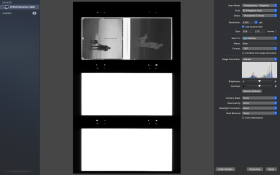
This is what Image Capture looks like.

Screen Shot 2020-05-08 at 10.28.48 AM.png
 
Looks like the majority of the tools in the "Expert" mode of Epson Scan for Windows.

If you want image editing tools download GIMP or RawTherepee or any number of open source image editing tools that are free and quite capable.

Scanning to "finished product" is counter productive, IMHO. Why bake-in a look you will have to defeat later when you decide to re-interpret the image?
 
What macOS are you using? I have version 10.14. When I visit the page Kino posted, https://epson.com/Support/Scanners/Perfection-Series/Epson-Perfection-4990-Photo/s/SPT_B11B175012, it auto-detects my OS and offers me a download of Scanner Driver and EPSON Scan Utility v3.07 .

This is a pretty old application and if it's 32-bit, it might not be compatible with macOS 10.15.

If you have an Epson Scan application on your computer, you should be able to plug in the scanner and then open the application. You can download the application independently of plugging in the scanner.
 
What macOS are you using? I have version 10.14. When I visit the page Kino posted, https://epson.com/Support/Scanners/Perfection-Series/Epson-Perfection-4990-Photo/s/SPT_B11B175012, it auto-detects my OS and offers me a download of Scanner Driver and EPSON Scan Utility v3.07 .

This is a pretty old application and if it's 32-bit, it might not be compatible with macOS 10.15.

If you have an Epson Scan application on your computer, you should be able to plug in the scanner and then open the application. You can download the application independently of plugging in the scanner.


I'm on 10.15.

I went ahead and downloaded Silverfast again. Seems to be working ok, For some reason everything I scanned with Image Capture was really dark, like unable to see the image. Silverfast seems to be controlling things fine though.
 
None of this is relevant to the various "quality" standards if you're not making your own (not somebody else's ) . You can't dodge printing skills by focusing on scanning. Your scans are BS if you don't print them big. Reality bites.
 
None of this is relevant to the various "quality" standards if you're not making your own (not somebody else's ) . You can't dodge printing skills by focusing on scanning. Your scans are BS if you don't print them big. Reality bites.

I’m not quite sure what you’re getting at. What does the printing of my scans have to do with the software used for an older scanner? I’m not asking about the quality, I’m asking what software is available for this older scanner?
 
Why not go to Epson support. Install the correct driver and then search for the software you would like to use. Most companies ie SilverFast (LaserSoft) have free trials. Use one or more to see what works for you. My ancient Epson 4870 originally came packaged with SilverFast wihich I updated to be compatible with my current computer and OS. It works fine for my needs even though I really only use it for scanning and do my editing with PhotoShop. I would think that Epson Scan would work as well as any of the others. Best to make good exposures to begin with and tweak with software. Most programs have way more features than you will end up using. Keep it simple and enjoy the photography.

http://www.jeffreyglasser.com/

http://www.sculptureandphotography.com/
 
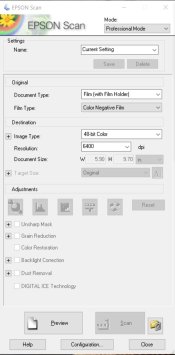
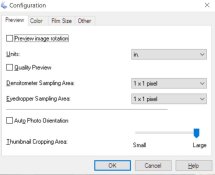
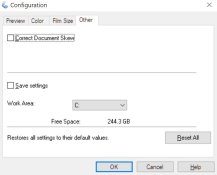
I use a Mac running Sierra (10.12.x) to keep compatibility with Adobe CS6. My version of Epson software is Ver. 3.07A. Attached images show the version, and typical scan controls. As someone else pointed out, finalization is done in another program, for me Photoshop.

Screen Shot 2020-05-09 at 11.12.49 AM.png
Screen Shot 2020-05-09 at 11.12.58 AM.png
 
Why not go to Epson support. Install the correct driver and then search for the software you would like to use.
He did - unfortunately his computer operating system is updated past the version that is compatible with the more capable Epson software, so the download defaults to software that is much less capable.
Epson may release an update - the OP's macOS is just one version newer than what Epson has provided for - but if I understand correctly the newest macOS drops 32 bit compatibility, so Epson may not be willing to do the work.
 
From the Epson website. Is this what he is looking for? I suggested an Epson driver and some othe editing software. Seems likr that would work.

Untitled.jpg
 
If you check that site for the OP's macOS version of 10.15, only Image Capture is listed and no Epson Scan software shows up.
If you check it for older versions - 10.14 and earlier - Epson Scan versions are available.
 
I searched "scanner driver for mac os 10.15 and an epson 4990" and that is what came up on their site. Just trying to help
 
I went back and the search said ICA scanner driver v 5.8.7 for image capture which is what I thought was what he wanted to do and then edit in other software.
 
Photrio.com contains affiliate links to products. We may receive a commission for purchases made through these links.
To read our full affiliate disclosure statement please click Here.

PHOTRIO PARTNERS EQUALLY FUNDING OUR COMMUNITY:


Ilford ADOX Freestyle Photographic Stearman Press Weldon Color Lab Blue Moon Camera & Machine
Top Bottom