
-
Welcome to Photrio!Registration is fast and free. Join today to unlock search, see fewer ads, and access all forum features.Click here to sign up
- Home
- Forums
- Analog Workflow Forums (100% Analog/Traditional)
- Darkroom
- Color: Film, Paper, and Chemistry
You are using an out of date browser. It may not display this or other websites correctly.
You should upgrade or use an alternative browser.
You should upgrade or use an alternative browser.
White dust after c41
-
A
- Thread starter yya
- Start date



Recent Classifieds
-
For Sale Fuji GW670 III
- Started by campy51
-
For Sale Hasselblad X Pan w/ 45mm/f4 Lens
- Started by eftones
-
For Sale 6 antique French pneumatic shutters _ Guerry
- Started by Manual Camera
-
For Sale Voigtländer Nokton Classic 35mm/1.4 with Leica M-mount
- Started by Klaus Mähring
-
For Sale Voigtländer Bessa R2 Special Edition Olive Green
- Started by Klaus Mähring
Forum statistics

pentaxuser
Member
Thanks for your reply, please see my latest reply to Kodaks
Yes I too have always wondered about his background

Some day soon we are bound to have someone join us on Photrio who is called Harmon. Just imagine the confusion then

pentaxuser
pentaxuser
Member
Whenever I see Mobberly, I think of this:
So I'm always surprised by your American cinema references!
Well stone the bleeding crows, guv, there's forty fousand feathers on a frush! Nah, if we want to portray 2 French men, then better to have 2 Americans than anyone speaking like that

I mean imagine Casablanca if it was called 'arry's " café americain"
pentaxuser
Last edited by a moderator:
LOL, I see what you did thereSome day soon we are bound to have someone join us on Photrio who is called Harmon.

Yes I too have always wondered about his background
Some day soon we are bound to have someone join us on Photrio who is called Harmon. Just imagine the confusion then
pentaxuser
As far as I'm aware, Angie isn't a Photrio member:
https://en.wikipedia.org/wiki/Angie_Harmon
mshchem
Subscriber
OK, your processing sounds OK. I have heard occasional complaints related to final rinse/stabilizer. You could try to process a roll and skip that step, and just do a final rinse in demineralized/distilled water with some photoflo.
I can't remember what kit I had way back when, I had white crystals from the stabilizer. I use Kodak chemistry now no troubles with the Flexicolor final rinse.

Assume that all information is relevant.
I used the same method again, with fresh chemicals and unexpired Kodak Gold 200 for a quick test. I processed it using a Nikor stainless steel tank following the Ilfcolor instructions: 3 minutes 15 seconds for development, 6 minutes 30 seconds for bleaching, and 4 minutes 20 seconds for fixing. After pouring in the bleach, I accidentally dropped the cap, which caused a delay of a few seconds before I started agitation. For the final wash, I used filtered water at 30°C with the Ilford wash method, extending it to 8 cycles. I finished with Photo Flo and distilled water for the final rinse. However, some speckle-like spots still appeared and could not be washed off, even after trying to clean them with ethanol. There are some of these speckle-like spots on both the emulsion side and the base side, with the base side being more obvious and severe.
Attachments
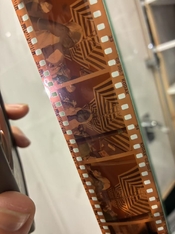
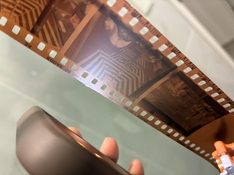
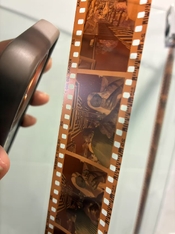
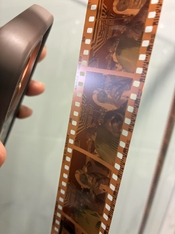
I used the same method again, with fresh chemicals and unexpired Kodak Gold 200 for a quick test. I processed it using a Nikor stainless steel tank following the Ilfcolor instructions: 3 minutes 15 seconds for development, 6 minutes 30 seconds for bleaching, and 4 minutes 20 seconds for fixing. After pouring in the bleach, I accidentally dropped the cap, which caused a delay of a few seconds before I started agitation. For the final wash, I used filtered water at 30°C with the Ilford wash method, extending it to 8 cycles. I finished with Photo Flo and distilled water for the final rinse. However, some speckle-like spots still appeared and could not be washed off, even after trying to clean them with ethanol. There are some of these speckle-like spots on both the emulsion side and the base side, with the base side being more obvious and severe.
The agitation method I used was Kodak’s C-41 manual processing method.
Attachments

Try without the photoflo. The problem does seem a lot less pronounced than it was before.
Please note that dust can also drop onto the film as it dries. Sometimes, a problem like this really is a matter of picking the best place in your home to dry the film in and then ensure there's as little airflow/disturbance in that room as possible to prevent kicking up dust.
Please note that dust can also drop onto the film as it dries. Sometimes, a problem like this really is a matter of picking the best place in your home to dry the film in and then ensure there's as little airflow/disturbance in that room as possible to prevent kicking up dust.
Try without the photoflo. The problem does seem a lot less pronounced than it was before.
Please note that dust can also drop onto the film as it dries. Sometimes, a problem like this really is a matter of picking the best place in your home to dry the film in and then ensure there's as little airflow/disturbance in that room as possible to prevent kicking up dust.
OK
Try without the photoflo. The problem does seem a lot less pronounced than it was before.
Please note that dust can also drop onto the film as it dries. Sometimes, a problem like this really is a matter of picking the best place in your home to dry the film in and then ensure there's as little airflow/disturbance in that room as possible to prevent kicking up dust.
I noticed that after development, these spots tend to cluster around the edges of the frame throughout the entire roll. I tried wiping them off with alcohol but it had no effect. After re-bleaching and re-fixing, these spots became evenly distributed across the entire image area. I suspect this issue might be related to the quality of the bleach or fixer.
Well, if that's the case, I'd put my money on the fixer rather than the bleach. But in the first try you mentioned you used fresh bleach that wasn't used before. I don't see how that would throw down this precipitate.
Did you try soaking a strip of film in a weak acid solution and then wash it again?
Did you try soaking a strip of film in a weak acid solution and then wash it again?
Well, if that's the case, I'd put my money on the fixer rather than the bleach. But in the first try you mentioned you used fresh bleach that wasn't used before. I don't see how that would throw down this precipitate.
Did you try soaking a strip of film in a weak acid solution and then wash it again?
Under reflected light, these marks look more like indentations or signs of corrosion. I could try using Ilford stop bath, but I don’t think it would help much.
It would be the first time I'd see something resembling corrosion or pits on C41 film. It's most likely little bumps that look differently due to a trick of the light.Under reflected light, these marks look more like indentations or signs of corrosion.
Try the acid soak, see if they disappear.
It would be the first time I'd see something resembling corrosion or pits on C41 film. It's most likely little bumps that look differently due to a trick of the light.
Try the acid soak, see if they disappear.
Previously, when I used Tetenal to process C41 film, the results were very clean. I don’t develop many rolls, so I always use the chemicals as one-shot. I’ve ordered the Kodak 2.5L kit to continue experimenting. If this issue disappears, it should confirm that the problem was caused by the Ilfocolor chemicals.
Yes, definitely; it's really odd though. I kind of hope that the problem will go away if you use other chemistry as it would be an easy solution. But often, problems like these are related to other process factors like the wash sequence combined with wash water quality, contamination of tanks/drums etc.
thanks again!Yes, definitely; it's really odd though. I kind of hope that the problem will go away if you use other chemistry as it would be an easy solution. But often, problems like these are related to other process factors like the wash sequence combined with wash water quality, contamination of tanks/drums etc.
No problem, I hope you'll find a solution! It's super frustrating when this happens; everything looks fine until you slap the negatives onto the scanner or enlarger and boom...white zits everywhere.
If it's any consolation, I had the same thing happening on a roll of Vision3 the other day. Processed two rolls in the same tank; one was unaffected, the other wasn't. I cut a corner in the final wash sequence and was 'rewarded' by more or less the same problem you're having here. I'll have to re-wash those negatives.
If it's any consolation, I had the same thing happening on a roll of Vision3 the other day. Processed two rolls in the same tank; one was unaffected, the other wasn't. I cut a corner in the final wash sequence and was 'rewarded' by more or less the same problem you're having here. I'll have to re-wash those negatives.
No problem, I hope you'll find a solution! It's super frustrating when this happens; everything looks fine until you slap the negatives onto the scanner or enlarger and boom...white zits everywhere.
If it's any consolation, I had the same thing happening on a roll of Vision3 the other day. Processed two rolls in the same tank; one was unaffected, the other wasn't. I cut a corner in the final wash sequence and was 'rewarded' by more or less the same problem you're having here. I'll have to re-wash those negatives.
Looking back, I think the only possible issue was that I didn’t stir the chemicals long enough during mixing. Also, during the bleaching stage where I was supposed to agitate for 5 seconds every 30 seconds, I probably only agitated twice within 5 seconds.
I don't think either of these factors explains it, really. The mixing issue would only be an issue if you started with powdered chemistry and it somehow wouldn't dissolve. But C41 chemistry typically comes as liquid concentrates, so it's already dissolved. Agitation certainly isnt' a cause for this.
I don't think either of these factors explains it, really. The mixing issue would only be an issue if you started with powdered chemistry and it somehow wouldn't dissolve. But C41 chemistry typically comes as liquid concentrates, so it's already dissolved. Agitation certainly isnt' a cause for this.
When I get home, I will show a test negative that was re-soaked in fresh bleach and fixer. I used newly mixed chemicals as well, and the increased and more evenly distributed spots might help explain something.
I don't think either of these factors explains it, really. The mixing issue would only be an issue if you started with powdered chemistry and it somehow wouldn't dissolve. But C41 chemistry typically comes as liquid concentrates, so it's already dissolved. Agitation certainly isnt' a cause for this.
I can confirm that the spots appeared during the fixer step. Today I received Kodak chemicals, and after the bleach step, the negatives looked clean with no suspicious spots. However, after two washes and fixing, followed by rinsing with distilled water, I saw similar spots, almost identical to what I experienced before with Ilfocolor.
Ah, that's interesting!
Do you have any B&W fixer at hand? See how the film comes out if you fix it in that fixer instead of this particular Ilfocolor fixer. Modern C41 film will generally come out fine even if the fixer used is acidic.
Do you have any B&W fixer at hand? See how the film comes out if you fix it in that fixer instead of this particular Ilfocolor fixer. Modern C41 film will generally come out fine even if the fixer used is acidic.
I can confirm that the spots appeared during the fixer step. Today I received Kodak chemicals, and after the bleach step, the negatives looked clean with no suspicious spots. However, after two washes and fixing, followed by rinsing with distilled water, I saw similar spots, almost identical to what I experienced before with Ilfocolor.
I’m use Kodak c41 fixer
So you're getting these white spots after fixing & washing, and you've used both Ilfocolor fix (as in your very first post) as well as Kodak fixer?
Is it possible that the wash is the problem? How are you washing the film exactly? And how about my earlier suggestions about avoiding dust in the drying environment? Has that yielded anything? At least you've now narrowed it down to the final stages of the process.
Is it possible that the wash is the problem? How are you washing the film exactly? And how about my earlier suggestions about avoiding dust in the drying environment? Has that yielded anything? At least you've now narrowed it down to the final stages of the process.
| Photrio.com contains affiliate links to products. We may receive a commission for purchases made through these links. To read our full affiliate disclosure statement please click Here. |
PHOTRIO PARTNERS EQUALLY FUNDING OUR COMMUNITY:  |