

Sirius Glass
Subscriber
Once I learned split-grade printing, I never turned back. It is the only way I print now.
Ditto. It was a great leap forward for me.


Once I learned split-grade printing, I never turned back. It is the only way I print now.

I think the less sky crop is an improvement, and agree with those suggesting split grade printing could be useful here. Plus it's just fun.
Yes after years of irritating test strips I went to split grade printin. I use a combination of Ilford exposure meter and dividing the calibration time between grade 5 and grade 00 filters, remembering to double the exposure for the grade 5 exposure. Might then tweak either of these exposures slightly and choose dodge and burn accordingl.

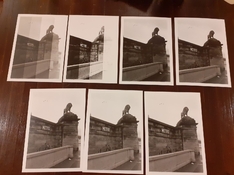
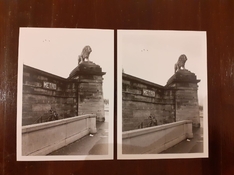
Yes! It's a satisfying way to print for sure. It's good to see a little sky tone defining those upper edges.So, I really love how much I can control and opening up shadows or changing the highlights a bit without having to sacrifice one or the other.

 analoge-fotografie.net


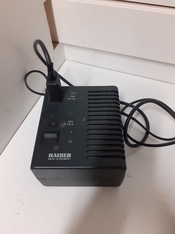
Thing is, the transformer didn't have any hole to plug anything else into it! I meant to take a picture of the bottom and back, but I assure you, there was nothing there!I think on that one you're supposed to plug the transformer (the one with the switch on it) into the timer of your choice.
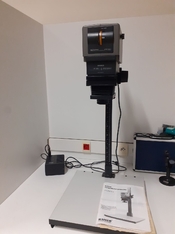
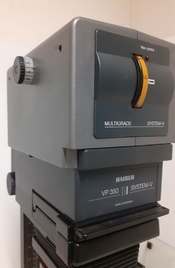
Sorry, I don't know what the dial on the left side of the head does. A friend of mine has a couple of Kaisers, but I never used them.
Thank you. I briefly tried to find something online, but I had limited time there. Yes, the dial was indeed for the filters and I could see the color change in the light as I moved it, so I was excited to try it without moving too many things around...As for plugging the into a timer...I saw now other socket/hole anywhere on the thing and I looked everywhere.I tried to find a manual for your enlarger but failed. The manual you have is for a larger format model.
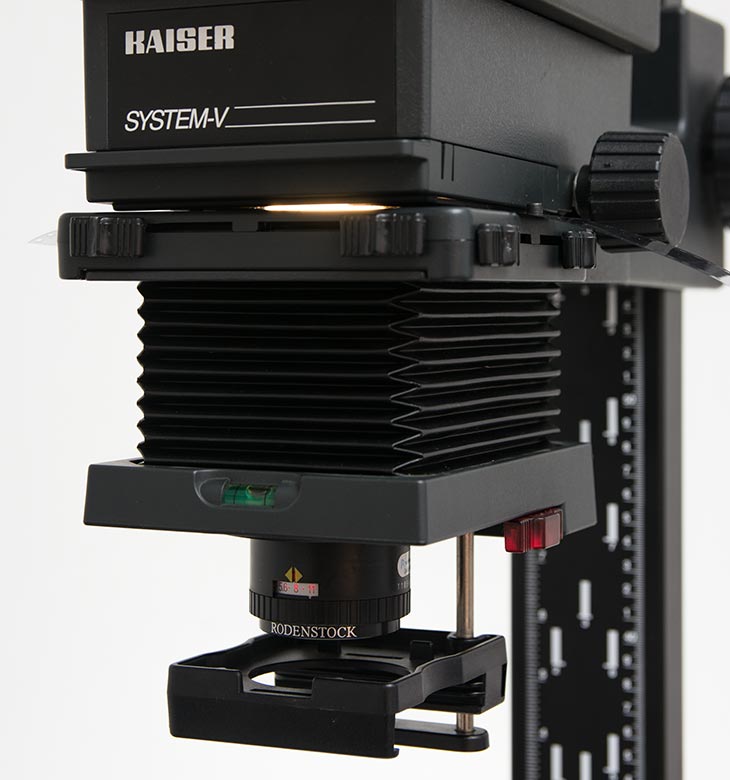
Here is the manual for the Straight Black and White version which shows the filter drawer and the colour head accessory but does not show this head but mentions it as multigrade head on page 9.
This is also not your enlarger but is very helpful
This is not a colour enlarger as it does not have three colours, magenta, yellow and cyan. It is a multigrade enlarger (which is fine) which has a one dial for moving between filter grades, moving between yellow and magenta.Vorstellung Kaiser Vergrößerer System-V
Hier stelle ich den Kaiser System V Vergrößerer vor mit Multigrade-Kopf und Farbkopf für Kleinbild bis zum Mittelformat 6x7.
It also looks like it has a filter drawer below the front dial for using filters such as Ilford filters.
For split printing you would normally dial the wheel between Zero all the way to 5 for each type of exposure.
The knob on the left side is a variable gray filter, which changes the intensity of the lamp and therefor the time of exposure required.
The knob on the right side moves between white light and the filter setting.
You do need to plug the enlarger into a timer which then plugs into the wall.
I think this model may be for 35mm only ( I could well be wrong on that)
Kindest Regards
Well....this is not a color head enlarger, but the manual called that knob "density aperture", yet nothing seemed to happen when I moved it. However, I didn't test it with a negative in and the room light off, so you might indeed be right! I'll have to wait until next Monday to see!The information on the colour head for that enlarger - which has the same sort of dial on that side - has this:
" Continuously adjustable, illuminated density aperture up to 60 densitometric densities (= two aperture settings). "
So I think I might be right

l am not familiar with this enlarger, but if you are able to connect it to the mains, that is the cord you would plug into a timer.Thing is, the transformer didn't have any hole to plug anything else into it! I meant to take a picture of the bottom and back, but I assure you, there was nothing there!
Thank you. I briefly tried to find something online, but I had limited time there. Yes, the dial was indeed for the filters and I could see the color change in the light as I moved it, so I was excited to try it without moving too many things around...As for plugging the into a timer...I saw now other socket/hole anywhere on the thing and I looked everywhere.
Well....this is not a color head enlarger, but the manual called that knob "density aperture", yet nothing seemed to happen when I moved it. However, I didn't test it with a negative in and the room light off, so you might indeed be right! I'll have to wait until next Monday to see!
Thank you all!
Well if you don't like the sky, you could always convert to digital photography and produce a file of a hundred different sky images to combine with what ever image you want.

Just printed this one this week. I'm happy with the sky just being white and merging into the margins, even if I know that's not really technically correct.*
I'm wondering what you'd do in regards to the sky if this was your picture. There's info in the negative, some static, amorphous gray clouds...
Also, as a viewer, how do you perceive the picture with a borderless sky? Do you notice it? Does it bother you?
*As a side note, I notice I've been printing crisp white skies a lot recently and I know it's heavily influenced by the endless stretches of gray days we've been having. I miss sunlight!
View attachment 326460
As I said in post 34
The knob on the left side is a variable gray filter, which changes the intensity of the lamp and therefor the time of exposure required.
The knob on the right side moves between white light and the filter setting.
You do need to plug the enlarger (voltage stabilizer main and only plug with no other openings) into a timer which then plugs into the wall.
blank skies look boring but, having white puffy clouds in every picture is unrealistic and can get boring too. Often, skies are just not worth the effort to print them down. I use a yellow filter and live with the results because it looks more realistic that way.
Want to really thank you for this. It's been on my mind since I read it and it has gotten me out the door to shoot...turn your negatives into positives, indeed!Looking up, it's a featureless cloudy sky...looking down, you have a tens of thousands of square miles soft box overhead
Blasphemy!Well if you don't like the sky, you could always convert to digital photography and produce a file of a hundred different sky images to combine with what ever image you want.
For clarity:
1) very few enlargers have built in timers;
2) for enlargers that have separate power supplies, usually the enlarger is plugged into or directly wired into the power supply, and then the power supply is either
a) plugged directly into the AC wall socket, or, much more commonly,
b) plugged into the AC socket on the timer, which itself has a cord that is plugged into the wall socket;
3) the "density aperture" control might be bypassed by a white/light switch or lever intended for use when focusing - most colour or variable contrast light sources have such a lever or switch. If that light source has that, when it is engaged, changing the contrast setting wouldn't change the colour of the light, but with the switch or lever is not engaged, the colour will change and, possibly, moving the "density aperture" control will change the brightness.
In regards to the right side, there's indeed a lever labeled "in/out". In the "in" position, the filter colors show up. So, I'll try to see if moving it engages the one on the left.As I said in post 34
The knob on the left side is a variable gray filter, which changes the intensity of the lamp and therefor the time of exposure required.
The knob on the right side moves between white light and the filter setting.
You do need to plug the enlarger (voltage stabilizer main and only plug with no other openings) into a timer which then plugs into the wall.

Ditto. It was a great leap forward for me.

One of the hardest lessons I had to learn (took many years in fact) was to not let my expectations regarding weather or subject matter ruin a day of photographing.Want to really thank you for this. It's been on my mind since I read it and it has gotten me out the door to shoot...turn your negatives into positives, indeed!
| Photrio.com contains affiliate links to products. We may receive a commission for purchases made through these links. To read our full affiliate disclosure statement please click Here. |
PHOTRIO PARTNERS EQUALLY FUNDING OUR COMMUNITY:  |


