• Welcome to Photrio!
    Registration is fast and free. Join today to unlock search, see fewer ads, and access all forum features.
    Click here to sign up

print meter

Lost

H
Lost

  • 0
  • 0
  • 21
Joints

H
Joints

  • 0
  • 0
  • 15

Forum statistics

Threads
203,529
Messages
2,856,060
Members
101,887
Latest member
alfie74
Recent bookmarks
0
There is always the sort of-hybrid tool. I got this in a box of stuff about 45 years ago.
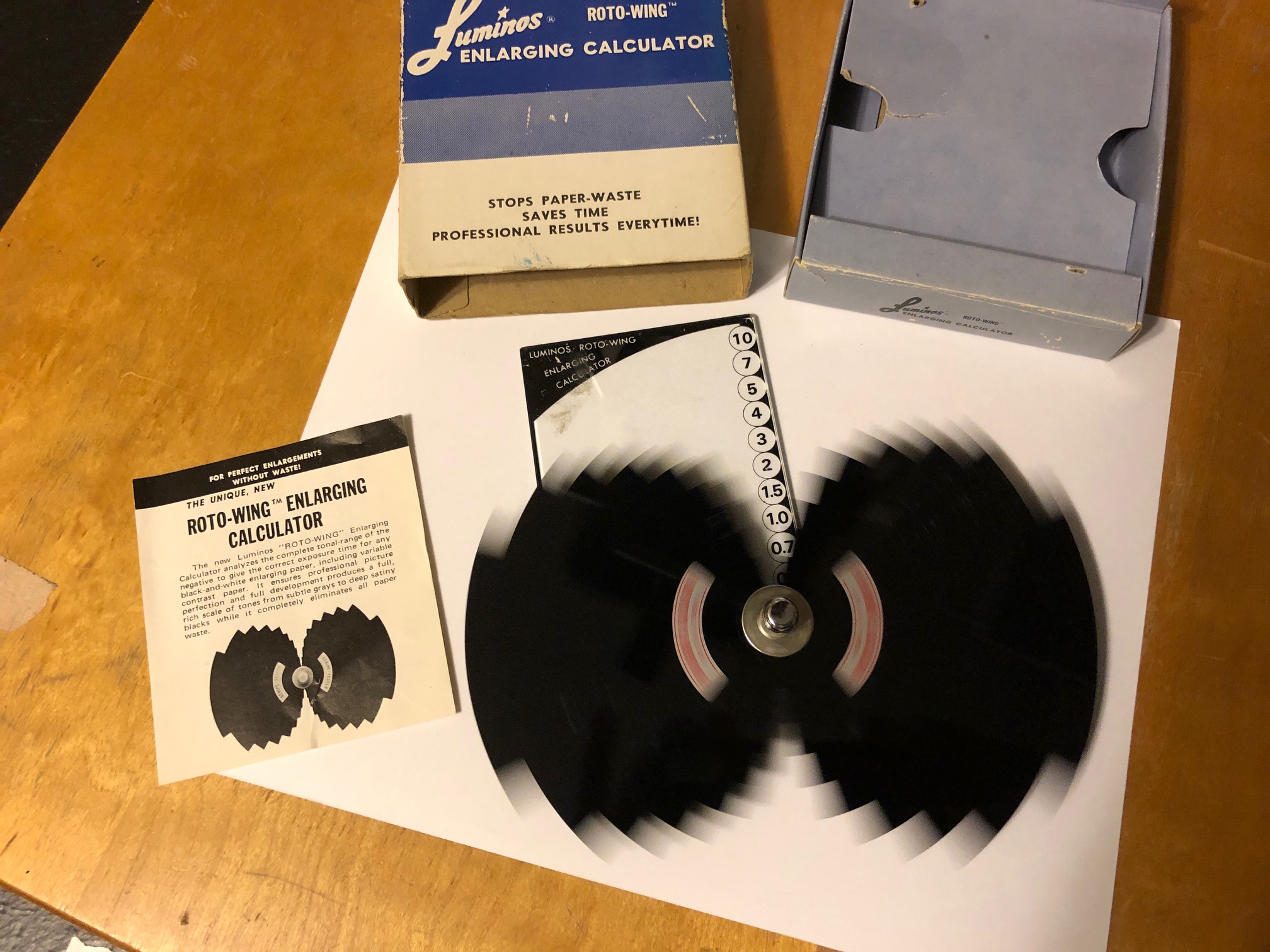
C8EF94F8-CFF5-4CC0-9425-FA311AEC285B.jpeg
 
I used my meter (from darkroomautomation.com) one hour ago. I love it.
I also have an f-stop timer, and love it. I made it using an Arduino because it also needed high-power circuitry to operate the LEDs in my LED-head at settable levels. There's nothing on the market for that, forcing me to DIY.
To use a meter, first do this:

1. Using test-strips, make a perfect print at the most common grade (filter) you use. Write down its exposure-time.
2. Remove the filter from the enlarger, and with the safelight OFF, use the meter (on the easel) to measure a kind of tone that's often important for your kind of work, such as a highlight or skin-tone. Write down the meter-reading.

From now on, when making prints, you can measure that important tone (with no filter, safelight OFF), and adjust the f-stop until it matches what you wrote down. Expose for the time you wrote, and you'll have a good print. At least that tone will be correct. For non-critical snapshots, this print will be good enough. With no test-strip.
For critical work, the meter will get you close, saving you some time.

Mark Overton
 
Last edited:
I watched master printer Bob Carnie in a darkroom make some beautiful B&W prints from the various negatives we students supplied. He didn’t use any meters or f/stop timers. He counted off seconds and waved his hands around under the lens. Experience (just do it!) is what you need. The paper you “waste” is your tuition. Some tools can help you get there a little sooner if you already have the knowledge and some skill.
 
The OP is a newbie to darkroom work and IIRC from another thread is having trouble focusing the enlarger. More electronics are not the answer now.

Figure out the focusing problem, then if you like, use one of those pie chart things (aka Kodak or Delta Projection Print Scale, like this: https://www.freestylephoto.biz/41621-Delta-Projection-Print-Scale ). Put it on some important part of the images such as a main subject, person's face, etc. Follow the directions and use it to print onto a small piece of paper. That will get you a rough exposure time. Make a full size print and then experiment with changing the contrast (assuming you have access to multigrade filters or head; you need this at some point).

Reading an intro book about darkroom printing is also good for a reference.
 
The OP is a newbie to darkroom work and IIRC from another thread is having trouble focusing the enlarger. More electronics are not the answer now.

Figure out the focusing problem, then if you like, use one of those pie chart things (aka Kodak or Delta Projection Print Scale, like this: https://www.freestylephoto.biz/41621-Delta-Projection-Print-Scale ). Put it on some important part of the images such as a main subject, person's face, etc. Follow the directions and use it to print onto a small piece of paper. That will get you a rough exposure time. Make a full size print and then experiment with changing the contrast (assuming you have access to multigrade filters or head; you need this at some point).

Reading an intro book about darkroom printing is also good for a reference.

Ive only have the horenstien book on bw photography because it came with my enlarger. I need a simplistic book with some detailed illustrations. Unfortunately using google book searches i havent been able to find something that comes close.

Bluntly, the books i have read sample chapters from tend to be either a 2nd grade explanation of where babies come from, or a hardcore video from something called kink factory
 
I don't recall what the Henry Horenstein book is like (assuming it's "Black and White Photography" and not one of the more advanced volumes), but it's probably fine. The issue is also that you need to slow down and turn only one knob at once (literally and metaphorically); don't chase more complex solutions, such as enlarging meters. It will just be more confusing.

A book that would probably work well for you is John Schaeffer's "Ansel Adams Guide to Basic Techniques of Photography" vol 1. (Not volume 2, it's more specialized.) I think the printing/enlarging chapter does actually have some illustrations like you seek.

An older book I read when starting out was David Vestal's "The Craft of Photography." There is actually a public domain older edition freely available on the Internet Archive at https://archive.org/details/TheCraftOfPhotography/mode/2up , but I'm not sure that it's going to be better than the Horenstein book.
 
the horenstien book i have is the entry level black and white photograpy book. MOST of it is just mindless babble about different types of cameras, types of film, etc. the printing section seems ok but confusing, the film developing part is ok and has excellent photos of different types of film negatives that have undergone "WTF" types of mistakes.

I truly have to thank you for recommending that david vestal book, page four on the hardware and software section is an illustration showing light spread from a light source, i believe that it explains the science behind f stop printing. inverse square law.
 
Haven't had a darkroom in awhile so my memory might be a little foggy. Kodak used to sell a clear plastic tool that was maybe 4x4 inches with a circle inscribed. The circle was then sectioned into 10 arcs with the arcs going from very dark to almost clear - think zone system. You laid the device on a piece of paper made an enlargement using you normal time. The you developed the print and examined the circle for the best exposure. Simple and worked well.
 
I think the OP would do better to make test strips and maybe pick up an Ilford EM10 meter to help establish a base exposure. They are a lot less money than what he's looking to buy.
upload_2021-12-26_10-17-7.jpeg
 
Looking at my bookcase, I have a number of Henry Horenstein photo books, which I really like. I also have one called 'Black and White Photography A Basic Manual' by him. Is the latter what you have? If so, put it to one side, it's got too much text and will put you off learning.

Although I have years of experience now, I have bought a number of books over the years, both to read but also to lend to others who are just starting out in the darkroom.

I have recently got one called, 'Into your darkroom step by step' by Dennis P Curtin. This contains sections on various parts of the darkroom practice and has a lot of pictures, which I find really help.

Another I refer to and have lent out many times was the basic manual by Paterson. A smallish A5 sized book that was a really good starter, it's called, 'Book Of The Darkroom by Paterson'.

Just checking ebay.com, where I got both of mine cheaply, both are available at good prices and with lots on offer.

As mentioned, I learnt, like many, many others, by doing test strips, which is a good way to learn. Just expect to use a bit of paper, just as an artist does with their paints.

IF, you really want a gadget to help, the circular multiple exposure acetate disc and the Ilford EM10, both mentioned, would be the items that I would start out with, to get you going at not to much expense.

Best of luck.

Terry S
 
YEs i have the black and white photography a basic manual, read page 179 in it. In the making a test strip page the first step is to close down the aperture on the enlarging lens to f/8 or f/11
 
...and waved his hands around under the lens...

One of my issues with the move to all digital is how the "hand of the artist" get removed. It's one reason I stick to film photography (along with my drawing and painting.)
 
I've owned various kinds over many decades. All of them require you run tests on your processes. If you change your paper, temperature or chemistry, it will make the readings invalid. It's just like any tool, there's nothing magical about them and highly dependent on the skill of the user. When you run you tests, be consistent and take good notes. For t casual darkroom user that make a few prints each session, they may not be worth the trouble.
 
http://www.darkroomautomation.com/em.htm

Is this a useful thing to have when starting out with enlarging, and having no real clue and no access to anyone who has done a print before in person,
If you have a mid-tone area seen in all prints, which should print to identical density on the print, the enlarging meter (if it measures a small spot) can allow you to dependably achieve that 18% grey midtone density at that location in the print.

If you do not consistently measure an 18% part of a print, but change where you meter depending upon the print -- for example, a darker grey in one photo but a light grey is a different photo, the meter does not necessarily help you to achieve that consistency of density.

But, as already mentioned, you need consistency in all other apects of your process. If you change paper (and sometimes, even change batches of paper), change developer, processing temperature, etc. you lack the consistency needed for a consistent 18% location in the print.
 
reddesert mentioned Vestal's book.He also wrote the art of black & white enlarging. Of my library the two of them they are the last
ones I would let go of.
They're written in plain english and easy to understand with photos of the how-to steps
I had the Adams books but boring as hell and of no use to me when I started.

You know what they say about opinions right? Everybody's got one.:errm:
 
reddesert mentioned Vestal's book.He also wrote the art of black & white enlarging. Of my library the two of them they are the last
ones I would let go of.
They're written in plain english and easy to understand with photos of the how-to steps
I had the Adams books but boring as hell and of no use to me when I started.

You know what they say about opinions right? Everybody's got one.:errm:


vestals book was fun until he started talking about his process of using two fixer baths for the same piece of print paper. Instant migraine on that.
 
Yeah, the two bath fixer is great for archival prints but most people aren't making prints to hang in a museum or gallery. You maybe should be
looking for a book specifically for Darkroom at this point. Most books can't cover the one subject well enough to be useful. (just another opinion though)

Another good one is "Master Printing Course" by Tim Rudman. Good book but that's for long after you can make a GOOD print..
 
Starting out printing with an f/stop timer like this Will put you on the road to success quickly.

The common GraLab 300 timer can be converted into an f-stop timer by taping an f-stop timing dial to its front, as shown on page 25 of the book, Way Beyond Monochrome (2nd ed), by Ralph Lambrecht (who is the poster above).
Alternatively, you could put marks on its dial at the following times: 5.6, 8, 11, 16, 22, 32, 45, 64. These times are a half-stop apart, and you can estimate quarter-stops or even eighth-stops between them.

If a beginner learns to think of time in stops, he will get the benefits and won't need to unlearn seconds later.

Mark Overton
 
vestals book was fun until he started talking about his process of using two fixer baths for the same piece of print paper. Instant migraine on that.
2 fixer baths is very common for those seeking archival quality prints. If that gives you a headache, you're going to have issues with some of the more advanced techniques such as dodging and burning, split-grade printing, toning and bleaching, just to name a few that are the next step up from straight printing. And spotting your final prints, too.
 
I use TF4 alkaline archival fixer. Saves a great deal of time. No second bath needed. Yes, it's more expensive. But what is you time worth?

And making exquisite prints has nothing to do with owning a darkroom meter or not. People were doing that long before they were ever invented. But I certainly know what they can help do in certain workflows. It's nice to have options.
 
Photrio.com contains affiliate links to products. We may receive a commission for purchases made through these links.
To read our full affiliate disclosure statement please click Here.

PHOTRIO PARTNERS EQUALLY FUNDING OUR COMMUNITY:



Ilford ADOX Freestyle Photographic Stearman Press Weldon Color Lab Blue Moon Camera & Machine
Top Bottom