
• Welcome to Photrio!
    Registration is fast and free. Join today to unlock search, see fewer ads, and access all forum features.
    Click here to sign up

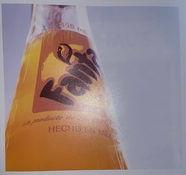
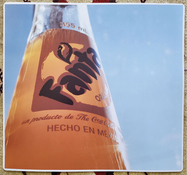
Please help. Insufficient color filtration.

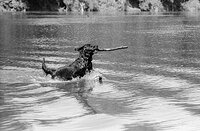
Man in market place

A
Man in market place

  • 0
  • 0
  • 5
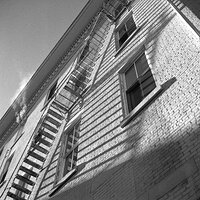
Abandoned Church

A
Abandoned Church

  • 2
  • 0
  • 30

Forum statistics

Threads
203,120
Messages
2,850,101
Members
101,680
Latest member
QGolden
Recent bookmarks
0
If you develop a sheet of paper without any exposure to the enlarger, and it's white, it's not the chemistry or the paper.

This is not necessarily correct. When I was doing testing with RA4 safelight intensities, there turned out to be quite a wide range of light levels where there was no fogging of paper whites, but a pronounced color cast that could not be filtered away entirely. The same is true for off-spec chemistry; there's a bandwidth where paper whites remain white, but color balance cannot be adjusted properly. HOWEVER, generally you move outside that bandwidth (both with light fogging and the chemistry issue) occasionally, resulting in seemingly isolated incidences of more visible problems that ultimately give away the problem. Still, don't rely on paper whites telling the full story with RA4. It's a good clue, but not the only one.
 
Is there any possibility that someone has swapped out the dichroic filters with the wrong filters?

Or even switched them around - for example, the M control adjusts the Cyan filter, and vice-versa?
 
This is not necessarily correct. When I was doing testing with RA4 safelight intensities, there turned out to be quite a wide range of light levels where there was no fogging of paper whites, but a pronounced color cast that could not be filtered away entirely. The same is true for off-spec chemistry; there's a bandwidth where paper whites remain white, but color balance cannot be adjusted properly. HOWEVER, generally you move outside that bandwidth (both with light fogging and the chemistry issue) occasionally, resulting in seemingly isolated incidences of more visible problems that ultimately give away the problem. Still, don't rely on paper whites telling the full story with RA4. It's a good clue, but not the only one.

Sure. Extraordinary circumstances. This is not chemistry or safelights. Something is dramatically wrong.
 
I remember the good old days when you bought a box of Kodak Ektacolor paper, there was a recommended starting filter pack, you dialed in (or assembled the acetate filters) and you would get a pretty good print right off. No safelights, Kodak chemistry, bingo.
I would make sure that the filters are actually intact and that the white light switch is off.
 
Well the difference between your 2 pics brbo does look pretty clear and would appear to fly in the face of Matt's statement about an IR filter It's always disconcerting when this happens. I hope there is a means of reconciling what seems to be exact opposites.

pentaxuser
 
Well the difference between your 2 pics brbo does look pretty clear and would appear to fly in the face of Matt's statement about an IR filter It's always disconcerting when this happens. I hope there is a means of reconciling what seems to be exact opposites.

pentaxuser

It probably differs based on the light system and IR filter employed. The ones I've encountered in the past didn't show nearly as much difference. In any event, the OP's problem as described in this thread aren't likely to arise because of a properly configured IR filter in the light path. Perhaps there are other light path filters that could cause those problems, and be put in there by mistake, but I can't think of what they would be.
 
I remember the good old days when you bought a box of Kodak Ektacolor paper, there was a recommended starting filter pack, you dialed in (or assembled the acetate filters) and you would get a pretty good print right off. No safelights, Kodak chemistry, bingo.
I would make sure that the filters are actually intact and that the white light switch is off.

Yes, that was when the air was clean and words were dirty. :sigh
 
And before they were able to make paper whose recommended filtration didn't vary from batch to batch - which is/was until recently the situation.
 
The last box of Kodak color paper I bought, at least 15 years ago still had a starting filter pack, it was a great place to start.

Way back, 1970's, Kodacolor-X, practically, using, recommended filter pack, and a 212 bulb, perfect prints were easy.
 
I found the manual, there's a white light lever on the left front of the color head, if the filters are removed from the light path with this lever a white light should illuminate on the front panel of the colorhead. The filtration values are dialed in but this lever raises all the dichroic filters out of the light path. Check this.


Hi thank you for help with this. I can see how someone might overlook this feature to remove all filters from the light path, and return to their previously set positions. This feature is working properly on my enlarger head, and have tested several times, however don't ever really use it otherwise. I did solve the problem - detailed in my next post.
 
The position of the bulb was apparently the cause my issue. I'm rather dumbfounded to think how such a tiny, near imperceptible hardware malalignment could have such a dramatic effect. Regardless, the color head now appears to be functioning as it should. The print here was made w/ M65, Y72.5, C0, and (thankfully!) no gels. Original view through viewfinder shown for comparison. While this print is underexposed/low density, and has perhaps a touch of magenta, it at least confirms that the problem is resolved. Thank you all very much again for your helpful ideas.
 

Attachments

  • PSX_20221125_093331.jpg
    PSX_20221125_093331.jpg
    271.4 KB · Views: 87
  • PSX_20221125_093358.jpg
    PSX_20221125_093358.jpg
    121 KB · Views: 88
Well the OP got his money's worth investing in APUG Photrio.
 
Great news!
 
Just to share final evidence of problem resolution. Approx 9x9 in. RA-4 optical print from portra 160. Settings: M75, Y72.5, C0. I like to finish the job with a corner rounding tool.
 

Attachments

  • PSX_20221126_230730.jpg
    PSX_20221126_230730.jpg
    622.8 KB · Views: 86
Photrio.com contains affiliate links to products. We may receive a commission for purchases made through these links.
To read our full affiliate disclosure statement please click Here.

PHOTRIO PARTNERS EQUALLY FUNDING OUR COMMUNITY:


Ilford ADOX Freestyle Photographic Stearman Press Weldon Color Lab Blue Moon Camera & Machine
Top Bottom