• Welcome to Photrio!
    Registration is fast and free. Join today to unlock search, see fewer ads, and access all forum features.
    Click here to sign up
Resource icon

Online Tool for curve plotting and analyzation

Cyanotype stereo card

A
Cyanotype stereo card

  • 0
  • 0
  • 0
IMG_0025.jpeg

A
IMG_0025.jpeg

  • 0
  • 1
  • 0

Forum statistics

Threads
203,125
Messages
2,850,240
Members
101,690
Latest member
nisherii
Recent bookmarks
0
@RalphLambrecht I added the feature you requested. The Analysis plot area now always shows film / dev combinations.


1770851619468.png
 
1770854348774.png
1770854378780.png


1770854396044.png
1770854447592.png


Website does now again host the most up to date version, implementing these new features:
1) New look
2) Ui bug fixes
3) Show all and Hide all curves buttons
4) An option to choose how Normal is defined in the Zonesystem table - you can choose between a Ci you define as normal or use the auto select of the tool that is based on your entered LER (Negative density range required for your Paper) and the dynamic flare model
5) Curves are now no longer stretched optically, Y and X axis are now displayed as the same interval
6) The new website analogplotter.com only houses this tool
 
Also new addtions as of now:
1) PDF Export got cleaner format
2) Time on PDF is now in 00:00 (60:60) format
3) The website now features a compare film button that lets you plot all the data of up to 10 films against each other and export separately as a PDF
 
Last edited:
I made some changes again just now:
1) When data was extrapolated in the Zone system table, effective film speed would sometimes show nonsensical speed reductions. This has now been solved by using a linear extrapolation of the data.
2) I also introduced True Fractional gradient calculation as an alternative to DeltaX. But I am unsure how well it functions, to me, it seems way more sensitive to noisy input data.

The Delta X method is more reliable at the moment, but it still has issues with extremely contrasty curves. I capped the delta X function to prevent artificial speed loss when analyzing high-contrast negatives.
The tool now detects when the contrast proxy (ΔD) reaches its mathematical peak (approx. 1.79). Instead of allowing the formula to curve back down, I now "cap" the correction factor at this peak.
 
BIG Feature

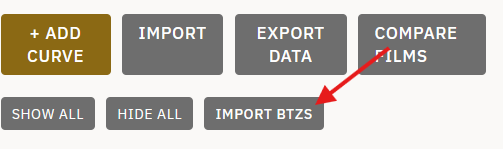
You can now import your BTZS save files into my program. This will import all curves and data you configured in BTZS into my software.
 

Attachments

  • Screenshot 2026-02-12 145438.png
    Screenshot 2026-02-12 145438.png
    12.9 KB · Views: 38
I have been unable to reach the website.
 
The software will now not only interpolate from datasets but also extrapolate from the datasets. If you have too little data, the software will now output "recommended" times and speeds

I haven't been able to figure out how to do that. I only have one set of data (for 18 minutes development).
 
I haven't been able to figure out how to do that. I only have one set of data (for 18 minutes development).
You will need more than one set for data to be extrapolated. I would recommend at least 5 different curves. from lets say 4min dev time to 20 min or so
 
You will need more than one set for data to be extrapolated. I would recommend at least 5 different curves. from lets say 4min dev time to 20 min or so

Got it. Thanks.
 
Update:

The software now allows the user to see more info in the User Interface.
1771182812513.png

The first table shows all relevant film data: Delta D, Ci, Gamma, Gbar, Fractional density EI, Jones Criterion EI, Delta X EI

1771182886975.png

The second and thrid table show scene and exposure related values, Like N numbers, LSLR and Flare. Here you can also define your own Normal, your target LER and the flare model you want to use.

I also removed the mathematical clamp on delta X and just made the software switch to Jones Criterion should Delta X start to fail mathematically.

I also added page numbers to the exported PDF
 
Update:

1771235886844.png

The reference curve feature has been overhauled. Now you can choose between a reference curve you have actual data for and is within your curve set (that's the pick a reference option) or you use the interpolated reference option. This interpolates a perfect Delta 0.80 curve out of your data and therefore gives you no need to try to develop a 0.80 curve precisely.


1771236129870.png


the interpolated curve will be shown among your curves
 
Update:

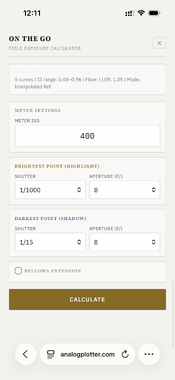
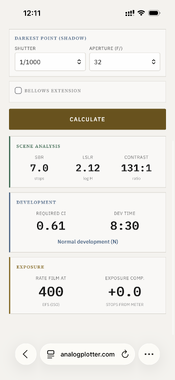
The tool now has a button called "on the go" you can enter this mode after importing a curve set, on your phone. You can enter your meter's ISO and then measure the brightest and darkest scene element. Enter these two into the tool, and it will tell you (based on your data) how to expose and develop. For LF users, there is also a bellows extension feature factored in.
 

Attachments

  • IMG_6184.PNG
    IMG_6184.PNG
    338.8 KB · Views: 39
  • IMG_6186.PNG
    IMG_6186.PNG
    337.8 KB · Views: 34
Hey Rene,
thank you so much for your work! It´s great
I would like to request the option to have different logH for each curve.
 
Update;

I removed the mobile version again. I didn't like it.

I added a quadrant system

1771495675409.png


I also added an area where you can interact with the analysis plots

1771495701584.png


you can cycle through them with the tabs above the curves

1771495740036.png


The normal Ui now also shows very sophisticated information, much more than before. The tool automatically interpolates perfect N-Zone curves for you, even if your data set is limited. Do still insert as much data as you can produce, tho.
Advice: Don't use DletaX or Jones Criterion for speed if your data isn't super clean and reliable, small measurement errors will result in big result variations.

1771495917809.png
 
Update
the tool now also features a print curve section as a tab
1771505316604.png


In this section you can now enter you step tablet vs print density data. You can also select a print curve to use in the quadrant system.
When you enter different curves with different contrast filtration, the program will interpolate exact CMY filter settings that produce the user defined LER.
Let's say you want a LER of 1.05, but only have data that produces LER 1.0, 0.60, 1.35 curves, the software will tell you: you have to filter like this in order to get a LER of 1.05.


1771505524018.png
 
Hey! Why do you need it? Can do it theoretically. Whats the use?

I’m not always using the same exposure when I shoot the step wedge. Sometimes the exposure changes because I tweak the sensitometer setup, and sometimes I intentionally expose differently depending on the film speed (e.g., ISO 50 vs ISO 400) to make better use of the wedge’s range. Both situations can even happen within measurements of the same film stock. With a per-curve log⁡H option, I could use all my data without having to manually recalculate it.

Totally understand if that’s not worth your effort, really appreciate your work.
 
I’m not always using the same exposure when I shoot the step wedge. Sometimes the exposure changes because I tweak the sensitometer setup, and sometimes I intentionally expose differently depending on the film speed (e.g., ISO 50 vs ISO 400) to make better use of the wedge’s range. Both situations can even happen within measurements of the same film stock. With a per-curve log⁡H option, I could use all my data without having to manually recalculate it.

Totally understand if that’s not worth your effort, really appreciate your work.

It's not about the effort, I think it might help introducing problems. I'd rather try to get the data without exposure change in a set of curves. There are many inconsistencies that could flaw the data by changing more than one variable when testing. In my experience it is very possible to not change exposure and still have enough data to work with. Or am I mistaken ? In my mind, I'd rather not introduce a feature that encourages somewhat sloppy practices.
 
I understand your point.
The data is actually surprisingly accurate. If I develop two wedges with different exposures, they match up really well in the overlapping parts.

Edit:
Sometimes Step 21 doesn’t represent base+fog, so I always measure it separately. The numbers might get shifted in your speed-point search if Steps 21/20 aren’t actually B+F.
Is this something I’m doing wrong, should I shift the wedge exposure? The downside is that I’d lose data points on the high-density end.
As a workaround, I manually add a data point at zero logE (−3.00 lux·s). Your EI calculations come out the same when I do it manually; I’m just not sure whether I’m messing up something else with this approach.
 
Last edited:
Small Update;

When exporting your data the files get named after File document Name (which should be the Film) + Developer you entered
You can now export film curves and Paper curves separately. The Paper curves are named in the same fashion. This allows you to save different film paper profiles and comapre them easily.

1771577041748.png
 
I understand your point.
The data is actually surprisingly accurate. If I develop two wedges with different exposures, they match up really well in the overlapping parts.

Edit:
Sometimes Step 21 doesn’t represent base+fog, so I always measure it separately. The numbers might get shifted in your speed-point search if Steps 21/20 aren’t actually B+F.
Is this something I’m doing wrong, should I shift the wedge exposure? The downside is that I’d lose data points on the high-density end.
As a workaround, I manually add a data point at zero logE (−3.00 lux·s). Your EI calculations come out the same when I do it manually; I’m just not sure whether I’m messing up something else with this approach.

I do it like this: I test until I find my first exposure giving me 2-3x B+F density in the beginning of the strip. I do a range of tests afterward like (5 to 18 min dev, same exposure) and this generates enough data for me. I also just switched to a 41-Step tablet with a DMAX of 4.05. Which makes life way better in this regard, but comes along with other issues.
 
Photrio.com contains affiliate links to products. We may receive a commission for purchases made through these links.
To read our full affiliate disclosure statement please click Here.

PHOTRIO PARTNERS EQUALLY FUNDING OUR COMMUNITY:



Ilford ADOX Freestyle Photographic Stearman Press Weldon Color Lab Blue Moon Camera & Machine
Top Bottom