@koraks Have you considered peltier cooling? It would be far simpler than any liquid cooling system, which would also probably introduce some vibrations. Regarding the PCB, the etching part is easy, transferring the artwork to the PCB is the complicated part IMHO.
Yes, I have, but I think it's unnecessary - or rather: if Peltier cooling helps, then likely other means of cooling will also achieve the same. I think the main/critical issue is to get the heat away from the led die as rapidly as possible. I'm thinking along the same lines as
@bernard_L here; it's junction temperature that is critical, and the question is how rapidly the junction stabilizes in terms of temperature under changing conditions. This is insanely difficult to test in a home setting, of course. The best I can do, I feel, is to make sure there is (1) as low as possible thermal resistance between the led and the cooling system and (2) overdimension the cooling system so that it does not heat up appreciably under normal operating conditions.
And yes, for PCB manufacturing I'd look towards toner transfer initially as it's the most accessible method of DIY-ing PCB's. But again, the main bottle neck here is the lack of supply of usable and affordable metal-core PCB material. That would leave finding a party that is willing to do 1-offs at reasonable costs, which may be something I could look into at some point. But for now I think I'm just going to try gluing on leds to a piece of 3mm copper plate using Arctic Silver thermal adhesive and then glue the copper plate to a generously sized aluminum heat sink with a fan fitted onto it. If that doesn't help, likely nothing else will.
However good your heatsink, there will always be the thermal resistance from junction to body. Maybe select high power LED model (actual criterion being low junction-case resistance), and operate at significantly less than rated power?
Another consideration. The temperature rise of the junction is not an issue per se if the settling time constant is significantly shorter than any operational time constant (exposure time, idle time between exposures). Presumably the time constant of the LED body (mounted on perfect heatsink) is much shorter than the time constant of a typical heatsink. This would nullify my comment above;
Yeah, provided reasonably good thermal contact between the led and the heat sink. That's where I have some doubts as I used very basic low-cost thermal glue. I don't think it makes for a very good thermal junction to be honest. It doesn't help that the thermally conducting surface of those leds is pretty darn small.
BTW, I've done some more testing and it seems like the problem may be manageable in practice. Turns out that for some arcane reason I don't understand yet, only the red channel suffers from this problem. This means that as long as I only use blue and green to focus/compose, I don't have a color shift in a subsequent exposure. I just tested this and updated the software in the controller and it seems to work like a charm. The only downside is obviously that I have less light available for focusing and it's cyan light instead of white, but it seems workable. I tested leaving the new cyan focus light on for 90 seconds and then immediately exposing prints at the desired filter settings and they came out without any visible color shifts.
I'm now left to wonder why it's only the red channel that's affected. There are a few hypotheses:
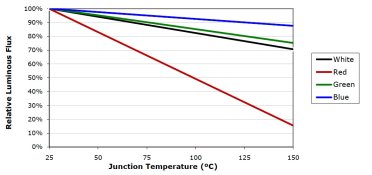
1: Same hypothesis as in post #30: color shift in the led due to heating up, which for some reason only affects the red leds (they're identical in construction to the blue and green ones, but obviously the junction type is different). However, there are a few things that go against this hypothesis. Firstly, the color shift (i.e. dominant wavelength shift) is likely to be in the vicinity of 0.1nm per degree. That's not a whole lot. A 40 degree temperature increase (which is a reasonable guess) would induce a 4nm shift. That wouldn't really explain the rather substantial color shift in the prints I'm getting. Secondly, if it is related to light output change in the leds due to their heating up, the effect is the exact opposite of what you'd expect - leds tend to get dimmer as they heat up, but these red ones seem to go in the opposite direction. Doesn't make sense.
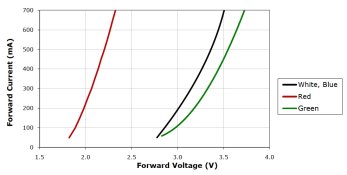
2: Maybe it's not the leds, but the driver/current limiter. I use LM350T's to control current, and for blue and green, these run at less than 1A per piece. However, since I have twice as many red leds, and they're in series-parallel (two strands), this channel runs at something like 1.6A if memory serves. I made sure that the voltage overhead is minimal so that this channel doesn't overheat easily, but it will probably still run hotter than the other channels. Then again, all the LM350T's are mounted to the same heat sink, which doesn't get really warm when I run the lights at full power. So I'd be still stumped in this case.
3: A bit of a wild guess, but I use IRF740's to do the PWM switching. These are driven from essentially 5V logic, which is not very generous - but according to the datasheet, it should be more than enough for them to switch entirely off and on at this current level. But maybe I'm at the edge of what still works for the red channel that draws twice the current compared to the other channels? But again, it doesn't make perfect sense as you'd expect the mosfet to not switch on entirely on this channel, reducing the relative light output. Particularly since a mosfet has a positive Rds(on) temperature coefficient. So again, hotter = less light.
It all just doesn't compute. The only thing I know for now is that it works quite alright if I can live with cyan light focusing in color mode...