

• Welcome to Photrio!
    Registration is fast and free. Join today to unlock search, see fewer ads, and access all forum features.
    Click here to sign up

Build a shutter tester for Focal Plane shutters - Cheap, Easy & it Works

Recent Classifieds

Forum statistics

Threads
204,278
Messages
2,866,550
Members
102,207
Latest member
gustavocf
Recent bookmarks
0
I really do appreciate all your help. I moved hastily because I found one that came with the expansion board - so I know it fits correctly.

I was worried because the linked board seems to be the “32D” variety while mine is ESP32”S”. Research lead me to believe it’s an older version. As long as I don’t fry anything - I’ll be happy :smile:

I had loaded the bin file etc before the other parts arrived. Traveling for a week - so I’ll get the rotary switch and anything else needed to test/generate code wired up when I return.

Thank You!
 
I'll send some thanks as well. The parts have left China and with some luck should be here next week for me to make an update on the (non screen) build and flash. I'm sure that I will be back with some questions quite soon! Thanks again!
 
Hey folks. Huge thanks for all the work that has gone into this project! I am in the process of working my way through the entire thread (have another 10 pages to go), but wanted to ask a question so I can order the parts while I finish up the reading. I planned on making the ESP32 version - because it was mentioned to be a more robust board. But after reading the first 1/2 of the thread - I'm not sure I understand the specific benefits of the ESP32 version vs the Nano version. Is it the inclusion of additional sensors that sets it apart from the more simple version? I'm fine going the ESP32 route if it will provide improved performance/results. Could someone please clarify the advantages?

Parts clarification: The PDF parts list for the ESP32 version lists a specific TFT. I've been successful sourcing everything else locally (USA) so i don't need to mess with tariffs, payments upon receipt etc, but have only found a 3.5" TFT that seems to runs the same specs as the 4" version suggested. Unfortunately, the only 4" versions I found are running Drive IC: ST7796S instead of the stated ILI9488. Can you please let me know if this 3.5" TFT would work, other than mounting discrepancies etc? I can always design and 3D print a different box if needed, to match the new dimensions - as long as the specs check out and will work correctly. The nano version parts list is all easily purchased locally.

Below are the specs provided for the smaller version of the ESP32. Please let me know if anything jumps out as incorrect for the project. Really appreciate any help and guidance.

Scott

3.5" SPI 480*320 display parameter​

  • Size: 3.5inch
  • Type: TFT
  • Resolution: 480*320
  • Drive IC: ILI9488
  • Touch: Yes
  • Interface: 4-wire SPI
  • Touch: resistive touch (with touch pen)
  • Active area: 48.96*73.44mm
  • PCB Size: 56.34*98.00mm
  • Weight: 57g
  • Working temperature: -20 °C to 60 °C
  • Storage temperature: -30 °C to 70 °C


2.4in


Hi, there is no link to the product you ordered & the picture shows a 2.8" screen.
Whilst a 3.5" screen is not supported, I have just tried my 3.5" screen and it works perfectly, including touch.
It must be mounted so the connection pins are at the bottom. (Screen rotated 180 degrees).

I have modified the 3d printed case to accept the smaller screen and will also modify the frame to hold the ESP32 board.
These will be on Github shortly. Mounting hole spacing is 92mm by 49.5mm.

I cannot find the exact board I have on AliExpress, but here is the closest. Mine actually looks like the 'no-touch' version, with the additional FC ce screen printing, but mine has u2 populated on the board, which is the touch ic.

No guarantee that this, or other 3.5" boards will work correctly.


1776008502261.png


1776008958404.png
 
Sorry, should have added link in my initial post. Not sure if Amazon listing will work internationally, but this is the one I got:

TFT (LINK)

It hasn’t been hooked up to anything but the computer yet - so I won’t know for sure until I get home from traveling at the end of this coming week. Fingers crossed.
 
Sorry, should have added link in my initial post. Not sure if Amazon listing will work internationally, but this is the one I got:

TFT (LINK)

It hasn’t been hooked up to anything but the computer yet - so I won’t know for sure until I get home from traveling at the end of this coming week. Fingers crossed.

Hi, no problem.

Yes this tft board looks fine, it even has the teeny holes in the pcb near each of the larger mounting holes, like mine.

Mine all works perfectly here on the bench. Just need to rotate it 180 degrees.
Bend radius of the USB cable may be a little tight if the ESP32 is also rotated 180 degrees, when in the printed enclosure.
ESP can be mounted as low as possible in the frame.
The enclosure for 3.5" screen is printing right now, so will find out soon.
 
Good to hear. Sounds like I may have unwittingly traversed the Chinese manufacturing minefield :smile:

My biggest remaining concerns are the sensors. It does appear that I received the type that have the correct connections - but the quality is so poor that each pin/pad area on the underside seems to have been semi-damaged by the person/robot that soldered the connections. I’ll post a pic when I get home.

Looking forward to checking out the 3D designs for the smaller TFT. I figured I’d design/print something quick - but if you already have one that works - even better! Thank you again for all your work on this project. It really is top notch.
 
Finally got the basic wiring set up for TFT and Encoder. I'm sure you can all imagine how exciting it was to see this screen pop up letting me know the test had completed successfully :smile:

I have sent a PM to Niglyn for my auth code. I did realize that I have the older firmware version on the board - so I'm not sure whether I should update and wait on auth code. I do not plan on using the LED/LCD or touch etc. But I would like to have use the tester for leaf shutters at some point - is it best to update before I go any further?

Very excited!

Scott

Welcome Screen.JPG
 
Finally got the basic wiring set up for TFT and Encoder. I'm sure you can all imagine how exciting it was to see this screen pop up letting me know the test had completed successfully :smile:

I have sent a PM to Niglyn for my auth code. I did realize that I have the older firmware version on the board - so I'm not sure whether I should update and wait on auth code. I do not plan on using the LED/LCD or touch etc. But I would like to have use the tester for leaf shutters at some point - is it best to update before I go any further?

Very excited!

Scott

View attachment 422395

HI, the encoder test is to ensure it is working correctly before the pass key is entered. Else, if it is bouncing for example, random codes could be entered, which will lock you out of the system.

The pass key is good for the life of the tester. When updating fw, normally entering the pass key again is not required.

However, the next version due out soon will require the pass key being re-entered as the internal memory mapping is changing.
It will always be the same pass key as originally given.

Will reply to your dm now.
 
Admittedly I may be missing it - but I can't seem to find the 3D printed Camera Mount shown in post #915. I've looked through the various folders on github. Is it available for download?

Thanks!

Project is coming along. 3D printing is causing the biggest delay at this point. Have the auth code entered in correctly, and now waiting for the sensor and laser enclosures to finish printing so that I can start testing that the connections are all solid. So far everything seems to check out with the multimeter - so I'm hoping it will be smooth once I mount the sensors/lasers.

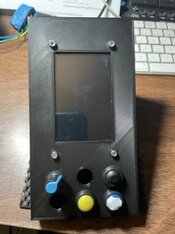
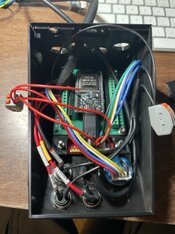
Not my neatest work - but below are some pics of the enclosure with 3.5" TFT and ESP32 with expansion board.

I really don't have any criticisms about the build - but Niglyn is always asking for comments...

The only things I noticed:

The new 3D printed enclosure (main face and sides) for the 3.5" TFT doesn't have holes in the sides to screw the bottom and rear parts to. No big deal, a little gaff tape goes a long way :smile:

The 25mm M3 bolts that hold the 3.5" TFT and the "riser" for mounting ESP32 on expansion board have plenty of room on the bottom 2 holes, but the 2 at the top touch the back wall. I think 20mm bolts might have just enough thread for a nut and clear the back wall.

Otherwise this has been a great build. Thanks to all who participated it making it such a cool project.
 

Attachments

  • IMG_0374 Medium.jpeg
    IMG_0374 Medium.jpeg
    79.5 KB · Views: 43
  • IMG_0373 Medium.jpeg
    IMG_0373 Medium.jpeg
    95.5 KB · Views: 41
Last edited:
Admittedly I may be missing it - but I can't seem to find the 3D printed Camera Mount shown in post #915. I've looked through the various folders on github. Is it available for download?

Thanks!

Project is coming along. 3D printing is causing the biggest delay at this point. Have the auth code entered in correctly, and now waiting for the sensor and laser enclosures to finish printing so that I can start testing that the connections are all solid. So far everything seems to check out with the multimeter - so I'm hoping it will be smooth once I mount the sensors/lasers.

Not my neatest work - but below are some pics of the enclosure with 3.5" TFT and ESP32 with expansion board.

I really don't have any criticisms about the build - but Niglyn is always asking for comments...

The only things I noticed:

The new 3D printed enclosure (main face and sides) for the 3.5" TFT doesn't have holes in the sides to screw the bottom and rear parts to. No big deal, a little gaff tape goes a long way :smile:

The 25mm M3 bolts that hold the 3.5" TFT and the "riser" for mounting ESP32 on expansion board have plenty of room on the bottom 2 holes, but the 2 at the top touch the back wall. I think 20mm bolts might have just enough thread for a nut and clear the back wall.

Otherwise this has been a great build. Thanks to all who participated it making it such a cool project.

Hi, sorry, print files for the steady are now added. These fit onto the aluminium AliExpress lifting table.

Have also added a little ReadME file in each of the folders, stating what the files are for. Where I can, I also incude a picture.

Did you print your enclosure face down? I use a textured build-plate and get a nice finish to the face.

Not sure why the screw holes are missing on the case. Will look at the files.

Strange the bolts touch the back. The mounting holes were moved down for the smaller screen, so should have more clearance.

Yes, getting feedback helps find issue I may miss and helps improve the project.

Keep us updated.

Regards.
 
Thanks so much for adding the files. I have the small lift - and this seems like it will be a nice addition for more easily getting the correct positioning.

I did print it face down - but the printer was in need of tuning - printing too close to the bed. I also have a textured bed and it typically produced a nice finish. Not so worried about it on this project - function over fashion :smile:

Not sure about the bolts. The 25mm bolts were quite tight in there. They could work - but I think 20mm might help. Perhaps flipping the board frame around contributed? I flipped it to account for the pins on the 3.5" being 180 degrees rotated.

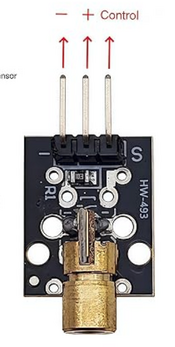
A quick clarification: The wiring schematic (and a photo of a build I found in this thread) show the lasers with the 3.3v wire going to the "S" pin on the laser board. Is this correct? Mine seem to power up fine, but I was curious why this would not be sent to the + pin.

I'll have some questions coming. Ran into some issues doing the basic connections testing. Want to make sure I have tried everything to narrow down and clarify the issues before I bother you here.

Thanks again!
 
Thanks so much for adding the files. I have the small lift - and this seems like it will be a nice addition for more easily getting the correct positioning.

I did print it face down - but the printer was in need of tuning - printing too close to the bed. I also have a textured bed and it typically produced a nice finish. Not so worried about it on this project - function over fashion :smile:

Not sure about the bolts. The 25mm bolts were quite tight in there. They could work - but I think 20mm might help. Perhaps flipping the board frame around contributed? I flipped it to account for the pins on the 3.5" being 180 degrees rotated.

A quick clarification: The wiring schematic (and a photo of a build I found in this thread) show the lasers with the 3.3v wire going to the "S" pin on the laser board. Is this correct? Mine seem to power up fine, but I was curious why this would not be sent to the + pin.

I'll have some questions coming. Ran into some issues doing the basic connections testing. Want to make sure I have tried everything to narrow down and clarify the issues before I bother you here.

Thanks again!

Hi, S is the voltage for the Laser board. centre pin is not connected and third pin is 0V.
 
Thanks.

That's the way I wired it, since I saw it on your schematic. I was just worried after seeing on the product page that S was "control."
 

Attachments

  • Laser Pin Pic.png
    Laser Pin Pic.png
    256.5 KB · Views: 33
Firmware Update

Latest firmware 4.1.0.5 for ESP32 is now on Github.

Oscilloscope screen added.
Sound added. (high pitch beep on completed test, lower pitch on failed test & beep when ready for next test)
Data logging appends, rather than deleting old file (option to delete old files at start up).
Memory wear levelling.
Flicker detection improved and ultra sensitive to both fast and slow flicker.
(Slow flicker issue was driving me nuts & too slow to be detected as flicker).

Faster start up and processing times.
Minor screen display changes.

LCD functionality removed.
Schematic changed to show sensors powered from 5v (No need to change current builds to 5v)

IMPORTANT Wiring change.
If the optional SD card wiring has been added, the wire on pin 17 must be moved to to the pin labelled TX or 1
Refer to updated schematic.


Note if upgrading firmware, passkey will require re-entering. It is the same pass key already issued.
If you cannot find your pass key, just DM & I will send it.
 
Hi All, came across this great tester on a vintage camera repair forum I am on!! Wow! So I'm in the process of purchasing parts and having a neighbour 3D print the parts. I have both horizontal and vertical shutter cameras. So can I build one device to do both? It appears looking at the circuit diagram, I would need to insert some switching to connect the top and bottom vertical sensors instead of the left and right sensors depending on whether I am testing a horizontal or vertical shutter camera.
Am I correct in this understanding?
Has anyone done this - and if so what switching did you use? I was thinking of an SPDT switch on the sensor box to swap power between the two sets of sensors depending on the shutter orientation (simple wiring difference to the descriptions)- then just adjust the shutter spacing in the setup.
Alternatively, I could wire two plugs from the sensor set depending on whether horizontal or vertical shutter and plug the correct one in to the controller so the correct sensors are connected. It's only the seniors that need to change I believe - I can power all 5 lasers permanently.

TIA
Cheers
 
Last edited:
Hi All, came across this great tester on a vintage camera repair forum I am on!! Wow! So I'm in the process of purchasing parts and having a neighbour 3D print the parts. I have both horizontal and vertical shutter cameras. So can I build one device to do both? It appears looking at the circuit diagram, I would need to insert some switching to connect the top and bottom vertical sensors instead of the left and right sensors depending on whether I am testing a horizontal or vertical shutter camera.
Am I correct in this understanding?
Has anyone done this - and if so what switching did you use? I was thinking of an SPDT switch on the sensor box to swap power between the two sets of sensors depending on the shutter orientation (simple wiring difference to the descriptions)- then just adjust the shutter spacing in the setup.
Alternatively, I could wire two plugs from the sensor set depending on whether horizontal or vertical shutter and plug the correct one in to the controller so the correct sensors are connected. It's only the seniors that need to change I believe - I can power all 5 lasers permanently.

TIA
Cheers

Hi BM,

Yes, you could have all 5 Lasers on, wired to 5V. This is how my 3d printed Laser box is wired.

I have never got as far as adding the additional two sensors for vertical shutters within the 3d printed box.

This is something I will/may get round to. Two issues, firstly, there is very little space inside the box to wire up the additional sensors.

Second issue is how to switch between V&H. It might work just switching the 5V supply to the required sensor, or you may also have to switch the output as well.

I have thought about making a pcb for the sensors. The main problem here is the raised rectangular part on the sensor below the lens.
This stops the lens just fitting into a hole on the pcb. You will understand what I mean when you mount the sensors into the 3d printed box.
 
Hi, I am interested on making this tester.
I am in the process of buying the components, but I have trouble understanding where and how is the GY-302 light sensor used for. Is it a remanent of the first iterations, or does it fulfil a function that the laser and receivers modules cant?

Also, should the buttons be open by default, or the ones that stay on or off until you press them again?

Finally, I intend on 3d printing the case and from what I understood I would need to use the laser diodes and not the ky-008 lase module same with the receiver, but what is the part number? on the documentation I was only able to find info on the module receiver ky-007.
 
Last edited:
Hi BM,

Yes, you could have all 5 Lasers on, wired to 5V. This is how my 3d printed Laser box is wired.

I have never got as far as adding the additional two sensors for vertical shutters within the 3d printed box.

This is something I will/may get round to. Two issues, firstly, there is very little space inside the box to wire up the additional sensors.

Second issue is how to switch between V&H. It might work just switching the 5V supply to the required sensor, or you may also have to switch the output as well.

I have thought about making a pcb for the sensors. The main problem here is the raised rectangular part on the sensor below the lens.
This stops the lens just fitting into a hole on the pcb. You will understand what I mean when you mount the sensors into the 3d printed box.

Hi Niglyn, thank you. Yes, I thought about the unpowered sensors may still cause an issue with your readings. In the end, two leads may be the purist solution to prevent problems. But I will make a test bench and see first.
As to wiring up - is there any reason why I can't solder leads onto the sensor legs and then put the PCB elsewhere - in perhaps a deeper box I get printed?

Would rather avoid making two test platforms.

Will be fun to experiment anyway - satisfies my engineering mind...

Cheers.
 
Hi, I am interested on making this tester.
I am in the process of buying the components, but I have trouble understanding where and how is the GY-302 light sensor used for. Is it a remanent of the first iterations, or does it fulfil a function that the laser and receivers modules cant?

Also, should the buttons be open by default, or the ones that stay on or off until you press them again?

Finally, I intend on 3d printing the case and from what I understood I would need to use the laser diodes and not the ky-008 lase module same with the receiver, but what is the part number? on the documentation I was only able to find info on the module receiver ky-007.

Hi, the light sensor does not do much. Most people do not add this, or the LED matrix.

The sensor just shows the ambient light level. It does not interface with The Shutter Tester in any other way.
 
Hi Niglyn, thank you. Yes, I thought about the unpowered sensors may still cause an issue with your readings. In the end, two leads may be the purist solution to prevent problems. But I will make a test bench and see first.
As to wiring up - is there any reason why I can't solder leads onto the sensor legs and then put the PCB elsewhere - in perhaps a deeper box I get printed?

Would rather avoid making two test platforms.

Will be fun to experiment anyway - satisfies my engineering mind...

Cheers.

Hi, should be no issue in extending the sensor leads, however the decoupling capacitor should be as close to the sensor as possible.

There should be enough room on the existing strip-board to fit everything.

A bespoke pcb would be the ideal, but the issue remains how to align five sensors correctly. Also, I don't think the pcb would be that popular, adding the additional cost of them.

Just switching the output of the sensors should work, rather than also switching the +V.

With the LCD no more, this frees up two pins, so a FW update may use these for vertical sensors, negating the need for switches.
 
Hi, should be no issue in extending the sensor leads, however the decoupling capacitor should be as close to the sensor as possible.

There should be enough room on the existing strip-board to fit everything.

A bespoke pcb would be the ideal, but the issue remains how to align five sensors correctly. Also, I don't think the pcb would be that popular, adding the additional cost of them.

Just switching the output of the sensors should work, rather than also switching the +V.

With the LCD no more, this frees up two pins, so a FW update may use these for vertical sensors, negating the need for switches.

Yes, a DPDT to swap which sensors connect to the controller seems the best way rather than a SPDT on the power - that way there is less issue. Thanks for the comment on the decoupling capacitor - that should be easy to achieve.

As for aligning the sensors correctly - not sure what you mean - is it keeping them well positioned in their holes? I was thinking of hot gluing the top and bottom vertical sensors or making some slightly different retaining brackets to keep in place.

A FW update and associated wiring would be good. You do so much work on this, but that would be nice.
 
Yes, a DPDT to swap which sensors connect to the controller seems the best way rather than a SPDT on the power - that way there is less issue. Thanks for the comment on the decoupling capacitor - that should be easy to achieve.

As for aligning the sensors correctly - not sure what you mean - is it keeping them well positioned in their holes? I was thinking of hot gluing the top and bottom vertical sensors or making some slightly different retaining brackets to keep in place.

A FW update and associated wiring would be good. You do so much work on this, but that would be nice.

Hi, when you look at the sensors, not only do they have the lens that protrudes, but also a rectangular protrusion.

It is the rectangular protrusion that stops the lens fitting in a hole. Otherwise, the pcb could have the holes drilled for the lens to look through. The sensor could then be easily mounted on the component side of the pcb and look though the hole on the pcb.

The 3d printed enclosure has a recess for the rectangular protrusion and hole for the lens. A cap then goes on the back, to hold it in place.

So, to make a pcb and get all five sensors correctly aligned would be nightmare.

However, as I type this, a genius idea has just popped into my brain, of a simple way to achieve this.
Simple is relative, I would have to spend time designing the pcb and associated 3d printed parts and I am not sure many people would want the added expense of ordering pcbs.
 
Hi, the light sensor does not do much. Most people do not add this, or the LED matrix.

The sensor just shows the ambient light level. It does not interface with The Shutter Tester in any other way.

Lastly, I intend on 3d printing the case and from what I understood I would need to use the laser diodes and not the ky-008 lase module same with the receiver, but what is the part number? on the documentation I was only able to find info on the module receiver ky-007.
 
Photrio.com contains affiliate links to products. We may receive a commission for purchases made through these links.
To read our full affiliate disclosure statement please click Here.

PHOTRIO PARTNERS EQUALLY FUNDING OUR COMMUNITY:


Ilford ADOX Freestyle Photographic Stearman Press Weldon Color Lab Blue Moon Camera & Machine
Top Bottom