• Welcome to Photrio!
    Registration is fast and free. Join today to unlock search, see fewer ads, and access all forum features.
    Click here to sign up

Very flat (tonal range) negatives

Landed Here

H
Landed Here

  • 2
  • 2
  • 24
Fujino Trail

H
Fujino Trail

  • 1
  • 1
  • 57

Recent Classifieds

Forum statistics

Threads
201,830
Messages
2,830,820
Members
100,976
Latest member
MarkWalberg
Recent bookmarks
0

Jessestr

Member
Allowing Ads
Joined
Mar 31, 2014
Messages
399
Format
35mm
I've started a topic about this previously, but it really gets worse and worse. I've been developing my own b/w negs over 2 years now. Always shot on Tri-x, no problem.

Since I'm starting to print more seriously, I've noticed that I always have to grab for higher grades. I started with a M305 Durst, then M605 and now a M670.... And it feels like the M670 doesn't produce as contrasty prints, so I have to reach for higher grades, but then negatives that I know that have full tonal ranges, print well on grade 1-2.

I mostly worked indoor, window light, bright portraits, and the background fading in darkness, so mostly good tonal range and still ... I always develop 20 degrees celcius, follow the dilutions / times from Massive Dev Chart.. and still they look so flat. Normally the negatives look good (checking by eye) and lately I found that my negs really looked flat/dull and I can't seem to find why.

This is very strange... any ideas? It's a fresh bottle of HC-110, always dilution B, always same agitation...
 

MattKing

Moderator
Moderator
Allowing Ads
Joined
Apr 24, 2005
Messages
55,190
Location
Delta, BC Canada
Format
Medium Format
The Massive Development Chart is an unreliable resource.

How do your development times compare to the manufacturer's recommendations?
 
OP
OP

Jessestr

Member
Allowing Ads
Joined
Mar 31, 2014
Messages
399
Format
35mm
The Massive Development Chart is an unreliable resource.

How do your development times compare to the manufacturer's recommendations?

I checked. Developed a FP4+ roll today, 8m45seconds, manufacturer says 9mins... And these look VERY flat, even on scanner. Reading them with a real densitometer tells me that they are very flat. Even though it was quite sunny today and had a good amount of tones... Should have brought my spotmeter to check...

I hope it's just because a lack of tonal range in real life and nothing to do with my development
 

MattKing

Moderator
Moderator
Allowing Ads
Joined
Apr 24, 2005
Messages
55,190
Location
Delta, BC Canada
Format
Medium Format
Is there any chance you have some of the old, European market only HC-110 that was of a different concentration than the current stuff or the old North America stuff?
 
OP
OP

Jessestr

Member
Allowing Ads
Joined
Mar 31, 2014
Messages
399
Format
35mm
Is there any chance you have some of the old, European market only HC-110 that was of a different concentration than the current stuff or the old North America stuff?

Mhm. No, it's the new bottle. Same as my previous bottle. I already increased my agitation, as I always agitated very very slowly. So I went two two full agitations, every minute within 10 seconds...
I'm a person that likes a little extra contrast anyways, but right now , it's just "dull"
 

MattKing

Moderator
Moderator
Allowing Ads
Joined
Apr 24, 2005
Messages
55,190
Location
Delta, BC Canada
Format
Medium Format
Check your thermometer.
 

paul ron

Member
Allowing Ads
Joined
Jan 22, 2004
Messages
2,709
Location
NYC
Format
Medium Format
to boost the contrast, ive used selenium toner on negatives. youll have to experiment on exactly how long to leave them in till you get the desired highlights.
 

Loren Sattler

Subscriber
Allowing Ads
Joined
Dec 25, 2005
Messages
384
Location
Toledo, Ohio
Format
Medium Format
Kodak recommends 5-7 vigorous inversions (completed in 5 seconds) every 30 seconds throughout the development time. I would try that first and see what you get. You may dramatically increase the contrast. If that does not improve things, I would try a quart of D76 and give that a try.

See page 3 of Kodak's developing instructions here for agitation techniques: http://www.kodak.com/global/en/professional/support/techPubs/aj3/aj3.pdf
 

John Bragg

Member
Allowing Ads
Joined
Nov 29, 2005
Messages
1,039
Location
Cornwall, UK
Format
35mm
There can be a number of causes for this. Check that your paper is fresh and that your paper developer is not contaminated or out of date. That can produce flat results. Also check that you are giving adequate exposure for what is a potentially contrasty setup. Window light portrature can seem easy, but you need to expose enough to keep detail in shadow and then NOT over develop to preserve highlights. HC-110 is fairly bomb proof so it sounds like method needs adjusting. Can even be the water in your area needs longer development..How are negatives that are exposed in more average lighting ? Do they also look flat ? Shoot a test scene, bracket exposures and develop normally. See what you come up with from that as it could also be down to your personal ei being out of whack. We are all different in how we shoot and develop our film and that is part of the magic.
 
Last edited:
Joined
Sep 10, 2002
Messages
3,675
Location
Eugene, Oregon
Format
4x5 Format
I'm surprised no one has offered the most logical solution. In Kodak's words, "If your negatives are consistently to flat, increase development time."

Do check your chemistry, etc, but if all is in order, then you simply need to develop more. Try 15% more as a starting point.

Best,

Doremus
 
OP
OP

Jessestr

Member
Allowing Ads
Joined
Mar 31, 2014
Messages
399
Format
35mm
See page 3 of Kodak's developing instructions here for agitation techniques: http://www.kodak.com/global/en/professional/support/techPubs/aj3/aj3.pdf

Thanks! Will read this!


To all, many thanks for the comments. I have been metering and checking negatives with a densitometer and it seems like it's just the "light", as I have some well exposed negatives with plenty of contrast on the same roll as very dull negatives. Any tips for developing 135/120 when it's a duller day or should I change exposure? Too bad you can't expose for the shadows and develop for the highlights on rollfilm...

I'm surprised no one has offered the most logical solution. In Kodak's words, "If your negatives are consistently to flat, increase development time."

Do check your chemistry, etc, but if all is in order, then you simply need to develop more. Try 15% more as a starting point.

Best,

Doremus

I've been thinking about it, but then I ask myself, why do I have to change my development from the recommended times?
I'll shoot some new rolls and check with the spotmeter for the zone system, see if there is plenty of tonal contrast and print those negs. If it's still flat, then it's probably my development
 

RobC

Member
Allowing Ads
Joined
Nov 5, 2007
Messages
3,880
Location
UK
Format
Multi Format
please explain how you are doing your light metering. i.e. which light meter and its type, in camera or hand held and your technique for taking a light reading. How old is the meter/camera and what model is it. Is it a digital device or analogue with a needle.
 
Joined
Sep 10, 2002
Messages
3,675
Location
Eugene, Oregon
Format
4x5 Format
Manufacturers change film formulations, developer formulations, your water changes, whatever. Any of these can require longer developing times for one reason or the other. Every time I mix up a new batch of PMK (even though I I'm using the Photographer's Formulary powder kit that should be consistent) I check development times and tweak if needed. I often have to.

"Recommended times" are just that: recommendations for starting points. If you agitate exactly as the Kodak lab techs do, your thermometers match theirs exactly, your water quality is exactly the same, and you expose exactly as they do for their tests, etc., then the recommended time will likely work for you. If not, well, you're on your own. Things like the Massive Development Chart are "wiki-like" in that they are compilations of user contributions. Reliability and applicability are often a matter of luck. Find what works for you and take the recommendations with a grain of salt.

I assume you can recognize the difference between underexposed and underdeveloped. If you're not sure here, check the meter(s) too.

Best,

Doremus
 
OP
OP

Jessestr

Member
Allowing Ads
Joined
Mar 31, 2014
Messages
399
Format
35mm
please explain how you are doing your light metering. i.e. which light meter and its type, in camera or hand held and your technique for taking a light reading. How old is the meter/camera and what model is it. Is it a digital device or analogue with a needle.

I used to meter with a spotmeter ( Pentax Digital Spotmeter ) but went back to a Minolta IVf because I felt my exposures weren't consistent enough and mostly a bit overexposed. The meter matches with my Sony A7 meter, and my other in camera meters. So the meter is not the problem.

Manufacturers change film formulations, developer formulations, your water changes, whatever. Any of these can require longer developing times for one reason or the other. Every time I mix up a new batch of PMK (even though I I'm using the Photographer's Formulary powder kit that should be consistent) I check development times and tweak if needed. I often have to.

"Recommended times" are just that: recommendations for starting points. If you agitate exactly as the Kodak lab techs do, your thermometers match theirs exactly, your water quality is exactly the same, and you expose exactly as they do for their tests, etc., then the recommended time will likely work for you. If not, well, you're on your own. Things like the Massive Development Chart are "wiki-like" in that they are compilations of user contributions. Reliability and applicability are often a matter of luck. Find what works for you and take the recommendations with a grain of salt.

I assume you can recognize the difference between underexposed and underdeveloped. If you're not sure here, check the meter(s) too.

Best,

Doremus

I see.. Didn't knew it could be so much different. I will try a more faster agitation, as I do it very slowly. However, adding 15% development time... I'm not sure, I had issues with overdevelopment before, very dense highlights. Hard to print... Not so sure about that. Development only controls highlights right and little shadows? I mostly feel that the exposure is allright, but there aren't too many shadow parts... So maybe it's just the tonal contrast of the scene + too slow agitation = dull/flat negative?
 

RobC

Member
Allowing Ads
Joined
Nov 5, 2007
Messages
3,880
Location
UK
Format
Multi Format
+1

but I suspect something else is going on since he's been doing it OK for some time and its suddenly going wrong. It could be dev, it could be faulty meter, it could be sticky shutter etc. He just needs to narrow down the casue via practical tests. He seems to have checked his devloper is OK and its new so start looking elsewhere.
I suspect it may be his metering technique since he's getting variable results, sometimes its OK and others it isn't. we're just coming out of winter which often has much lower contrast lighting levels so it could be that combined with poor metering and exposure placement. will we ever know...
 
OP
OP

Jessestr

Member
Allowing Ads
Joined
Mar 31, 2014
Messages
399
Format
35mm
+1

but I suspect something else is going on since he's been doing it OK for some time and its suddenly going wrong. It could be dev, it could be faulty meter, it could be sticky shutter etc. He just needs to narrow down the casue via practical tests. He seems to have checked his devloper is OK and its new so start looking elsewhere.
I suspect it may be his metering technique since he's getting variable results, sometimes its OK and others it isn't. we're just coming out of winter which often has much lower contrast lighting levels so it could be that combined with poor metering and exposure placement. will we ever know...

Ha! I said that to a friend, maybe it's just the light of the winter... but was not so sure. As I really have some well exposed negs lying around, but I find it very difficult (and that's why I like shoothing b/w) to find a very good tonal range scene. I feel that my highlights and mid tones are mostly ok, but lack of shadows/blacks when I'm shooting outside. When I'm shoothing inside, I get more contrasty negatives for sure, unless I have these small windows and shoothing far away from the light source, then everything seems ... flat.

Is there any way, to compensate for flat light outside? Maybe even a faster exposure, so I get more shadows and compensate for the highlights in print exposure?

Checklist:
- Fresh developer, both film and paper
- Fresh paper
- Fresh fixer (not underfixed, clear negative base)
- Meter's are okay
- Shutters are okay too (different camera's) and some had a CLA recently
- ...
 

calebarchie

Member
Joined
Jul 25, 2014
Messages
704
Location
Australia 2680
Format
Hybrid
Thanks! Will read this!


To all, many thanks for the comments. I have been metering and checking negatives with a densitometer and it seems like it's just the "light", as I have some well exposed negatives with plenty of contrast on the same roll as very dull negatives. Any tips for developing 135/120 when it's a duller day or should I change exposure? Too bad you can't expose for the shadows and develop for the highlights on rollfilm...


I've been thinking about it, but then I ask myself, why do I have to change my development from the recommended times?
I'll shoot some new rolls and check with the spotmeter for the zone system, see if there is plenty of tonal contrast and print those negs. If it's still flat, then it's probably my development

...

I assume you did not click and read the link i posted?

It provides a very solution for using the zone system specifically with roll film. Primarily using two cameras and dev methods.
 

bdial

Subscriber
Joined
Jan 2, 2005
Messages
7,516
Location
North East U.S.
Format
Multi Format
To get more contrast, develop longer or agitate more, or both. If something changed it's probably worthwhile to try and identify that change.

Municipal water sources can change, the recent experience in Michigan is an extreme example, but one town near here changes their water source seasonally from wells to reservoirs and the wells have a higher iron content which impacts the developer and compensation is needed.
 
OP
OP

Jessestr

Member
Allowing Ads
Joined
Mar 31, 2014
Messages
399
Format
35mm
...
I assume you did not click and read the link i posted?

I did but I rather stick to the traditional methods.

On topic:
I have checked some negatives with my RH Designs Analyzer, read out the negs with the densitometer. I can safely say that, my negs are semi-ok. I have compared them to very contrasty negs and lower contrasty negs, to find out how they compare to each other. So, the analyzer is calibrated for different papers. Currently I'm using Adox MCC and when I'm reading the highlights/shadows on that paper I have to go for a much higher grade. If I use the factory defaults (multigrade filters) - not the color filters. I go from ex. Grade 4.5 to grade 3.... I will recalibrate the contrast settings for the analyzer and check if I made any errors.

Means => enlarger is probably much less contrasty then the average filter. So a dull/flat negative becomes even duller..

Edit: I have rechecked my contrast calibration and seems much better now for most negatives, still have to add a grade or grade and a half to get full tonal range, but on very contrasty negs I have to go to grade 1. But that's for the negatives before I started noticing flatter negs...

To get more contrast, develop longer or agitate more, or both. If something changed it's probably worthwhile to try and identify that change.

Municipal water sources can change, the recent experience in Michigan is an extreme example, but one town near here changes their water source seasonally from wells to reservoirs and the wells have a higher iron content which impacts the developer and compensation is needed.

Our water softener broke... so we got hard water now.. Will be replaced soon though, but it's like that for a few months now. Could that be the problem?
 
Last edited:

RobC

Member
Allowing Ads
Joined
Nov 5, 2007
Messages
3,880
Location
UK
Format
Multi Format
For B&W negative film users only.

Right I think this is what you need to understand. The numbers I'm going to give you are ball park numbers just to make it easy for you to understand. You will likely need to refine them with experience.

Firstly you need to know that manufacturers ISO speed and recommended dev is designed to capture 7 stops of subject range onto film which will print exactly to a Grade 2 paper.

straight away this means yo need to be aware of how many stops of subject brighness range there are in your composition. If you don't know that then you have no idea how to set camera exposure. If you are using in camera meter it will usually just average the scene which if the scene has too much light sky in it will result in your neg being underexposed for the shadows. The highlights would be fine.
So question is, what is your subject brightness range? We'll refer to that as SBR from now on. I'll also introduce the terms "Closed Subject" and "Open Subject".
A closed subject is one which which doesn't have any brighter sections behind or in front of the main subject so would be something like a portrait where the background was a high hedge so there was no sky in the frame.
An open subject is one where there is some background lighting brighter than main subject so typically a landscape with sky, especially when there are a lot of bright white clouds.

A closed subject is highly unlikely to have a SBR of as much as 7 stops. It may only be 5 stops so if you have metered it reasonably well you will get it all on film without the shadows being too thin(blocked out).

An open subject can be as high as 12 stops SBR or even more in extreme cases but is often between 7 and 10 stops depending on brightness of sky and clouds or background.

So what is going on with your metering and exposure placement?

My bet is that when you get what you call a flat negative is actaully your averaging meter underexposing the shadows because it is being overly influenced by the highlight values in the subject. So you get mid tones and highlights which print fine but shadows go completely black which is what you are describing.

So how do you deal with that? Well the standard advice is expose for shadows and develop for the highlights.
With roll film this its not so easily doable because you can't develop each frame individually but you can always expose for the shadows which ensures you don't get blocked shadows.

However if your SBR is say 9 stops then its going to be tricky to print becasue 9 stops doesn't fit on G2 paper so you end up having to print shadows and midtones with G2 and then burn in highlights.

There is a better way which follows:

Adjust your film speed to half the ISO box speed which loses you a stop of speed but gains you better shadow details. It does however push the neg highlight densities up too. So what you do is reduce your development by 30% (to 70%) of the manufacturers recommended development time when using ISO box speed. This will bring the neg highlight densities down to much more easily printable values.

The result of doing this is your subject neg densities will have lower contrast than they did before BUT will have some shadow details them and it will print far more easily than it would have if you had not reduced film speed and development.
So the price of doing this is that you lose 1 stop of speed but the benefits outweigh that.

Now just to complicate it a little further, you must get your exposure correct. You have three choices, you either expose for the shadows or you expose for the highlights or you expose for the mid tones. Most expose for the shadows to make sure everything is captured on film from deepest shadows and up. Seems like good idea BUT if your SBR is only 7 stops then highlights on neg won't be as dense as they should ideally be and you need to decrease printing time and increase contrast. Unfortuantely that will very likely mean you need to sacriice some of that hard won shadow detail on the neg. So what I do is expose for the highlights in the knowledge that providing my SBR is 10 stops or less I won't lose any shadow detail on the neg. Only if the SBR is greater than 10 stops do I expose for the shadows to be sure I get them on film and deal with excessive highlight densitty that casues when printing.

The big advantage of exposing for the highlights is that you get consistent highlight negative densities. The normal method of printing is to work out a print time for highlights and then adjust contrast for the shadows. This is becasue some (not all) VC printing filters are speed matched on a highlight print density. Ilford filters definitely are. Your enlarger Y+M filters could be anywhere depending on your enlarger.

Now how to take a meter reading? Well for your landscape images I would always use a spot meter (which I believe you have). What you do is to look at the subject and spot meter tha darkest significant (not tiny black bits) and lightest part (e.g. brightest part of white cloud ) of your subject and the difference between them in stops is your SBR. If the SBR is 10 stops or less then you need to meter a highlight. The highlight to meter is one that you want to retain full textural detail in just before its going to lose detail due to its brightness. So this may be a bright part of a cloud in which you want to be able to see the texture in the cloud or a brides white gown in which you want retain texture of the cloth. You take that reading and Open up TWO Stops from that reading and that is the exposure setting you use (or its equivalent value).

If on the other hand your SBR was more than 10 stops, then you spot meter a shadow area that you want to retain full shadow detail in (just before it starts to become blocked up) and you Close Down 2 Stops from the meter reading and use that as your exposure setting (or its equivalent value).

Thats all there is to it. You may need to adjust your film speed up or down a 1/3 of a stop to refine it once you have tried a few rolls of film and you may need to adjust dev time down by upto another 20% to refine it but use the values I gave you above for starters.

Thats' all there is to it. A spot meter is your friend becasue it allows you to place exposure with a good deal of precision. And most of your subjects will be less than 10 stops SBR so most of your negs will be really easy to print. I expect most to require G3 to print and some more than G3 but none of them should lose shadow detail unless you increase print contrast too much.

And what about those closed subjects which have lower contrast to start with? Well above will work for them too but may require printing at G4 or occasionally G5 if subject is really low contrast.
However, if you are in the studio or you know all the images on a single roll of film will be of closed subjects then I would revert to using ISO box speed and manufacturers recommended development. But in this case I would meter a highlight in which you want full textural detail and open up 1 1/2 stops (not 2) and expose using that. Again you will get consistent neg highlight densities which is desireable and makes printing easier.
 
Last edited:

bdial

Subscriber
Joined
Jan 2, 2005
Messages
7,516
Location
North East U.S.
Format
Multi Format
Our water softener broke... so we got hard water now.. Will be replaced soon though, but it's like that for a few months now. Could that be the problem?

Hard to say from here, but it's possible. Generally, most commercial developers have ingredients to minimize the impact of tap water variability. Certainly that's true of HC110. But it's not perfect, and as has been stated, all the guidelines, whether from a manufacture's data sheet or the massive chart are starting points, and results are subject to variables like water, temperature accuracy and all the rest.
If your negatives had good contrast before the softener broke and don't now, and nothing else changed, then that could be the cause.

My water comes from my private well, and is quite hard, so I mix my chemistry with distilled water so as to eliminate the water's chemistry as a variable.
That's not to say that it's impossible to get good results from my tap water, I could perfectly well use it, but using distilled lets me eliminate one variable in the process.
 

calebarchie

Member
Joined
Jul 25, 2014
Messages
704
Location
Australia 2680
Format
Hybrid
It follows the exact same principles but suited towards roll film. Conventional methods do not work well with roll film so this must be compensated for, if you want traditional why are you still shooting roll film?

Just another option, but each to their own.
 
OP
OP

Jessestr

Member
Allowing Ads
Joined
Mar 31, 2014
Messages
399
Format
35mm
For B&W negative film users only.

Right I think this is what you need to understand. The numbers I'm going to give you are ball park numbers just to make it easy for you to understand. You will likely need to refine them with experience.

Firstly you need to know that manufacturers ISO speed and recommended dev is designed to capture 7 stops of subject range onto film which will print exactly to a Grade 2 paper.

straight away this means yo need to be aware of how many stops of subject brighness range there are in your composition. If you don't know that then you have no idea how to set camera exposure. If you are using in camera meter it will usually just average the scene which if the scene has too much light sky in it will result in your neg being underexposed for the shadows. The highlights would be fine.
So question is, what is your subject brightness range? We'll refer to that as SBR from now on. I'll also introduce the terms "Closed Subject" and "Open Subject".
A closed subject is one which which doesn't have any brighter sections behind or in front of the main subject so would be something like a portrait where the background was a high hedge so there was no sky in the frame.
An open subject is one where there is some background lighting brighter than main subject so typically a landscape with sky, especially when there are a lot of bright white clouds.

A closed subject is highly unlikely to have a SBR of as much as 7 stops. It may only be 5 stops so if you have metered it reasonably well you will get it all on film without the shadows being too thin(blocked out).

An open subject can be as high as 12 stops SBR or even more in extreme cases but is often between 7 and 10 stops depending on brightness of sky and clouds or background.

So what is going on with your metering and exposure placement?

My bet is that when you get what you call a flat negative is actaully your averaging meter underexposing the shadows because it is being overly influenced by the highlight values in the subject. So you get mid tones and highlights which print fine but shadows go completely black which is what you are describing.

So how do you deal with that? Well the standard advice is expose for shadows and develop for the highlights.
With roll film this its not so easily doable because you can't develop each frame individually but you can always expose for the shadows which ensures you don't get blocked shadows.

However if your SBR is say 9 stops then its going to be tricky to print becasue 9 stops doesn't fit on G2 paper so you end up having to print shadows and midtones with G2 and then burn in highlights.

There is a better way which follows:

Adjust your film speed to half the ISO box speed which loses you a stop of speed but gains you better shadow details. It does however push the neg highlight densities up too. So what you do is reduce your development by 30% (to 70%) of the manufacturers recommended development time when using ISO box speed. This will bring the neg highlight densities down to much more easily printable values.

The result of doing this is your subject neg densities will have lower contrast than they did before BUT will have some shadow details them and it will print far more easily than it would have if you had not reduced film speed and development.
So the price of doing this is that you lose 1 stop of speed but the benefits outweigh that.

Now just to complicate it a little further, you must get your exposure correct. You have three choices, you either expose for the shadows or you expose for the highlights or you expose for the mid tones. Most expose for the shadows to make sure everything is captured on film from deepest shadows and up. Seems like good idea BUT if your SBR is only 7 stops then highlights on neg won't be as dense as they should ideally be and you need to increase printing time and contrast. Unfortuantely that will very likely mean you need to sacriice some of that hard won shadow detail on the neg. So what I do is expose for for the highlights in the knowledge that providing my SBR is 10 stops or less I won't lose any shadow detail on the neg. Only if the SBR is greater than 10 stops do I expose for the shadows to be sure I get them on film and deal with excessive highlight densitty that casues when printing.

The big advantage of exposing for the highlights is that you get consistent highlight negative densities. The normal method of printing is to work out a print time for highlights and then adjust contrast for the shadows. This is becasue some (not all) VC printing filters are speed matched on a highlight print density. Ilford filters definitely are. Your enlarger Y+M filters could be anywhere depending on your enlarger.

Now how to take a meter reading? Well for your landscape images I would always use a spot meter (which I believe you have). What you do is to look at the subject and spot meter tha darkest significant (not tiny black bits) and lightest part (e.g. brightest part of white cloud ) of your subject and the difference between them in stops is your SBR. If the SBR is 10 stops or less then you need to meter a highlight. The highlight to meter is one that you want to retain full textural detail in just before its going to lose detail due to its brightness. So this may be a bright part of a cloud in which you want to be able to see the texture in the cloud or a brides white gown which youw ant retain texture of the cloth. You then take that reading and Open up TWO Stops from that reading and that is the exposure setting you use (or its equivalent value).

If on the other hand your SBR was more than 10 stops, then you spot meter a shadow area that you want to retain full full shadow detail in (just before it starts to become blocked up) and you Close Down 2 Stops from the meter reading and use that as your exposure setting (or its equivalent value).

Thats all there is to it. You may need to adjust your film speed up or down a 1/3 of a stop to refine it once you have tried a few rolls of film and you may need to adjust dev time down by upto another 20% to refine it but use the values I gave you above for starters.

Thats' all there is to it. A spot meter is your friend becasue it allows you to place exposure with a good deal of precision. And most of your subjects will be less than 10 stops SBR so most of your negs will be really easy to print. I expect most to require G3 to print and some more than G3 but none of them should lose shadow detail unless you increase print contrast too much.

And what about those closed subjects which have lower contrast to start with? Well above will work for them too but may require printing at G4 or occasionally G5 if subject is really low contrast.
However, if you are in the studio or you know all the images on a single roll of film will be of closed subjects then I would revert to using ISO box speed and manufacturers recommended development. But in this case I would meter a highlight in which you want full textural detail and open up 1 1/2 stops (not 2) and expose using that. Again you will get consistent neg highlight densities which is desireable and makes printing easier.

Wow.. thanks for this post! It was really helpful and learned a lot... but there are some questions now haha..

First, I have been using a spotmeter to do exactly what you tell me to do. Except that I measured the skin tones and then placed the skin tone in the desired zone. (As I did mostly portraiture) However, due to the skin being different for every person, and the small light/shadow differences I got very mixed results and inconsistent exposures. So I went back to an incident meter, a Minolta IVf. (I never or rarely use in camera metering).

However, you think that I get a flat negative due to my shadows being underexposed... but you can't probably know.. but that's not the case. I've been studying my negatives this afternoon and I have seen many different results:

- A very contrasty negative that prints great on grade 1. I can see the highlights very good on the negative, as well as darker parts.
- Most of my negatives are however much less contrasty, in meaning that the difference between the brightest and darkest part is much smaller and is forcing me to print on grade 3-4. However the print looks great on those grades.
- I have seen overdeveloped negatives (dense highlights) which still require a grade 4 to print
- I've seen very flat negatives, almost no blacks or whites
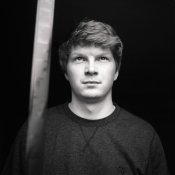
- And especially (see attachment), this was a test portrait to see the exposure problems, (it's an editted scan). I placed a friend in front of a window, having so much exposure on the face that the background fades away because there is more then 7 stops of separation between highlight and shadow.... BUT if I check with my densitometer.... it's quite contrastless (no real white highlights)... because the brightest part is the skintone... so zone 6...

(The contrasty negative is between 150-300, so a difference of 150 on the densitometer.. and the grade 3-4 negatives are more like 230-300 ... a difference of 70.. or sometimes even as low as 50)

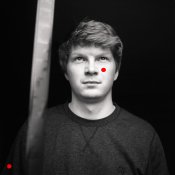
I'm using an RH designs Analyzer Pro, since a few weeks ago to print my negatives. I get very good results with it but the question is ... if I would expose the attachment here. I would place the the darkest part of the sweater on the greyest zone where there is still detail. (since I want the background to be black with no detail) and I would place the brightest part where there is still texture on the cheek (see red dots). If I want to do that, I have to go to grade 4.5-5 to get the maximum separation between the darkest textured tone and the lightest textured tone... but the question here is is the cheek really the brightest tone? Since it's skin, I should probably put it more in a greyer zone, which makes the print printable on ex. grade 3... but then I have no real highlights (referring to your closed subject).

So what they told me is that a negative is good in contrast if it exposes a full range of tones, but in this case, there is no real highlight... (zone 7-8) is it bad to print it like that or do I really have to go for the full range of tones or just print it, like that, without the real white highlights. So again, I metered that shot with an indicent meter... There is SURE more then 7 stops of visible exposure... and still I have no real highlights. Is it because of the scene? Maybe if the background would be a bright sunny sky, I would have had my full range of tones? But if the brightest skintone would be indeed the brightest textured area, it wouldn't be natural?

I came to the conclusion (for what I know now) that my agitation scheme is too slow, that most of the scenes I photograph are below the SBR of 10. But then, I can't do a magic trick and cast a spell to happily increase the SBR. How do I deal with those situations as you mostly do not have control in situations using available daylight?

I find it weird that even with the incident meter, I get average results, even in a scene like the attachment where there is plenty of tonal range. Maybe it's a combination of using a new enlarger that feels like it's color head is less contrasty, then my previous enlargers and also, using an analyzer to get my exposure / grades. I'm not a pro with it yet and still learning and maybe I'm interpreting it wrong on occassions that I feel like it needs a high grade... I came to realize that not every picture has a deep shadow or bright highlight and I'm trying to achieve that with the analyzer (as you measure the negative, you can see where the tone will end up in the print)... As the manual said you have to put the brightest part on the brightest point in the analyzer, and the darkest part on the darkest part in the analyzer... but as said before and shown here... not every negative has a really bright (clouds/sun like white) and still look good without it on print....

Any thoughts about that?

And last... How do you recommend to meter for portraits? Incident or spot and go for the skin tones or your technique with shadows and highlights?

 

Attachments

  • jens_portrait.jpg
    jens_portrait.jpg
    67.8 KB · Views: 125
  • jens_portrait_measuremaop.jpg
    jens_portrait_measuremaop.jpg
    107.3 KB · Views: 120

pentaxuser

Member
Allowing Ads
Joined
May 9, 2005
Messages
20,339
Location
Daventry, No
Format
35mm
Is there any way, to compensate for flat light outside? Maybe even a faster exposure, so I get more shadows and compensate for the highlights in print exposure?

...

What do you mean by " a faster exposure gives you more shadows"? Do you mean that the shadows will be less detailed and there will be more of them as in blacker shadows with less detail. If you do then a faster exposure will do this.

It has never been clear to me what you regard as a flat print. Do you regard the jens portraits as flat?

Show us some flat negatives and what prints from those negatives look like at grades 2,3, 4 and 5 look like

We will be in a better position to advise you what to do once we see a range of examples

pentaxuser
 
Photrio.com contains affiliate links to products. We may receive a commission for purchases made through these links.
To read our full affiliate disclosure statement please click Here.

PHOTRIO PARTNERS EQUALLY FUNDING OUR COMMUNITY:


Ilford ADOX Freestyle Photographic Stearman Press Weldon Color Lab Blue Moon Camera & Machine
Top Bottom