• Welcome to Photrio!
    Registration is fast and free. Join today to unlock search, see fewer ads, and access all forum features.
    Click here to sign up

Very flat (tonal range) negatives

Landed Here

H
Landed Here

  • 2
  • 2
  • 20
Fujino Trail

H
Fujino Trail

  • 1
  • 1
  • 55

Recent Classifieds

Forum statistics

Threads
201,829
Messages
2,830,802
Members
100,976
Latest member
MarkWalberg
Recent bookmarks
0

MattKing

Moderator
Moderator
Allowing Ads
Joined
Apr 24, 2005
Messages
55,188
Location
Delta, BC Canada
Format
Medium Format
So what they told me is that a negative is good in contrast if it exposes a full range of tones, but in this case, there is no real highlight... (zone 7-8) is it bad to print it like that or do I really have to go for the full range of tones or just print it, like that, without the real white highlights

Before you go any further, I think you need to think about what you consider to be "contrast".

Contrast really isn't the difference between the darkest and lightest part of the scene. Contrast is the difference between dark and light tones, when they are adjacent to each other in your print (sometimes referred to as "micro-contrast"). Micro-contrast is where you will find the "pop" in the print.

You can have a high contrast print with a very narrow range of tones. And you can have a low contrast print with a wide range of tones.

When printing, you choose the grade or the contrast filter to adjust the micro-contrast, and you use dodging, burning, masking and/or print bleaching to add or subtract deeper shadows or brighter specular highlights (where necessary).

For most negatives, my print exposure determination is based on the appearance of the mid-tones and highlights. My contrast determination is based on the appearance of the details/micro-contrast - mostly in the mid-tones and highlights. My burning and dodging determinations are based on a number of things, including the weight and presence of the shadows and specular highlights.

With your "flat" negatives, you should try to pin down the print time and contrast based solely on the appearance of the skin tones. Then use burning and dodging - possibly with different contrast settings - to change the relative appearance of the darker parts of the image.

When you are exposing your film, you choose exposure to give you the detail you need in the shadows. When you develop your film, you choose a development time that will give you good contrast in the mid-tones and highlights.

If the scene is evenly lit, you can use the relative brightness of the highlights vs. the shadows to guide you, because that will be a good guide to achieving good contrast in the highlights and mid-tones (for most subjects).

If the scene is not evenly lit, then you sometimes need to adjust exposure to protect highlights (at the expense of the shadows) or adjust development (at the expense of mid-tone and highlight contrast.
 

MattKing

Moderator
Moderator
Allowing Ads
Joined
Apr 24, 2005
Messages
55,188
Location
Delta, BC Canada
Format
Medium Format
please explain how you are doing your light metering. i.e. which light meter and its type, in camera or hand held and your technique for taking a light reading.

I used to meter with a spotmeter ( Pentax Digital Spotmeter ) but went back to a Minolta IVf because I felt my exposures weren't consistent enough and mostly a bit overexposed. The meter matches with my Sony A7 meter, and my other in camera meters. So the meter is not the problem.

You didn't answer the most important part of Rob's question.

It isn't which meter or type of meter you use that matters, it is the technique you use when you use that meter.

For example, in your portraits which are side-lit with window lighting, which meter, in which mode, with which accessories, held in which position and directed which way?
 

calebarchie

Member
Joined
Jul 25, 2014
Messages
704
Location
Australia 2680
Format
Hybrid
Had you read anything on that site you would of had an gathered an understanding similar to Rob's post.

A densitometer, RH Analyzer, spot meter and little understanding. Looks like someone went on a little spending spree.
 

ColColt

Member
Allowing Ads
Joined
May 26, 2015
Messages
1,824
Location
TN
Format
Multi Format
I don't see anything wrong with the example of the portrait in post #24 other than it could be tad bright for the facial tone. I've used the Pentax spot meter before and with Caucasian skin, as he has in the example, I'd take the reading, open one stop and that's going to be about as good as it gets...IF the meter is calibrated correctly.

Portraits by window light can be tricky. It depends on the quality and quantity of light coming through. If overcast the lighting is soft and not "in your face"(pun intended). Harsh sunlight will require a white reflector on the other side to cut down the variance from bright to shadow side unless that's the effect you want.

Generally speaking, if I shoot Tri-X at box speed I do so on a "cloudy, bright no shadows" condition or a heavy overcast day. I'll give that roll, if shot entirely under those circumstances, about 1 1/2 minute to2 minutes more developing time than if I shot that roll at ASA 200-250. Then, I develop with less time. On the other side of the coin, I've had good luck with either Tri-X or HP-5 at ASA250 and just using HC-110 with Dilution H for around 10 minutes and most all frames look good with adequate shadow detail and no blown highlights.

Experience is the best teacher in all things photographic and there has been some very good advice given here by those that have been down this road before.
 

RobC

Member
Allowing Ads
Joined
Nov 5, 2007
Messages
3,880
Location
UK
Format
Multi Format
for studio portraits I would suggest an incident meter. Subjects move and so the reflection values move before you have time to put down your meter and trip the shutter whereas the light stays the same if its flash.
Outdoors for any protraits I would use incident. Again subjects move. However, if you meter their forehead on the light side and not so light side and average the two readings then you'll be pretty close and it won't matter unless they turn their head away from the light source used for the readings.

Note that knowing how many stops of SBR occupy a negative density range of 1.3log which prints exactly to G2 paper is important otherwise your placement of exposure on the film curve will be out. It won't matter if it gives a little over exposure but it will if it gives under exposure becasue its then lost.
However, if you follow what I've said above and expose for the highlights, then most of your exposures (which won't be as much as 10 stops SBR) will be shifted up the curve so will have extremly good shadow separation which you can control further by use of filtration. And I note you are using ILFORD MG Filters which are ideal for this method.

You can't control SBR when doing landscapes. You can when doing outdoor portraits by using reflectors and/or flash. The point is that if you are going to be photographing SBRs of greater than 7 it will make printing difficult. By halving film speed and reducing dev you get it all on neg within a neg density range which will print inside a G2 but will probably require G3 or maybe a bit more to make it look good without compromising shadow separation/detail.

What a lot of people don't seem to realise is that if your SBR is say 5 stops and you expose for the shadows you will get it all on the neg fine. However you've got to get it from the neg to the paper. So what do you do? You set print time for a highlight and adjust contrast to get it right. The problem is because the SBR was only 5 stops, the negative density for the highlight is lower than is optimal which means the print time you work out for it is shorter than is required for the shadows to be correct tone so your shadows look weak. So you increase the print contrast to compensate. That is a problem becasue if you exposed for the shadows they will go right down to the bottom of the toe and have only just enough separation to begin with. As soon as you increase print contrast you will lose that separation in getting the shadows dark enough. Result is nicely printed mid to highlights and blocked shadows. But if you try and keep shadow separation and get mid to high values right, you have to do somesaults with your printing burning and dodging to get it to look any good.
But if you had exposed for the highlight the density on film will be where it should be. The shadow densities will be shifted up the curve but have extremely good separation so you have room to play with increasing contrast to put them up the paper curve to correct print density without blocking them. It is much simpler to get a decent print doing it this way.

I know its contrary to what the vast majority of people and books tell you but there are or were a few very good printers out there who do/did it this way.

Personally I would bin the analyser and learn to do it intuitively. You'll actually learn how paper responds to your inputs instead of being dependant on machine calibration and automation.
 
Last edited:

ColColt

Member
Allowing Ads
Joined
May 26, 2015
Messages
1,824
Location
TN
Format
Multi Format
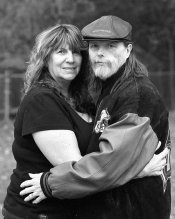
This is a good example of using the Luna Pro SBC outside with incident mode on a "cloudy, bright no shadows" day of my kid brother and his wife taken with the Pentax 6x7 and normal lens. I had a good idea of the exposure but wanted to be sure since I don't see them often and the reading was spot on to me.


Attachments

  • DarrellandRita3.jpg
    DarrellandRita3.jpg
    650.6 KB · Views: 111
OP
OP

Jessestr

Member
Allowing Ads
Joined
Mar 31, 2014
Messages
399
Format
35mm
What do you mean by " a faster exposure gives you more shadows"? Do you mean that the shadows will be less detailed and there will be more of them as in blacker shadows with less detail. If you do then a faster exposure will do this.

It has never been clear to me what you regard as a flat print. Do you regard the jens portraits as flat?

Show us some flat negatives and what prints from those negatives look like at grades 2,3, 4 and 5 look like
We will be in a better position to advise you what to do once we see a range of examples

pentaxuser

A faster exposure = darker shadows, since (see below) I mostly get fine exposed negs, but a lack of shadows. I like very strong tonal contrast... Check my website for my black and white work (jessestr.be) and you'll see what I like, mostly strong contrast and a lot of tonal contrast.

What I mean with a flat print is that I have a lot of grey tones, not really a bright white, and also not really a deep black. When a print just looks lifeless... Due to the flat light in real life too...
I consider the portrait of Jens as good, a little too bright on the highlights.

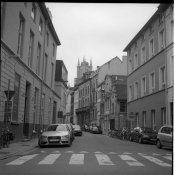
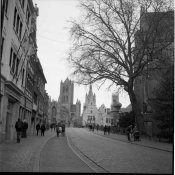
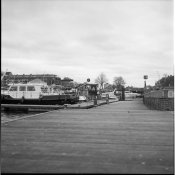
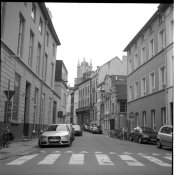
See attachments for examples. These are SCANS (uneditted) but look exactly like the testprints I made of them. This was a roll to test my exposure/development. It was a dull day, but as you can see, much midtones and greyish... but no real highlights/shadows. Due to my exposure or just the light? That's the question.
Keep in mind that this is the most extreme case I've ever had. Most negatives have more tonal range/contrast
They are taken on a 1956 Rolleiflex, with clean optics. (tessar lens.. so not the most contrasty lens)

Before you go any further, I think you need to think about what you consider to be "contrast".
Thanks for the explanation. See above what I mean about contrast.


You didn't answer the most important part of Rob's question.
For example, in your portraits which are side-lit with window lighting, which meter, in which mode, with which accessories, held in which position and directed which way?

For spotmeter, I measure on the skin that I want to be in zone 6 (for caucausian skin) and then put that in zone 6, mostly works great. But very difficult in some tricky lightning situations.
For incident, I place the meter just below the chin and point the white dome to the lens of the camera.

Had you read anything on that site you would of had an gathered an understanding similar to Rob's post.

A densitometer, RH Analyzer, spot meter and little understanding. Looks like someone went on a little spending spree.

I've been printing 1.5 years just with teststrips and on looks. Since I had the chance to get the Analyzer cheaply, I took it :smile: The densitometer is included in the analyzer and I've been using the spotmeter for over a year now too... But I shouldn't justify myself for this...

I don't see anything wrong with the example of the portrait in post #24 other than it could be tad bright for the facial tone. I've used the Pentax spot meter before and with Caucasian skin, as he has in the example, I'd take the reading, open one stop and that's going to be about as good as it gets...IF the meter is calibrated correctly.

...

Generally speaking, if I shoot Tri-X at box speed I do so on a "cloudy, bright no shadows" condition or a heavy overcast day. I'll give that roll, if shot entirely under those circumstances, about 1 1/2 minute to2 minutes more developing time than if I shot that roll at ASA 200-250. Then, I develop with less time. On the other side of the coin, I've had good luck with either Tri-X or HP-5 at ASA250 and just using HC-110 with Dilution H for around 10 minutes and most all frames look good with adequate shadow detail and no blown highlights.

Experience is the best teacher in all things photographic and there has been some very good advice given here by those that have been down this road before.

Thanks for the insights. I'll keep the extra development time in mind for dull days. The portrait is the only one that's fine on the roll, except as you say, the skin is a bit too bright. But as you can see in the attachments, the rest is just lifeless.


for studio portraits I would suggest an incident meter. Subjects move and so the reflection values move before you have time to put down your meter and trip the shutter whereas the light stays the same if its flash.
Outdoors for any protraits I would use incident. Again subjects move. However, if you meter their forehead on the light side and not so light side and average the two readings then you'll be pretty close and it won't matter unless they turn their head away from the light source used for the readings.

....

Personally I would bin the analyser and learn to do it intuitively. You'll actually learn how paper responds to your inputs instead of being dependant on machine calibration and automation.
Thanks again... Maybe I should go back to the teststrip method and see what it gives me. The analyzer has worked for me... and has also opened my eyes on some negatives. I get very much different (and better results) since the analyzer also calculates the exposure difference when changing grades etc. The values/grades I get are much different then the ones I come up with on test printing, and often they are much better... They look extremely weird when they come up on the screen, but when the print is developed... it looks great. But yes, maybe I should just ditch it.

I have 30 fiber prints to make for an exposition starting June 3th... I was hoping the analyzer would speed the process but I guess it's just holding me back. I justfound out that, it's partly because of the analyzer that I was thinking that my negs looked flat, since I wasn't using it right and it wasn't calibrated very well for the gradation part. The grades look much better now for what I want to achieve...

I'll re-read all the post written here and source more information about printing. Everything made more sense when I just used test strips.. now it seems that everything is going wrong from the development of the film... but it's probably just the analyzer that is fooling me.

Nobody said it was going to be easy when I switched to film.. but I love learning the tricks to get it right...

 

Attachments

  • lowcontrast_example-1.jpg
    lowcontrast_example-1.jpg
    83.2 KB · Views: 131
  • lowcontrast_example-2.jpg
    lowcontrast_example-2.jpg
    89.7 KB · Views: 121
  • lowcontrast_example-3.jpg
    lowcontrast_example-3.jpg
    81.2 KB · Views: 123
Last edited:

RobC

Member
Allowing Ads
Joined
Nov 5, 2007
Messages
3,880
Location
UK
Format
Multi Format
well no the development may or may not be good. It depends on your average subject brighness range. If it was always the average of 7 stops and used manufacturers recommendations for dev at box speed then everything should be fine.
BUT very often the SBR won't be 7 stops so the question is how best to handle that without ruining some shots inadvertently. The asnswer is what I've posted above and not that you were doing it wrong. You were probably doing it how manufacturer suggested which is the average way. Thats all they can do for you until you have learnt a lot more about what is actually happening and how best to control it.

You may find following useful but don't use an analyser to do the test prints:

(there was a url link here which no longer exists)
 

RobC

Member
Allowing Ads
Joined
Nov 5, 2007
Messages
3,880
Location
UK
Format
Multi Format
I'd say those images you posted are all over printed and all require more contrast. The sky will go white if you do this.
But since we don't know what the SBR was and what your film and dev were we can't say exactly why you have that as your finish point. It could just be the scan and/or my monitor.

You will find that the more printing you do (without an analyser) the better your judgement will become. And every once in while you'll print something that looks so much better than what you've done before and this print should become your new reference bar for all future prints until you do another print much better than that one which becomes your new reference bar. There are several plateaus and hurdles to get over before you get really good. An analyser doesn't learn so rely on it and you'll always get only what its calibrated to. And it can't make decisions about burning and dodging for you and to get that right you need to have a reel feel for paper response to your inputs. Get creative yourself.
 
OP
OP

Jessestr

Member
Allowing Ads
Joined
Mar 31, 2014
Messages
399
Format
35mm
well no the development may or may not be good. It depends on your average subject brighness range. If it was always the average of 7 stops and used manufacturers recommendations for dev at box speed then everything should be fine.
BUT very often the SBR won't be 7 stops so the question is how best to handle that without ruining some shots inadvertently. The asnswer is what I've posted above and not that you were doing it wrong. You were probably doing it how manufacturer suggested which is the average way. Thats all they can do for you until you have learnt a lot more about what is actually happening and how best to control it.

You may find following useful but don't use an analyser to do the test prints:

(there was a url link here which no longer exists)

Thanks for the link! Looks like something worth trying out.
I've been doing more research on my problem and I guess it's just a combination of a few things. (Agitation, color head that isn't too contrasty anymore and sometimes dull scenery/light) but most of all the analyzer that was fooling me. I was using it wrong anyways, it worked perfectly for prints with a bright white and a deep shadow like I was teached to, but for the pictures I'm printing I was using it wrong. However, I decided that I will go back to test strips and learn it. So most negatives that I try to read out right now, look quite good.

Would it be a good idea to invest into multigrade filters? Since my enlarger is really .. well there is almost no difference between grade 00 and 1, also almost no difference between 2-3 and no difference between 4-5. (Used a stouffer stepping wedge to test this).

Edit: I'll sell the Analyzer :smile:
 

RobC

Member
Allowing Ads
Joined
Nov 5, 2007
Messages
3,880
Location
UK
Format
Multi Format
I thought you were using MG Filters or did you mean Y+M?

I never used an M670 so I don't know how well adjusted their filters are for the paper you are using.
You really need to do a test with a step wedge to see how well spaced the grades are and where the theoretical speed point is so that you can predict what a change in grade will do. The stouffer 31 step transmission wedge with 1/3 stop increments is best. You don't need a calibrated one for doing this. The basic one is plenty good enough. There may be other cheaper ones if you look thru what they have.

(there was a url link here which no longer exists)

does your enlarger have an above the lens filter drawer? If not then the below the lens ilford filters work perfectly well BUT it can be a real pain to fit the damn thing to the lens so I'd use the colour head filters if you don't have a filter drawer.
 
Last edited:

ColColt

Member
Allowing Ads
Joined
May 26, 2015
Messages
1,824
Location
TN
Format
Multi Format
Personally, I think that first one and perhaps the others could be improved with just a bit more brightening and a touch more contrast...like this.
 

Attachments

  • lowcontrast_example-1.jpg
    lowcontrast_example-1.jpg
    148.7 KB · Views: 115
OP
OP

Jessestr

Member
Allowing Ads
Joined
Mar 31, 2014
Messages
399
Format
35mm
I thought you were using MG Filters or did you mean Y+M?

I never used an M670 so I don't know how well adjusted their filters are for the paper you are using.
You really need to do a test with a step wedge to see how well spaced the grades are and where the theoretical speed point is so that you can predict what a change in grade will do. The stouffer 31 step transmission wedge with 1/3 stop increments is best. You don't need a calibrated one for doing this. The basic one is plenty good enough. There may be other cheaper ones if you look thru what they have.

(there was a url link here which no longer exists)

does your enlarger have an above the lens filter drawer? If not then the below the lens ilford filters work perfectly well BUT it can be a real pain to fit the damn thing to the lens so I'd use the colour head filters if you don't have a filter drawer.

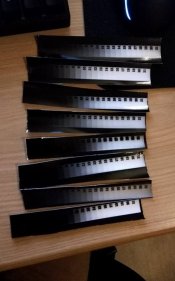
I use Y+M. I feel that the M305 and M605 have better contrast in the filters. I have used a stouffer wedge. See attachment
As you can see there is little to no difference. They are in random order... I don't have a filter drawer.

Normally I get a Devere 4x5" this week... Hoping it's a condenser one which will allow me to use filter drawers.


Personally, I think that first one and perhaps the others could be improved with just a bit more brightening and a touch more contrast...like this.

Yes. Looks better, but I'm really searching after more blacks etc, probably something I like... I should find more tonal contrast scenes... I quit model photography since a few weeks and I'm not sure where I'll be heading. I want to try documentary ...
 

Attachments

  • stouffer.jpg
    stouffer.jpg
    55.2 KB · Views: 102

pentaxuser

Member
Allowing Ads
Joined
May 9, 2005
Messages
20,339
Location
Daventry, No
Format
35mm
Thanks for the examples of the low contrast scenes. What grade were these printed at? Did you try and print these at the grades I mentioned and if so what changes did you see?

These look like very low contrast scenes but what contrast range is in the scene seems to be there on the scan.

I wonder if you are looking for a lot more contrast that the scene is capable of. What Y and M settings are you using and what is the source of these settings i.e. are they the dual filtration source provided by Ilford for its paper or what the paper makers, if not Ilford suggests?

pentaxuser
 

jvo

Subscriber
Joined
Dec 6, 2008
Messages
1,783
Location
left coast of east coast
Format
Digital
For B&W negative film users only.

Right I think this is what you need to understand. The numbers I'm going to give you are ball park numbers just to make it easy for you to understand. You will likely need to refine them with experience.

Firstly you need to know that manufacturers ISO speed and recommended dev is designed to capture 7 stops of subject range onto film which will print exactly to a Grade 2 paper.

straight away this means yo need to be aware of how many stops of subject brighness range there are in your composition. If you don't know that then you have no idea how to set camera exposure. If you are using in camera meter it will usually just average the scene which if the scene has too much light sky in it will result in your neg being underexposed for the shadows. The highlights would be fine....
....

concise, lucid, and helpful - thank you!

this has been a great conversation, thanks to all.:cool:

jvo
 

RobC

Member
Allowing Ads
Joined
Nov 5, 2007
Messages
3,880
Location
UK
Format
Multi Format
I use Y+M. I feel that the M305 and M605 have better contrast in the filters. I have used a stouffer wedge. See attachment
As you can see there is little to no difference. They are in random order... I don't have a filter drawer.

Normally I get a Devere 4x5" this week... Hoping it's a condenser one which will allow me to use filter drawers.


Yes. Looks better, but I'm really searching after more blacks etc, probably something I like... I should find more tonal contrast scenes... I quit model photography since a few weeks and I'm not sure where I'll be heading. I want to try documentary ...
I can not tell anything from your photo os step wedges. The important thing is that you start from softest grade and make sure it fits on paper from black to white and all subsequent grade exposures use exactly same enlarger settings otherwise you can't see where the tones align or not.
 
Last edited:

RobC

Member
Allowing Ads
Joined
Nov 5, 2007
Messages
3,880
Location
UK
Format
Multi Format
concise, lucid, and helpful - thank you!

this has been a great conversation, thanks to all.:cool:

jvo
make sure you read the following two post so you get the full picture:

(there was a url link here which no longer exists)
 
Joined
Sep 10, 2002
Messages
3,675
Location
Eugene, Oregon
Format
4x5 Format
Jessestr,

After looking at your examples of low contrast, I get the impression that you are expecting more from flat lighting on an overcast day than is possible. A very bright overcast sky and flat lighting on the much darker subject almost always yields the results you posted. You have to decide where you want the contrast, i.e., between subject and sky or in the subject matter itself without considering the sky and develop or filter accordingly. I would imagine that if you measure the deepest shadows and the highest sky values in your negatives you'll find close to a full tonal range; it's just proportioned in a way you don't like it much.

Especially if you incident-meter a scene like this, you're going to get a bright sky with a too-dark and muddy everything else. A spotmeter helps visualize here if you are using it to check mid-tones and highlights in relation to shadows (and not just metering a shadow and setting an exposure). It's not uncommon that I'll meter just such a scene and find the main subject ranges from Zone III through Zone V (or darker) and the sky meters on Zone X... I'll recompose or not shoot in many of these cases.

FWIW, you might not like the contrast in your shots, but many might. And, with a bit of burning of the sky and a higher contrast grade, you might get the results you're after.

Best,

Doremus
 
Photrio.com contains affiliate links to products. We may receive a commission for purchases made through these links.
To read our full affiliate disclosure statement please click Here.

PHOTRIO PARTNERS EQUALLY FUNDING OUR COMMUNITY:


Ilford ADOX Freestyle Photographic Stearman Press Weldon Color Lab Blue Moon Camera & Machine
Top Bottom