• Welcome to Photrio!
    Registration is fast and free. Join today to unlock search, see fewer ads, and access all forum features.
    Click here to sign up

Using AI during Scanning and Subsequent Editing

At the Lagoon

A
At the Lagoon

  • 6
  • 4
  • 78
Afternoon Calm II

D
Afternoon Calm II

  • 4
  • 4
  • 57

Forum statistics

Threads
203,512
Messages
2,855,836
Members
101,880
Latest member
coachlinc
Recent bookmarks
0

Alan Edward Klein

Member
Allowing Ads
Joined
Aug 29, 2017
Messages
10,491
Location
New Jersey formerly NYC
Format
Multi Format
What app and how are you using AI when scanning film and subsequent editing for such things as eliminating dust spots, reversing color negative film, correcting colors, etc? Include the type of scanner you're using such as:

a. flat bed scanner
b. drum scanners
c. digital camera scanning
d. other
 
I sometimes use ChatGPT to give me completely wrong information about all of the above.
 
I guess it depends a bit on what constitutes 'AI'. Tools like the 'healing brush' in e.g. Photoshop and GIMP can be considered as a form of AI - just not an LLM, which is what we usually think of today when referring to AI.

The other day I was spotting a scan (with said healing brush) and I figured that there should really be an AI-powered tool to automate the process. It's such predictable, mind-numbing work that surely it would be perfect for an LLM to perform. Is this already present in newer Photoshop versions or the AI-powered version of Affinity? I've not looked into it yet; I'd be interested to hear if others have and what their experiences are.
 
^ I am also interested in this! Scanning a huge batch of 35mm slides on digitdia scanner, and interested in optimal workflow for dustremoval.
 
^ I am also interested in this! Scanning a huge batch of 35mm slides on digitdia scanner, and interested in optimal workflow for dustremoval.

Removal of dust is also a problem with my Epson flat-bed scanners (V600 and V850) because the Epson ICE program doesn't work with BW photos, only with color like Ektachrome slides, but not Kodachrome slides. Kodacrhome has a triple-layer design that prevents it.

Currently, I use Lightroom spot tool to hit each dust spot on the scanned photo, which is a slow process. An AI program automatically doing this would be great and should seem to work on digital camera scanning processes like yours. Anyone using one of these apps?
 
Removal of dust is also a problem with my Epson flat-bed scanners (V600 and V850) because the Epson ICE program doesn't work with BW photos, only with color like Ektachrome slides, but not Kodachrome slides. Kodacrhome has a triple-layer design that prevents it.

Currently, I use Lightroom spot tool to hit each dust spot on the scanned photo, which is a slow process. An AI program automatically doing this would be great and should seem to work on digital camera scanning processes like yours. Anyone using one of these apps?

You refer to an app as if you know it exists. Are there any? Topaz AI might remove dust--I've never tried. I think AI would end up removing details as well as dust. How would an AI program distinguish between a specular highlight and dust? A pattern and dust or dirt? A small bird in the distant sky?
 
That's exactly why AI (as in LLM's) is so promising. While the older dust/scratch removal tools wouldn't distinguish between the nature of features because they had a very limited ability to include contextual data, that's where LLM's can make a real difference.
 
I'd be happy with AI that just flags likely imperfections, and allows me to both elect to use the clone tool or not, and tab to the next flagged spot.
 
For Black and white, I will add a temporary curves layer that accentuates dust so I can either clone it out or use the healing brush.
 
I'd be happy with AI that just flags likely imperfections, and allows me to both elect to use the clone tool or not, and tab to the next flagged spot.

My Lightroom has a visualize spots switch in the healing/spot removal tool with a slider to adjust its sensitivity. Then you can select the spots you want corrected.
 
For Black and white, I will add a temporary curves layer that accentuates dust so I can either clone it out or use the healing brush.

I;m never sure which to use the heal or clone?
 
I;m never sure which to use the heal or clone?

Using the healing feature generally works better for spots because it will automagically try to make the spot blend in with whatever surrounds it. With the clone tool, you manually identify (by clicking an area) to serve as the repair spot. Problem is, the spot you pick to clone over your "bad spot" may not be as close a match in color or density as you thought, so your cloned area might stand out against the background.
 
Using the healing feature generally works better for spots because it will automagically try to make the spot blend in with whatever surrounds it. With the clone tool, you manually identify (by clicking an area) to serve as the repair spot. Problem is, the spot you pick to clone over your "bad spot" may not be as close a match in color or density as you thought, so your cloned area might stand out against the background.

I have had mixed results with the spot healing brush. Much better with the regular healing brush.
 
If talking local LLMs - I find them very powerful for tedious tasks like IPTC description and tagging. As I'm currently writing an application I would be interested in how others are thinking about this. I always wanted to manually tag my images but then failed miserably in doing exactly that. Now with local AI that's actually so easy to implement that it's worth a try I would argue.
Bildschirmfoto 2026-04-07 um 18.57.39.png
Bildschirmfoto 2026-04-07 um 18.58.01.png
 
The other day I was spotting a scan (with said healing brush) and I figured that there should really be an AI-powered tool to automate the process.
I'm afraid this is an aside, and I don't want to derail the thread, which is very pertinent ... but briefly, why do you use the healing tool? I always spot with the clone tool, because that copies the grain pattern. Am I missing something?
 
I'm afraid this is an aside, and I don't want to derail the thread, which is very pertinent ... but briefly, why do you use the healing tool? I always spot with the clone tool, because that copies the grain pattern. Am I missing something?
Not sure if we're talking about the same thing. I'm on GIMP; what I remember from Photoshop (like...CS2 or thereabouts) is that the clone and healing tool were rather distinct, but in GIMP, the healing tool is more of a hybrid between the two: it 'heals' based on a sample - so you have to define a reference point first, like with the regular clone tool. The clone tool works similarly to Photoshop AFAIK.
 
Not sure if we're talking about the same thing. I'm on GIMP; what I remember from Photoshop (like...CS2 or thereabouts) is that the clone and healing tool were rather distinct, but in GIMP, the healing tool is more of a hybrid between the two: it 'heals' based on a sample - so you have to define a reference point first, like with the regular clone tool. The clone tool works similarly to Photoshop AFAIK.

Thanks. I am using GIMP. I’m going to have to compare the effect of the two tools. Hadn’t realised the heal tool too involved sampling a source area.
 
A colleague was just showing me his latest results from ChatGPT so I thought I would try removing dust and scratches compared to my Coolscan.
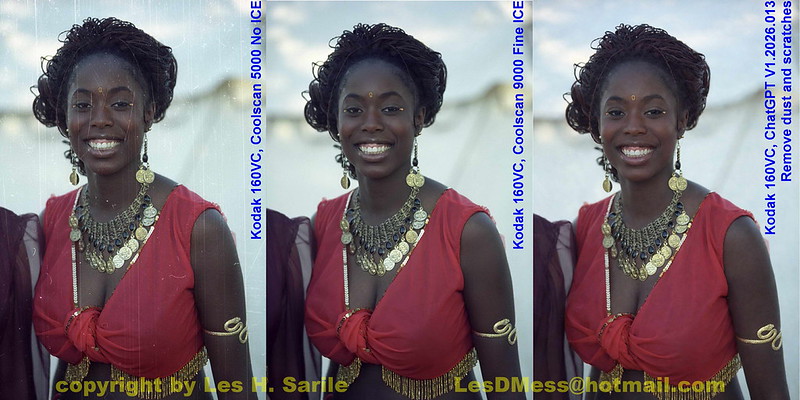
Kodak 160VC-06-36 9K ICE vs ChatGPT by Les DMess, on Flickr

With a ChatGPT subscription, the processing time takes about less than a minute compared to additional 30-40 seconds to the scan with ICE enabled.

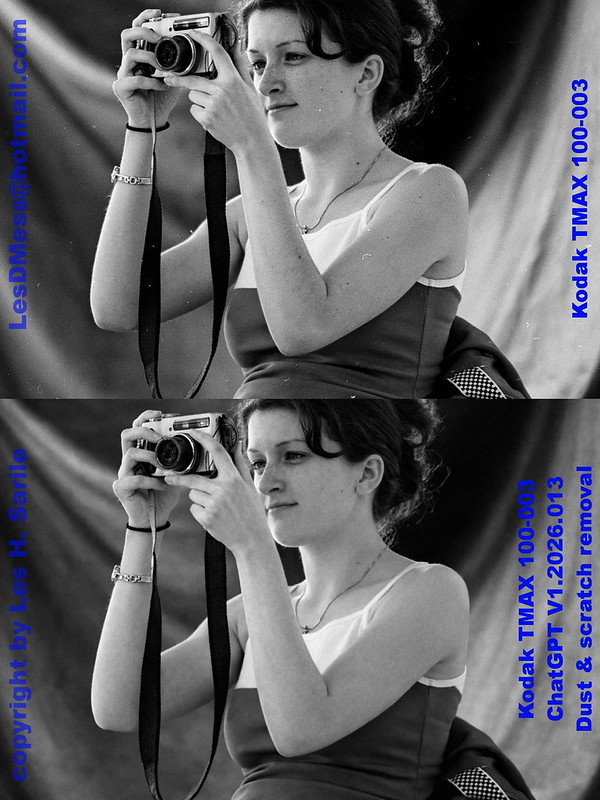
However, Coolscan's ICE does not work with true b&w films so that can save in post processing for those types of films as shown below. Granted my b&w sample is not as badly scratched but the results look good. I always hated spotting my prints . . . :tongue:

Kodak TMAX 100-003 ChatGPT D&S removal by Les DMess, on Flickr

However, there is a big shortcoming and that is the current maximum image size of 1536 X 1024. My 4000dpi scans are typically 5200 X 3600 ±200 pixels for cropping the borders. I suppose I can use another AI powered tool to increase the resolution . . . :wink:


While playing with this, I thought I would try to see if ChatGPT can also do something with badly focused or blurred images. Over the years, I've tried to do something with these types of images with less then optimal results. A year or two ago new AI tools started coming up promising to focus images but those that I've tried didn't produce any results I would even consider useful. To my surprise it looks like we now have a tool that can address this!

This was a badly focused image I took on Kodak 160VC many years ago and ChatGPT handles it very well I think.
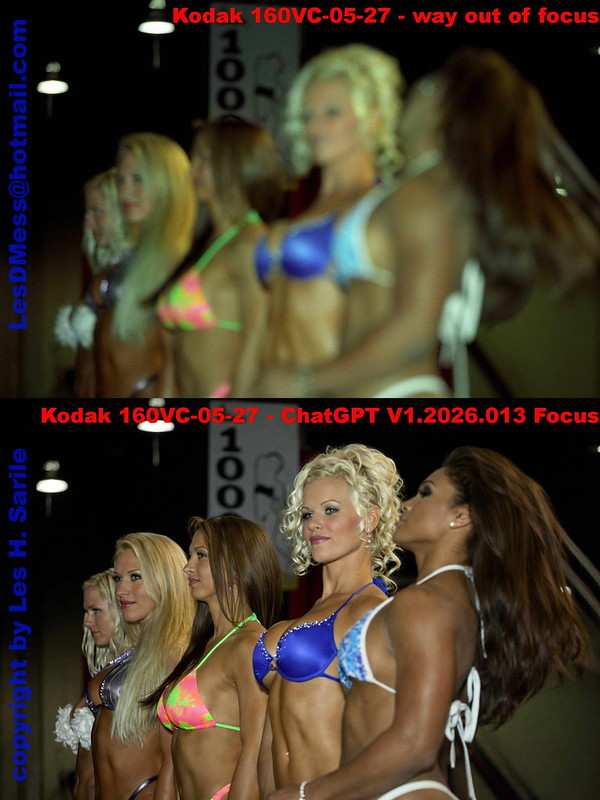
Kodak 160VC-05-27 ChatGPT Focus by Les DMess, on Flickr

It goes without saying that with images this bad, ChatGPT is making "guesses" at what the image should be - filling in details. I have other clearly focused images of these contestants and the guesses were reasonably close. So, if the guesses close enough then great and if not then not so great. The pixel limit still applies here too.

I think for these two purposes, this tool can be very handy. What do you thin? Have you tried any others? Have any results to share?

Here are other pics of two that you can judge for yourself what I considered a reasonable guess . . .
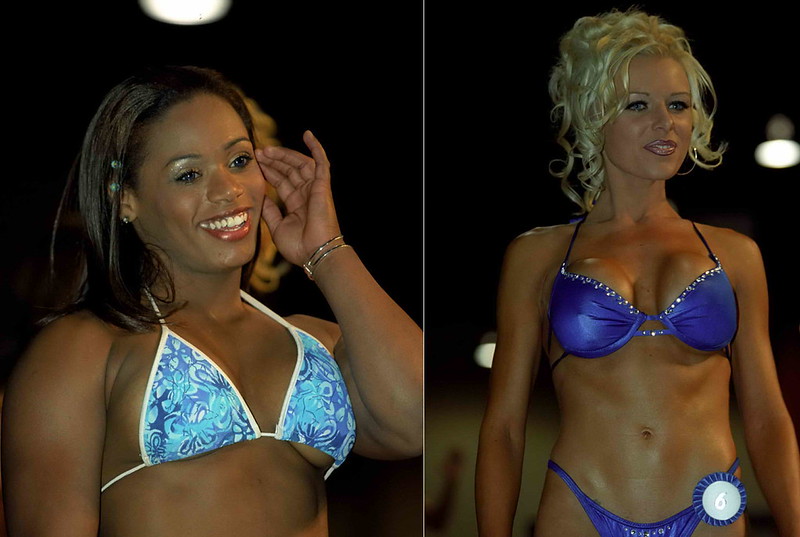
Kodak 160VC-05-27 ChatGPT Focus different angle by Les DMess, on Flickr

 
Last edited:
I think it's very interesting @Les Sarile and thanks for posting those! Apart from the observation I agree with that with the out-of-focus shot, evidently ChatGPT makes up most of the facial features, so I suppose this doesn't work too well if you know the ladies in the photo, as they may look odd or even downright 'wrong'. But the image looks plausible, that's for sure.

The dust & scratch removal exercise is interesting since it is evidently very effective indeed, but it also involves a subtle change in color (slightly warmer) and contrast (shadows lifted slightly). The result I think is pleasing, but not exactly true to the original. Then again, I also don't see (at least at a glance) very obvious signs of hallucination as we so often see in AI-processed images.
 
A colleague of mine had an Adobe AI subscription so I asked him to run my image through cleanup and this how it came out.

Kodak 160VC-036 Adobe AI vs Coolscan ICE by Les DMess, on Flickr

It took her facial jewelry out and still didn't clean the dust and scratches.

I believe this has been a couple years/versions ago now so they may have since improved.
 
I think even for simple tasks like dust removal, it is not that easy to let AI automate everything over a large batch. Because it is often difficult to tell a dust from a bird, or tiny moon, or a small pebble down the road. Human still needs to be in the loop to decide, once the AI provides the candidates.

Automated batch processing is only great when the detection and action are deterministic, e.g. traditional ICE dust removal that is based on depth.
 
Les, I think it's all pretty amazing. Thanks for providing those tests.

One thing. The black woman's face isn't even in the original. How can the AI photo show someone who actaully looks like the actual woman un;ess AI had access to her in another picture. Is it possible the image of her was in another photo that was used online by AI to assemble your picture?
 
No, it's just a hallucination. It's not a real person's face, but an amalgamation of faces from many many images upon which the software was trained.

Actually that's true for all the faces in the photo, none of the faces are the actual faces of the people originally in the scene.

Generative AI is not capable of making the kinds of decisions you're attributing to it. It doesn't have the capability to know who a person is, or what they look like. It's just predicting what it thinks you want the individual pixel values to be based on the pixel values it was trained on and the prompting you give it.
 
Photrio.com contains affiliate links to products. We may receive a commission for purchases made through these links.
To read our full affiliate disclosure statement please click Here.

PHOTRIO PARTNERS EQUALLY FUNDING OUR COMMUNITY:


Ilford ADOX Freestyle Photographic Stearman Press Weldon Color Lab Blue Moon Camera & Machine
Top Bottom