• Welcome to Photrio!
    Registration is fast and free. Join today to unlock search, see fewer ads, and access all forum features.
    Click here to sign up

Rodinal - and thoughts

102391040027-2.jpg

A
102391040027-2.jpg

  • 0
  • 0
  • 8
Just a Sparrow

D
Just a Sparrow

  • 0
  • 0
  • 33

Recent Classifieds

Forum statistics

Threads
201,774
Messages
2,829,902
Members
100,939
Latest member
yoi
Recent bookmarks
1
OP
OP

mitchins

Member
Allowing Ads
Joined
May 22, 2014
Messages
49
Format
Medium Format
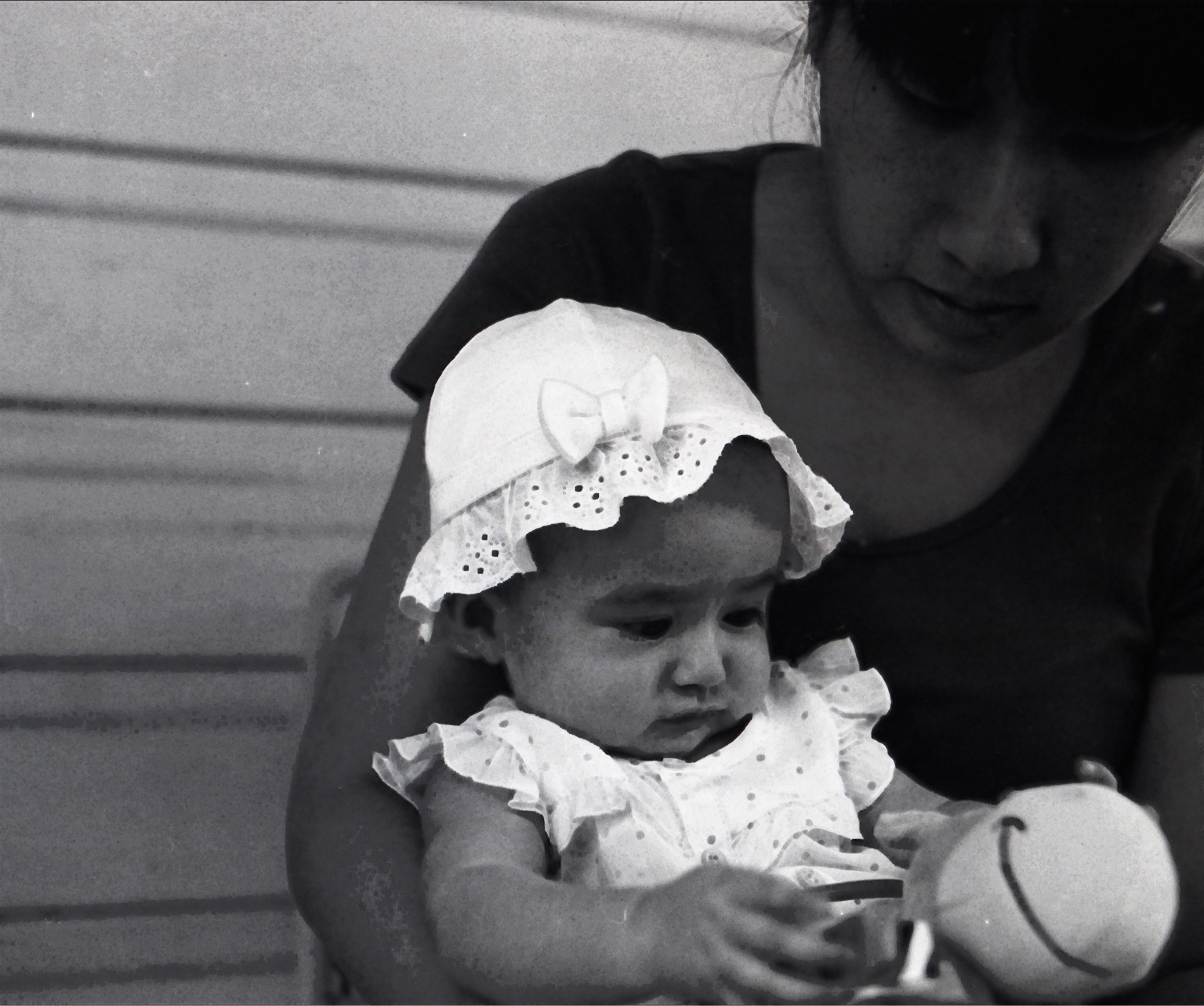
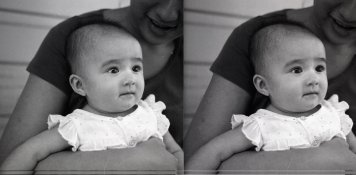
Mamiya RB67. Fomapan 200 in 1+50 (10 minutes) rodinal . Scanned on Epson v700. Looks awful sadly, the detail just doesn't appear to be there. Could someone please try to help I'm at a loss to understand
99895ba0ead14ee1a609d866596a7086.jpg

I better figure this out before she gets too big!

Edit: this could t be due to film being out of DOF on scanner since it curls right? I think I know that and it's not this.
1200 DPI should be adequate there's nowhere near that much detail don't think it's my scanner settings. Could it be agitations? Did I shake it too violently or something?

Also on the left side on my wife's arm it looks like burnt highlights but not quite - does that mean anything? Is it not developed or too developed? I used a photoflo with demineralised water - much reduced dots, not completely on all frames.

Also I may have placed the film emulsion side down instead of up in the scanner, but again could they really cause anything like this.

Sent from my iPhone using Tapatalk
 
Last edited by a moderator:

mnemosyne

Member
Allowing Ads
Joined
Jan 19, 2011
Messages
759
Location
Europe
Format
Multi Format
Mamiya RB67. Fomapan 200 in 1+50 (10 minutes) rodinal . Scanned on Epson v700. Looks awful sadly, the detail just doesn't appear to be there. Could someone please try to help I'm at a loss to understand
I better figure this out before she gets too big!

Edit: this could t be due to film being out of DOF on scanner since it curls right? I think I know that and it's not this.
1200 DPI should be adequate there's nowhere near that much detail don't think it's my scanner settings. Could it be agitations? Did I shake it too violently or something?

Also I may have placed the film emulsion side down instead of up in the scanner, but again could they really cause anything like this.

Sent from my iPhone using Tapatalk


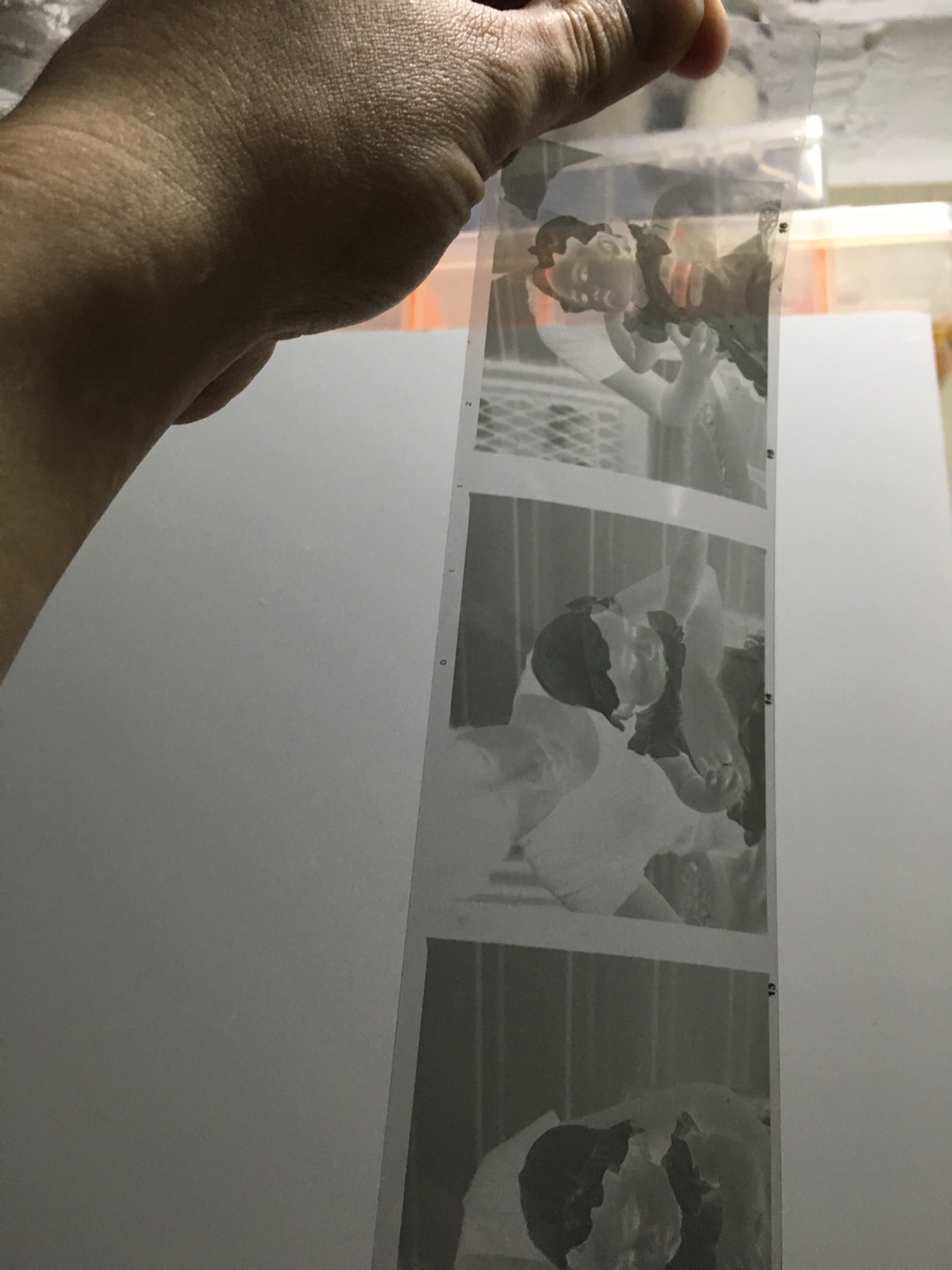
Almost impossible to tell what is wrong with a negative by looking at a scan because the scanner software tries to overcome the shortcomings of the negative by making all kinds of adjustments. Show us a picture of the actual negative against a diffuse light source and it should be very obvious if the negative is underexposed and/or underdeveloped/overdeveloped or if there are other problems like insufficient fixing (very common nowadays).

You won't get a lot of detail from a 1200 ppi scan from a flatbed scanner (effective resolution is always much lower than the nominal on this type of scanners). Scan at max resolution or at least half max resolution and downsampling to require ppi is good practice.
 
OP
OP

mitchins

Member
Allowing Ads
Joined
May 22, 2014
Messages
49
Format
Medium Format
ff0378b4baccda08b5c55d39be7a5ad5.jpg


I took this last night but I'll get a better one specifically when I get home.


Sent from my iPhone using Tapatalk
 

piu58

Member
Allowing Ads
Joined
May 29, 2006
Messages
1,545
Location
Leipzig, Germany
Format
Medium Format
> Looks awful sadly, the detail just doesn't appear to be there.

You gave the film too less light, the shadows are nearly empty. To get the midtones at a region where they should be, the contrast is too high.

Try to give a top more light. The contrast of the negatives seems to be good, so your development time seems ok.
 
OP
OP

mitchins

Member
Allowing Ads
Joined
May 22, 2014
Messages
49
Format
Medium Format
Hmm. That could be. I might have over compensated for being outside even though it was in the shade. But wouldn't the whole image be darkened uniformly or does film behave completely different to adjusting the brightness/exposure setting? (As I type this I realise it may well be different)


Sent from my iPhone using Tapatalk
 

MattKing

Moderator
Moderator
Joined
Apr 24, 2005
Messages
55,143
Location
Delta, BC Canada
Format
Medium Format
Hmm. That could be. I might have over compensated for being outside even though it was in the shade. But wouldn't the whole image be darkened uniformly or does film behave completely different to adjusting the brightness/exposure setting? (As I type this I realise it may well be different)


Sent from my iPhone using Tapatalk

The answer to your question is actually yes, but that is only part of it.

If you under-expose film and then try to present the results by either printing it or scanning it, the mode of presentation also affects the final product. The problems you see may be related as much to the scanning process and its attempts to rehabilitate your under-exposed film as they are to the film itself.
 

mnemosyne

Member
Allowing Ads
Joined
Jan 19, 2011
Messages
759
Location
Europe
Format
Multi Format
Hmm. That could be. I might have over compensated for being outside even though it was in the shade. But wouldn't the whole image be darkened uniformly or does film behave completely different to adjusting the brightness/exposure setting? (As I type this I realise it may well be different)

Not sure if I understand your question correctly, but the problem with underexposure is that darker grey and midtones are pulled into the flat toe area of the density curve where the film is not able to differentiate/separate the tones well. This is why the mid-tones and darker greys suffer most from underexposure. If you then crank up the overall brightness in post processing (or printing) to compensate, the mid-greys will look very mushy.

I agree the negatives look underexposed by 1-2 stops and the only remedy is to meter more carefully next time (incident meter or reflective with grey card) or (in case you in fact did meter the scenes carefully) rate the film down by ~two stops. When trying to pinpoint a problem never change more than one variable at a time. So only change the exposure with your next film, nothing else and check the results. Then, if you find that with adjusted exposure you get good shadow detail but midtone separation/contrast is still too flat, you could adjust development in a later step to finetune your process. But as Uwe said, the contrast does not look too bad, so you will likely be fine with just adding more exposure.
 

Xmas

Member
Allowing Ads
Joined
Sep 4, 2006
Messages
6,398
Location
UK
Format
35mm RF
You have underexposed by more than two stops.
A negative needs to have shadows that have silver in them.
More simple the shadows need to be distinguished from the rebates.
Rebates clear except for any film base colour.
Shadows opaque silver.

Most film developer combinations compress the contrast as the light intensity gets too low. And the shadow details are less separate and more difficult to print, wet printing is way difficult without silver in shadows.

Some people only meter for zone 1 shadows.

Don't listen to people who say push, they are being paid money by the devil.

You need to look at (ie through)the negative not the scanned image.
 
OP
OP

mitchins

Member
Allowing Ads
Joined
May 22, 2014
Messages
49
Format
Medium Format
You have underexposed by more than two stops.
A negative needs to have shadows that have silver in them.
More simple the shadows need to be distinguished from the rebates.
Rebates clear except for any film base colour.
Shadows opaque silver.

Most film developer combinations compress the contrast as the light intensity gets too low. And the shadow details are less separate and more difficult to print, wet printing is way difficult without silver in shadows.

Some people only meter for zone 1 shadows.

Don't listen to people who say push, they are being paid money by the devil.

You need to look at (ie through)the negative not the scanned image.

I think you are right, I found one shot that at least seems to be within one or two stops. (I think I over-exposed, what I thought on purpose as a way to check later).
I think people say Foma 200 should be rated down a bit anyway.
It's a damn sight better. Getting caught with F3.8 on RB67 is a lot harder than the mama 645 lenses.

Do you think on an RB67 you need to account much for the bellows extension when taking metering into effect?


One the left is a normal shot, coincidentally trying to remove the damage with Epson Digital ICE made it WORSE.
attachment.php


PS. what was that advice about scanners and their resolution? Double what you want because you have to downsize the desktop scanner rating?
 

Attachments

  • comparison_norm_ice.jpg
    comparison_norm_ice.jpg
    693 KB · Views: 302

R.Gould

Member
Allowing Ads
Joined
Apr 22, 2010
Messages
1,752
Location
Jersey Chann
Format
Multi Format
I use Fomapan as my main film, mostly 400 but sometimes 200, in both 120 and 35mm, and always develop in Rodinal 1/50, and 90% of it is exposed at box speed, The only time I would expose at less than box speed is if it is a very overcast day, when I would give an extra stop. When I give the extra stop I develop for 12 minutes for the 400 and 11 minutes for the 200 (at 200 and 100) with the other 90% I develop my Fomapan for 15 minutes for 400 and 14 minutes for 200, these give me near perfect negatives with detail in both shadow and highlight areas, and negatives that print fairly easily, one other thing is that I find that with HP5+ Rodinal does not work well at 1/50, I only get 200 and have to over develop, around 17minutes to get a reasonable negative, but with rodinal at 1/25 I get box speed at around 7 minutes (I don't use hp5 much and would need to check the time)and get perfectly developed negatives
Richard
 

Xmas

Member
Allowing Ads
Joined
Sep 4, 2006
Messages
6,398
Location
UK
Format
35mm RF
I think you are right, I found one shot that at least seems to be within one or two stops. (I think I over-exposed, what I thought on purpose as a way to check later).
I think people say Foma 200 should be rated down a bit anyway.
It's a damn sight better. Getting caught with F3.8 on RB67 is a lot harder than the mama 645 lenses.

Do you think on an RB67 you need to account much for the bellows extension when taking metering into effect?


One the left is a normal shot, coincidentally trying to remove the damage with Epson Digital ICE made it WORSE.
attachment.php


PS. what was that advice about scanners and their resolution? Double what you want because you have to downsize the desktop scanner rating?

I like the shot get mummy to kiss baby, and reshoot.
You need to inhibit digital ICE with mono film except for XP2+ the scanner gets confused... iCE only for E6 or C41.
Please say how you are metering.
The Foma data sheets need careful reading, Google.
 

Rolleijoe

Member
Allowing Ads
Joined
Dec 16, 2004
Messages
524
Location
S.E. Texas
Format
Medium Format
I've used Rodinal for decades. Everything from Tri-X, APX films, Ilford, Neopan 400 & Acros, Rollei Ortho, Foma. No problems with any aspect of this living legend. 1:50 10min 20° C, normal agitation.

Must agree with poster who said if you're not getting good results, it's you not it.
 

MattKing

Moderator
Moderator
Joined
Apr 24, 2005
Messages
55,143
Location
Delta, BC Canada
Format
Medium Format
On the scanner question (heresy!) it is the optical resolution that matters, not the "notional maximum with software factored in" resolution.

With a flatbed scanner - think about 1700 pixels/inch maximum.

More importantly, and relevant to APUG, you need to separate the effects of the exposure, the film, the negative, and the mode of presentation (printing or scanning or projecting).
 
OP
OP

mitchins

Member
Allowing Ads
Joined
May 22, 2014
Messages
49
Format
Medium Format
I like the shot get mummy to kiss baby, and reshoot.
You need to inhibit digital ICE with mono film except for XP2+ the scanner gets confused... iCE only for E6 or C41.
Please say how you are metering.
The Foma data sheets need careful reading, Google.

Thanks.
I'm a little embarrassed but I did have a Sekonic L308, I must not be using it properly.
I took an incident reading. (I know this term but its only my 3rd time using the meter - it worked very successfully with Fomapan 100 on a Toyo 4x5).
I used F4.0 @ ISO 200 and it came up with about 1/40 of a second, so I used the next shutter stop of 1/60 since the lens is slightly faster than F4 (F3.8 - not much) and 1/30 might be hard with a portrait.
Looks like two conclusions: I didn't give it enough light, and I may benefit from longer in (Rodinal - even 14 minutes instead of the 7 I used).

Thanks for the tip I'll try it again.
 
Last edited by a moderator:

MattKing

Moderator
Moderator
Joined
Apr 24, 2005
Messages
55,143
Location
Delta, BC Canada
Format
Medium Format
Thanks.
I'm a little embarrassed but I did have a Sekonic L308, I must not be using it properly.
I took an incident reading. (I know this term but its only my 3rd time using the meter - it worked very successfully with Fomapan 100 on a Toyo 4x5).
I used F4.0 @ ISO 200 and it came up with about 1/40 of a second, so I used the next shutter stop of 1/60 since the lens is slightly faster than F4 (F3.8 - not much) and 1/30 might be hard with a portrait.
Looks like two conclusions: I didn't give it enough light, and I may benefit from longer in (Rodinal - even 14 minutes instead of the 7 I used).

Thanks for the tip I'll try it again.

Longer development doesn't do much for exposure problems. It does boost contrast though.
 
OP
OP

mitchins

Member
Allowing Ads
Joined
May 22, 2014
Messages
49
Format
Medium Format
Longer development doesn't do much for exposure problems. It does boost contrast though.

Good point. Contrast looks fairly decent already. It might be worth trying to see if the shadows become any better?

I might try Foma 400 with the RB67 next but people say it's got as much grain as Kellogg's cereal


Sent from my iPhone using Tapatalk
 

Xmas

Member
Allowing Ads
Joined
Sep 4, 2006
Messages
6,398
Location
UK
Format
35mm RF
Good point. Contrast looks fairly decent already. It might be worth trying to see if the shadows become any better?

I might try Foma 400 with the RB67 next but people say it's got as much grain as Kellogg's cereal


Sent from my iPhone using Tapatalk

Foma 400 on 6x7 should not be that bad, I'd set the meter to 250, incident should be ok.
The shadow speed is fixed sensibly, you need the RB on a tripod, or lights.
 

Athiril

Subscriber
Allowing Ads
Joined
Feb 6, 2009
Messages
3,062
Location
Tokyo
Format
Medium Format
You only need a tripod in lower light situations. Though I tend to try and stick to 1/125 or above for hand held.

Thanks.
I'm a little embarrassed but I did have a Sekonic L308, I must not be using it properly.
I took an incident reading. (I know this term but its only my 3rd time using the meter - it worked very successfully with Fomapan 100 on a Toyo 4x5).
I used F4.0 @ ISO 200 and it came up with about 1/40 of a second, so I used the next shutter stop of 1/60 since the lens is slightly faster than F4 (F3.8 - not much) and 1/30 might be hard with a portrait.
Looks like two conclusions: I didn't give it enough light, and I may benefit from longer in (Rodinal - even 14 minutes instead of the 7 I used).

Thanks for the tip I'll try it again.

Including the f-stop difference it comes out to close to half a stop difference (of underexposure from EI 200), shouldn't be that bad to be honest, but I haven't used Foma 200.
 
Last edited by a moderator:

ColColt

Member
Allowing Ads
Joined
May 26, 2015
Messages
1,824
Location
TN
Format
Multi Format
mitchins-I once had a Sekonic L-308, never liked it. I know this may sound like a silly question as you probably no doubt know how to use it but if using it as an incident meter you do know to go to the subject and point the dome back toward the camera position? Otherwise, you could get erroneous reading.
 
OP
OP

mitchins

Member
Allowing Ads
Joined
May 22, 2014
Messages
49
Format
Medium Format
mitchins-I once had a Sekonic L-308, never liked it. I know this may sound like a silly question as you probably no doubt know how to use it but if using it as an incident meter you do know to go to the subject and point the dome back toward the camera position? Otherwise, you could get erroneous reading.

I do, however I was about 50cm from the subject not sure if that makes much difference outside


Sent from my iPhone using Tapatalk
 

ColColt

Member
Allowing Ads
Joined
May 26, 2015
Messages
1,824
Location
TN
Format
Multi Format
As long as the dome is pointed from subject position back to the camera distance wouldn't matter. You're just reading the light at her position.
 

Athiril

Subscriber
Allowing Ads
Joined
Feb 6, 2009
Messages
3,062
Location
Tokyo
Format
Medium Format
mitchins-I once had a Sekonic L-308, never liked it. I know this may sound like a silly question as you probably no doubt know how to use it but if using it as an incident meter you do know to go to the subject and point the dome back toward the camera position? Otherwise, you could get erroneous reading.

You should point it towards the main light that's lighting the subject, or part of the subject that you wish to expose correctly for. The light is not coming from the camera.
 
OP
OP

mitchins

Member
Allowing Ads
Joined
May 22, 2014
Messages
49
Format
Medium Format
You should point it towards the main light that's lighting the subject, or part of the subject that you wish to expose correctly for. The light is not coming from the camera.

Perhaps the fact it was an afternoon and the sun was coming in through an angle there may have been less more like where I metered. I'll have to keep trying and get the hang of it


Sent from my iPhone using Tapatalk
 

tih

Subscriber
Joined
Sep 12, 2006
Messages
191
Location
Norway
Format
Multi Format
Do you think on an RB67 you need to account much for the bellows extension when taking metering into effect?

The RB67 has a diagram on the side that shows you how much to compensate, based on the used lens and the current bellows extension. Look closely at it, and you'll figure out how to use it.
 
Photrio.com contains affiliate links to products. We may receive a commission for purchases made through these links.
To read our full affiliate disclosure statement please click Here.

PHOTRIO PARTNERS EQUALLY FUNDING OUR COMMUNITY:



Ilford ADOX Freestyle Photographic Stearman Press Weldon Color Lab Blue Moon Camera & Machine
Top Bottom