
• Welcome to Photrio!
    Registration is fast and free. Join today to unlock search, see fewer ads, and access all forum features.
    Click here to sign up

Open source f/stop enlarger timer released

Recent Classifieds

Forum statistics

Threads
201,770
Messages
2,829,863
Members
100,936
Latest member
rdbirt
Recent bookmarks
1
OP
OP
polyglot

polyglot

Member
Allowing Ads
Joined
Jun 12, 2009
Messages
3,467
Location
South Australia
Format
Medium Format
Yes, interference on the power supply line will cause the Arduino or LCD to crash or be corrupted. You must have a clean power supply, completely independent of (or very well isolated from) any large loads that you're switching, otherwise the switch transients will cause problems. This is a huge issue for all-DC systems, e.g. people trying to control DC motors and servos and connecting them to the same DC supply that runs the Arduino itself, but it shouldn't be too much of a problem for AC systems because you have a switching regulator to isolate your arduino from the mains. Some are better than others, of course...

In your case it sounds like you're getting a big transient off the cooling fan; there's probably something wrong with it if the transient is worse than the enlarger switching. Could probably do with a snubber on the fan terminals.
 

fran

Member
Allowing Ads
Joined
Jan 9, 2007
Messages
258
Location
Kildare, Ire
Format
Multi Format
All true. I did indeed add snubbers to the fan supply, and doing that along with following the guidelines linked in my post means that the problem seems to be gone. I used those optically isolated relays, which although dirt cheap on ebay, at least work as they should for now. The real test will come with time and use....


Fran
 
OP
OP
polyglot

polyglot

Member
Allowing Ads
Joined
Jun 12, 2009
Messages
3,467
Location
South Australia
Format
Medium Format
PCBs are sold out, but a new batch of 30 are on their way to me from Hong Kong right now. If you're thinking about building one of these, parts are available!

Would people (without electronics/soldering skills/tools) be interested in a pre-assembled+tested version? I suspect it'd be on the order of $100 including everything except a case, power supply (phone charger) and mains relay, for which you would use a powerswitchtail or similar.
 

mexipike

Member
Allowing Ads
Joined
Feb 12, 2007
Messages
377
Location
Los Angeles, CA
Format
Med. Format RF
PCBs are sold out, but a new batch of 30 are on their way to me from Hong Kong right now. If you're thinking about building one of these, parts are available!

Would people (without electronics/soldering skills/tools) be interested in a pre-assembled+tested version? I suspect it'd be on the order of $100 including everything except a case, power supply (phone charger) and mains relay, for which you would use a powerswitchtail or similar.

I would strongly consider purchasing a prebuilt unit, I keep telling myself that I will put together this one and even have a PCB but it seems a little out of my scope.
 
OP
OP
polyglot

polyglot

Member
Allowing Ads
Joined
Jun 12, 2009
Messages
3,467
Location
South Australia
Format
Medium Format
So I just wrote an email full of Mouser part numbers to someone and figured it would be best posted here too for anyone doing a build at the moment.

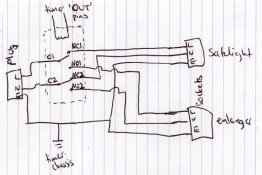
If you want to turn a safelight off when the enlarger is on, you use a DPDT mechanical relay with 5V coil. Assuming you're buying from Mouser, get 653-G2RL-2-DC5 and wire it like I've shown in the attached scribblings: power supply to the common pins, safelight between the NC (normally connected) pins and enlarger between the NO (normally open) pins; earth always connected to both loads. If buying a relay elsewhere, the important specifications are:
- 5V coil with about 65 ohms resistance
- contacts rated for >=8A at >=115VAC (USA) or >=240VAC (elsewhere)
- DPDT

Look at page 4 of the datasheet for that relay (link is on Mouser page). From the pinout:
- timer "OUT" pins connect to pins 1 and 8
- supply Live connects to pin 3
- safelight Live connects to pin 2
- enlarger Live connects to pin 4
- supply Neutral connects to pin 6
- safelight Neutral connects to pin 7
- enlarger Neutral connects to pin 5

All connections to that relay must be soldered and use mains-rated wiring; I recommend stripping open a 3-pin extension cord and using the 3 wires from inside it.

Before powering up, make sure that the ground connections are solid:
- input plug to timer chassis
- input plug to both output sockets
- input L/N should show continuity to the safelight L/N

and make sure there are NO shorts:
- input L/N to chassis
- enlarger L/N not showing continuity anywhere.
- there should be at least 5mm clearance between any mains circuits (L/N lines) and the chassis or any other wiring.

Grounds are NOT OPTIONAL. Use a metal chassis/case for the timer and always connect it to a grounded supply.

That will work for enlargers up to about 500W (115V). If yours is bigger, you need a bigger relay.

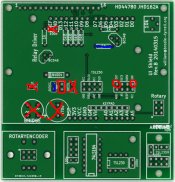
Have a look at the attached scan of the PCB that I've marked up. You can leave off the 100n capacitor; it's not actually required for the timer and is on the board only to support other things that the same board is used for. Where there are blue lines on there, put in wire links. The two circled pins are where you connect the foot switch. Use a high quality (Apple/Samsung not generic chinese $5 thing) USB phone charger as the power supply and that means you can leave off all the power supply parts on this board, and don't need a transformer in the box. The pins labelled "OUT" (with red rectangle highlight on scan) are what connects to the relay coil.

In terms of transistors, any BC546, 547, 548, 549 will be fine. Any version from any manufacturer, with any letters at all after the numbers. For the purposes of this circuit, they're all compatible.

For resistors, pretty much anything goes. Easiest to obtain will be 1/8W metal-film or 1/4W carbon; for example on Mouser, 71-RN55D-F-1.0K and 71-RN55D-F-6.8K

For wiring to the foot switch, relay, etc, I recommend buying something like eBay 251661434781 and Mouser 855-M20-9724046 (snap off shorter lengths as required). You'll also want a couple of 855-M20-9774046 (snap-off lengths as required) for the pins that plug into the Arduino and LCD. And you'll want a couple of 855-M20-7821646; one to solder onto the LCD and another for the encoder board; again you just cut it to length with sidecutters (sacrificing one pin with each cut) so that it has the right number of pins; 2 strips of 3 pins are used for the encoder.
 

Attachments

  • safelight-wiring.jpg
    safelight-wiring.jpg
    165.3 KB · Views: 155
  • pcb-relay-wiring.jpg
    pcb-relay-wiring.jpg
    306.9 KB · Views: 186
OP
OP
polyglot

polyglot

Member
Allowing Ads
Joined
Jun 12, 2009
Messages
3,467
Location
South Australia
Format
Medium Format
Beware: Windows Update may kill your f/stop timer or any other Arduino device you may own.

Short version:
- most Arduinos use an "FT232" chip to implement their USB port,
- the FT232 chips are incredibly common and frequently cloned. If you have a generic Chinese Arduino, it will definitely have a clone FT232 chip on it.
- The clone chips work absolutely fine.
- FTDI, the manufacturer of the chips, has released a new driver which will deliberately brick (destroy) any clone chip connected to a Windows PC
- plugging any Arduino into the new Windows driver risks bricking it

There are ways of unbricking these chips, but it is complicated.
 

Dr Croubie

Member
Allowing Ads
Joined
Mar 21, 2013
Messages
1,986
Location
rAdelaide
Format
Multi Format
Beware: Windows Update may kill your f/stop timer or any other Arduino device you may own.

Short version:
- most Arduinos use an "FT232" chip to implement their USB port,
- the FT232 chips are incredibly common and frequently cloned. If you have a generic Chinese Arduino, it will definitely have a clone FT232 chip on it.
- The clone chips work absolutely fine.
- FTDI, the manufacturer of the chips, has released a new driver which will deliberately brick (destroy) any clone chip connected to a Windows PC
- plugging any Arduino into the new Windows driver risks bricking it

There are ways of unbricking these chips, but it is complicated.

Ouch. I can understand FTDI getting annoyed at people cloning their IP, but for someone who doesn't know if they have a genuine chip or not it's best to stay away from the official drivers, and that's only going to push people into using non-official drivers and bypassing FTDI altogether (I know I would if I used Win).

Any word yet on this appearing in Linux? I'm using the FTDI module as supplied in the kernel sources, would kernel devs let this auto-brick code through?
 
OP
OP
polyglot

polyglot

Member
Allowing Ads
Joined
Jun 12, 2009
Messages
3,467
Location
South Australia
Format
Medium Format
The linux drivers are open source and not subject to this kind of bullshit. However if you plug an Arduino into windows and it gets bricked (the new drivers reprogram the fake chips with a zero PID so that they can no longer be recognised by the kernel for what they are), it will no longer work on linux either. As an aside, no one copied any FTDI IP, the problem is that they're using FTDI's device identifiers and chip markings on a compatible but completely independent design; it's branding fraud rather than copyright violation.

The most common reaction I've seen so far is "it's too risky to design FTDI chips into products now" especially considering most small-scale designers contract out PCB assembly to China and do not control their build supply-chain. I expect to see demand for FTDI devices dropping dramatically as they get designed out of stuff. There are functionally-similar alternatives available legitimately for approximately what the cloners charge for fake FT232s.

The depressing thing is that if Microsoft's USBSER.SYS wasn't completely broken (it doesn't pass their own WHQL testing), all the USB/serial adapters would be running on USB's open specification for serial ports and there would have been no need for FTDI to invent a new protocol and ship a driver and for people to clone that device because the FTDI driver was more stable and usable than the Windows generic-serial driver. Goes without saying that the USB/serial driver in linux works fine but that because of MS's fuckup, there is no credible supply of generic USB/serial adapter chips to use with that working driver.

It will be Interesting Times when the first piece of medical equipment gets bricked and the hospital's lawyers start asking questions. Quietly sabotaging end-user equipment is not going to lead to sunshine and happiness for anyone. Putting up a "this is a fake device and I won't talk to it" warning would have (I think) done everything that FTDI needed - get all the fake chips out of the supply pipeline - without enraging end-users. And it would have pressured end-users to pressure equipment manufacturers to fix/upgrade their products, not just randomly broken a whole bunch of stuff.
 
Last edited by a moderator:

Dr Croubie

Member
Allowing Ads
Joined
Mar 21, 2013
Messages
1,986
Location
rAdelaide
Format
Multi Format
That's good to know, if it's completely open source then I can't imagine devs letting that through if they know about it. I was wondering if the kernel-driver code was something supplied by FTDI themselves, or even as a binary-blob, that it may somehow work its way in. Another good reason to not use binary-blobs, you never know what's in there.

So now the next question is (from someone who doesn't use windows much), can windows users get around this?

Can I just *not* install the new updated bricking driver? I know updates can be hidden and such, presumably if I've got the driver already I just have to 'hide' the update and keep using the old one, correct? (obviously, one must be adept enough and have settings not on 'update automatically without telling me')

But if I'm putting together a new system as of today, it will automatically download the new bricking driver and there's nothing I can do about it? Or if I find an old driver (installed manually, not from the windows catalogue) then hide the new one in windows update as above? Or is there an unofficial 3rd-party non-bricking driver, that I can install that will stop the 'official' bricking driver from being installed?


Interesting what you say about hospitals and lawsuits, if something bricks and someone gets killed, it's gonna make a lot of lawyers rich going back up the pipeline to see who knowingly (or more likely unknowingly) used the wrong chip. A lot more people than the end-user may have been duped along the way.

I'm wondering about the usbser.sys bit too. At one end of the spectrum there are those who cloned the chip entirely to purposefully counterfeit and deceive. But at the other end of the spectrum, I wonder if there are those who purposefully and legally cleanroomed starting with the driver, or even invented their own hardware but wanted to use a working driver, who found that they had to emulate certain protocols to use said driver and are now finding themselves also victims of the brick?
 

Truzi

Member
Joined
Mar 18, 2012
Messages
2,685
Format
Multi Format
I use Debian Linux myself, but am employed in IT where people only know about micro$oft. Yes, you can "roll back" a driver (there are more difficult ways too - it can be done). However, if it has already bricked a chip, that chip will not magically start working again. It would have to be unbricked.

I'm not sure about windoze 8, as it's even less under the buyer's control than previous versions... but in windows 7 you can prevent updating drivers. The problem is, unless you do some registry hacks, every time there is a new version of the driver it will be offered.

If you let the machine automatically update, you are at risk of getting the new driver. You can configure it so all updates are "manual." It's easy, you run the windows update program, which gives you a list of available updates. You then choose/hide/deselect the items you do and don't want, and tell it to update the selected items.

Alternately, you can say you only want "critical" or "important" updates to be automatic. The idea is only security patches will be automatic, while things like drivers are "additional" or "other," and you have to do it manually.

However, this doesn't always work. For example, we "hid" internet explorer 10 (then 11) from optional updates because it did not work with certain websites our university uses to conduct business and bring in Federal funds. Oddly, these browsers would later appear as important/critical updates. Also, in MSIE 10's Help/About menu, the option for the browser itself to automatically update is on by default. (Needless to say, we have had to scramble to downgrade from 11 back to 10 so our people could actually do their jobs - and no, I was not the one in charge of how upgrades/updates are propagated. If I were it never would have happened.)

Sorry for the length, but I'm trying to illustrate that to avoid this driver from being updated, you will need to take responsibility for your own system and not let it update automatically (and ultimately, that may not even prevent it). You cannot trust that windows update will not take an optional update and elevate it to critical/important update on a whim (they did this with certain versions of M$IE to "show" market share, even when the newer versions worked worse). Also, microsoft is in bed with certain vendors and industries, and has historically forced things in order to make others happy (search on Google for the whole DRM issue, and how Zune even added DRM to personal voice recordings).
 

WarEaglemtn

Member
Allowing Ads
Joined
Aug 4, 2004
Messages
461
Format
Multi Format
Too bad Edward Weston didn't have one of these. It might have helped him to become a good printer.
 
OP
OP
polyglot

polyglot

Member
Allowing Ads
Joined
Jun 12, 2009
Messages
3,467
Location
South Australia
Format
Medium Format
Too bad Edward Weston didn't have one of these. It might have helped him to become a good printer.

You'd better go back to contact-printing by sunlight so you can be as good as him. Because the machinery is obviously the determining factor in your artistic vision.
 

rbultman

Member
Allowing Ads
Joined
Sep 1, 2012
Messages
411
Location
Louisville,
Format
Multi Format
polyglot - Have you considered putting the source on github? It is free for open source and would allow others to easily contribute source to the project while still being completely under your control.

Regards,
Rob
 

rbultman

Member
Allowing Ads
Joined
Sep 1, 2012
Messages
411
Location
Louisville,
Format
Multi Format
... The new version has some pins broken out so that you can theoretically connect a TSL230 (much wider dynamic range, complex control scheme) or TSL235R (low max-brightness but probably OK under enlarger, may require some ND; no control logic required) light meter and therefore meter your exposures...

This might be a stupid question, but how do you meter the exposure without the device getting in the way of the print? Sorry, total darkroom noob here.

Regards,
Rob
 
OP
OP
polyglot

polyglot

Member
Allowing Ads
Joined
Jun 12, 2009
Messages
3,467
Location
South Australia
Format
Medium Format
This might be a stupid question, but how do you meter the exposure without the device getting in the way of the print? Sorry, total darkroom noob here.

It's simple, you don't meter while you're actually exposing the print. It's not like a closed-loop cold-head which measures light output and integrates it over time, it's more like taking a photo where you meter first, take the meter out of the scene, do some calculations, then expose.

You place the sensor probe under the enlarger to take readings from a few critical places in the print (highlights, shadows, etc) and the readings in conjunction with your paper curves tell you how much contrast and exposure you will need to make a print. The fancier meters/timers you can buy allow you to download paper curves and will automatically do those computations for you but the Arduino doesn't really have enough storage for that. I could in principle add a big I2C EEPROM or reduce the number of stored programs by half to maybe enable that kind of functionality. The f/stop timer code also very nearly fills the device too, so there might be a problem with flash (code) space being insufficient. I'd like to avoid requiring a mega2560 or similar because those boards are physically a bit too big because of all the IO they have.

I'm also pondering porting it to ARM (very small, cheap and powerful 32-bit micros) but almost certainly won't, just because they're far less accessible for people who are inexperienced with microcontrollers.

re github, yeah, it exists, as do lots of other services like sourceforge. I've used them and they're valuable if there's a reasonable number of active contributors to coordinate but that's not the case here. I'd prefer to just host it myself and accept patches (of which there have been zero so far) manually than outsource the hosting and suffer the complexity that comes with git.
 
Last edited by a moderator:
OP
OP
polyglot

polyglot

Member
Allowing Ads
Joined
Jun 12, 2009
Messages
3,467
Location
South Australia
Format
Medium Format
Dead Link Removed for enlarger metering!

This adds support for the TSL235 light sensor, which gives you baseboard enlarger-meter functionality. This version requires the Rev.B PCB; anyone who previously bought a Rev.A and wants a Rev.B to get metering support can buy a new one from me at half price (USD10 shipped); PM me and remind me that you're a previous buyer. You will also need to use a SPDT output relay so that the safelight switches off when the enlarger is on, otherwise the safelight will be included in the meter reading and cause you major grief.

I've tested it as far as waving the meter around on my baseboard and observing that the readings are sensible. I haven't made any prints yet using the meter, haven't verified linearity or started calibrating my paper, but that will happen in the next few weeks. I'm pushing the code out now so that people can try it out.

The meter is enabled in FOCUS mode. You press * at the Expose or Main menus and if the TSL235 is plugged in, it will display a light-intensity reading in stops (brighter is a higher number), otherwise "NO SENSOR". If you use a stereo tip/ring/sleeve plug like I did, don't plug/unplug the sensor while the timer is powered-on or you could short stuff out in the socket.


(anyone who has a Rev.B PCB will note the presence of a TSL230 footprint; they are a more-complex device with adjustable sensitivity so I put a footprint in as risk-mitigation in case an enlarger's output could not be cleanly read with the simpler/cheaper/smaller TSL235. It turns out that my enlarger fits right into the lower end of the dynamic range of a TSL235R; I do not at this stage intend to add support for the TSL230)
 

fran

Member
Allowing Ads
Joined
Jan 9, 2007
Messages
258
Location
Kildare, Ire
Format
Multi Format
Thanks for this update. I actually brought my timer in from the darkroom only the other day intending to replace the keypad (long story, don't ask), but seeing as this update is here, I think I'll flash it with the new version. I still have the sensor pcb but have yet to order up the stuff for it. I'll probably add the jack now when and do it like you suggest when the parts come in.

Side note - I've been using the timer for several months and very much like it. Works very well, and although it seems very complicated to start with, once you get used to it, it becomes intuitive very quickly.

Fran
 
OP
OP
polyglot

polyglot

Member
Allowing Ads
Joined
Jun 12, 2009
Messages
3,467
Location
South Australia
Format
Medium Format
Glad to hear it's working for you, and particularly that it eventually becomes intuitive :smile:

Don't bother reflashing it yet unless you have the light sensor ready, I found a bug* last night and will publish a fix for it in the next couple days. I've done the fix but just need to upload it to the website.

I've also made some progress on a PC (Java therefore portable) interface; I've got a GUI that can show and edit all the stored programs in the timer but it can't yet save/load the programs to files.


* nothing critical. It was not properly reporting the error case when the sum of dodge times comes to more than the base exposure, i.e. an invalid print program. It would just proceed to run the program anyway, without subtracting any of the dodge times from the base exposure. You can test this for yourself with a program of +4, -2 and -1 stops.
 
Photrio.com contains affiliate links to products. We may receive a commission for purchases made through these links.
To read our full affiliate disclosure statement please click Here.

PHOTRIO PARTNERS EQUALLY FUNDING OUR COMMUNITY:


Ilford ADOX Freestyle Photographic Stearman Press Weldon Color Lab Blue Moon Camera & Machine
Top Bottom