
• Welcome to Photrio!
    Registration is fast and free. Join today to unlock search, see fewer ads, and access all forum features.
    Click here to sign up

Open source f/stop enlarger timer released

Recent Classifieds

Forum statistics

Threads
201,770
Messages
2,829,863
Members
100,936
Latest member
rdbirt
Recent bookmarks
1
OP
OP
polyglot

polyglot

Member
Allowing Ads
Joined
Jun 12, 2009
Messages
3,467
Location
South Australia
Format
Medium Format
fran: I had a look through your list. A couple of comments:
- the LCD is a different physical form to the one I used (text upside down, maybe different pinout wrt backlight, I didn't check) and costs about 4x as much. Try eBay 380464863090 instead.
- keypads without alpha a REALLY ANNOYING if you want to enter text, unless you spend your days typing into a Nokia. I haven't tested it but eBay 390503416529 should work OK.
- if you use the above keypad with integrated cable+socket, you won't need the IDC sockets.
- you have a chassis socket for the foot switch; you probably want to buy a matching plug for it.

mexipike: yep, about 7 left. However if you have the old one, I would keep it for now if I were you since the new one does NOTHING new yet. In theory you can attach a light sensor to the new one, but that depends on me not being a lazy bastard with the software. If/when I get around to implementing that, you can substitute the new board in for the old one as it is basically physically compatible.

You can run the latest (0.5) software on the old board too.
 

fran

Member
Allowing Ads
Joined
Jan 9, 2007
Messages
258
Location
Kildare, Ire
Format
Multi Format
Thanks. LCD from ebay bought and the keypad is underway. Its probably cheaper to buy a footswitch with 3.5mm socket already complete - these are only about a tenner on ebay.

Here's an interesting one. I found the keypad on ebay - he has ireland excluded for postage, but I contacted him to see would he send it. However, I then went back and searched on ebay for his exact product description - and it dones't show up. I've gone to advanced search and made sure to allow worldwide, post anywhere etc etc - but it doesn't show up. I never would have found that unless you posted the item #. Interesting huh?


Fran
 
Last edited by a moderator:
OP
OP
polyglot

polyglot

Member
Allowing Ads
Joined
Jun 12, 2009
Messages
3,467
Location
South Australia
Format
Medium Format
Yeah, if he has Ireland excluded then my guess is that it won't show in any searches for you. I have the same problem in Australia - loads of US-specific things with awesome prices that are just not available here but sometimes they will make an exception if asked. At least we have relatively free access to the cheap asian manufacturers here :wink:

To get around it, try logging out of eBay and then going to ebay.com instead of your country-specific URL.
 

fran

Member
Allowing Ads
Joined
Jan 9, 2007
Messages
258
Location
Kildare, Ire
Format
Multi Format
Edit post -ignore....

Fran
 
Last edited by a moderator:

fran

Member
Allowing Ads
Joined
Jan 9, 2007
Messages
258
Location
Kildare, Ire
Format
Multi Format
Last edited by a moderator:

Trond

Subscriber
Allowing Ads
Joined
Jul 21, 2004
Messages
858
Location
Harestua, Norway
Format
Multi Format
I have soldered on all the necessary components (I think), but can't get the keyboard to work properly. Tested with two different keyboards. I have probably done something stupid! Will post some photos of my board when I come home from work today. Hopefully you can identify the mistake.

Trond
 
OP
OP
polyglot

polyglot

Member
Allowing Ads
Joined
Jun 12, 2009
Messages
3,467
Location
South Australia
Format
Medium Format
When you say it doesn't work, do you get any keypresses? Or just the wrong keypresses? What is the contact resistance of the keypad? If you're using a ribbon cable with 2-row connectors and getting nothing at all, have you tried switching one end of the cable to the other row?
 

Trond

Subscriber
Allowing Ads
Joined
Jul 21, 2004
Messages
858
Location
Harestua, Norway
Format
Multi Format
Yes, I do get keypresses on some keys, but not all of them, and the keys that do something don't do what I expect. But now I found a third keyboard which does work.

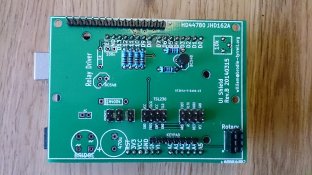
This is the board:
2014-05-05 18.31.51.jpg

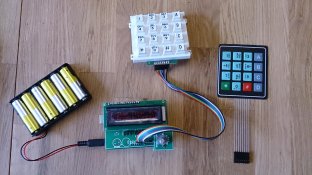
These are the two keyboards that don't work:
2014-05-05 18.29.33.jpg

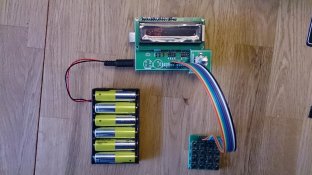
This is with the keyboard that works:
2014-05-05 19.58.26.jpg

That small keyboard is obviously not very practical, so it looks like I have to find another keyboard. Funny that the two other keyboards don't work properly. Perhaps I've damaged them somehow. Any ideas?

Trond
 

L Gebhardt

Member
Joined
Jun 27, 2003
Messages
2,364
Location
NH
Format
Large Format
Yes, I do get keypresses on some keys, but not all of them, and the keys that do something don't do what I expect. But now I found a third keyboard which does work.

This is the board:
View attachment 87415

These are the two keyboards that don't work:
View attachment 87416

This is with the keyboard that works:
View attachment 87414

That small keyboard is obviously not very practical, so it looks like I have to find another keyboard. Funny that the two other keyboards don't work properly. Perhaps I've damaged them somehow. Any ideas?

Trond

The white keyboard is the same one that I used when building mine. The wires were not arranged in an intuitive manner and I needed to adjust things to make it work. You can figure out the proper pins with trial and error and an ohm meter. I forget if I adjusted the code or the wires. i think it was the wires.

Note that the membrane keyboard you show has a different set of alpha values printed on the keys, so you would need to adjust the code for that part of the program as well.
 

fran

Member
Allowing Ads
Joined
Jan 9, 2007
Messages
258
Location
Kildare, Ire
Format
Multi Format
I'm sure its just that the pin out on the keyboard doesn't match the pinout specified in the code as Larry indicated. I ordered the rest of the parts needed from farnell, so should have them shortly. Its likely to be a few weeks before everything gets here though. Trond - if you get yours working, do keep us posted on what its like to use!!

Fran
 

michaelbsc

Member
Allowing Ads
Joined
Dec 18, 2007
Messages
2,103
Location
South Caroli
Format
Multi Format
Well apparently my board arrived last week while I was out of town. So it's time for me to start scrounging parts too.
 
OP
OP
polyglot

polyglot

Member
Allowing Ads
Joined
Jun 12, 2009
Messages
3,467
Location
South Australia
Format
Medium Format
Interesting that the keyboards have different pinouts, and quite frustrating I'm sure. If the rows/columns are not grouped as two contiguous sets of four then you will need to swap wires around a bit because the keypad-scanning software and hardware requires that. If the ordering of pins within each group of four is not uniform, then you can fix that in the code by re-ordering the SCANCOL and SCANROW values.

Trond: is your backlight showing up OK? The instructions call for a wire link in place of the 1k resistor at the lower right (just below the transistor on the right) when you're using that (correct) JHD162A LCD as there's a current-limit resistor on the LCD board already. If your backlight is OK then just leave it as is, but if it's too dim then you'll want to short that resistor; the software will dim the backlight. Also, I can't tell from the photo (I hate the printing on metal resistors and can never tell red from brown) whether those are 6k8 or 68k resistors. Might pay to check them with a multimeter to ensure you haven't got 68k, because that would prevent the keypad from working.
 
Last edited by a moderator:

Trond

Subscriber
Allowing Ads
Joined
Jul 21, 2004
Messages
858
Location
Harestua, Norway
Format
Multi Format
I figured out the pins on the white keyboard with the help of an ohm-meter and arranged the wires accordingly. Now it works! This is how it is arranged:

1 2 3 4 5 6 7 8
3 5 6 7 8 1 2 4

The backlight is indeed a little dim, and I meant to ask you about that. I was unsure about which 1K resistor that should be replaced by a wire. Will replace it now.

I double checked the other resistors, and they are the correct kind.

Thanks for your help!

Trond
 

fran

Member
Allowing Ads
Joined
Jan 9, 2007
Messages
258
Location
Kildare, Ire
Format
Multi Format
After many delays my end, I finally got my timer together today! My son is pretty hot on arduino - which was handy as the keyboard I bought had an odd pinout. He figured it out though and its working fine now. I also used one of the cheap 5v dual channel relays from eBay. Learn I got this working too. That board needs 5v and ground (which I took from the extra pins, and then the signal from the "out" pins. Works great!

There's a couple of things I need to fix and figure out still. I still find it awkward to set a base exposure and figure out adding dodges and burns. I don't think I'll save many programs, so it's likely I'll only use the current program. I just need to get better at figuring out editing.

Looking forward to getting it boxed up and tested soon!


Fran
 

fran

Member
Allowing Ads
Joined
Jan 9, 2007
Messages
258
Location
Kildare, Ire
Format
Multi Format
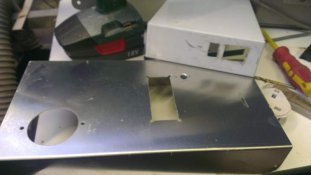
A bit more progress tonight. I made a template for the cut out on the top of the box for the display, encoder and keypad, made up the mountings for the boards and scavenged a 5V smps phone charger to use as a PS for the arduino. Planning on cutting tomorrow night and a test assembly. The way I have it done, the stack of PCBs will hang from the top of the case, with the rotary encoder being supported with its own standoffs. The keypad I bought is self adhesive and sits on the top of the box, so I don't have to figure how to support it during key presses.

I'll take some pics of the build then too.


Fran
 

fran

Member
Allowing Ads
Joined
Jan 9, 2007
Messages
258
Location
Kildare, Ire
Format
Multi Format
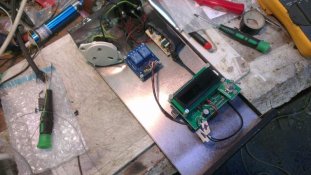
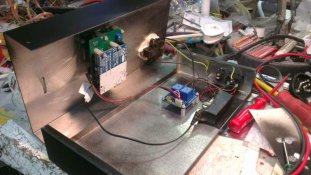
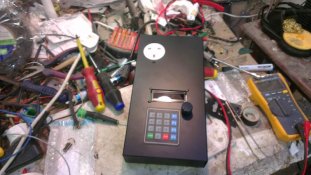
So I finally got it finished!!! well for now at least......


We've got some metal work shots below and another video from youtube of it all working. I hope to test it out later in the week in the darkroom, but it all looks good at least. My usual test strip (which is kinda f-stop based) starts at 8s - then 11, 16, 22, 32, 45 and 63. That gives half stop times from 3 stops up and with my enlarger at least 8s is always under and 63 always over (although sometimes its useful for a burn). I think I'll try taking advantage of the 8 strip memory in the programming to start at 3.5 stops and use 1/3 stops. That gives me good coverage and tighter strips with the same overall time -I often find I use times between 22 and 32s - settling on say, 28s as a base time with dodges/burns around that.

Things I might come back to: access hole underneath for the LCD contrast and access to USB without opening the case.


http://youtu.be/d0Txgts8qJ0


I'd like to offer kudos and thanks to polyglot for the time spent coding, getting the PCBs made and distributed etc.


Fran
 

Attachments

  • IMAG0863lores.jpg
    IMAG0863lores.jpg
    31.1 KB · Views: 196
  • IMAG0867lores.jpg
    IMAG0867lores.jpg
    62 KB · Views: 201
  • IMAG0868lores.jpg
    IMAG0868lores.jpg
    62 KB · Views: 209
  • IMAG0869lores.jpg
    IMAG0869lores.jpg
    58.4 KB · Views: 189
OP
OP
polyglot

polyglot

Member
Allowing Ads
Joined
Jun 12, 2009
Messages
3,467
Location
South Australia
Format
Medium Format
Looking good. You might want to glue a thin sheet of plastic (eg rubylith) between the LCD and face to keep drops of water out.

Also don't forget that it has a built-in test-strip generator so you don't need to use the memories like that. Note also due to turn-on/off weirdnesses with most enlargers that one exposure of 64s is a bit different to 8 exposures that sum to 64s so for testing purposes you probably want to use the test-strip generator in "Ind"dependent mode, ie a separate full exposure for each test step. It also supports "Cover" mode where you build the strip up incrementally, covering it as you go.
 

fran

Member
Allowing Ads
Joined
Jan 9, 2007
Messages
258
Location
Kildare, Ire
Format
Multi Format
Just an update:

I experienced some issues with the timer in use: the arduino would show up gobbledegook or randomly switch times when connected to one of my enlargers, but not the other. I knew there had to be some sort of interference causing, but it took a while to figure it out. Anyway, the long and short of it is that arduino is susceptible to EMI interference from connected devices. This was apparent in my system as the cooling fan on the diffuser head is switched by a relay in a controller box (which is separate to the timer). The interference/random switching always occurred when that second relay clicked. I found the link below very useful and it has sorted the problem for me. Posting this as it may help someone else....


http://forum.arduino.cc/index.php/topic,107591.0.html

Fran
 
Photrio.com contains affiliate links to products. We may receive a commission for purchases made through these links.
To read our full affiliate disclosure statement please click Here.

PHOTRIO PARTNERS EQUALLY FUNDING OUR COMMUNITY:


Ilford ADOX Freestyle Photographic Stearman Press Weldon Color Lab Blue Moon Camera & Machine
Top Bottom