

• Welcome to Photrio!
    Registration is fast and free. Join today to unlock search, see fewer ads, and access all forum features.
    Click here to sign up

mottling on RPX 25 in Xtol

Grill

H
Grill

  • 0
  • 0
  • 18
Cemetery Chapel

H
Cemetery Chapel

  • 2
  • 0
  • 47

Recent Classifieds

Forum statistics

Threads
202,775
Messages
2,845,368
Members
101,516
Latest member
DDX
Recent bookmarks
0

abruzzi

Member
Joined
Mar 10, 2018
Messages
3,323
Location
New Mexico, USA
Format
Large Format
Sorry, I know there are a lot of "why did this screw up" questions that cant really have definitive answers, but I'm curious what might cause this. I've added a lot of detail below the image, but mostly I'm curious what I did wrong:


Its very noticeable in the sky. If its hard to see in this reduce shot, click to see the larger version. All of the shots with sky have this visible (I'm assuming its all over, but mostly visible in the sky because there is nothing to distract from it in the sky.)

This was shot on 120 6x4.5 with an orange filter and metered at ISO 5 (2 1/3 stops down from 25) I started with a presoak for about 2 minutes, then I developed in Xtol 1:1 for 8 minutes at 20C. The Xtol powder was mixed a few weeks ago and has been kept in a wine bag, so no contact with air except the tiny bit I couldn't squeeze out. The original mix and the 1:1 mix were both done with tap water, but I haven't had any issue on other films I've developed, though this is my first time shooting RPX25.

After 8 minutes in developer, I followed with 1 minute in Kodak stop bath at 1:66, then 8 minutes in mostly fresh (about 4 rolls done) Kodafix. Washed for 10 minutes, then a couple drops of Photoflo for 30 seconds, and hang dry overnight.
 
The sky is not uniformly blue. Clouds, moisture, smog, smoke, ... all effect the color in each area.
 
yeah, but these are clearly artifacts in the film. it almost looks like reticulation though less regular and not as pronounced as the examples I've seen in the past.
 
I cannot see it on the screen. Post a blow up. If it is reticulation then the chemical and water temperatures were too far apart OR the pH was way off on one of the chemicals.
 
Hard to tell, it looks a bit like the texture of the backing paper coming through, did the film get damp at any point, or stored loose in the fridge?
 
A pity the OP mentioned Xtol. Is that the whistle of an incoming 88mm shell from Rattymouse I can hear?:D

pentaxuser
 
the film was refrigerated in its normal wrapper for a day or two before it was removed and shot. It has been pretty humid here (currently 30%--this is the desert, the humidity is supposed to be closer to 5%) but nothing like everywhere else in the world. If the film was unwrapped in 85 degree heat straight from the refrigerator without warming up first, is that an issue?

Temps for everything except the pre-soak were all 20C, the presoak was straight out of the tap at about 25C (is that bad?) I've attached a close up that makes it a bit more obvious. Ignore the faint grid, that is my backlight (iPad, digitizing is still a hack job for me), the issue is the wavy vertical streaks. I can't see these on the negative, but I don't have a great loupe, just a 50mm lens.

EDIT: now that I think about is, this was down by the river, and its more humid down there than up where the sensors are, so it may have been as high as 50-60%. Also, the Xtol is used oneshot, and not reused. It has been brilliant with the TMAX100 I have shot recently.
 

Attachments

  • Screen Shot 2018-08-20 at 5.18.19 PM.png
    Screen Shot 2018-08-20 at 5.18.19 PM.png
    670.6 KB · Views: 324
Had this been machine processed, I'd suspect roller marks. Since it was tank processed I'd have to agree with post #5.
 
I have a few more rolls. I’ll be a little more cautious with the next roll and see if it does any better.
 
several people, myself included, had this exact issue with Rollei retro 80s, which is reported by some people to be the same film as RPX 25. It was from 120 rolls only and did not affect 35mm rolls. sorry you had this issue.

whats the expiration date of you film you shot?
 
several people, myself included, had this exact issue with Rollei retro 80s, which is reported by some people to be the same film as RPX 25. It was from 120 rolls only and did not affect 35mm rolls. sorry you had this issue.

whats the expiration date of you film you shot?

The rolls I still have expire October 2021, so I assume it’s the same for this roll. We'll see how the other 4rolls turn out. I liked a lot about the images, but if I can’t trust the film...fortunately, there is still Pan F+ which has turned out great.
 
yep, backing paper I would reckon. As I understand it, this kind of mottling happens when the back side of the paper sticks ever so slightly to the adjacent emulsion side of the film. Humidity is what makes the paper/emulsion "sticky" and heat doesn't help either.
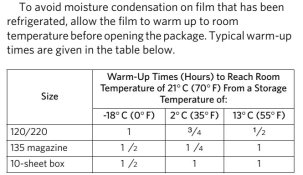
Condensation should be avoided under all circumstances. Kodak published a table with recommended times that frozen/refrigerated film should be given to adapt to ambient temperature before you open the package (below). Also, do not store your roll film in a refrigerator after exposure. It is of course entirely possible that the problem started much earlier and the film was subjected to adverse condition before you even bought it. You will know after the next few rolls.

Kodak_warmup_times.jpg
source: Kodak publication E-4050
 
The marks are there, but very faint. I'm going with some sort of interaction with the backing paper, possibly caused by moisture though if the film was refrigerated inside it's unopened package this shouldn't be a problem. Occasionally small problems are reported with the Rollei branded films. I've had one Retro 400S in 120 have some holes in the emulsion on the first frame...but not this.

It's quite likely you did nothing wrong in your processing, though I'm not familiar with XTOL you don't seem to have done anything untoward or unusual. 25C water and 60% humidity which you mentioned should be fine. It's a lovely photo too, probably the marking would show up on a wet print but at least it can be saved with a good scan and some use of software.
 
...It has been pretty humid here (currently 30%...If the film was unwrapped in 85 degree heat straight from the refrigerator without warming up first, is that an issue?...
Yes, that's an issue! Don't do that. Let the film warm up to ambient for an hour after removal from a refrigerator before breaking the inner foil packet seal.
 
Film Issue.JPG

Hi, I have exactly the same issue with streaks on the Rollei RPX 25 also possibly with an expiration date of Oct 2021 Batch Number 370053. Abruzzi, did you get a chance to try out your other rolls of film?
 
First: I do not get mottling with RPX-25 and Xtol. Second, whoever says RPX-25 and the Retro-80S are the same film... I have no idea how they come to that conclusion.

I just shot 4 120 film types for comparison, all processed with Xtol, and I shot them all on box speed. Both set of negatives have similar tonals just looking at them,
http://richardman.photo/blog/medium-format-film-shootout-part-i/
 
Hi, I have exactly the same issue with streaks on the Rollei RPX 25 also possibly with an expiration date of Oct 2021 Batch Number 370053. Abruzzi, did you get a chance to try out your other rolls of film?

Unfortunately, I haven’t had a chance to shoot any of my other rolls. My rolls are from the identical batch number 370053.
 
Many thanks for the confirmation regarding the batch number - Gets me thinking this is a bad batch. I will process one of my rolls to see if I get the same thing again. Thanks
 
Unfortunately, I haven’t had a chance to shoot any of my other rolls. My rolls are from the identical batch number 370053.
Yes this batch number does have issues, I will be emailing B&H who supplied the film tomorrow. Another image below with the same type of marks

Film Issue 01.JPG
 
post back B&H's response. I bought about 5 rolls, and have only shot the one. If they're all bad, I'd like to get them exchanged.
 
I am having same issues with RPX 100 (developed with Kodak D-76). It happened to me first time I purchased it and I claimed for both two rolls, the local store replaced it for another pack of RPX100 and it has happened it again. So, after viewing this post I assume Rollei is having some trouble about backing paper on its products.
 

Attachments

  • 01.jpg
    01.jpg
    370.2 KB · Views: 149
Seems as if nearly everyone has been having backing paper issues. Kodak, Ilford, Rollei. Haven't seen any of this on the .EDU Ultra I usually shoot, but I haven't processed much of the fresh film yet...
 
I am having same issues with RPX 100 (developed with Kodak D-76). It happened to me first time I purchased it and I claimed for both two rolls, the local store replaced it for another pack of RPX100 and it has happened it again. So, after viewing this post I assume Rollei is having some trouble about backing paper on its products.

Seems as if nearly everyone has been having backing paper issues. Kodak, Ilford, Rollei. Haven't seen any of this on the .EDU Ultra I usually shoot, but I haven't processed much of the fresh film yet...

Since there is now only one source in the World of backing paper, as Mr. Spock would say, "It is only logical ..."
 
Since there is now only one source in the World of backing paper, as Mr. Spock would say, "It is only logical ..."

I wondered about that. Might have to drop back a tech level or so -- this wasn't a big problem with the films of the 1950s. Tempting to suggest the technologies that lead to higher speed with finer grain might be more sensitive to wrapper offset and backing paper mottling.
 
Photrio.com contains affiliate links to products. We may receive a commission for purchases made through these links.
To read our full affiliate disclosure statement please click Here.

PHOTRIO PARTNERS EQUALLY FUNDING OUR COMMUNITY:


Ilford ADOX Freestyle Photographic Stearman Press Weldon Color Lab Blue Moon Camera & Machine
Top Bottom