



• Welcome to Photrio!
    Registration is fast and free. Join today to unlock search, see fewer ads, and access all forum features.
    Click here to sign up

I've just ground my own glass

100 years ...

A
100 years ...

  • 0
  • 0
  • 19
Synchronized pool cleaners

A
Synchronized pool cleaners

  • 0
  • 0
  • 43

Recent Classifieds

Forum statistics

Threads
202,991
Messages
2,848,502
Members
101,586
Latest member
subicrn
Recent bookmarks
1

vickersdc

Member
Allowing Ads
Joined
Jan 8, 2007
Messages
453
Location
Somerset, UK.
Format
Multi Format
I recently bought an 18cm x 24cm FKD camera, and when it arrived the lens had not been securely packed; during transit it had smashed the original ground glass into hundreds of pieces.

To be fair to the seller, he is sending me a new one, but in the mean time I thought it was a good opportunity to make my own. My wife has just taken up making stained glass, so she cut some 2mm glass to size and clipped the corners.

Using 600grit Silicon Carbide, it took about 1/2 hour to do, all that's left is to draw the lines on. The glass is really bright and it'll be interesting to compare it against the new one that it on it's way to me!
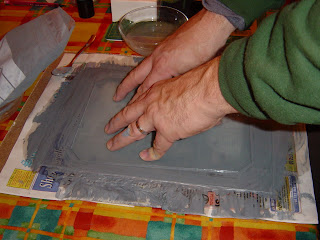
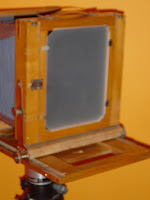
DSC01897.JPG
DSC01904.JPG
 
There is a glass etching paste available. Try Lee Valley Tools.
 
Is there a way to do this chemically too?

Thanks for posting the pictures by the way. Makes it much easier to understand. How do you get them into the post?

The images need to be stored somewhere else on the internet, Flickr for example. In this case, the photos are from a forthcoming 'article' on my LF blog.

Wherever they're stored, you'll need the http reference for the image (on Flickr go to "all sizes" and copy / paste it into the message editor here on APUG (there'll be a button that looks like some mountains, or a coupleof pyramids - click that).

Hope it helps,
Cheers.
 
The images need to be stored somewhere else on the internet, Flickr for example. In this case, the photos are from a forthcoming 'article' on my LF blog.

Wherever they're stored, you'll need the http reference for the image (on Flickr go to "all sizes" and copy / paste it into the message editor here on APUG (there'll be a button that looks like some mountains, or a coupleof pyramids - click that).

BTW: You can easily attach images to a post and use the image references for those as well. It's not absolutely necessary they're stored on another server.
 
Well done David, I'm always surprised more people dont grind their own screen. I've made a few now and I finding cutting the glass the most difficult part.

Ian
 
It was quite therapeutic making the ground glass :smile: Here's a quick shot taken with a point & shoot this morning of the result...
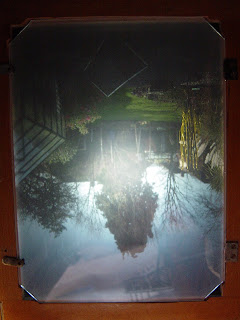
DSC01906.JPG
 
Like this, go advanced (option under quick reply) & manage attachments, then upload the images.

Ian

Ian

That's what I do, but then they end up as an attachment just like yours. I was interested in having them right in the message, like in the original post.
 
Ian

That's what I do, but then they end up as an attachment just like yours. I was interested in having them right in the message, like in the original post.

Ralph, just take the target link from the attachment and put it between two IMG blocks.
 
Ralph, then upload them to a directory on your own website and just insert the link to the URL for the image, or upload to the Technical gallery here and do the same..

Ian
 
Ralph, then upload them to a directory on your own website and just insert the link to the URL for the image, or upload to the Technical gallery here and do the same..

Ian

To cumbersome. Post #8 talks about an alternative way to get them into the post directly.
 
Without wishing to be a grump, this post is about ground glass screens... not how to post images into a thread!

brianmquinn: thanks for the info on the article.
 
Without wishing to be a grump, this post is about ground glass screens... not how to post images into a thread!

brianmquinn: thanks for the info on the article.

Sorry, I thought we were done with the ground glass.
 
To get them to show up as large photos and not thumbs, they have to be hosted somewhere else. Upload them to your site, maybe make a subfolder (darkroomagic.com/apugpics/) for example, then link to that using the little postcard looking icon (mountains and sun) beside the quote icon above the text box.
 
Several years ago I tried to make a 4x5 screen with a chemical for etching glass. I tried various methods of coating the glass including floating but could never match the eveness and brightness I could get with hand grinding.
 
The only thing that 'surprised' me was that after 20-odd minutes of grinding, there was still a small area of glass that was untouched. At first I thought it was me not grinding properly, then I realised that the glass couldn't have been perfectly flat to start with!
 
In any event, very well done, David. I might have to do one for my 4x5. One day just to tinker.
 
To get them to show up as large photos and not thumbs, they have to be hosted somewhere else. Upload them to your site, maybe make a subfolder (darkroomagic.com/apugpics/) for example, then link to that using the little postcard looking icon (mountains and sun) beside the quote icon above the text box.

Thanks for the info. There does not seem to be an easier way. I'll just stick to adding them as attachments.

Let's go back to the ground-glass discussion. Sorry for hijacking the thread.
 
what did you use for the grinding surface? Where does one get 600 grit SiC paste?
 
Photrio.com contains affiliate links to products. We may receive a commission for purchases made through these links.
To read our full affiliate disclosure statement please click Here.

PHOTRIO PARTNERS EQUALLY FUNDING OUR COMMUNITY:


Ilford ADOX Freestyle Photographic Stearman Press Weldon Color Lab Blue Moon Camera & Machine
Top Bottom
