• Welcome to Photrio!
    Registration is fast and free. Join today to unlock search, see fewer ads, and access all forum features.
    Click here to sign up

I don't know what is causing these light speckled lines in my photos near the image edge

Cool as Ice

A
Cool as Ice

  • 0
  • 0
  • 22
Pond

H
Pond

  • 2
  • 0
  • 47

Recent Classifieds

Forum statistics

Threads
202,703
Messages
2,844,458
Members
101,478
Latest member
The Count
Recent bookmarks
0
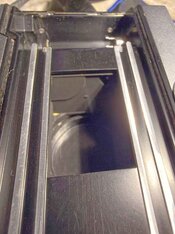
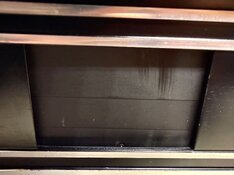
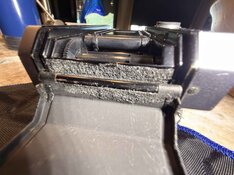
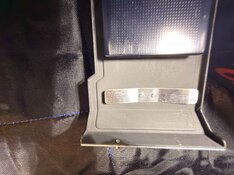
After cleaning the camera to make pictures, I noticed that the back door is completely missing the seal by the roll of film. The seal kit photo shows there are supposed to be seals at both ends of the back door. I made a photo of camera open on B, looking to the end of the camera that I believe is the problem. Nothing appeared to be shiny to my eye.

photo 1 is seal kit from web. photo 2 a terrible looking seal that is shedding, photo 3 no seal by the film roll side of the camera, and photo 4 looking into the camera. Did early Nikkormats FTNs not have that seal? mine is probably in the first couple of years of production. The seal missing, and that the door is a little sprung/mishapen makes sense to me as issue only occurs is only in brighter conditions.
seal photo Nikkormat.png
 

Attachments

  • IMG_4238_DxO.jpg
    IMG_4238_DxO.jpg
    347.1 KB · Views: 31
  • IMG_4239_DxO.jpg
    IMG_4239_DxO.jpg
    454.9 KB · Views: 26
  • IMG_4246_DxO.jpg
    IMG_4246_DxO.jpg
    399.5 KB · Views: 31
Hi, I don't have an elegant or useful way to make the neg photo.

Tape the negs to a piece of paper and tape the paper to a well lit window and take a photos of that. Doesn't need to be fancy.
 
The seal missing, and that the door is a little sprung/mishapen makes sense to me as issue only occurs is only in brighter conditions. View attachment 419092
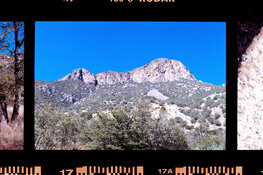
You may be right about poor sealing but what puzzles me is that the middle set of 3 pics seem to show nothing of the problem that pic 1 shows and yet all 3 pics appear to be taken in what looks to be quite bright conditions?

There may be a way to reconcile my observation above with what I see from the pics but if there is I cannot think of it

pentaxuser
 
  • BSAbbott
  • Deleted
  • Reason: file size issue
After cleaning the camera to make pictures, I noticed that the back door is completely missing the seal by the roll of film. The seal kit photo shows there are supposed to be seals at both ends of the back door. I made a photo of camera open on B, looking to the end of the camera that I believe is the problem. Nothing appeared to be shiny to my eye.

photo 1 is seal kit from web. photo 2 a terrible looking seal that is shedding, photo 3 no seal by the film roll side of the camera, and photo 4 looking into the camera. Did early Nikkormats FTNs not have that seal? mine is probably in the first couple of years of production. The seal missing, and that the door is a little sprung/mishapen makes sense to me as issue only occurs is only in brighter conditions. View attachment 419092
I had a similar issue on my Sears KS-2. Didn't notice it until I used the camera without the half-case.

To fix it, I used some thick black felt in the proper areas, and it's been fine.
 
Here's a jpeg of raw scan, with minimal editing from import to LR.
 

Attachments

  • 8111-19-2_DxO-1.jpg
    8111-19-2_DxO-1.jpg
    735.4 KB · Views: 29
Here's positive done by negative lab pro, some editing to accentuate the issue.
Thanks for all the useful feedback!
Peace
 

Attachments

  • 8111-19-3_DxO-1.jpg
    8111-19-3_DxO-1.jpg
    1.3 MB · Views: 24
Thanks; it's very faint, but it's there and there's nothing outside of the frame that seems to correlate to it.

The suggestion by @Alan Townsend to tape up the back of the camera, if only temporary to see if fixes the problem, is worth trying out.
 
Yes - the artifact is on the negative.
 
Yes - the artifact is on the negative.

Wow it is faint, so faint that I wonder if I see something that the thread has programmed me to see. I could probably look at this in another setting such as the Gallery and simply think it was a nice looking print of a nice scene

Maybe we are back to the old discussion of being unable to see the elusive "colour crossover " 🙂

pentaxuser
 
Thank you to all the expertise and wisdom brought to me. I hope to do those back seals when the kit comes next week. Then make a roll of photos again. I’ll post the results. A great lesson in not trusting that the seals look good. Next used camera for me will have new seals installed before I chase my tail again.
Peace
 
Hi to anyone looking for the next step to my issue. An update. Short answer the squiggles did not go away by replacing the hinge seal. Good news is I didn't make the problem worse, and my camera is no longer shedding foam seal particles and scratching the film.

I've included two more scans today. I made photos after cleaning the interior of the camera and only replacing the foam hinge seal.

My new thought/theory is it has to do with the act of making a photo, not just a light leak from the back. My reasoning is that the leak does not extend into the rebate areas. Full scan and a tight one showing the issue occurring on the next frame too.

full frame close crop with next neighbor frame, squiggle does not jump the frame gap.
8322-3_DxO.jpg8322-3-3_DxO.jpg
I think I will accept that this camera has a character flaws (like its owner) and not to sweat it. I'll continue to inspect and see if there is a loose screw somewhere, or a shiny surface, or a light leak from the mirror while up? I did buy a case, so I'll see if that somehow covers the issue. At least it will protect the camera and looks kinda cool. I did buy a much newer Nikkormat FTN (seems like last year of production) and film tested it, it doesn't appear to have these kind of issue, so that will be my main camera, this will be a backup for a different film.

Thanks for all the interested looks and comments, very helpful and supportive.
Peace, Brian
 
Very interesting indeed; thanks for the follow-up! I still remain of the position that the most likely cause IMO is a reflection against the edges of the film gate, with the light being the illumination of the scene itself. This would explain why re-sealing the hinge doesn't make a difference. Also, I agree that an actual light leak would have extended beyond the image frame - at least a leak around the back of the camera.

What's interesting/remarkable is the squiggly nature of the lines.

Btw, with your phenomenon somewhere in the back of my mind, I noticed something on a recent roll of film I shot the other day:
1773329054884.png

This is the corner of a scanned 35mm frame, but note it's on Kodak DoubleX, so negative instead of positive; i.e. the 'lighter' line actually inverts to a darker one on the print. So it's the exact opposite of yours in that sense. Also, it's a totally different camera (Canon EOS 30v). I think I've only ever seen this when using a filter (yellow in this case) on this particular lens. But I may just have overlooked it most of the time.
 
That film gate is positively glowing. I think the squiggliness is from the slight variation/scratches in that shiny surface. Try some matte black paint on a toothpick or tiny brush, very thin, only on the area which is at 90 degree to the film.

Also, see if the high points and low points in the squiggles can be mapped to a very close-up and detailed image of the film gate in bright light.
 
So just to be clear the squiggles appear on every frame? I ask this because I seem to recall that some frames were OK and if that is the case then it begs the questions of why they don't appear on every frame which you'd expect if there are reflections on some part of the back of the camera

Thanks

pentaxuser
 
Last edited:
Interesting. There seems to be a rash of a variation of this problem popping up around the Web.

There is someone on the Large Photography Forum with a similar problem on 8x10, only along one edge of the image aperture. The defect is almost identical in density and pattern.

Weird.
 
  • BSAbbott
  • Deleted
  • Reason: not ready
The issue occurs mostly in with a bright sky, never in shade that I can discern. Here are two better photos of the film gate. I wish I had tried to do this earlier. I think I can see the pattern in the gate, the squiggles.

How to fix? I saw the suggestion of toothpick and matte paint. I could get some matte paint from the local Hobby Lobby I bet. Can I use a sharpie? Acrylic or oil based paint pens? I've seen both available here. Seems like matte finish would be important.

IMG_4291.jpeg IMG_4295.jpeg
IMG_4291 (2).jpeg
 
Last edited:
In your 2nd photo of the last post it appears your gate is closer to one side of what's behind the shutter than the other. That would explain why you only see it on one side - it's being shaded on the other side.

Whatever you use it should be matte black and not something that will peel off and cause problems with the shutter. Normally there would be some sanding of the surface first but I'd be worried about doing that based on its location.
 
Thanks, I'm not sure how wildly distorted the iPhone macro lens is, but there's some for sure. You expressed my fears of something peeling and getting on the film or worse jam up the shutter. Sanding seems impossible, especially for a $65 camera. I was thinking cleaning with alcohol like I used to clean the camera body seals.
 
Depends on the lighting conditions.

Thanks, so what kind of lighting would not reveal the problem - dull overcast light or might it depend on where the shot was even on a sunny day?

It looks as if there several OK shots where the lighting conditions are much the same as when the "not OK" shots are taken if I have understood what BSAbbott has said

Maybe the angle of the lens to the position of the sun is key?

You and others might be right: it was just that I had expected that in the same kind of sunshine conditions the problem would reveal itself which it doesn't appear to to so

pentaxuser
 
The easiest thing to do is to frame a bit less tightly and crop it out of the print or scan.
 
Hi Kino, you are so right, I think I've reached the end of worrying about this. I will try a few coats of a new sharpie on the film gate edge to see if it does any good. Then I'll either be cropping or not.

The issue seems to be in bright directional light only, not shady or cloudy.

The good news I did learned how to change the crumbling mirror and hinge seals.

The best thing that came out of this though is that I saw how great this community is at being helpful and kind.

Peace, Brian
 
Photrio.com contains affiliate links to products. We may receive a commission for purchases made through these links.
To read our full affiliate disclosure statement please click Here.

PHOTRIO PARTNERS EQUALLY FUNDING OUR COMMUNITY:


Ilford ADOX Freestyle Photographic Stearman Press Weldon Color Lab Blue Moon Camera & Machine
Top Bottom