• Welcome to Photrio!
    Registration is fast and free. Join today to unlock search, see fewer ads, and access all forum features.
    Click here to sign up

Help me set up my B&W darkroom, please.

Recent Classifieds

Forum statistics

Threads
201,760
Messages
2,829,664
Members
100,929
Latest member
WBM
Recent bookmarks
0

Ariston

Member
Allowing Ads
Joined
Jan 20, 2019
Messages
1,658
Location
Atlanta
Format
Multi Format
I cannot overstate how excited I am. Back in July, Vincent (here on Photrio) offered up some darkroom equipment for FREE. I drove down to New Orleans from Atlanta to pick it up. It was insane how generous he was, and it included just about everything I needed to set up a darkroom.

I am just now able to start setting it up in a small guest bedroom. I know I will need some help along the way so I wanted to start this thread, and start with four questions:

1) How can I minimize dust in a carpeted room?

2) Are there any tips you can give me for setting up or using the Beseler 23CII Dichro enlarger? I think I have the enlarger put together correctly, and everything seems to function. I assume I will have to check that it is level. Anything else?

3) Is there anything I need to be conscious of as far as work flow? I intend to put a camping sink next to the window to run water in, and then a table next to that for the developing trays. Other than that, I can't think of any critical locations for equipment.

4) What paper is best for beginners? My inclination is to use the cheapest I can find so I can practice plenty.

I'm sure I will have more questions, and if there is some advice you can give I have covered here, please let me know.

I am so, so excited!
 

Saganich

Subscriber
Allowing Ads
Joined
Nov 21, 2004
Messages
1,326
Location
Brooklyn
Format
35mm RF
It's doable but the carpet will get ruined eventually. If you can't remove it consider some plastic tarp covering the area under the trays. Dedusting negs before the enlarger is the standard practice regardless of how dusty or not dusty the room is. There are tools and methods for checking enlarger alignment I suggest looking into that. Set it up and get to work, the problems and pitfalls will become obvious. When I set-up in a spare bedroom with carpet I also painted the walls black...don't do that.
 

mshchem

Subscriber
Allowing Ads
Joined
Nov 26, 2007
Messages
15,982
Location
Iowa City, Iowa USA
Format
Medium Format
Just get to work. And don't buy a print washer. Use the new Ilford RC paper. Get a dish rack to let the prints dry without spots. Don't buy any gizmos. Put down a plastic tarp. When I need extra tray space I use the Lifetime brand blow molded plastic tables. These go up and down in seconds and don't stain.
 

BGriffin23

Member
Allowing Ads
Joined
Oct 21, 2020
Messages
56
Location
CT, USA
Format
Multi Format
I cannot overstate how excited I am. Back in July, Vincent (here on Photrio) offered up some darkroom equipment for FREE. I drove down to New Orleans from Atlanta to pick it up. It was insane how generous he was, and it included just about everything I needed to set up a darkroom.

I am just now able to start setting it up in a small guest bedroom. I know I will need some help along the way so I wanted to start this thread, and start with four questions:

1) How can I minimize dust in a carpeted room?

2) Are there any tips you can give me for setting up or using the Beseler 23CII Dichro enlarger? I think I have the enlarger put together correctly, and everything seems to function. I assume I will have to check that it is level. Anything else?

3) Is there anything I need to be conscious of as far as work flow? I intend to put a camping sink next to the window to run water in, and then a table next to that for the developing trays. Other than that, I can't think of any critical locations for equipment.

4) What paper is best for beginners? My inclination is to use the cheapest I can find so I can practice plenty.

I'm sure I will have more questions, and if there is some advice you can give I have covered here, please let me know.

I am so, so excited!

3): Have separate tongs for each tray so you don't accidentally mix chemicals. I am wary of your talk of a window in the DR. Make double sure everything in your DR is light-tight. Go in and turn off all the lights and let your eyes get acclimated to the dark. If even after 15-20 minutes you don't see any faint glow coming from any seems around your door, window etc. you're good to go, otherwise find a way to seal these. Make sure your safelight is pointed away from anywhere your paper or enlarger is going to be, bouncing light off the furthest wall in your DR from these items. Hopefully you can get some sort of ventilation fan in your DR. Kodafix fumes can have interesting effects after a few hour DR session. :wink:

4): Cheapest paper is best. Adorama has a house brand paper for 18¢/sheet of 5x7 and 35¢/sheet 8x10.

Time and temp is important for your developer, never try to short the dev time. If your first prints are coming out dark or totally black reduce the enlarger exposure time to 1 second and work your way up if need be. I ended up putting a 15w bulb in my enlarger instead of the 75w one it came with to lengthen exposure times and give me more control in this area. For stop and fix time and temp are not so critical IMO, at least for entry-level DR-ing. I carefully time the dev in my head ("one one-hundred, two one-hundred") but just stop/fix by whatever 30 and 120 seconds feels like.

I like to keep a log in a notebook of all my DR activities and what the basic conditions that went into making print X or Y (exposure time, any special notes etc) and look these over later to see what went right and wrong, what produced a good looking or not so good looking print. Eventually you might get a natural feel for this, but as a beginner you need hard data to mull over. I also keep a running inventory of all my chemicals, paper supply etc.

for dust maybe just vacuum the carpet regularly? Before every DR session?

I personally recommend the Master Time-o-Lite DR timer.

Good luck and have fun! :smile:
 
Last edited:

BGriffin23

Member
Allowing Ads
Joined
Oct 21, 2020
Messages
56
Location
CT, USA
Format
Multi Format
You don't need a expensive special wash tray. Just drill a 1/8" hole in a regular cheapo darkroom tray and keep water flowing through the tray.
 
OP
OP

Ariston

Member
Allowing Ads
Joined
Jan 20, 2019
Messages
1,658
Location
Atlanta
Format
Multi Format
Ahhh, so much good advice. Exactly what I need. Regarding the window, I will seal it up and print at night. Is it best to lay out a test strip to check for stray light. I need to test the location of the red lights, anyway.

I've seen the coin test for testing paper for fogging from light. If that is not the best method, let me know.

I just ordered paper and chemicals from Freestyle. The cheap stuff from Adorama is on backorder, but I am going to try and get my hands on some of that - what a great tip.
 

MattKing

Moderator
Moderator
Allowing Ads
Joined
Apr 24, 2005
Messages
55,135
Location
Delta, BC Canada
Format
Medium Format
OP
OP

Ariston

Member
Allowing Ads
Joined
Jan 20, 2019
Messages
1,658
Location
Atlanta
Format
Multi Format
Regarding the Beseler if you need to align it Naked Photographer has a video on that:


Actually, the incredibly boring but much more comprehensive Kodak Safelight test tells you more:
https://www.kodak.com/uploadedfiles..._motion_products_filter_K4_Safelight_1106.pdf
That is, of course, a test with paper.
Film is much more sensitive.
Have you wandered through this thread?: https://www.photrio.com/forum/threads/bathroom-and-other-temporary-makeshift-darkrooms.35581/


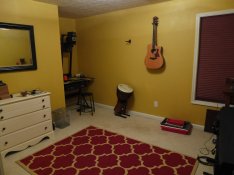
Thank you guys for these links. This thread is going to serve as a continual reference for me as I get set up. Below is a photo of the room, still disheveled and not nearly finished. The window will be blacked out and a sink and table will be on the wall to the right that is out of view. Any suggestions regarding layout are welcomed:

Darkroom.JPG
 

Deleted member 88956

If this is to be permanent darkroom... REMOVE CARPET. Anything else will make you disappointed in no time. For window make light trapped cover that you can still open/remove easily.
 

BGriffin23

Member
Allowing Ads
Joined
Oct 21, 2020
Messages
56
Location
CT, USA
Format
Multi Format
Idea for the OP: Since print washing takes place after all the light sensitive steps are complete and thus can take place in the light, you could just use a tray to transport your print after fixing into a bathroom or other area for washing with running water outside your darkroom rather than trying to figure out how to set up a sink in it.
 

mrosenlof

Member
Joined
Feb 25, 2010
Messages
631
Location
Colorado
Format
Multi Format
I agree that carpet is going to be tough. But if you can't remove, vacuum a lot. Maybe the day before a printing session. Get an air filter for the room. Hepa is good. Electrostatic is also.

You need to align the enlarger. I don't know details about the besseler, but it looks like somebody has posted a link. Test your safelight. A no-safelight darkness test that's usually sufficient is sit in the darkroom for about 5 minutes (in the dark). If after that you can't see your hand in front of your face, it's probably good.

have fun!
 

BGriffin23

Member
Allowing Ads
Joined
Oct 21, 2020
Messages
56
Location
CT, USA
Format
Multi Format
You need to align the enlarger. I don't know details about the besseler, but it looks like somebody has posted a link.

What do you mean by align?

A no-safelight darkness test that's usually sufficient is sit in the darkroom for about 5 minutes (in the dark).

It can take 15 minutes or more for the human eye to grow fully accustomed to darkness, so I would wait longer than 5 minutes.
 

ic-racer

Member
Joined
Feb 25, 2007
Messages
16,727
Location
USA
Format
Multi Format
I was 13 when I set up my first darkroom. Some lessons learned (If I knew then what I know now...)

1) Mom took me to the hardware store to buy red party lights. Took almost a 25 sheet box of paper before I figured out the red lights were passing LOTS of white light near the base.
2) I used f22 for my enlargements and the prints never had any sharp grain, but insisting they are the 'sharpest because I stopped down...'
3) I only had #3 and #4 contrast filters. That is not really enough, should have had the whole set (these were relatively expensive back then).
4) Most of my negatives were under exposed and under developed. I would not budge from "Box Speed" and the published development times; I treated those as Gold Standard in spite of the fact my prints sucked.
5) I could not make tiny 'reduction' prints for my sister's dollhouse. I did not know that if the negative and the paper are too close, no focused image is possible; reductions are made with a large paper to negative distance!
 

logan2z

Subscriber
Allowing Ads
Joined
Jan 11, 2019
Messages
3,980
Location
SF Bay Area, USA
Format
Multi Format
What do you mean by align?
Aligning the enlarger means to make the negative stage, lens stage and easel exactly parallel to each other. If the enlarger is not aligned, prints will not be sharp corner to corner.

The Beseler 23CII can be a bit tricky to align, but the video clip posted earlier in this thread should help.
 

Sirius Glass

Subscriber
Joined
Jan 18, 2007
Messages
50,814
Location
Southern California
Format
Multi Format
If this is to be permanent darkroom... REMOVE CARPET. Anything else will make you disappointed in no time. For window make light trapped cover that you can still open/remove easily.

I have had a wall to wall carpeted dry darkroom and the rug has never been a problem and gives some cushioning for the feet.

Buy a good grain focuser. Peak Grain Focusers are well worth the cost.
 

Sirius Glass

Subscriber
Joined
Jan 18, 2007
Messages
50,814
Location
Southern California
Format
Multi Format
Idea for the OP: Since print washing takes place after all the light sensitive steps are complete and thus can take place in the light, you could just use a tray to transport your print after fixing into a bathroom or other area for washing with running water outside your darkroom rather than trying to figure out how to set up a sink in it.

All my wet darkroom work is done in a large bathroom. I put a plywood board across the double sinks. The bathroom fan provides ventilation and the light for the fan was changed to a darkroom bulb.
 
OP
OP

Ariston

Member
Allowing Ads
Joined
Jan 20, 2019
Messages
1,658
Location
Atlanta
Format
Multi Format
Hey guys, I am trying to level/align the enlarger. I am running into a problem. When I move my grain focuser toward the edges, it starts vignetting. I can't really see the edges, which is where I need to see. Am I doing something wrong? The lens aperture is open full up. It is a Paterson grain focuser.
 

Sirius Glass

Subscriber
Joined
Jan 18, 2007
Messages
50,814
Location
Southern California
Format
Multi Format
Hey guys, I am trying to level/align the enlarger. I am running into a problem. When I move my grain focuser toward the edges, it starts vignetting. I can't really see the edges, which is where I need to see. Am I doing something wrong? The lens aperture is open full up. It is a Paterson grain focuser.

No many grain focusers do not do well away from the center. I would not worry about it.
 

logan2z

Subscriber
Allowing Ads
Joined
Jan 11, 2019
Messages
3,980
Location
SF Bay Area, USA
Format
Multi Format
Hey guys, I am trying to level/align the enlarger. I am running into a problem. When I move my grain focuser toward the edges, it starts vignetting. I can't really see the edges, which is where I need to see. Am I doing something wrong? The lens aperture is open full up. It is a Paterson grain focuser.
See Sirius' suggestion of the Peak Grain Focuser, the Model 1. It's big advantage is that it will allow you to see into the corners.
 
OP
OP

Ariston

Member
Allowing Ads
Joined
Jan 20, 2019
Messages
1,658
Location
Atlanta
Format
Multi Format
Hopefully I can afford one of the Peak grain focusers soon.

One more question: Are the 3D printed negative carriers crap? I only have a 35mm carrier at the moment, but I have many medium format negatives in binders that I will want to print.
 

BGriffin23

Member
Allowing Ads
Joined
Oct 21, 2020
Messages
56
Location
CT, USA
Format
Multi Format
Hopefully I can afford one of the Peak grain focusers soon.

One more question: Are the 3D printed negative carriers crap? I only have a 35mm carrier at the moment, but I have many medium format negatives in binders that I will want to print.

Provide a link to what you're referring to.
 

Sirius Glass

Subscriber
Joined
Jan 18, 2007
Messages
50,814
Location
Southern California
Format
Multi Format
Hopefully I can afford one of the Peak grain focusers soon.

One more question: Are the 3D printed negative carriers crap? I only have a 35mm carrier at the moment, but I have many medium format negatives in binders that I will want to print.

I never used one. I found many negative carriers on this site's classifieds.
 

albada

Member
Allowing Ads
Joined
Apr 10, 2008
Messages
2,177
Location
Escondido, C
Format
35mm RF
I have had a wall to wall carpeted dry darkroom and the rug has never been a problem and gives some cushioning for the feet.
Buy a good grain focuser. Peak Grain Focusers are well worth the cost.

I have carpet in the spare-room-cum-darkroom, and it's fine. But I have a secret:
Don't use trays!
That's right, don't use trays. Their short walls make them too easy to spill.
Instead, use Sterlite (or equivalent) bins of suitable size. These are cheap and available everywhere in the US. The only way you can spill such a bin is if you're hopelessly uncoordinated or trip while carrying it.

And +1 for the Peak Grain focuser. I have three brands of focusers, and the Peak beats the others by a country mile.
Mark Overton
 
Photrio.com contains affiliate links to products. We may receive a commission for purchases made through these links.
To read our full affiliate disclosure statement please click Here.

PHOTRIO PARTNERS EQUALLY FUNDING OUR COMMUNITY:


Ilford ADOX Freestyle Photographic Stearman Press Weldon Color Lab Blue Moon Camera & Machine
Top Bottom