

• Welcome to Photrio!
    Registration is fast and free. Join today to unlock search, see fewer ads, and access all forum features.
    Click here to sign up

Film ruined by paper

PenStocks

A
PenStocks

  • 6
  • 2
  • 93
Landed Here

H
Landed Here

  • 4
  • 6
  • 80

Recent Classifieds

Forum statistics

Threads
201,841
Messages
2,830,981
Members
100,978
Latest member
Enrich
Recent bookmarks
0

JW PHOTO

Member
Allowing Ads
Joined
May 15, 2006
Messages
1,148
Location
Lake, Michig
Format
Medium Format
I agree with David on this one. The longer a company plays with a problem like this the more sales they lose. I, for one, will not buy any film that might develop defects while in my possession. Sure, all films start to degrade over time, but usually just slight or excessive fog is the result and you can sometimes print right through that with pretty good results. I had the same problem(numbers bleeding), others did too, with Shanghai GP3 120 film. I didn't mind it much since I bought it cheap and was only using it to test some cameras out. For the "once in a life time shot" this film would be like hunting Cape Buffalo with a box cartridges where one or two in twenty might not go off. Except the outcome from the Cape Buffalo might be a little more exciting. Of course a pissed off brides mother can be pretty exciting also when she finds a big "no. 8 on her daughters pretty white wedding dress. :whistling: John W
 

MattKing

Moderator
Moderator
Allowing Ads
Joined
Apr 24, 2005
Messages
55,194
Location
Delta, BC Canada
Format
Medium Format
There may not be a problem with the film.

It may very well be due to one particular portion of a batch being exposed to extreme temperature at some point (either before or after retail sale) in the supply chain.

If that is the case, it would in essence be an insoluble problem. But at least it would be relatively unlikely to be encountered again by anyone.

And by the way, I think those numbers would be more likely to appear on the groom's suit than on the bride's dress. Even so, "#8" would still be a disappointment:D.
 
OP
OP
RattyMouse

RattyMouse

Member
Allowing Ads
Joined
Oct 18, 2011
Messages
6,045
Location
Ann Arbor, Mi
Format
Multi Format
Did this get sorted out Finally? Kodak replaced film and the issue didn't occur?
Did the folks who had complaints send their Film to Kodak?


Sent from Tap-a-talk

I am not pursuing this with Kodak as I'm in the midst of an international move. My plate is far too full to worry about the poor quality of my past batch of film.
 

ignatiu5

Subscriber
Allowing Ads
Joined
Feb 16, 2007
Messages
334
Location
Philadelphia, USA
Format
Medium Format
Did this get sorted out Finally? Kodak replaced film and the issue didn't occur?
Did the folks who had complaints send their Film to Kodak?


Sent from Tap-a-talk

I didn't send Kodak my film, but I did send them a scan (the same as I posted earlier in this thread) of an affected negative. I received a confirmation email today that replacement film (and I actually asked for Tri-X in lieu of the faulty TMax 400, just to hedge my bets against a defective lot/run/shipment) was being sent today.

I've got two rolls left from those wonky TMY-2 propacks that are exposed but not yet developed. I fear that some shots from a recent trip to NYC are going to be lost...
 

ignatiu5

Subscriber
Allowing Ads
Joined
Feb 16, 2007
Messages
334
Location
Philadelphia, USA
Format
Medium Format
I would expect that any heat related damage for RM would have arisen as part of the supply chain. Shanghai is a long way from Rochester, but more problematic would be damage arising between Rochester and B&H.

I've been trying to think of a scenario that connects all of the transportation dots. Perhaps a non-refrigerated truck spends an inordinate amount of time stuck in I90 traffic/broken down/whatever in the summer heat (I bought my film in June) on its way east from Rochester. Part of the now heat-stroked cargo is delivered to B&H in Manhattan, before the truck carries on to JFK airport to deliver the rest of the damaged film destined for retailers overseas.
 

MattKing

Moderator
Moderator
Allowing Ads
Joined
Apr 24, 2005
Messages
55,194
Location
Delta, BC Canada
Format
Medium Format
I've been trying to think of a scenario that connects all of the transportation dots. Perhaps a non-refrigerated truck spends an inordinate amount of time stuck in I90 traffic/broken down/whatever in the summer heat (I bought my film in June) on its way east from Rochester. Part of the now heat-stroked cargo is delivered to B&H in Manhattan, before the truck carries on to JFK airport to deliver the rest of the damaged film destined for retailers overseas.

My local, Canadian retailer buys some of their stock from B & H, because for some items, it is cheaper to do so and import it than to buy it wholesale from Canadian distributors.

It may be the same in Shanghai.
 

Xmas

Member
Allowing Ads
Joined
Sep 4, 2006
Messages
6,398
Location
UK
Format
35mm RF
I don't think Kodak is 'playing' with the problem. Troubleshooting intermittent problems can be VERY difficult.

It may be a process changed imposed upon Kodak for factory safety. If the new dye is ok to X degrees and X is high then the problem is supply chain 'delinquency'... Pig to address that.
When I shot weddings I always bought a brick of ten and used one early to check there was not a problem.
Brides could be well picky eg about size of their nose or colour of their white dress.
 

JW PHOTO

Member
Allowing Ads
Joined
May 15, 2006
Messages
1,148
Location
Lake, Michig
Format
Medium Format
It may be a process changed imposed upon Kodak for factory safety. If the new dye is ok to X degrees and X is high then the problem is supply chain 'delinquency'... Pig to address that.
When I shot weddings I always bought a brick of ten and used one early to check there was not a problem.
Brides could be well picky eg about size of their nose or colour of their white dress.

I always like the old saying, "If it ain't broke don't fix it"! I've used a lot of Ilford and some Fuji B&W film and their numbers dye doesn't bleed(if that's the problem). Maybe Kodak ought to find out where those two buy their printing dye from? It seems to be a common consensus the the Shanghai GP3 120 film is free from bleed through when fresh, but the longer it is kept the more the fumes from the numbers dye is transferred into the emulsion. If it's the same with the batches of Kodak film then it's hard for them to pinpoint the exact nature of the problem. I'm not saying I know for sure that Kodak is having the same problem that occurred with Shanghai GP3 film, but there sure are some similarities that's for sure. It also might explain why some folks have the problem and some folks don't. I'll just keep using Ilford until they have a problem?
As for Brides being picky? I always seemed to have more of a problem with the brides mother since much of the time she and her hubby were footing the bill. Most of the time it was trying "to make a silk purse out of a sows ear" problem. Mom always thought the camera/photographer didn't do her daughter justice. Well, in the days I shot weddings and airbrush or retouching could sometimes work magic. I say sometimes. Now it's so much easier with software programs, but still the same idea. John W
 

ignatiu5

Subscriber
Allowing Ads
Joined
Feb 16, 2007
Messages
334
Location
Philadelphia, USA
Format
Medium Format
I thought I'd bump this thread as I am curious whether this has been a continuous problem regarding backing paper text on Kodak film, or if it was just a one-off problem.
Anyone have recent issues?
 

Photo Engineer

Subscriber
Allowing Ads
Joined
Apr 19, 2005
Messages
29,018
Location
Rochester, NY
Format
Multi Format
My impression is that Kodak is looking into this matter. The first thing is that they must duplicate the problem.

PE
 

Xmas

Member
Allowing Ads
Joined
Sep 4, 2006
Messages
6,398
Location
UK
Format
35mm RF
My impression is that Kodak is looking into this matter. The first thing is that they must duplicate the problem.

PE
Without the negative and backing paper that is not going to be easy, you might 'duplicate' a different problem with similar symptoms?
 

Xmas

Member
Allowing Ads
Joined
Sep 4, 2006
Messages
6,398
Location
UK
Format
35mm RF
I was not meaning to criticize you in any way I was aware you had been busy and not returned the problem frames and backing.

Id email them if you had time they might want the stache back.

They are honour bound to replace if they request them sent back.

They may feel bad about your lost pictures as well. They would understand that you might not have picked up the fault immediately.
 

JW PHOTO

Member
Allowing Ads
Joined
May 15, 2006
Messages
1,148
Location
Lake, Michig
Format
Medium Format
I see on the other web photo site under (B&W-film and processing) forum a thread titled "Help With Figuring Out What Went Wrong Here" Shows somebody else with the same problem. I guess it's not just an isolated case or two. I'm sticking with Ilford until this gets ironed out. John W
 

mooseontheloose

Moderator
Allowing Ads
Joined
Sep 20, 2007
Messages
4,110
Location
Kyoto, Japan
Format
Multi Format
I haven't noticed any problems (so far) on the Tri-X film I shot this summer, so maybe it is just a TMAX issue.
 

ignatiu5

Subscriber
Allowing Ads
Joined
Feb 16, 2007
Messages
334
Location
Philadelphia, USA
Format
Medium Format
Well, did anyone send them samples?

I sent them (scanned) samples of affected TMAX 400 negatives, but the associated backing paper was long discarded, as there was a lag between development and scanning. I requested and received rolls of Tri-X as a replacement. I asked the Kodak Alaris Film Business Manager some additional questions at the time about the source or reason for the paper problem, but received no additional correspondence on the issue. Hence my bumping of this thread; I was curious if others had more information.
 

ignatiu5

Subscriber
Allowing Ads
Joined
Feb 16, 2007
Messages
334
Location
Philadelphia, USA
Format
Medium Format

mooseontheloose

Moderator
Allowing Ads
Joined
Sep 20, 2007
Messages
4,110
Location
Kyoto, Japan
Format
Multi Format
Rachelle, was your Tri-X new paper or old paper? The text on this link (http://www.kodak.com/global/en/professional/products/films/filmsIndex.jhtml) suggests that all of their 120 has a different paper backing.

I've been keeping track of that as well, as I develop. I have a film development log to keep track of every film I develop and have been marking which rolls have come with the dark grey (old) border, and which with the light grey (new). I've also been keeping all of my backing paper should anything come up. As I've mentioned earlier there doesn't seem to be a problem so far, but I haven't looked at each and every neg under a loupe yet either.
 

shiaochungho

Member
Allowing Ads
Joined
Nov 26, 2015
Messages
1
Format
Medium Format
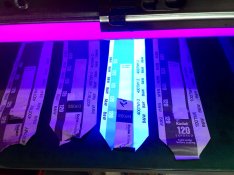
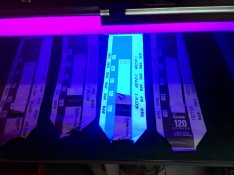
attachment.php
I put some diffrient edition of back papers under utraviolet light
I found that the new Kodak Tmax400 has Fluorescent agents
Have a look of the picture,I doubt if this cause the problem.....
 

Attachments

  • P_20151127_091455.jpg
    P_20151127_091455.jpg
    474.9 KB · Views: 173
  • P_20151127_091450.jpg
    P_20151127_091450.jpg
    425.7 KB · Views: 654

Sirius Glass

Subscriber
Joined
Jan 18, 2007
Messages
50,818
Location
Southern California
Format
Multi Format
attachment.php
I put some diffrient edition of back papers under utraviolet light
I found that the new Kodak Tmax400 has Fluorescent agents
Have a look of the picture,I doubt if this cause the problem.....

Welcome to APUG
 
Photrio.com contains affiliate links to products. We may receive a commission for purchases made through these links.
To read our full affiliate disclosure statement please click Here.

PHOTRIO PARTNERS EQUALLY FUNDING OUR COMMUNITY:


Ilford ADOX Freestyle Photographic Stearman Press Weldon Color Lab Blue Moon Camera & Machine
Top Bottom