• Welcome to Photrio!
    Registration is fast and free. Join today to unlock search, see fewer ads, and access all forum features.
    Click here to sign up

Film defects Mamiya c330 pro

Refuge

H
Refuge

  • 1
  • 0
  • 32
Solitude

H
Solitude

  • 1
  • 0
  • 25

Recent Classifieds

Forum statistics

Threads
203,610
Messages
2,857,055
Members
101,927
Latest member
paulbesley
Recent bookmarks
0

instantcrow

Subscriber
Allowing Ads
Joined
Mar 30, 2026
Messages
16
Location
Cleveland, OH
Format
Analog
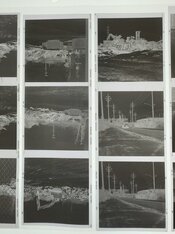
I've developed a few rolls of TriX 400 on a Mamiya c330 pro, and the negatives have been fine aside from excessive linear silver density at the sides of most frames. These linear densities extend beyond the bounds of the frame. The negatives themselves are fine otherwise with no fogging or dents. The printed images are lighter on edges where these densities are. See attached images.

I'm developing in Rodinol 1:50 at 20degC for 9minutes with typical agitation for first 30s then 10s/minute thereafter. citric acid stop, ilford rapid fix. I'm using a Nikor stainless steel tank and reels with 15 oz (450mL) developer as per instructions. This leaves adequate headroom. I do not think these are edge effects, though I could be wrong. They almost look like light reflections from the silver-colored film guides inside the camera. Any ideas are much appreciated. Thanks!
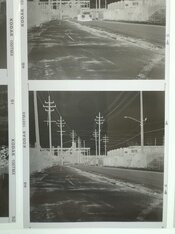
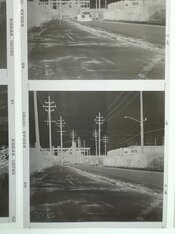
defect 3.jpegdefect 2.jpegdefect 1.jpeg
 
Is this a new phenomenon from this combination of camera and processing equipment? Or have they been performing correctly in the past?
 
Is this a new phenomenon from this combination of camera and processing equipment? Or have they been performing correctly in the past?

I have shot about five rolls through this camera, and they all had the same defect. I have no prior experience with MF film or cameras, so I have no prior comparison.
 
I would suspect some reflection or other source of light fogging in the camera.
How are the light seals, and is the back latching securely?
 
Honestly, I am having trouble seeing the problem with your example negatives. But when you say, "excessive linear silver density at the sides of most frames" it sounds a lot like a problem I was having with developing my 120 negatives. Certainly, I was also having the problem of, "...printed images are lighter on edges where these densities are."

Would you say what you are seeing is similar to what I described in this thread?
(scroll down to posts #25-26-27 for better examples of what I was seeing)
 
Last edited:
Honestly, I am having trouble seeing the problem with your example negatives. But when you say, "excessive linear silver density at the sides of most frames" it sounds a lot like a problem I was having with developing my 120 negatives. Certainly, I was also having the problem of, "...printed images are lighter on edges where these densities are."

Would you say what you are seeing is similar to what I described in this thread?
(scroll down to posts #25-26-27 for better examples of what I was seeing)

It is similar. My development method is as standard as I can make it. It's possible that changing agitation vigor will change things...
 
After inverting it and enhancing the contrast, it is easier to see a line where the density changes noticeably along with what looks like a couple of circular areas of differing density. This does not look like a processing defect, but some odd kind of mechanical exposure issue. But first - is the film within the expiration date and did it go through any odd storage or handling situation before or after you used it? Has any film you shot with this camera come out completely normal?

A reflection from the silver-colored film guides inside the camera would require some errant light rays inside the camera body, so generally I would check out the camera's light seals, lens mount and film back for any small light leaks.

defect 3a.jpg
 
For the round artifacts I wonder if it was raining at the time? For the higher density edges was it a 'fat roll' not tightly wound onto the spool when loading the film? Otherwise I'd say be more gentle with agitation, maybe use the twizzle stick or swirl and don't invert the tank.
 
It is similar.

I don't see the problem:
1775287897666.png


Could it be you're dealing with a problem related to scanning? How do you scan/digitize your negatives?

For the round artifacts
I assume that's just an artifact of how the film was photographed for the illustration; a reflection of sorts, maybe. I don't think it's on the film; it doesn't appear on the 'group shot'.
 
After inverting it and enhancing the contrast, it is easier to see a line where the density changes noticeably along with what looks like a couple of circular areas of differing density. This does not look like a processing defect, but some odd kind of mechanical exposure issue. But first - is the film within the expiration date and did it go through any odd storage or handling situation before or after you used it? Has any film you shot with this camera come out completely normal?

A reflection from the silver-colored film guides inside the camera would require some errant light rays inside the camera body, so generally I would check out the camera's light seals, lens mount and film back for any small light leaks.

View attachment 421507

The artifacts in red are likely a reflection of my iphone as I photographed the negatives in sleeves on a light table. The film is not expired, and I kept it light safe. All of the rolls on this body have had these linear densities on side of frames parallel to long axis of film (as opposed to between frames).
 
I don't see the problem:
View attachment 421508

Could it be you're dealing with a problem related to scanning? How do you scan/digitize your negatives?


I assume that's just an artifact of how the film was photographed for the illustration; a reflection of sorts, maybe. I don't think it's on the film; it doesn't appear on the 'group shot'.

I don't scan negatives. I simply photographed the images here with my iphone in attempt to capture the linear densities on edge from. In the end they don't impact printed image that much...if they do I can just burn the edges.
 
@instantcrow, when I was experiencing a similar problem with unexpected density at the side edges of my 6x6 negatives, it was somewhat frustrating to present the problem here on the forum with enough clarity to be understood. I had to describe the problem multiple different ways, and I had to provide several different photos of my negatives before anyone else could see what I was seeing. That's just the way it is, so don't get discouraged.

It is similar. My development method is as standard as I can make it. It's possible that changing agitation vigor will change things...
Based on the similarity to my problem, and based on your text descriptions, I think you are probably experiencing the same problem I was -- that is, when agitating, the flow of developer around the wire reels is somehow causing slightly increased developement at the edges of the negatives.

The one thing you say which might lead me to look for some other cause is...
These linear densities extend beyond the bounds of the frame
... If by that you mean you are seeing the unexpected density in the rebate area of the film (the area where the film manufacturer's name and frame numbers appear), then that would point more to a light leak/camera issue rather than an agitation issue. However, looking at your examples, I do not see any darkening of the rebate areas that would suggest a light leak. And everything else you say suggests to me that cause is likely to be due to a slight overdevelopment at the edges of the film, which is likely related to agitation.

If you read the thread I posted about my problem (link in post #9), I think it is a fair summary to say, once I was able to show the problem well enough for others to see it, there was some agreement that my problem was likely due to my agitation. However, there was not much agreement about whether I was agitating too much, or too little. At the time, I was taking a university photography class and the professor said I was over agitating.

More recently, after some experimentation, I think the extra density is less of a problem with more gentle agitation. But I am still investigating.
 
Okay, now we're on the same page.
So the problem is not that you have a band of added density within the image frame, along the edge.
The problem is the thin line extending from the corners of the image frame.

You may be able to find the culprit by inspecting the back and see where the light seeps past the frame gate. Maybe it's possible to fill that gap somehow. But personally I'd just consider this to be a 'feature', not a bug.
 
Now I am really confused.

@instantcrow, are you talking about only the thin line circled in red?

View attachment 421520

What! Is that all we are talking about! Well spotted.

The way the Mamiya is constructed it leaves a small gap each side of the film gate, shown here, and easily seen if looking for a culprit especially given the image is projected upside down onto the film. You can fit a fingernail into the gap.


IMG_1108v2.jpg
 
It is so much easier to have these sorts of discussions in real life.
I've seen those little lines between frames on C330 negatives for almost 50 years, so I just assumed that that @instantcrow couldn't have been referring to them!
 
My Hasselblad has two small yet obnoxious notches on one side of the film gate…
 
Photrio.com contains affiliate links to products. We may receive a commission for purchases made through these links.
To read our full affiliate disclosure statement please click Here.

PHOTRIO PARTNERS EQUALLY FUNDING OUR COMMUNITY:


Ilford ADOX Freestyle Photographic Stearman Press Weldon Color Lab Blue Moon Camera & Machine
Top Bottom