• Welcome to Photrio!
    Registration is fast and free. Join today to unlock search, see fewer ads, and access all forum features.
    Click here to sign up

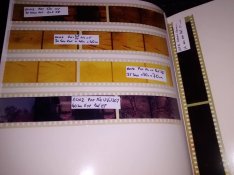
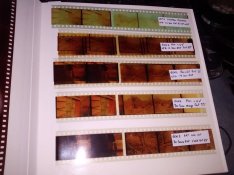
ECP film in ECP developer still yellow

22886.jpg

A
22886.jpg

  • 1
  • 0
  • 12
22890.jpg

A
22890.jpg

  • 0
  • 0
  • 9

Recent Classifieds

Forum statistics

Threads
204,342
Messages
2,867,380
Members
102,230
Latest member
sesuone
Recent bookmarks
0
ECP is intended for making prints from ECN. The basic balance is tungsten plus 50R to start with just like color paper. It also needs a UV filter if used in sunlight. So, depending on how you use it the filter pack will vary. It also has very high contrast (about 2.5 vs 0.55 for ECN) and thus is harder to balance just like color paper. It moves in balance rapidly with light changes.

You have really not told us anything about exposure, but rather assumed it was the process. I'm now pointing at the exposure.

PE
 
You have really not told us anything about exposure, but rather assumed it was the process. I'm now pointing at the exposure.

PE

Oh, you are right, I thought I had mentioned already those values before:
I was using 1/30, 1/15, 1/8, 1/4, 1/2, 1s, 2s, 4s when contact-copying the same ECN-2 negative onto ECP to compare and a micro-controller to turn on the light source very accurately and reproducible for those exact times.
In my still camera I used exposure times of up to 30 seconds and indeed got a bit more of an image when exposing longer (this I mentioned before here).
So yes, I also think that much more exposure is the way to go.
 
This material is very very slow. It requires lots of filtration and tungsten light as stated above, but it makes very good "slides" with a huge dynamic range. Much more so than Ektachrome or Kodachrome.

PE
 
Please post results and ideas, I am very interested.
I stopped my experiments on this some time ago, being fed up to get yellow images every time :getlost:
But I still have 4 100ft 16mm rolls left for my Krasnogorsk and a few meters of 35mm for photos.
In case you should find a way to get something useful with ECP at home, I'd love to try it again.

PE, what do yo mean with remjet removal? At least the ECP films I have do not have any remjet on them. Do you propose that still doing the removal step could change the results in a good way, or do you mean that I might have done the removal step without knowing it and that caused bad results?

Bernhard
Hi Bernard,
I found some of the stuff where I bothered to take notes. I have to correct myself! It was green film base with the ecp2 and I had yellow problem with the ecn2. This was contact printing from Kodak Vision3 films onto 2383 using a paterson enlarger. I got close to some good results using ECN2. OH I see what i did, I used all the yellow in the filter pack. I'm not sure why the ECP2 gives the green film base. The chemicals are working solution pour off from a cine lab, so its the proper stuff.
 

Attachments

  • 20664568_10155010251078565_5227417340902561431_n.jpg
    20664568_10155010251078565_5227417340902561431_n.jpg
    52.4 KB · Views: 201
  • 20664887_10155010253383565_7606269554009283485_n.jpg
    20664887_10155010253383565_7606269554009283485_n.jpg
    53.9 KB · Views: 221
  • 20729282_10155010252283565_9066369963601533377_n.jpg
    20729282_10155010252283565_9066369963601533377_n.jpg
    62.5 KB · Views: 201
  • 20767938_10155010251768565_2981109108798003145_n.jpg
    20767938_10155010251768565_2981109108798003145_n.jpg
    74.2 KB · Views: 217
Last edited:
This material is very very slow. It requires lots of filtration and tungsten light as stated above, but it makes very good "slides" with a huge dynamic range. Much more so than Ektachrome or Kodachrome.

PE
Hi PE, 2383 is very slow indeed, 40 secs under the paterson enlarger is where you have to go to. I remember why I gave up with 2383. You really need an RGB filter pack and a lot more than a 150W bulb to get the exposure times down to workable levels. I can get 1000's of feet of 2383 for pennies! Most of its rotting in warehouses, a great shame, and to think most of the printing machines in the UK are now sitting in landfill somewhere :sad:.
 
Oh, you are right, I thought I had mentioned already those values before:
I was using 1/30, 1/15, 1/8, 1/4, 1/2, 1s, 2s, 4s when contact-copying the same ECN-2 negative onto ECP to compare and a micro-controller to turn on the light source very accurately and reproducible for those exact times.
In my still camera I used exposure times of up to 30 seconds and indeed got a bit more of an image when exposing longer (this I mentioned before here).
So yes, I also think that much more exposure is the way to go.
I take it you were using a slide copier attachment on the camera?
 
Hi Bernard,
I found some of the stuff where I bothered to take notes. I have to correct myself! It was green film base with the ecp2 and I had yellow problem with the ecn2. This was contact printing from Kodak Vision3 films onto 2383 using a paterson enlarger. I got close to some good results using ECN2. OH I see what i did, I used all the yellow in the filter pack. I'm not sure why the ECP2 gives the green film base. The chemicals are working solution pour off from a cine lab, so its the proper stuff.

It is not green, it is yellow. Add about 100 yellow to the filter pack and double or triple the exposure.

PE
 
Bernhard, you were lucky because I found the older EASTMAN Color Print Films 5386 documentation (revised 1999).
Current documentation of color print looks like this:
http://www.kodak.com/US/en/motion/P...bition/Color_Print_Film_2383_3383/default.htm
No characteristic curve, no spectral sensitivity.
I do not know if you could understand the differences of sensitivity of layer with the new documentation..

George

Hi George,
I wonder if you could help me. I am experimenting for a while with ecn-2 film thought ra-4 developer (blix as well) and never get consistent results. I guess the problem could be in the right dilution as I always get dark negatives,,?? like -2 stops. I am using the c-41 process times, 38C at 3,15min,, plus a good wash and a blix for 5-6min (c-41 or ra4). My negatives always get with a blue cast and quite dark, like very underexposed. I am using Kodak Vision films, EXR 500T (rated a 320 iso) and Vision 200T (rated 160iso).
I wonder what do you think is my problem. they told me that ra4 developer is very strong and should be more diluted than for c-41 process.
Thanks so much and I really appreciate, as I see that you're an expert in chemistry.
Carlos

insta:cgracaphoto85
 
Joachim[/QUOTE]

Hopefully Joachim you are doing well with the 35mm 2383.
Your a good teacher and I've almost got there.
Shown is 500T contact printed to 35mm 2383 with 80Y + 5M filter pack setting.
 

Attachments

  • thumbnail_IMG_20191210_195828.jpg
    thumbnail_IMG_20191210_195828.jpg
    85.8 KB · Views: 161

Hopefully Joachim you are doing well with the 35mm 2383.
Your a good teacher and I've almost got there.
Shown is 500T contact printed to 35mm 2383 with 80Y + 5M filter pack setting.
[/QUOTE]


Hi Mogsby

I'm trying to positive print onto 2383 from vision 3 250D negatives and am getting the black and yellow that yourself and filmcurl got in your early experiments with it. I know they are well exposed because they look good with black and white development at about 1 ASA.
No other colours are visible when colour processing with ECN2 process other than yellow and black.
I've tried shooting using a copy stand and a light source rated at 5000k like you would scan to digital they come out black and yellow.
I've also tried shooting daylight stills at 1 ASA through a vision 3 neg with the same yellow + black results.


How did you get your good non monochrome prints?

Is the light source important as suggested earlier - tungsten at 2700k- and what filters did you use?

Thanks!

John
 
@hugh_Speers welcome to Photrio!
@Mogsby may not respond promptly, or even at all; they've last been on the site over a year ago.

Could you post a picture of your most recent attempt at contact printing 250D onto 2383?

what filters did you use?

It's indicated in @Mogsby's post you quoted:
80Y + 5M filter pack setting.

This refers to the filter numbers in a regular dichroic color enlarger. Are you using an enlarger to contact print your film? Do you have access to a color enlarger?
Is the light source important as suggested earlier - tungsten at 2700k

Using a different color temperature will affect color filtration settings.
 

Hi Koraks

Thanks for the response, I'll post some scans of the yellow and black negs at the end of the week so you can see them.
They are very similar to the ones Mogsbys posted earlier in this thread.

Enlarger - no, I've been using a copy stand and a 35mm neg scan holder with a Kiaser white light for illumination 5000k. I'd also like to use my computer monitor.
Filters - ah that's really helpful, 80Y 5M they're colour enlarger filter settings. I was looking up Kodak colour compensation filters and 80A-C and no 80Y and they are all blue haha.

I'm thinking of what to try next - a different lightsource or a daylight to tungsten filter.
 
I'm thinking of what to try next - a different lightsource or a daylight to tungsten filter.

In principle your Kaiser light source may work, but you'll still have to use additional magenta and yellow filtration to get the color balance right. Simply switching to a tungsten balanced light source (or filtering your Kaiser to make it look more like tungsten) isn't going to be sufficient.

I'd also like to use my computer monitor.

You could also use your computer monitor as you said; that's actually an interesting idea. Essentially a computer monitor is a big array of red, green and blue emitters. By mixing them in the proper ratio, you should be able to get the right exposure. You could write a program that shows a full screen of the same color for a set amount of time, where you can adjust the R, G and B components in order to get the proper ratio for your film exposure. You'll have to experiment to get the color balance right, using test strips and iterative adjustments. I think it'll work best with an OLED monitor since a regular LCD screen will always 'bleed' some white backlight (it's never perfectly black) and that will expose the film. Although an LCD will work in principle if you shield the film before and after the single-color exposure.

Overall getting hold of a second hand color enlarger is an easier way to get the job done. Unless you for some reason want/need to rely on the Kaiser or your computer, I'd consider the old-fashioned enlarger since it'll be overall much more convenient.
 
Thanks Korak for the suggestions
I'll have a crack at using my monitor for some tests, it'll be a quick and interesting way to do tests and see if I can get some other colours, and perhaps prove its not the development as the problem.
I was planning on getting the intrepid enlarger at some point which doubles as a scanning light with filters, this might give me the control I need for this purpose too.
If I was to try daylight photography what filters would you suggest having a try with to control the daylight to tungsten and also the magenta and yellow.
I read on the kodak brochure that UV filters should be used also ! thats a lot of filters :wink:

Thanks for your help
 
I was planning on getting the intrepid enlarger at some point which doubles as a scanning light with filters

This is not to discourage you, but the Intrepid LED light source is a really poor solution for color work. It's inherently flawed due to insufficient PWM resolution especially on the blue channel. I do not recommend it if you intend to do color printing in the future. For B&W, it should be fine. For color, you're much (!) better off looking for an old Durst M305 or so if you're only going to do 35mm anyway.

As to the monitor as a light source: it may sound easy because you already have it, but things that seem easy often turn out to be a little more complicating. I'm pretty sure this will be one of those cases.

If I was to try daylight photography what filters would you suggest having a try with to control the daylight to tungsten and also the magenta and yellow.

You mean daylight photography using the 2383 print film? I think you would need something like an 85B filter for that. You'll end up with a negative that you can then either contact print or scan. At that stage you can do additional color corrections. I wouldn't bother with M and Y filters in addition to the 85B during image capture, unless the initial results are so wacky that there's no other way to get the job done. I'd also not bother with the UV filter. I expect the 2383 will be slow and hard/harsh for image capture. IDK, never tried it. It'd be interesting to see what you can come up with.
 
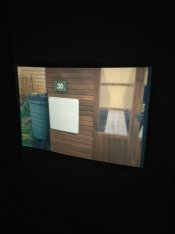
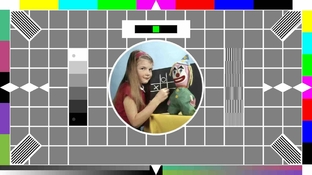
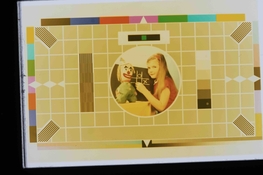
Hi there, Ive been having fun shooting images from my monitor onto the print film. attached is the image of the test screen I'm using and the reddened negative image I display on screen to create the slightly yellow cast positive image on film next to it.
I use a program called after effects a lot at work so I used it to create a timeline with the levels changing on every frame then shot a roll off and processed it as a means of testing, then narrowing down the results. I've tried to emulate as best I could what the colour enlarger head might have been doing with its filters but in RGB colour space. I have to say its a real head spinner trying to get my head around the way colour is working, very fascinating. I created a filter that reduced green and blue outputs of white to zero , then scaled the filter down to around 82% of it's effect. This gets me somewhere near the ball park of 3 colours coming through. I'm using a non OLED monitor so the blacks have some white in them, I'm guessing that is why all my greys are yellowish. I might try a filter over the actual lens to reduce the the yellow and I'm going to borrow an OLED to see what kind of results I can get with it. Any suggestions of experiments to do much appreciated :smile: and thanks again for your insights above, they got me producing some passable images.
 

Attachments

  • testcard.jpg
    testcard.jpg
    79.1 KB · Views: 68
  • Screenshot 2024-11-04 at 11.21.17.jpg
    Screenshot 2024-11-04 at 11.21.17.jpg
    97.3 KB · Views: 60
  • DSC08442.jpeg
    DSC08442.jpeg
    1.9 MB · Views: 74
I'm using a non OLED monitor so the blacks have some white in them, I'm guessing that is why all my greys are yellowish.

Maybe. I'd expect the backlight bleed to produce an overall cast alright. However, in mid-grey, this should be mostly correctable, so I'd expect it to mostly affect the black point. It creates a bit of a nightmare since the color cast induced by this effect is non-linear, so you're effectively battling a fairly severe case of crossover.

Looking at the yellow mid-grey, it's really mostly a matter of color balancing still being pretty far off the mark. Apparently there's still too much blue being thrown onto the film, so you need to dial that channel down a lot further. You'll then notice that mid-grey will end up being too light, so overall exposure may have to be increased somewhat.

One concern I have with using a computer monitor this way is the matching (or lack thereof) of the subpixel wavelengths of the monitor with the spectral sensitivity of the color layers of the film. It's quite conceivable that there's no way to get pure colors due to the monitor's colors not being a good match for the film. E.g. the green channel of your monitor may also affecting the red/cyan and/or the blue/yellow film layer, etc. To an extent, you can correct for this within the center of the gamut, but depending on how bad the problem is, you'll sacrifice in terms of pure/saturated hues. Effectively, the gamut becomes very small and images remain muddy, regardless of how saturated the original is.

The OLED screen may work better; see how that goes. Many smartphones have OLEDs, especially the higher end ones. Might be worth a try.

Edit: to expand on the above, I looked up the spectral sensitivity of Kodak 2383 print film:

1731750149678.png

Note two things in particular. One, the green/magenta curve in the middle overlaps with the other channels at either end. In order to keep away from this cross-contamination, green exposure needs to happen around 550nm or so. You may find that exposure with 525nm green (which is the common wavelength for green LEDs) results in formation of yellow dye along with magenta (i.e. if you try to print pure magenta, it always becomes red instead of pure magenta).
The second issue is the vertical lines to the left, around the 400nm mark. This is UV sensitivity of all three layers. Going back in this thread you can see Ron Mowrey/PhotoEngineer mentioning the need for a UV filter. This might be true for a computer monitor, especially a regular IPS/TN with a CFL or white LED backlight, just the same. There may/will be some side-band emission of the backlight into the 400nm region and possibly even below this (esp. with CFL backlight). Ideally you would include a hard-cut high-pass filter with an edge at 420nm or so in your filter pack to lop off this unwanted sensitivity. UV exposure would affect all layers, but since this is a tungsten-balanced film, it will primarily result in formation of yellow dye as also evidenced by the plot shown above. UV exposure will add an overall cast that leans towards yellow/orange, it'll be pronounced especially in highlight areas (so it'll induce crossover) and it'll overall reduce contrast and gamut.

 
Last edited:
Photrio.com contains affiliate links to products. We may receive a commission for purchases made through these links.
To read our full affiliate disclosure statement please click Here.

PHOTRIO PARTNERS EQUALLY FUNDING OUR COMMUNITY:


Ilford ADOX Freestyle Photographic Stearman Press Weldon Color Lab Blue Moon Camera & Machine
Top Bottom