
• Welcome to Photrio!
    Registration is fast and free. Join today to unlock search, see fewer ads, and access all forum features.
    Click here to sign up

ECP film in ECP developer still yellow

Tablao Flamenco

A
Tablao Flamenco

  • 1
  • 0
  • 12
Untitled

A
Untitled

  • 1
  • 2
  • 66

Forum statistics

Threads
204,326
Messages
2,867,174
Members
102,224
Latest member
BearThunder
Recent bookmarks
0

FilmCurlCom

Member
Joined
Dec 2, 2016
Messages
103
Location
Graz, Austria
Format
35mm
Hi all!

I have already experimented with ECP film in all sorts of chemistry in the past (C-41, C-41 with RA4 dev, ...) and it would always give me completely yellow results (like B&W, just yellow and white).
Now finally was able to get hold of a 2 liters bottle of real ECP developer recently and today I developed the first two films with it.

With the first one I took actual photos and also rephotographed images off my screen that were normal, inverted or had different color changes and mask overlays.
The second film I used in my contact-copier and copied from C-41 and ECN-2 negatives and even from intermediate film.

However, even after using the actual ECP developer all images on both films are completely yellow again. Only few frames where I had a very bright sun in my shot, that area shows an additional cyan, everything else is either yellow or transparent.

Here's the process I used:
ECP developer for 3 mins at 36.7° as given in Kodak's spec, all other steps at 25-27°
2% acetic acid as a stop bath for 1 min
Wash for 1 min
C-41/E6 Blix for 6 mins
Wash for 5 mins
Photoflo for 1 min

Could it be that the film I have (I cut down from a 20m ECP roll) is somewhat damaged? But if it was fogged or harmed some other way, that wouldn't lead to only yellow colors left?
Could it be that I heavily underexposed it and yellow is just the color that shows up first whilst others, like cyan where the sun was, require much more exposure? Any ideas?

Bernhard
 
Wow, three days and not a single reply? Isn't anyone of you interested in this at all?
Doesn't anyone have any helpful remarks for me, won't anybody care enough to help me a bit, PhotoEngineer, anyone?

Bernhard
 
Not many people will be doing this. I saw a roll of print film on ebay only once. So I looked into the ECP developer, but since I coudn't source CD2 (Suvatlar doesn't have it, at least not on his list) I gave up on the idea. And even if I had the film and ECP dev I still wouldn't know how to contact print my ECN-2 negatives onto the print film. Escpecially without cutting into stripes the print film prior to developing.
 
For contact-printing I use a 1950's Leitz/Leica Eldia, I put a source negative (6 frames strip) in and have a 1.6m/36 frames ECP film loaded inside the Eldia.
I use an Arduino/Microcontroller light source I built myself to get very precise exposure times that are reproducible everytime.
But this is not the problem, this all works well enough, the fact that everything turns yellow, even when using real ECP chemistry, that is my only real issue.

Bernhard
 
Have you tried cross processing a few frames of ECN-2 or C41 film in your ECP developer to see if it is generally working? If you get various colours the film might be at fault.
 
Interesting idea, I will try that.
Do you think that there's a posibility that only the red and green layers have been harmed and blue (and inverse yellow) remains?
That would make sense when considering that whatever chemistry I used (ECP, C-41, C-41 with RA-4 Dev, ...) the results were always similar and yellow.

If the film was fogged, shouldn't all layers be affected? So in case some are actually harmed, it has to have happened in the lab I got the film from already.
I only work in complete darkness when I cut off frames from the roll and I highly doubt anything was fogged at any time.

Bernhard
 
Sorry, but that is probably a paygrade to high for me.

By intuition I wouldn't expect two layers to fail completely with only one responding. But I don't know how old your stock is. The Rollei slide film is infamous for going quite yellow, but it retains a response for the other colours as well. But if your film is really old and was stored in a hot attic, who knows... In any case I don't think it could be fogging caused by your handling it.
 
Positive color films are made for making color release print film after an original color negative or interngative ..
The positive film is balanced for tungsten light.
Try to expose the color positive film to a 2800 ° K light.
With regard to the processing process, some differences are possible between: C 41, ECP 2 or ECN 2 procces.

George
 
I will check what color temperature the LED has that I use as a light source for the contact copier.
But that still doesn't explain why the film leader that was exposed by different types of light from all sides is just cyan instead of black for example.
Also, shouldn't I just get images with too much blue when using tungsten film in daylight balanced light but red and green or cyan and magenta would still be visible?
 
The problem is not if you had 2800 or 2900 ° K.
The problem is whether it was 2800 or 6000 ° K.
Here I presented my tests done on a positive color film with a color reversible process.
I gave exposure and fogging.
I used 3 Wratten 85 filters for exposure.
Even if it is another process, exposure conditions can be a starting point for your test.
First, you start with the image exposure (color scale).
If on grays scale you see that in the low densities you have a dominant and in the high
densities your dominate is the complementary color, then you have to fogging the film for balance it.

To make it easier, use the fog end of the film to see the maximum densities.

George
 
Last edited:
But that still doesn't explain why the film leader that was exposed by different types of light from all sides is just cyan instead of black for example.

You could test your film and your developer by doing the following:
- In broad daylight put a short test clip of your ECP film in C-41 CD or E6 CD
- In broad daylight put a short test clip of C-41 or E-6 film into your ECP developer
- In broad daylight put a short test clip of your ECP film into your ECP developer

One would predict that either all tests fully blacken the test clip, or at least two tests would fail to blacken the test clip. Depending on the outcome further action can be proposed.
 
Your problem is not the color developer but the fact that you do not have exposure parameters that will bring you closer to a color image.
I would suggest that you upload a color positive box and take a color shot outdoors in full sun a color scale.
Put your fully open diaphragm (2.8), put 3 Wratten 85 filters on the lens and expose to the clin: 30 sec, 15 sec, 7 sec, 3 sec, 1.5 sec,
1 sec, 1/2 sec, 1/4 Sec, 1/8 sec, 1/15 sec, 1/30 sec, 1/60 sec.
From this photo suite you should have a photo frame with a ~ good exposure.
Now you can start looking at the colors that appear.
If only yellow appears, you have to put a Wratten 85 filter.
The Wratten 85 filter cuts the blue light (generates yellow color), and if you give more exposure, the other colors - purple and azure - will begin to see.

George
 
I will tell you how I did the contact copy tests to the positive color developed in the color reversible process.
I made some kind of teststripe with gray filters from subtraction printing machine.
You can also take with unexposed negative b&w developed that has a density close to 0.30.
Take a piece of glass from an old laboratory filter that you no longer use.
Remove the color filter from the glass by putting it in warm water.
Leave the first beach free, without filter (0.00).
On beach 2 glued with Scotch a piece of film (0.30).
On beach 3 glued with scotch 2 pieces of overlapping film (0.60 density).
On beach 4 glued with scotch 3 pieces of overlapping film (0.90).
On beach 5 glued with scotch 4 pieces of overlapping film (1.20).
On beach 6 glued with scotch 5 pieces of superimposed film (1.50).
On beach 7 glued with scotch 6 pieces of overlapping film (1.80).
On beach 8 glued with scotch 7 pieces of overlapping film (2.10).
Stick on the glass and a negative color chart with a color scale.
The contact exposure I made to the light of the magnifying device with Ianpol color objective.
Perhaps you can use some of these things.

George
 

Attachments

  • Pozitiv color in proces reversibil color001 redus.jpg
    Pozitiv color in proces reversibil color001 redus.jpg
    104.5 KB · Views: 229
Thank you all for your suggestions, there's a lot of good ideas I can try now.
George, the image you attached looks really great! In which chemistry did you develop it and what was the film type?

I think I will try your suggestion of shooting in very bright sunlight through the 85 filters.
I did try it already with ONE 85 on the lens in the past, but never with 3, also I didn't expose as long as you suggested.
If that actually works, it'll mean that my light source for contact-copying is way too weak and I need to get much more light there to ever get full color images.
But it'd be happy just to understand what is wrong so I can improve that.
Maybe this Friday or Saturday I get some time to try out a few things and report back.

Bernhard
 
Bernhard, I'm glad to hear you can use some ideas from me.
The tests are made in 1997 on the color positive film developed on a reversible color process that I obtained the patent.
This test is make on EASTMAN Color Print Films 5386, as the film fog looks.
I make all of these tests at home, not at work, and that's why I improvised so much.
If I try to synthesize what I said before, it would be this:
You have different sensitivities on the three layers of dyes: yellow, purple and cyan because of the light you used.
At you, the greatest sensitivity you have on is the yellow (the layer sensitive to blue light).
That's why I recommended that you use the Wratten 85 filters to stop the blue light (the yellow colorant that is formed on the film), and you can increase the exposure.
So that the other two dyes will appear.
I hope I made it more understandable.
Sorry for my English.

What I told you about the sensitivity of layers can be seen here:
http://125px.com/docs/motionpicture/kodak/lab/h15386.pdf
pag. 3 - Spectral-Sensitivity Curves

George
 
Great, thank you George!
You explained it very well, I understand what you mean.
It was actually one thing I did think about, that maybe cyan and magenta might need more light than the yellow did, when looking at the Sensitivity Curves.
Let's see how it turns out in a few days when I use more light, I will keep you updated if I got any of the other colors successfully.

Bernhard
 
Bernhard, you were lucky because I found the older EASTMAN Color Print Films 5386 documentation (revised 1999).
Current documentation of color print looks like this:
http://www.kodak.com/US/en/motion/P...bition/Color_Print_Film_2383_3383/default.htm
No characteristic curve, no spectral sensitivity.
I do not know if you could understand the differences of sensitivity of layer with the new documentation..

George
 
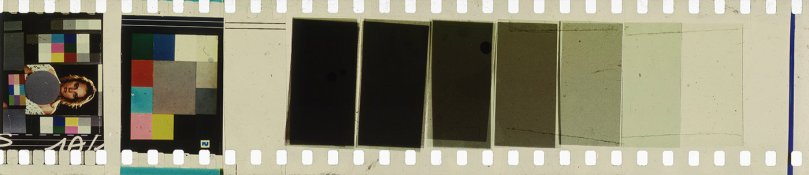
Today I developed another three ECP films:
  1. Shot in Nikon, rated as ISO 6, exposed at +3,+2,+1 stops, each without filter, with one 85, with 85 + orange gel, with 85 + 2 x orange gels
  2. Contact-copied from C-41 and ECN-2 negatives, light source was 4 instead of 1 LED and it was 4xyellow instead of 1xwhite
  3. A short 3 seconds 16mm ECP film shot with my Krasnogorsk that I threw in the Paterson tank too (didn't care to also load the Lomo tank just for testing)
As ECP is like a negative, I hoped to get cyan, magenta and yellow areas. Here's the results:
  1. In Nikon, without filters I get two colors: Yellow for darker, cyan for very bright areas. With 85 and orange filters added the yellow areas become cyan, no other color remains, so just one color is left. On two frames shot through a window I get some dark green as well, which totally confuses me. No matter how much I overexpose, there is never any magenta.
  2. Contact-copied with yellow lights, this film came out completely blank/transparent. I thought as so much yellow is formed (from too much blue sensitivity), using yellow light could counteract! Well now I have some 1.6m of 35mm transparent "leader" that I don't need :D
  3. The 16mm Kransogorsk film is also completely yellow.
To summarize:
  • In C-41 as well as in ECP developer I get very similar poor results. Maybe they sold me C-41 instead of ECP dev and that's why it won't work?
  • Increasing exposure gives more cyan, filtering with multiple orange filters turns yellow parts to cyan as well, sometimes there is green :blink:
  • The 16mm ECP film gave the same results, I doubt that the film lab sold me a crappy 35mm AND a crappy 16mm film, so the film is not to blame
The films are currently drying, I might upload some images here if someone is interested.

Bernhard
 
Bernhard, without seeing an image it's hard for me to understand what you did.
In general, cine positive films (black & white or color) used as a negative image can not rely on ISO that you know from negative or true slides.
From the text, I did not really understand if you used a color scale.
To be able to see exactly the colors.
With exposure, I recommended that you use the full aperture (2.8 or 1.8) and shutter speeds from 30 seconds to 1/60 sec when shooting in strong sunlight (exterior).
You wonder how much to expose yourself.
1. Forget about the notion of ISO in positive films.
Exposure is based on tests.
2. When I tested my invention, I did not have an automated photo camera (measure the light, put the exposure).
I had a Praktica L without a light measuring gauge.
We used a separate luxmeter that we had for measuring the projection screen (to see each and every time what light I have when I shoot).
Each time we photographed, I had about 20,000 to 30,000 lx of direct light.
3. You speak of overexposure when I understand that you have not yet reached the level of an acceptable exposure.
Cine positive films (black & white or color) can be used outdoors with lots of light (20000 - 30000 lx).
Trying to shoot on cine positive color seems totally unrealistic.
Filming means an exposure of 1/50 sec.
Counsel:
1. Shooting out in the sunshine a color scale.
Leave the windows and other stuff.
The color scale is a fixed mark.
2. Full aperture and shutter speeds from 30 seconds to 1/60 sec.
3. Full aperture diaphragm, with 3 W 85 filters and shutter speeds from 30 seconds to 1/60 sec.
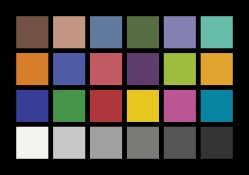
You have an example of a color scale.

George
 

Attachments

  • colors.jpg
    colors.jpg
    53.1 KB · Views: 194
Wow, three days and not a single reply? Isn't anyone of you interested in this at all?
Doesn't anyone have any helpful remarks for me, won't anybody care enough to help me a bit, PhotoEngineer, anyone?

Bernhard
HI,
You are not alone, I have 2383 film and have done tests the same as you. I used ECP2 developer and got yellow film base. I ran the 2383 in ECN2 and got a cleaner base, yet a bit green. I'll take some pics of the negatives when i get some time to fish them out.
 
There is no indications of REM Jet removal. This step adds alkali to the film. Some may dispute this, but it is possible to change the result. Kodak does not recommend Acetic Acid. They use Sulfuric Acid in their authentic process. I never studied this, but there must be a reason there as well.

Just some thoughts.

PE
 
HI,
You are not alone, I have 2383 film and have done tests the same as you. I used ECP2 developer and got yellow film base. I ran the 2383 in ECN2 and got a cleaner base, yet a bit green. I'll take some pics of the negatives when i get some time to fish them out.

Please post results and ideas, I am very interested.
I stopped my experiments on this some time ago, being fed up to get yellow images every time :getlost:
But I still have 4 100ft 16mm rolls left for my Krasnogorsk and a few meters of 35mm for photos.
In case you should find a way to get something useful with ECP at home, I'd love to try it again.

PE, what do yo mean with remjet removal? At least the ECP films I have do not have any remjet on them. Do you propose that still doing the removal step could change the results in a good way, or do you mean that I might have done the removal step without knowing it and that caused bad results?

Bernhard
 
Oh, I misread that to be ECN. Well, ECP is intended to be used with Tungsten lighting. And, it needs about 50 R in addition. Are you using that?

Sorry.

PE
 
Berndard, like George said, I think your film is very much underexposed.
As the blue sensitve layer is the most sensitive one, it appears first (in yellow).
I have a huge roll of 70mm print film and did some experiments some years ago.
This kind of film is very low sensitive. Maybe it was caused by the age, but it took me about 100x the exposure time compared to normal b/w film. So more around 1 ISO instead of 6 :smile:
Another fact is the resulting Schwarzschild effect when using low power light (normal enlarger lamp) and long time.
In real film labs, copy is done with very high intensity lamps. And, as George said, light with a high amount of red and yellow. I don't know about your LEDs. But I guess they are too dark to act as as real exposing light.
I got results but exposing time was too long to use the film in a camera.
Also I never got a real clear film base. I always got a reddish yellow filmbase, nearly like a masked C-41 film.
The only clear film base I got was when developing the film in b/w developer.
I did not have ECP developer. So I mixed the first batch by myself. I got some CD2 from Ebay. But the result was a nearly blank film with just a very weak image.
Then I used ECN2 and also C-41. The results were a bit better, but still not satisfying..
Then I used RA-4 developer which gave the best result. Developing time was short, around 2 Minutes.
But I had to add some KBr to lower fog.

Because I never got clear filmbase and nice colors with this film, I stopped any more experiments.
Maybe this film was from bad storage, even the seller said that the film was frozen.

Joachim
 
Oh, I misread that to be ECN. Well, ECP is intended to be used with Tungsten lighting. And, it needs about 50 R in addition. Are you using that?

Sorry.

PE

No need to apologize :smile:
With 50R you mean I should use a 50R color compensating filter?

Berndard, like George said, I think your film is very much underexposed.
The only clear film base I got was when developing the film in b/w developer.
Then I used RA-4 developer which gave the best result. Developing time was short, around 2 Minutes.
Joachim

Did the resulting B&W images you got satisfy you when you used the B&W developer (and which one did you use?).
Given the low ISO, shooting it in my 16mm Krasnogorsk movie camera won't make much sense (1/60s exposure time).
I am thinking that worst case if I find no better use for the rolls I still have, I could rephotograph inverted images off my screen.
That would give me positive B&W images on 16mm ECP which I could then run through my projector. Might be a nice film-out experiment.
I did such things with still films and also Super 8 (for titles) several times and was always surprised how nice the results looked, especially as my screen is only HD and far away from what film could resolve when doing a proper professional film-out.

Bernhard
 
Photrio.com contains affiliate links to products. We may receive a commission for purchases made through these links.
To read our full affiliate disclosure statement please click Here.

PHOTRIO PARTNERS EQUALLY FUNDING OUR COMMUNITY:


Ilford ADOX Freestyle Photographic Stearman Press Weldon Color Lab Blue Moon Camera & Machine
Top Bottom