
• Welcome to Photrio!
    Registration is fast and free. Join today to unlock search, see fewer ads, and access all forum features.
    Click here to sign up

DIY 31 Megapixel Enlarger

Burial Ground

A
Burial Ground

  • 1
  • 2
  • 40
Beach Girl-3

Beach Girl-3

  • 0
  • 0
  • 106

Recent Classifieds

Forum statistics

Threads
202,480
Messages
2,841,329
Members
101,350
Latest member
efryphoto
Recent bookmarks
0
My screen is working fine now, so eventually yours should go back to working. When mine got burned in, I think I had it running for 12 hours or so unattended, and I think it took a couple days to get the effect to dissapear.

Yeah it's strange, when I do these exposure tests it's only getting a maximum of about 45 minutes operation with the image displayed, then I turn it off.

This ghost effect would be pretty catastrophic in their intended use (SLA 3D printers) so I wonder how they avoid it? I'm thinking that the exposure time of each layer is probably only a few seconds and they probably blank the screen between each exposure, so the constant cycling of pixels might prevent them from getting stuck.

I could probably implement this in my code too, just have the screen flash to black and then back to the image every 5 or 10 seconds during the exposure. It would increase the exposure time, but not by a huge amount of the black screen is only displayed for a fraction of a second.
 
I’m guessing in SLA printers since each layer is a different shape no single frame gets displayed for a long enough duration for it to burn in. I made a gif which flashes between black and white that I set to full screen whenever I’m not exposing, and since creating that I’ve not had any issues with it burning in again.
 
Yeah it's strange, when I do these exposure tests it's only getting a maximum of about 45 minutes operation with the image displayed, then I turn it off.

This ghost effect would be pretty catastrophic in their intended use (SLA 3D printers) so I wonder how they avoid it? I'm thinking that the exposure time of each layer is probably only a few seconds and they probably blank the screen between each exposure, so the constant cycling of pixels might prevent them from getting stuck.

I could probably implement this in my code too, just have the screen flash to black and then back to the image every 5 or 10 seconds during the exposure. It would increase the exposure time, but not by a huge amount of the black screen is only displayed for a fraction of a second.



The problems they met in 3D printing can be seen in this video:

TL;DR: The first layer printing takes too long time, and the heat from resin curing cannot dissipate, making the screen more prone to burn-in with fixed image at high temperatures.

Although your machine doesn't directly cure resin on its surface, it has significantly higher UV power and runtime than typical 3D printers(350w vs 50w, 1000s vs 50s), while the LCD screen absorbs over 80% of the UV power. I know you've measured the temperature, but I'm still concerned about whether some localized heat points may appear and pixels might overheat. Maybe you can try not only have the screen flash to black(now they absorb all the UV power!), but also cut off UV LED for a while.
 
Last edited:
The problems they met in 3D printing can be seen in this video:

TL;DR: The first layer printing takes too long time, and the heat from resin curing cannot dissipate, making the screen more prone to burn-in with fixed image at high temperatures.

Although your machine doesn't directly cure resin on its surface, it has significantly higher UV power and runtime than typical 3D printers(350w vs 50w, 1000s vs 50s), while the LCD screen absorbs over 80% of the UV power. I know you've measured the temperature, but I'm still concerned about whether some localized heat points may appear and pixels might overheat. Maybe you can try not only have the screen flash to black(now they absorb all the UV power!), but also cut off UV LED for a while.


Yeah I thought that screen temperature could also be a reason that I see this issue faster than people using the same screen for normal enlargers with far less optical power.

I did measure temperature on the LCD using a thermocouple during development and I've aimed to keep steady-state temperature under 70 degrees Celsius. One difference with my setup vs. a standard SLA printer is that I have an enormous amount of cooling air blowing over both sides of the LCD screen constantly during operation (without that, the LCD would overheat and fail within seconds I suspect).

I'm not convinced that a black screen will get appreciably hotter than a completely 'clear' screen. You have to imagine that the maximum transmission of UV light through these LCD screens is <5%, that means even when the screen is completely clear it still absorbs 95% of the light energy hitting it. So the difference in heating of a completely black screen vs. a completely clear screen is less than 5%.

I could turn the LED on and off during operation, which I suppose would just reduce the average power and thus average temperature of the LCD during operation (resulting in longer exposure times but at a lower temperature). In some ways this is functionally the same as running the LED at a lower continuous power, which I can also do as it's connected to a variable constant-current power supply. One difference in operating at a higher peak power with some cool-down time vs. operating at a continuous lower power is the higher peak-power operation should be better for processes that have non-linear sensitivity to light (like DAS sensitised gelatin, which hardens via a two-photon process and benefits substantially from higher exposure power over shorter times).
 
My screen is working fine now, so eventually yours should go back to working. When mine got burned in, I think I had it running for 12 hours or so unattended, and I think it took a couple days to get the effect to dissapear.

Seems like I finally managed to get the ghost image to go away, the key seems to have been running the LED at full power into a black screen for 30 minutes or so. I read online that the persistent image is indeed made worse by the things I suspected (heat, high-contrast images) and so heating up the screen when trying to get rid of the persistence made quite a difference. It also makes sense why for me it happened relatively rapidly while for you it took extended 'on' time, your screen wouldn't be getting anywhere near as hot as mine.

Now that it's gone I'll have to implement periodic screen blanking and turning the LED off and on during exposures to prevent it coming back again.
 
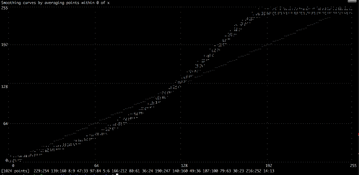
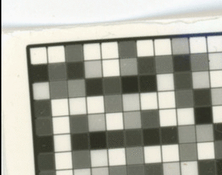
I have not spent much time on this project recently, and when I do, I don't have that many minutes to spend. I managed to get an okish linearization curve using chartthrob, and with the help of Claude Code modified it to generate pencil curves (.AMP files) that allow 256 values. I struggled with light falloff issues messing up calibration charts, and thought I might get more controlled correction curves if I modeled them as a 2.2 gamma correction component, a contrast component and an offset component.

Then I realized I was wasting my time throwing my efforts into a closed Adobe ecosystem, and made my own python tools to make charts and manipulate curves, which became its own distraction for a while, but I've just published it in its current state so I can move on and work on improving my printing workflow. I posted the link in a new thread:

I guess next steps for me are an expose program 'cos I'm still using the one @avandesande wrote, and while it works great, I can't change it to my own taste. I've not done much research. I use OpenCV for my chart program. SDL2 came up when I searched a long time ago. If I just want to display 1 image for a certain number of seconds, probably anything will work, but I'd like something that can display lots of large images for a precise number of frames, that must start to get tricky as hardware requirements are lowered. If anyone has pointers or code they're willing to contribute under a GPL license, please speak up. You might save me or others some effort.

I could post the improvements to chartthrob if there's interest, but it's nothing substantial. it can make pencil curves, and it reads sample by using median instead of mean.
 
Photrio.com contains affiliate links to products. We may receive a commission for purchases made through these links.
To read our full affiliate disclosure statement please click Here.

PHOTRIO PARTNERS EQUALLY FUNDING OUR COMMUNITY:


Ilford ADOX Freestyle Photographic Stearman Press Weldon Color Lab Blue Moon Camera & Machine
Top Bottom