
-
Welcome to Photrio!Registration is fast and free. Join today to unlock search, see fewer ads, and access all forum features.Click here to sign up
You are using an out of date browser. It may not display this or other websites correctly.
You should upgrade or use an alternative browser.
You should upgrade or use an alternative browser.
Darkroom portraits
-
A
- Thread starter argentic
- Start date

Recent Classifieds
-
For Sale Three 126 film cameras - $40
- Started by blee1996
-
For Sale Three Kodak 5x7 film sheath - $30
- Started by blee1996
-
For Sale Three 13x18 FKD wooden plate holder - $30
- Started by blee1996
-
For Sale Out of Production Paper Sale - Sealed Boxes - UK only.
- Started by Gary Holliday
Forum statistics
- Status
- Not open for further replies.


Happy darkrooming!

My best wishes and extreme jealousy with your shiny darkroom outfit there.
I especially like the colour scheme you have going, beats the dull layouts you see. And like it matters when it's dark.
I especially like the colour scheme you have going, beats the dull layouts you see. And like it matters when it's dark.

Why do we do this? Is it to prevent reflected light leaking from the enlarger head from fogging paper?
Light leaking from the enlarger head is part of it, but also, during exposure the light hitting your paper is reflected off and onto the walls, then back onto the paper, reducing contrast - flat black walls around the enlarger minimize this effect.

....the area aound the enlarger painted black, even if the darkroom is otherwise not black.....
I use black construction paper that's pinned to the walls rather than paint. I have a good deal of flexibility in where I put it, and it is absolutely matte black and not the least bit shiny. It's also easy to replace should it get damaged or splattered with anything (beer, scotch etc
 )
)
Mark S "This is the third darkroom that I have built, and I am pretty happy with it - although it only works well with one person in there, sometimes my wife wants to use it at the same time, and we can set up a second enlarger on the E wall, but we bump into each other a lot (not necessarily bad)."
Ah yes the old "Lets turn off the lights and see what developes"
Ah yes the old "Lets turn off the lights and see what developes"

The reasons others have given as to why I painted all the walls etc flat black are correct. I also will have a black curtain come down between the two enlargers if someone else is printing with me.
Thanks for all your comments. So far I have spent about 15 hours in the darkroom in the past couple of days getting ready for a show opening Nov 2nd. So far I really like the layout.
Thanks for all your comments. So far I have spent about 15 hours in the darkroom in the past couple of days getting ready for a show opening Nov 2nd. So far I really like the layout.

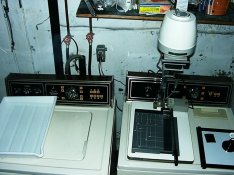
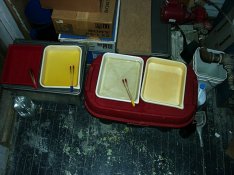
Here's mine: she's all makeshift, and gets out of the way in half an hour of setup. My one luxury is the El-Nikkor enlarger lens, but the enlarger and cold light come from my father who bought it in the 70s, and the rest comes from the stock of an uncle who had custody of the enlarger for a few years.
Attachments
I'm sure that no matter how much time you spend planning your darkroom (3 years in my case) you'll end up changing loads of things as you spend more time working in it.It's a hard life sometimes-you've got to pick a pocket or two 
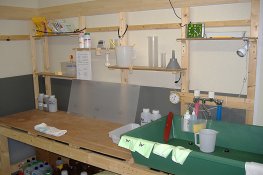
Here are a few pics of my current darkroom. I have been workiing in there for the last year and a half. It's all DIY.
My sink(the green stuff in the pic01) was originally a cement-mixing tub (about 4 feet long). I drilled the bottom, put the drainer, and sealed with epoxy, and it's set on an angle.
There is an exhaust fan on the ceiling right above the sink(not shown in the pic). A small darkroom light is bolted next to it, also.
The worktable is about 6 feet long and can take up to four 11x14 sized trays. Underneath it, liquid chemicals and empty trays are stored.
My enlarger is Fuji FD690 equipped with Fujinon and Nikkor enlarging lenses, and so far I'm pretty happy with the results I'm getting.
My sink(the green stuff in the pic01) was originally a cement-mixing tub (about 4 feet long). I drilled the bottom, put the drainer, and sealed with epoxy, and it's set on an angle.
There is an exhaust fan on the ceiling right above the sink(not shown in the pic). A small darkroom light is bolted next to it, also.
The worktable is about 6 feet long and can take up to four 11x14 sized trays. Underneath it, liquid chemicals and empty trays are stored.
My enlarger is Fuji FD690 equipped with Fujinon and Nikkor enlarging lenses, and so far I'm pretty happy with the results I'm getting.
Attachments
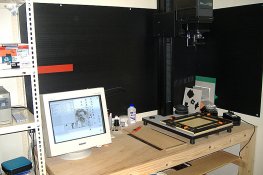
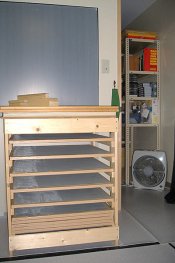
I'm impressed you've blended the computer aspect of your darkroom in so seamlessly, very well done I think. Pretty good for a DIY job, certainly spacey. Love the use of clothes pegs.
Nice work Firecracker. I wish I could be that handy.
I would consider painting the 2 x 4's with a gloss paint that can be easily cleaned. Over time, I think that the wood will attract alot of dust. Likewise the plywood bench tops I would paint or glue down a sheet of white laminate.
It might be the scan or my monitor, but it looks like there is a white residue on your drying screens.
I would consider painting the 2 x 4's with a gloss paint that can be easily cleaned. Over time, I think that the wood will attract alot of dust. Likewise the plywood bench tops I would paint or glue down a sheet of white laminate.
It might be the scan or my monitor, but it looks like there is a white residue on your drying screens.
Nice work Firecracker. I wish I could be that handy.
I would consider painting the 2 x 4's with a gloss paint that can be easily cleaned. Over time, I think that the wood will attract alot of dust. Likewise the plywood bench tops I would paint or glue down a sheet of white laminate.
It might be the scan or my monitor, but it looks like there is a white residue on your drying screens.
Thanks for the advice. I would paint the wood the surface with something sometime. It's just that I've found I'm terribly allergic to most of the paint materials that are sold in the DIY stores. Maybe the epoxy paint would be okay.
The "white residue" looking stuff is perhaps the reflection of the flash from the screens. These screens are not so flat but a bit loose after using them.
I'm impressed you've blended the computer aspect of your darkroom in so seamlessly, very well done I think. Pretty good for a DIY job, certainly spacey. Love the use of clothes pegs.
Thanks. Overtime, I've found that it is more practical to have the equipment set in one room, rather than in two separate rooms. The computer stuff is kept on the dry side near the opening (the pic03) so there's enough air move to get rid of the humidity and the moisture, etc. In the next room, which I keep my other stuff, there's a window to get fresh air in.
The darkroom is about 12 x 9 feet, and the ceiling height is about 8 feet high. And the other room is a little smaller than that with the same height,.

Here are some pics from my main darkroom . I am the handsome man in the prison clothes. The ugly guy in black is Corey my main assistant.
Ok I will try this again. Damm computers
Rats, I will have to get Dinesh over here this week to show me how to do these attachments, cursed computers.
Ok I will try this again. Damm computers
I can't imagine what you must be doing incorrectly. Below the reply screen is the "manage attachments" button. Click on that and then press a "browse" button to have one of your file folders come up. If the one that appears is correct, click on the file and it will show in the browse rectangle. Press upload to post that. If the file folder is not the one in which your pics are stored, just click on the "Look in" button and it will show you your available files. Find what you need and proceed as above.
And hurry up, dammit, I'm anxious to see yours, of all darkrooms!

Bob, on the upload box after you select your file sometimes you must scroll down within the upgrade box itself to see the 'upload' button at the bottom..

- Joined
- Jun 3, 2005
- Messages
- 1,714
- Format
- Multi Format
Rats, I will have to get Dinesh over here this week to show me how to do these attachments, cursed computers.
Bob, please keep in mind that I am dumber than a bag of hammers!
I think the problem is in the jpeg size, sad to say I am geared to pushing around 1/2gig files but I am totally usless when it comes to this . I am going to try again.
here goes
here goes
Attachments
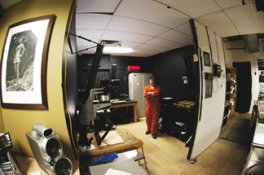
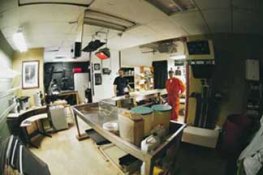
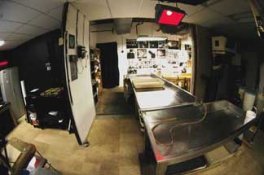

Ah! I thought at first it must have been one of those avant garde spherical sheds... Compared to my space, I would need a map and compass to find my way around! Of course, my darkroom is not part of my work day.

Bob, a darkroom is too big if you can play Frisbee in it
Murray
Murray
- Status
- Not open for further replies.
| Photrio.com contains affiliate links to products. We may receive a commission for purchases made through these links. To read our full affiliate disclosure statement please click Here. |
PHOTRIO PARTNERS EQUALLY FUNDING OUR COMMUNITY:  |