
At some point earlier this year, I kind of lost my mind and dived into a hole that was a bit deeper than I anticipated (otherwise I wouldn't have done it, probably). I went and created an RGB LED light source for my old and (t)rusty Durst 138s. I'll share some of my experiences in this thread for whomever is crazy enough to contemplate something similar, or for those who just want to be amused at how somehow can get carried away with something of doubtful relevance.
Background
I'm using two enlargers, both of which were gifted to me by very generous people. One is a Durst 138s for which I also have an Ilford 500 variable contrast head, but no color head. Evidently, it goes up to 5x7", although the maximum negative size I do with it is 4x5". The other is an M605 which does have a color head and of course goes up to 6x6cm. This left me with sort of a gap: no way to do color/RA4 printing for negative sizes between 6x6cm and 4x5". That sort of bugged me, also because I have a handful of boxes of old/outdated C41 sheet film in my fridge and I would want to make use of them at some point. In addition, I occasionally shoot roll film at 6x9cm or 6x12cm, and it would have been nice to be able to print color at those sizes too.
I looked around a bit for a color head for my 138s, but never found one to my liking (in the vicinity, affordable, etc.) So the 'obvious' solution (what was I thinking...) was to go the DIY route. I was aware of several people using LEDs for VC B&W printing and of Heiland's RGB LED head (which is way out of my budget). I was also aware that contemporary business-oriented RA4 exposure systems use LEDs or semiconductor lasers, and that RA4 paper can just as well be exposed using RGB light as with the traditional CMY dichroic method. After all, it boils down to sort of the same. Sort of...
Add to this the availability these days of RGB LED 'chips' (in fact assemblies with separate R, G and B LEDs on a single die). So that seemed like a pretty straightforward approach: select an RGB LED chip with sufficient power, build some hardware around it and write some software to control the whole thing.
Furthermore I wanted to make something that would not require permanent modification of the enlarger itself so I can easily convert back to its original light source or the Ilford 500 head. I also decided to keep the condensers in place instead of replacing them with a diffused light source. Effectively I ended up with a condenser-diffuser system with a diffuse light source followed by a stack of condensers. Does that make sense? I don't know, but in principle, it's similar to how many color enlargers work as far as I know.
Some options I excluded at an early stage:
I was aware of the ready-made RGB LED bulbs with remote controllers (easily available through eBay and AliExpress etc.), but the control options of either a standard remote control or a smartphone app seemed unattractive to me as neither is aimed at RA4 printing obviously and I wanted something that sort of mimics the way you generally print RA4 using an enlarger - i.e. individual controls for R, G and B (or C, M and Y) directly accessible through some sort of hardware control (e.g. a rotary encoder).
I briefly considered a pure hardware solution with the RGB channels controlled through either a pure hardware PWM solution (e.g. using a 555 timer) or through some kind of variable CCS (constant current source). Neither of these options would have given me much flexibility in linearizing the curves of each individual channel. Moreover, a variable CCS would probably create more problems with linearity than a PWM approach. A software-controlled PWM would give this kind of flexibility, so it made the most sense to go that route.
Architecture
The architecture of the system is fairly straightforward, consisting of three major building blocks: a power supply, the LED light source itself and a control box.
The light source
The first rendition was just a 100W RGB led 'chip' glued (thermal adhesive) to an old CPU cooler with a large heatsink and a fan. This worked of sorts and was perfectly good for B&W, but the color spectrum of the R and the B LEDs was not good enough for RA4. The blue was of too long wavelength and the red of too short wavelength (so effectively both too close to green). Fine for regular lighting solutions, but not good for RA4 printing. This first version allowed me to develop most of the hard- and software so it was kind of useful for testing, but not a good final solution. I also found that you need a lot of red relative to blue and green (after all, the paper is optimized originally for incandescent light sources with only a little blue and a lot of red in their spectra), so having the option to pick a more optimal ratio was attractive.
The current version is three arrays of LEDs:
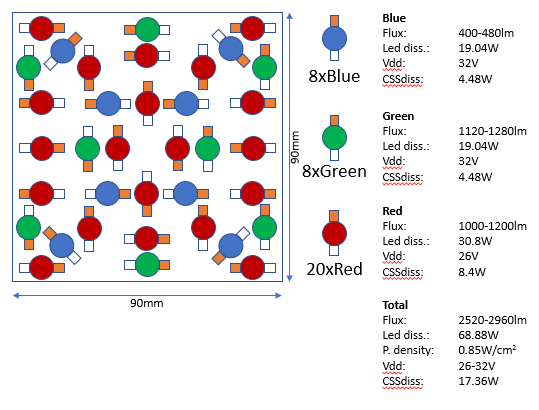
Blue: 8x 'near-UV' 425-430nm 3W
Green: 8x 'emerald green' 520-530nm 3W
Red: 20x 'deep red' 640-660m 3W
In total 36 LEDs for a nominal max power of 108W (which in reality turns out to be closer to 70W taking into account voltage drop and actual current used).
These were glued in a 90x90mm square pattern with thermal adhesive to a 5mm aluminum U-profile, which in turn was attached to a mounting bracket that slides into the thermal protective glass slot on the 138s. The blue and green LEDs are connected in series, the red LEDs are divided into two groups of 10 series-connected LEDs each and both arrays are paralleled. This translates into power requirements of ca. 32V@650mA for the blue and green channels and 26V @ 1300mA for the red channel (I run the LEDs are little under their 700mA max specification which gives virtually no penalty in terms of color rendition or light output, but it does likely extend the lifespan of the LEDs somewhat).
This is the pattern I fashioned for the LEDs:
At about 10cm from the LEDs a square diffuser fashioned from milky plexiglass is mounted. A heat sink is mounted at the back of the aluminum mounting bracket with an 80mm computer fan attached to it. Another 80mm fan is mounted so that it forces a stream of air across the front side of the LEDs, so effectively the LEDs are cooled both from the rear and the front. This creates some sound obviously, but a whole lot less than the noisy Ilford 500 head...
This is what the light source looks like as it is mounted in the enlarger:
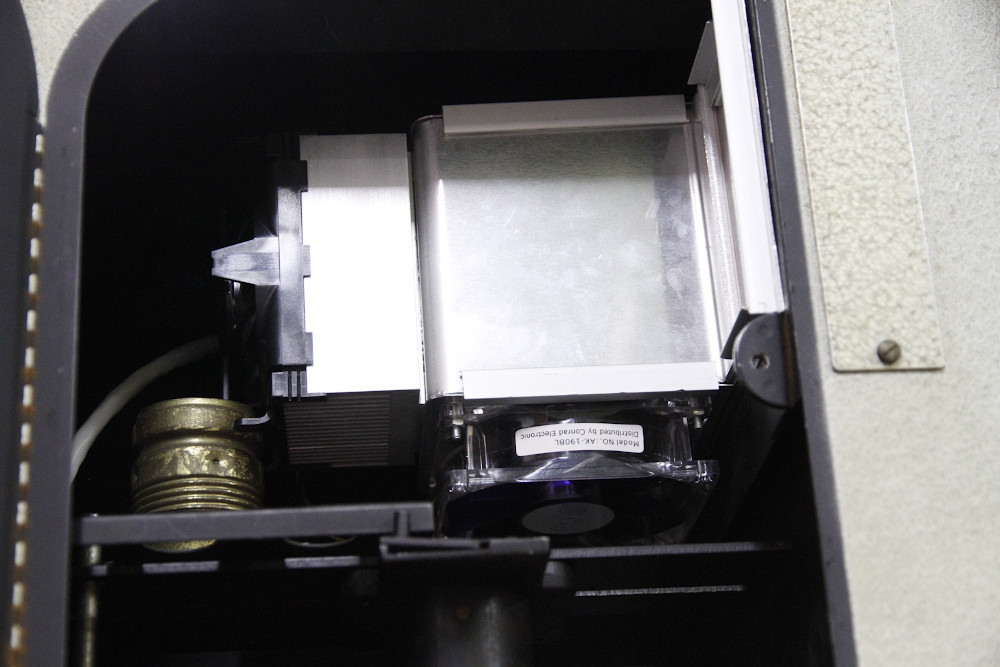
The rear cooling fan and heatsink are visible to the left, just above the old fitting for the original bulb of the 138 which could remain in place, the other fan is visible at the bottom. The big shiny thing is the U-shaped bracket on which the LEDs are glued (not visible in the image as they're inside the bracket). The diffuser screen is also not visible but is more or less flush with the mounting plate to the right. Electrical connections are towards the rear and not visible. I haphazardly used UTP network cable to connect the light source to the power supply which is of course a fairly poor choice for these current levels, but it works OK in practice. Light output is perfectly even on the baseboard with no observable hot- or cold spots (apart from light falloff of the enlarging lens used if it's not stopped down).
The power supply
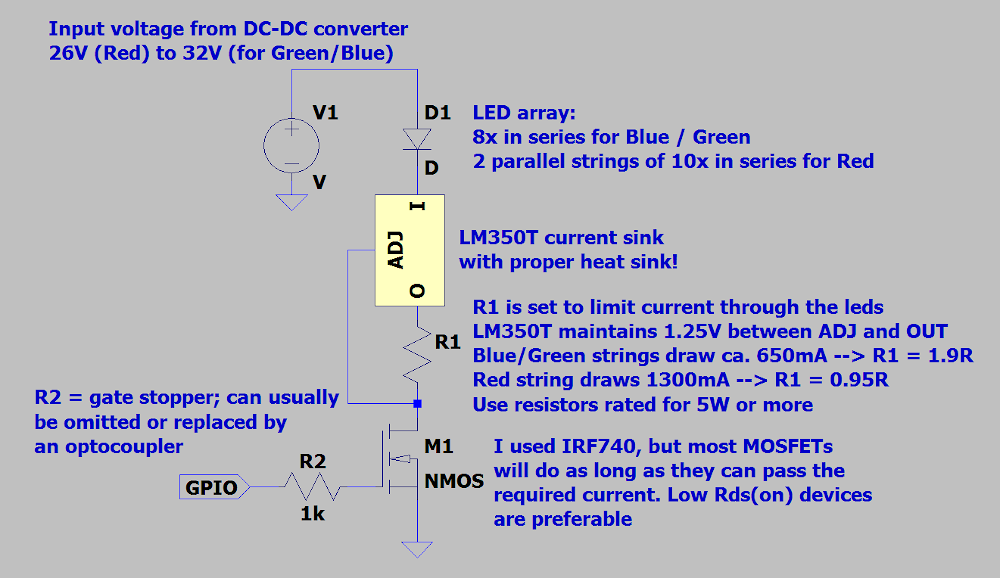
This is the simplest part; I basically use an off-the-shelf 12V SMPS and DC-DC step-up converters for the LEDs (one each for each color channel). The MOSFETs and LM350T current limiters are also in this module, so basically everything that handles any significant power is either in this module or in the light source module itself. A fan and some crude holes in the housing take care of the necessary cooling.
This is the power supply module:
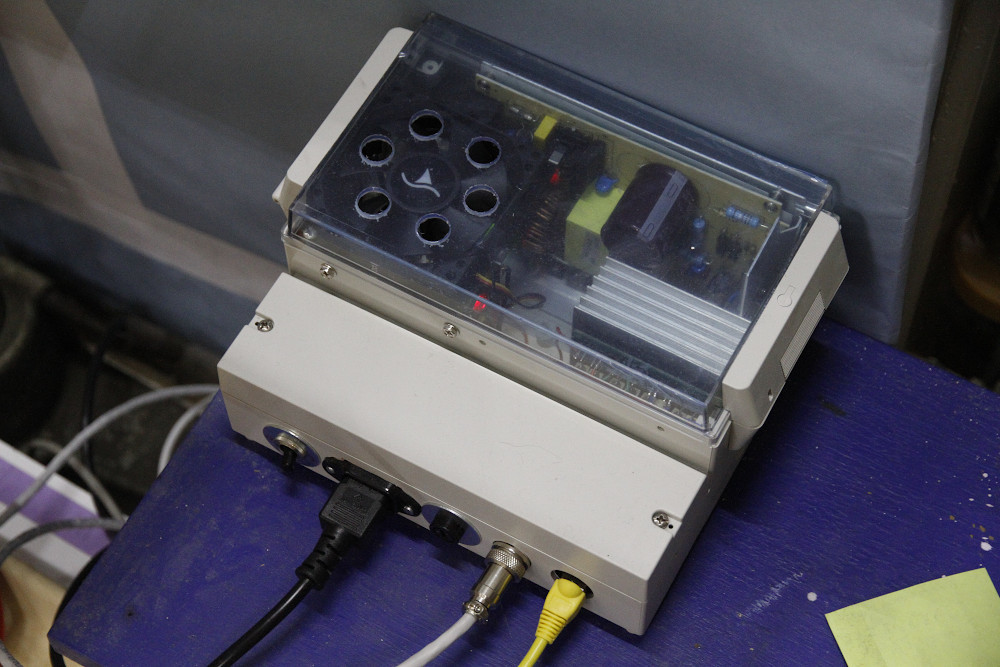
230V entry to the left (with on/off switch on its left and fuse holder on its right), the round shiny connector is a 10-pole DIN connector that goes to the light source in the enlarger. The yellow UTP cable is a bog-standard network patch cable that links the power supply module with the control module. The cooling fan is at the top left, the heat aluminum heat sink to its right is for the LM350T current limits which dissipate a few watts each at full power. The 12V SMPS is towards the back (with its cover removed to make everything fit inside the box). The DC-DC converters and the MOSFETS are at the bottom of the module and not visible in the picture.
Control module
The brains are of course the most complex. Essentially, the thing is built around an Arduino Nano (Chinese ripoff, that is). An MCP23017 offers an array of GPIO ports which are used to read the four rotary encoders (each with a push button switch), exposure button, 230V input trigger and foot switch. Four 7-segment 4-digit BCD displays are used to display values; the clock pins of the displays are connected and controlled by a single Arduino pin and the data pins of the displays each have their own Arduino port. This approach allows 4 displays to be run using only 5 pins on the Arduino. I tried running the displays over the MCP23017 as well, but this was inconvenient as (1) the library for the displays did not play nice with the MCP23017 and the data rate over the MCP23017 bus proved to be insufficient to run 4 displays without too much clogging up the timing of the processor. The 1637-controlled displays are run basically by bit-banging control signals to them, which makes things kind of slow (they're controlled with serial communication) and it takes some trickery to do this efficiently.
The rotary encoders obviously serve the purpose of setting the desired values for R, G, B (or C, M, Y) and the exposure time, and the contrast grade in B&W mode. A foot switch can be used to start the exposure, which is nice as it means I don't have to touch the enlarger itself when starting an exposure (the control module is bolted to the side of the enlarger's baseboard). The 230V input trigger was added in order to link the control module to an optional color analyzer; the control module enters exposure mode when it sees 230V on the 230V trigger input and runs the LEDs with their exposure settings as long as 230V is present on the input. This allows the normal use of a color analyzer as if it were hooked up to a regular CMY dichroic head including the analyze and expose modes of the color analyzer. In practice I've not used this function though, so it turned out a bit superfluous. It also seems like the analyzer has some trouble getting good readings with PWM controlled LEDs, but I haven't looked into it deeply.
The controller module running in CMY mode:
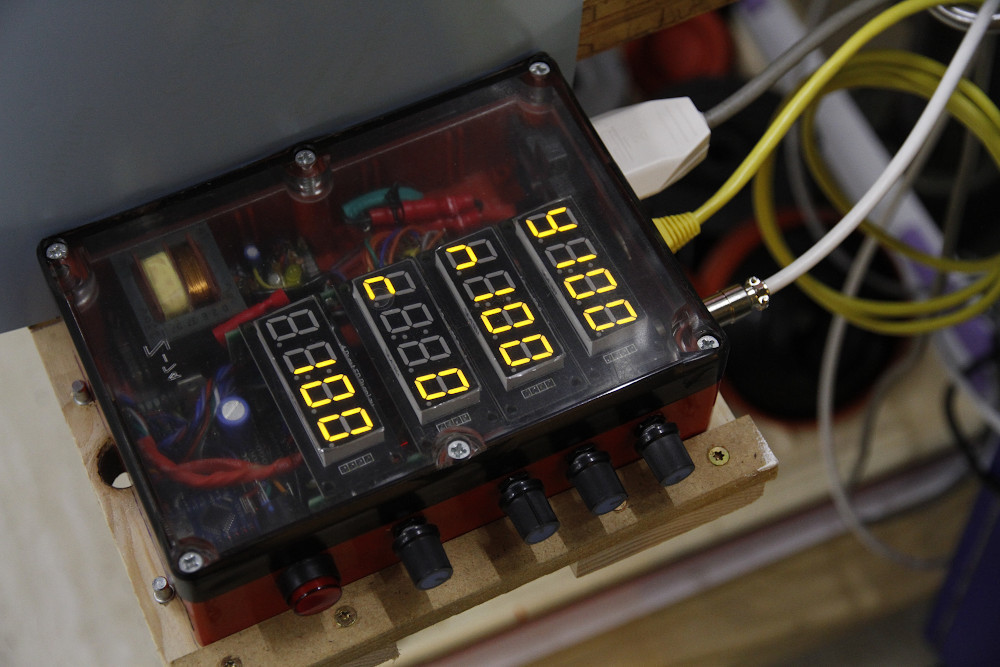
Four rotary encoders are visible at the bottom (in fact the right-hand side of the controller box, since I'm right-handed) as well as a push-button to give the 'expose' command. The single red LED in the 'expose' button is turned on in B&W mode (see below) and I currently blink it a few times when I store data to the Arduino's EEPROM so that I can turn off the control box and when turning it on, it recalls the settings as they were when the last exposure was made.
The control module has a few different modes for different purposes:
* An RGB color mode for color printing, with R, G and B values set individually with the rotary encoders.
* A CMY mode which is just RGB mode, but with the values inversed.
* A B&W mode in which the desired contrast grade is set and appropriate blue and green intensities being calculated by the processor. I programmed this in such a way that I get approximately the same exposure to just reach dmax across grades 1-5 (grade 0 requiring more exposure). Calculation of the blue and green components is done with a simple algorithm and contrast grades are set in decimals, so any grade between 0 and 5 can be set in tenths of a grade. This is much more precision than ever needed (half grade steps would be perfectly fine for me), but it was not more difficult than a lower precision setup.
* A 'raw' mode for setting uncompensated R, G and B values for testing purposes. In this mode, the entire 12-bit resolution of the PWM controller is available, so each channel can be set at any value across its 0-4095 range. In the other modes, more user-friendly ranges of 0-300 are used with compensation between channels to ensure more intuitive tracking between different channels.
For the PWM control, I use a PC9685 12-bit PWM controller, of which only 4 channels are used (3 for the color channels and 1 for the fans, although I ended up running the fans at full speed if any LED is on). I did not use the built-in Arduino 8 bit PWM functionality due to its inherent limitations. Most notably, good tracking and resolution of the color channels requires much more precision than 8 bit (allowing only 0-255 values). The PWM outputs are run through the UTP link cable to the power supply where they are fed to the gates of IRF740 MOSFETs that do the switching of the LED and fan channels.
The control box houses its own 7805 to make 5V for the CPU, displays etc. from the 12V it gets from the power supply module.
Below is the control module in B&W mode:
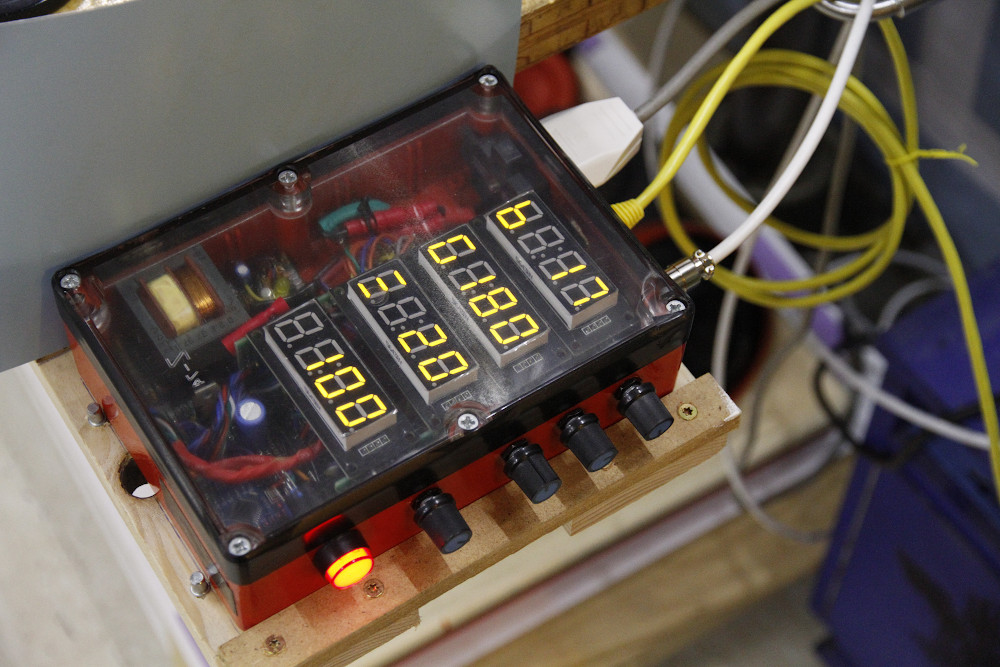
In this mode, the contrast grade is set using the 3rd rotary knob from the right (next to the display that says '20' for grade 2). The B and G values in the two displays above it are calculated automatically. The left-most/bottom display gives the time in tenths of a second (so the current value of '100' is 10.0 seconds).
The functionality of the control module comprises:
* An exposure mode in which the timer counts down while the LEDs are on in their configured state (at the contrast grade or color filtering set on the displays)
* A 'burn' mode in which the LEDs are on and the counter counts upwards from 0.
* A 'measure' mode in which the LEDs are on in their configured filter/contrast state.
* A 'focus' mode in which the LEDs burn at their highest setting to allow convenient focusing (you basically want all the light you can get while focusing after all).
Whenever an exposure is made, the controller updates its eeprom with the current settings so they can be retrieved after power down and I can continue where I last left off. This part seems a little buggy still as I only added it last week, but it's more of a minor update than an essential part of the system.
Linearization/LED control
The main challenge in terms of tailoring the software was to get the light response of the LEDs to work in a desirable way.
In color mode, I initially planned to mimic the CMY settings from my Durst M605 so that I could theoretically print the same negative with the same settings on both enlargers at the same filter values. However, since some crude measurements suggested that the M605 dichroic head seems wildly non-linear (even if you assume the filters work exponentially), I quite quickly gave up on this. Instead, I chose to pick a filter range of 0-300 with an associated 'density' range of about 4.5 stops. This gives a bit more resolution than the M605 head does, so I can basically set the color filtration in somewhat smaller steps than on my dichroic head. I ended up choosing an exponential curve for the color channels as follows:
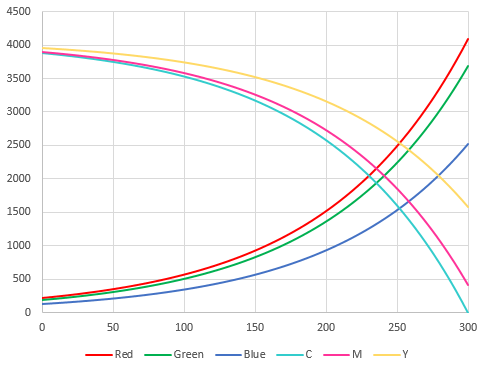
The 0-300 values on the horizontal axis are the 'user-friendly' values that can be set on the displays. The vertical axis displays the values as set on the 12-bit PWM controller (range 0-4095). I plotted R, G and B and their C, M and Y inverse values.
The steepness of the curves is a bit of a guesstimate based on earlier testing and this gradient turns out to give quite intuitive steps/increments in the range where most color negatives end up. This is around 125Y/125M(0/C), which would translate to something in the neighborhood of 40-60Y/M for a normal Durst dichroic head.
Note the roughly 4.5 stop range of each of the channels. Note also the different end points for each of the colors at the extreme 300-setting, which mimics (within a ballpark range) the color temperature of an incandescent bulb. However, this is uncalibrated and fairly arbitrary, so it's not necessarily an accurate alignment with the 2750K light bulb in my M605. Actually, if you look at the plots, it's very clear that it's not an accurate translation of an incandescent spectrum, as that would require the green curve to be roughly halfway (or just a little higher) the red and blue. However, I chose this configuration as it translates into roughly equal components of Y and M (B and G) for a typical C41 negative. An arbitrary choice for sure, and further emphasis on the fact that the intent was *not* to recreate filter behavior of a dichroic head in an exact way.
An oddity that is not captured in the graph is that I chose to turn off a channel if it's set to 0, so there is in fact a jump to the 0-point at the left extremity of each plot, but that's of little concern in regular color work as you'd never be close to a that point anyway.
In black and white mode, my intent was to create an intuitive scale of contrast grades and to have the controller do the work of calculating the required B and G light values. I did *not* calibrate these grades to ISO-R grades; instead, I did some test prints on Adox MCC112 and chose grades that look like roughly linear contrast increments for each grade. In reality, if you look at actual paper curves in paper datasheets, this means that my contrast grades do not conform to those as created by e.g. Multigrade filters. In other words: my grade 2.0 is probably a little different from the grade 2.0 you will get with Multigrade filters. Again, the purpose was not to create something that exactly mimics existing stuff, but to create something that works intuitively for me.
A further choice I made was to try and align the different grades in such a way that the exposure to just reach dmax on the paper remains the same across most of the grades. Eventually I did this for grades 1-5 and not for grades 0-1, as on the very low grades, the paper gets pretty slow (relative to the output of the light source) and it would result in unnecessarily long exposures for grades 1-5 to remain in pace with grades 0-1. Again this is a very personal choice, as I tend to print for good differentiation in the shadows and more or less allow the highlights to end up wherever they do, and adjusting the contrast grades if the highlights don't render as I'd like. But my starting point is always shadow differentiation. Hence, it makes sense to have a system in which I can easily change the contrast grade without having to alter the exposure time. I know that most existing systems (i.e. Ilford Multigrade filters) assume a similar exposure time for 'medium grey' across the middle contrast grades (typically 1-4, with 0 and 5 requiring different times), but for me, 'medium grey' is sort of a meaningless/ill-defined term if I subjectively evaluate a print, while the extremes of the density cure (blacks and whites) are much more intuitively experienced. Hence my departure from the established standards in this sense.
I did some experimenting with non-linear/exponential curves for blue and green across the grades, but in the end, it turns out that a linear 'curve' works quite well in practice, with some offsets to account for the 'same time for dmax' reasoning outlined above. This is what the B&W contrast grade curves look like at present:

Horizontal axis: contrast grade (i.e. my non-industry standard interpretation)
Vertical axis: light output of each channel in %, so essentially the same as the plots above but in % instead of absolute values.
Note two things:
(1) grade 0 has a small blue component. This is to allow the paper to reach dmax within a reasonable time; if only pure green would be used, exposure times (at least for some papers I've used) would be excessive and they would never quite reach dmax. Hence, my grade 0 would actually be something like '0+' in the standard interpretation. Or, put differently: I don't do an actual grade 00 (an entirely acceptable and deliberate compromise for me).
(2): at grade 5, the blue channel puts out only a very small amount of light compared to the maximum output of green at grade 0. This is because for complex reasons (which we could dedicate several posts to, relating to the efficiency of blue and green LEDs and response of emulsions...), the effective speed of the paper is much higher at grade 5/blue light than at grade 0/green light. If you look at curve plots of papers, this is not true/accurate at all, but those plots do not take into account luminous efficiency of light sources, which is what makes this quite complex. Another issue is that the effective speed of papers actually varies across grades, with the paper being slower in absolute terms at the extreme grades (0 and 5) and faster at intermediate grades (peak speed is usually at about grade 3). Hence, my linear approach to rendering the grades is not perfect in the real world, but close enough 'for government work'.
For all the mess with curves as explained above, both color and B&W contrast, I chose to use algorithms instead of e.g. lookup tables. The latter would have made it somewhat easier to work with complex non-linear curves, but I have the impression that that is not really necessary, and I quite like the elegance of a few lines of code with some formulas instead of large and more rigid lookup tables. To make and manipulate the curves, I extensively used X/Y plots in Excel, fitting exponential formulas and translating them into algorithms (at least for color and initially also for B&W). The current values and curves are my best approximation so far and I may very well change/optimize them in the future, which is also true for other elements of the code.
Experiences so far
Well, I'm quite pleased with how the system works and the results I get with it. The light output is certainly sufficient for what I do with it, which is mostly smaller prints up to 24x30cm. Exposure times are quite similar to what they were before with more classic light sources. They are maybe a bit on the longer side in B&W mode due to my 'same time for dmax' approach, but still acceptable as far as I can currently tell. In color mode, everything seems to work quite well; exposure is fast and easy, and the results are comparable to what I get from my M605 which I haven't used much anymore lately. I don't think the results are exactly on par with a good dichroic setup, but they are entirely acceptable to me with the ability to render subtle hues when the negatives contain these (and if I print on Fuji Crystal Archive Supreme), as well as very bold, pure and saturated hues (especially on Kodak Endura). Overall, color prints look natural (with proper filtration) to my eye and I have sufficient flexibility in tuning filtration to match the look I'm after. And I succeeded in my initial goal, which was to add the ability to do color enlargements of 4x5" film, which this setup does as easily as prints from 35m and everything in between. Moreover, I don't have to change anything in the enlarger setup to switch between color and B&W and B&W work is actually a bit easier than with the Ilford 500 head because I could tailor the user interface of the electronics to my needs/desires.
I do find that the condenser configuration is now different from the original light source and the Ilford 500 head. I use a 240 condenser in the top position regardless of the enlarger lens used and I vary the bottom condenser in accordance with the lens used, ranging from a 200 for a 135mm lens and 4x5" down to a 130 or 85 condensor for a 75mm lens and 6x6 or 35mm negatives respectively. I experimentally figured out which configurations give even illumination across the negatives and these were the combinations that turned out to be good in terms of evenness and light output.
I may add some examples of scanned prints at some point, but these always come (particularly in color) with the huge drawback of not accurately depicting the prints as they look in real life, so it's always a bit misleading and therefore not really a priority for me (sorry). Also note that nowhere in the process I did any real densitometry of prints, so it's all judged by eye, by making some prints from negatives of color charts and mostly prints of real-life negatives under various lighting conditions an on different film stocks. This way I determined earlier that the first version of the light source was insufficient for color work in my opinion (problems with color purity, particularly in greens and yellows). I think that maybe some marginal improvement is possible by replacing the current blue 425-430nm LEDs with 'royal blue' 440-450nm LEDs, but I have not verified this and so far I have not felt the inclination to replace the current ones.
Edit - some examples of RA4 prints made with this setup, all on FujiCrystal Archive Supreme lustre:
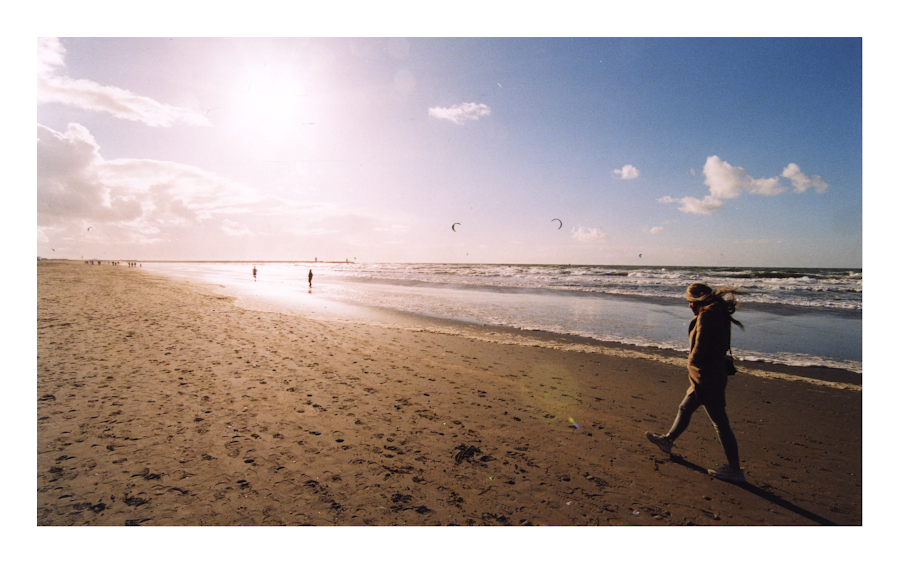
Fuji Superia 200 in Bonavolta C41 developer
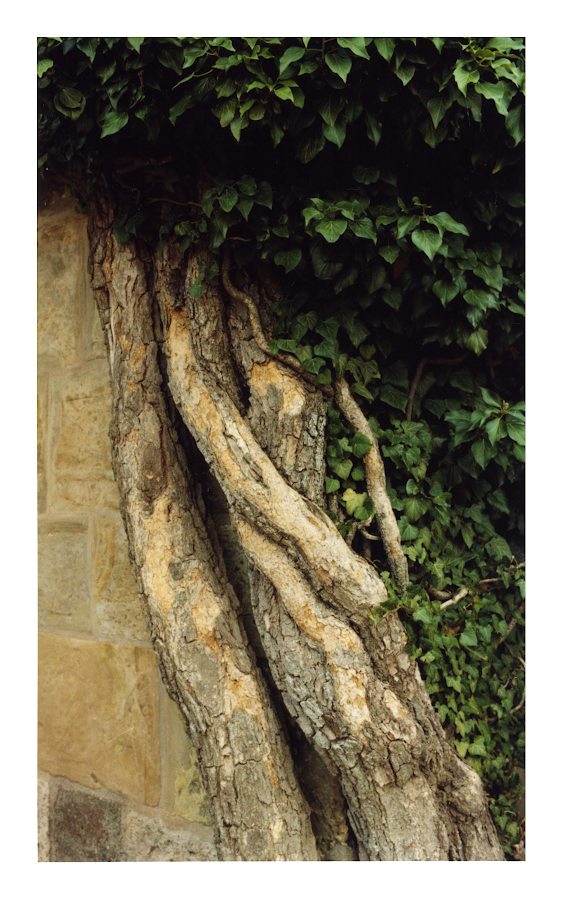
Kodak ProImage 100 in Fuji LR minilab chemistry
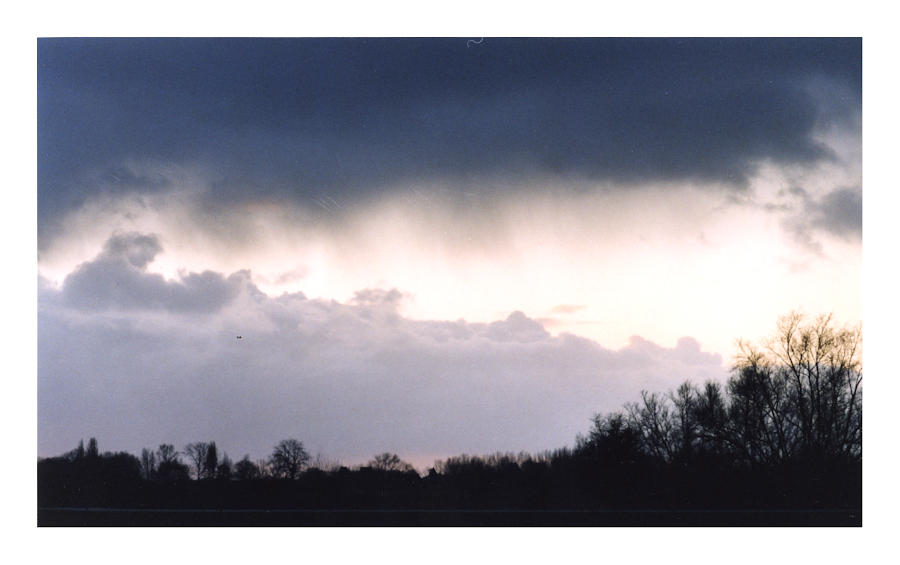
Fuji Superia 200 in Fuji LR minilab chemistry
Kodak ProImage 100 in Fuji LR minilab chemistry
Background
I'm using two enlargers, both of which were gifted to me by very generous people. One is a Durst 138s for which I also have an Ilford 500 variable contrast head, but no color head. Evidently, it goes up to 5x7", although the maximum negative size I do with it is 4x5". The other is an M605 which does have a color head and of course goes up to 6x6cm. This left me with sort of a gap: no way to do color/RA4 printing for negative sizes between 6x6cm and 4x5". That sort of bugged me, also because I have a handful of boxes of old/outdated C41 sheet film in my fridge and I would want to make use of them at some point. In addition, I occasionally shoot roll film at 6x9cm or 6x12cm, and it would have been nice to be able to print color at those sizes too.
I looked around a bit for a color head for my 138s, but never found one to my liking (in the vicinity, affordable, etc.) So the 'obvious' solution (what was I thinking...) was to go the DIY route. I was aware of several people using LEDs for VC B&W printing and of Heiland's RGB LED head (which is way out of my budget). I was also aware that contemporary business-oriented RA4 exposure systems use LEDs or semiconductor lasers, and that RA4 paper can just as well be exposed using RGB light as with the traditional CMY dichroic method. After all, it boils down to sort of the same. Sort of...
Add to this the availability these days of RGB LED 'chips' (in fact assemblies with separate R, G and B LEDs on a single die). So that seemed like a pretty straightforward approach: select an RGB LED chip with sufficient power, build some hardware around it and write some software to control the whole thing.
Furthermore I wanted to make something that would not require permanent modification of the enlarger itself so I can easily convert back to its original light source or the Ilford 500 head. I also decided to keep the condensers in place instead of replacing them with a diffused light source. Effectively I ended up with a condenser-diffuser system with a diffuse light source followed by a stack of condensers. Does that make sense? I don't know, but in principle, it's similar to how many color enlargers work as far as I know.
Some options I excluded at an early stage:
I was aware of the ready-made RGB LED bulbs with remote controllers (easily available through eBay and AliExpress etc.), but the control options of either a standard remote control or a smartphone app seemed unattractive to me as neither is aimed at RA4 printing obviously and I wanted something that sort of mimics the way you generally print RA4 using an enlarger - i.e. individual controls for R, G and B (or C, M and Y) directly accessible through some sort of hardware control (e.g. a rotary encoder).
I briefly considered a pure hardware solution with the RGB channels controlled through either a pure hardware PWM solution (e.g. using a 555 timer) or through some kind of variable CCS (constant current source). Neither of these options would have given me much flexibility in linearizing the curves of each individual channel. Moreover, a variable CCS would probably create more problems with linearity than a PWM approach. A software-controlled PWM would give this kind of flexibility, so it made the most sense to go that route.
Architecture
The architecture of the system is fairly straightforward, consisting of three major building blocks: a power supply, the LED light source itself and a control box.
The light source
The first rendition was just a 100W RGB led 'chip' glued (thermal adhesive) to an old CPU cooler with a large heatsink and a fan. This worked of sorts and was perfectly good for B&W, but the color spectrum of the R and the B LEDs was not good enough for RA4. The blue was of too long wavelength and the red of too short wavelength (so effectively both too close to green). Fine for regular lighting solutions, but not good for RA4 printing. This first version allowed me to develop most of the hard- and software so it was kind of useful for testing, but not a good final solution. I also found that you need a lot of red relative to blue and green (after all, the paper is optimized originally for incandescent light sources with only a little blue and a lot of red in their spectra), so having the option to pick a more optimal ratio was attractive.
The current version is three arrays of LEDs:
Blue: 8x 'near-UV' 425-430nm 3W
Green: 8x 'emerald green' 520-530nm 3W
Red: 20x 'deep red' 640-660m 3W
In total 36 LEDs for a nominal max power of 108W (which in reality turns out to be closer to 70W taking into account voltage drop and actual current used).
These were glued in a 90x90mm square pattern with thermal adhesive to a 5mm aluminum U-profile, which in turn was attached to a mounting bracket that slides into the thermal protective glass slot on the 138s. The blue and green LEDs are connected in series, the red LEDs are divided into two groups of 10 series-connected LEDs each and both arrays are paralleled. This translates into power requirements of ca. 32V@650mA for the blue and green channels and 26V @ 1300mA for the red channel (I run the LEDs are little under their 700mA max specification which gives virtually no penalty in terms of color rendition or light output, but it does likely extend the lifespan of the LEDs somewhat).
This is the pattern I fashioned for the LEDs:
At about 10cm from the LEDs a square diffuser fashioned from milky plexiglass is mounted. A heat sink is mounted at the back of the aluminum mounting bracket with an 80mm computer fan attached to it. Another 80mm fan is mounted so that it forces a stream of air across the front side of the LEDs, so effectively the LEDs are cooled both from the rear and the front. This creates some sound obviously, but a whole lot less than the noisy Ilford 500 head...
This is what the light source looks like as it is mounted in the enlarger:
The rear cooling fan and heatsink are visible to the left, just above the old fitting for the original bulb of the 138 which could remain in place, the other fan is visible at the bottom. The big shiny thing is the U-shaped bracket on which the LEDs are glued (not visible in the image as they're inside the bracket). The diffuser screen is also not visible but is more or less flush with the mounting plate to the right. Electrical connections are towards the rear and not visible. I haphazardly used UTP network cable to connect the light source to the power supply which is of course a fairly poor choice for these current levels, but it works OK in practice. Light output is perfectly even on the baseboard with no observable hot- or cold spots (apart from light falloff of the enlarging lens used if it's not stopped down).
The power supply
This is the simplest part; I basically use an off-the-shelf 12V SMPS and DC-DC step-up converters for the LEDs (one each for each color channel). The MOSFETs and LM350T current limiters are also in this module, so basically everything that handles any significant power is either in this module or in the light source module itself. A fan and some crude holes in the housing take care of the necessary cooling.
This is the power supply module:
230V entry to the left (with on/off switch on its left and fuse holder on its right), the round shiny connector is a 10-pole DIN connector that goes to the light source in the enlarger. The yellow UTP cable is a bog-standard network patch cable that links the power supply module with the control module. The cooling fan is at the top left, the heat aluminum heat sink to its right is for the LM350T current limits which dissipate a few watts each at full power. The 12V SMPS is towards the back (with its cover removed to make everything fit inside the box). The DC-DC converters and the MOSFETS are at the bottom of the module and not visible in the picture.
Control module
The brains are of course the most complex. Essentially, the thing is built around an Arduino Nano (Chinese ripoff, that is). An MCP23017 offers an array of GPIO ports which are used to read the four rotary encoders (each with a push button switch), exposure button, 230V input trigger and foot switch. Four 7-segment 4-digit BCD displays are used to display values; the clock pins of the displays are connected and controlled by a single Arduino pin and the data pins of the displays each have their own Arduino port. This approach allows 4 displays to be run using only 5 pins on the Arduino. I tried running the displays over the MCP23017 as well, but this was inconvenient as (1) the library for the displays did not play nice with the MCP23017 and the data rate over the MCP23017 bus proved to be insufficient to run 4 displays without too much clogging up the timing of the processor. The 1637-controlled displays are run basically by bit-banging control signals to them, which makes things kind of slow (they're controlled with serial communication) and it takes some trickery to do this efficiently.
The rotary encoders obviously serve the purpose of setting the desired values for R, G, B (or C, M, Y) and the exposure time, and the contrast grade in B&W mode. A foot switch can be used to start the exposure, which is nice as it means I don't have to touch the enlarger itself when starting an exposure (the control module is bolted to the side of the enlarger's baseboard). The 230V input trigger was added in order to link the control module to an optional color analyzer; the control module enters exposure mode when it sees 230V on the 230V trigger input and runs the LEDs with their exposure settings as long as 230V is present on the input. This allows the normal use of a color analyzer as if it were hooked up to a regular CMY dichroic head including the analyze and expose modes of the color analyzer. In practice I've not used this function though, so it turned out a bit superfluous. It also seems like the analyzer has some trouble getting good readings with PWM controlled LEDs, but I haven't looked into it deeply.
The controller module running in CMY mode:
Four rotary encoders are visible at the bottom (in fact the right-hand side of the controller box, since I'm right-handed) as well as a push-button to give the 'expose' command. The single red LED in the 'expose' button is turned on in B&W mode (see below) and I currently blink it a few times when I store data to the Arduino's EEPROM so that I can turn off the control box and when turning it on, it recalls the settings as they were when the last exposure was made.
The control module has a few different modes for different purposes:
* An RGB color mode for color printing, with R, G and B values set individually with the rotary encoders.
* A CMY mode which is just RGB mode, but with the values inversed.
* A B&W mode in which the desired contrast grade is set and appropriate blue and green intensities being calculated by the processor. I programmed this in such a way that I get approximately the same exposure to just reach dmax across grades 1-5 (grade 0 requiring more exposure). Calculation of the blue and green components is done with a simple algorithm and contrast grades are set in decimals, so any grade between 0 and 5 can be set in tenths of a grade. This is much more precision than ever needed (half grade steps would be perfectly fine for me), but it was not more difficult than a lower precision setup.
* A 'raw' mode for setting uncompensated R, G and B values for testing purposes. In this mode, the entire 12-bit resolution of the PWM controller is available, so each channel can be set at any value across its 0-4095 range. In the other modes, more user-friendly ranges of 0-300 are used with compensation between channels to ensure more intuitive tracking between different channels.
For the PWM control, I use a PC9685 12-bit PWM controller, of which only 4 channels are used (3 for the color channels and 1 for the fans, although I ended up running the fans at full speed if any LED is on). I did not use the built-in Arduino 8 bit PWM functionality due to its inherent limitations. Most notably, good tracking and resolution of the color channels requires much more precision than 8 bit (allowing only 0-255 values). The PWM outputs are run through the UTP link cable to the power supply where they are fed to the gates of IRF740 MOSFETs that do the switching of the LED and fan channels.
The control box houses its own 7805 to make 5V for the CPU, displays etc. from the 12V it gets from the power supply module.
Below is the control module in B&W mode:
In this mode, the contrast grade is set using the 3rd rotary knob from the right (next to the display that says '20' for grade 2). The B and G values in the two displays above it are calculated automatically. The left-most/bottom display gives the time in tenths of a second (so the current value of '100' is 10.0 seconds).
The functionality of the control module comprises:
* An exposure mode in which the timer counts down while the LEDs are on in their configured state (at the contrast grade or color filtering set on the displays)
* A 'burn' mode in which the LEDs are on and the counter counts upwards from 0.
* A 'measure' mode in which the LEDs are on in their configured filter/contrast state.
* A 'focus' mode in which the LEDs burn at their highest setting to allow convenient focusing (you basically want all the light you can get while focusing after all).
Whenever an exposure is made, the controller updates its eeprom with the current settings so they can be retrieved after power down and I can continue where I last left off. This part seems a little buggy still as I only added it last week, but it's more of a minor update than an essential part of the system.
Linearization/LED control
The main challenge in terms of tailoring the software was to get the light response of the LEDs to work in a desirable way.
In color mode, I initially planned to mimic the CMY settings from my Durst M605 so that I could theoretically print the same negative with the same settings on both enlargers at the same filter values. However, since some crude measurements suggested that the M605 dichroic head seems wildly non-linear (even if you assume the filters work exponentially), I quite quickly gave up on this. Instead, I chose to pick a filter range of 0-300 with an associated 'density' range of about 4.5 stops. This gives a bit more resolution than the M605 head does, so I can basically set the color filtration in somewhat smaller steps than on my dichroic head. I ended up choosing an exponential curve for the color channels as follows:
The 0-300 values on the horizontal axis are the 'user-friendly' values that can be set on the displays. The vertical axis displays the values as set on the 12-bit PWM controller (range 0-4095). I plotted R, G and B and their C, M and Y inverse values.
The steepness of the curves is a bit of a guesstimate based on earlier testing and this gradient turns out to give quite intuitive steps/increments in the range where most color negatives end up. This is around 125Y/125M(0/C), which would translate to something in the neighborhood of 40-60Y/M for a normal Durst dichroic head.
Note the roughly 4.5 stop range of each of the channels. Note also the different end points for each of the colors at the extreme 300-setting, which mimics (within a ballpark range) the color temperature of an incandescent bulb. However, this is uncalibrated and fairly arbitrary, so it's not necessarily an accurate alignment with the 2750K light bulb in my M605. Actually, if you look at the plots, it's very clear that it's not an accurate translation of an incandescent spectrum, as that would require the green curve to be roughly halfway (or just a little higher) the red and blue. However, I chose this configuration as it translates into roughly equal components of Y and M (B and G) for a typical C41 negative. An arbitrary choice for sure, and further emphasis on the fact that the intent was *not* to recreate filter behavior of a dichroic head in an exact way.
An oddity that is not captured in the graph is that I chose to turn off a channel if it's set to 0, so there is in fact a jump to the 0-point at the left extremity of each plot, but that's of little concern in regular color work as you'd never be close to a that point anyway.
In black and white mode, my intent was to create an intuitive scale of contrast grades and to have the controller do the work of calculating the required B and G light values. I did *not* calibrate these grades to ISO-R grades; instead, I did some test prints on Adox MCC112 and chose grades that look like roughly linear contrast increments for each grade. In reality, if you look at actual paper curves in paper datasheets, this means that my contrast grades do not conform to those as created by e.g. Multigrade filters. In other words: my grade 2.0 is probably a little different from the grade 2.0 you will get with Multigrade filters. Again, the purpose was not to create something that exactly mimics existing stuff, but to create something that works intuitively for me.
A further choice I made was to try and align the different grades in such a way that the exposure to just reach dmax on the paper remains the same across most of the grades. Eventually I did this for grades 1-5 and not for grades 0-1, as on the very low grades, the paper gets pretty slow (relative to the output of the light source) and it would result in unnecessarily long exposures for grades 1-5 to remain in pace with grades 0-1. Again this is a very personal choice, as I tend to print for good differentiation in the shadows and more or less allow the highlights to end up wherever they do, and adjusting the contrast grades if the highlights don't render as I'd like. But my starting point is always shadow differentiation. Hence, it makes sense to have a system in which I can easily change the contrast grade without having to alter the exposure time. I know that most existing systems (i.e. Ilford Multigrade filters) assume a similar exposure time for 'medium grey' across the middle contrast grades (typically 1-4, with 0 and 5 requiring different times), but for me, 'medium grey' is sort of a meaningless/ill-defined term if I subjectively evaluate a print, while the extremes of the density cure (blacks and whites) are much more intuitively experienced. Hence my departure from the established standards in this sense.
I did some experimenting with non-linear/exponential curves for blue and green across the grades, but in the end, it turns out that a linear 'curve' works quite well in practice, with some offsets to account for the 'same time for dmax' reasoning outlined above. This is what the B&W contrast grade curves look like at present:
Horizontal axis: contrast grade (i.e. my non-industry standard interpretation)
Vertical axis: light output of each channel in %, so essentially the same as the plots above but in % instead of absolute values.
Note two things:
(1) grade 0 has a small blue component. This is to allow the paper to reach dmax within a reasonable time; if only pure green would be used, exposure times (at least for some papers I've used) would be excessive and they would never quite reach dmax. Hence, my grade 0 would actually be something like '0+' in the standard interpretation. Or, put differently: I don't do an actual grade 00 (an entirely acceptable and deliberate compromise for me).
(2): at grade 5, the blue channel puts out only a very small amount of light compared to the maximum output of green at grade 0. This is because for complex reasons (which we could dedicate several posts to, relating to the efficiency of blue and green LEDs and response of emulsions...), the effective speed of the paper is much higher at grade 5/blue light than at grade 0/green light. If you look at curve plots of papers, this is not true/accurate at all, but those plots do not take into account luminous efficiency of light sources, which is what makes this quite complex. Another issue is that the effective speed of papers actually varies across grades, with the paper being slower in absolute terms at the extreme grades (0 and 5) and faster at intermediate grades (peak speed is usually at about grade 3). Hence, my linear approach to rendering the grades is not perfect in the real world, but close enough 'for government work'.
For all the mess with curves as explained above, both color and B&W contrast, I chose to use algorithms instead of e.g. lookup tables. The latter would have made it somewhat easier to work with complex non-linear curves, but I have the impression that that is not really necessary, and I quite like the elegance of a few lines of code with some formulas instead of large and more rigid lookup tables. To make and manipulate the curves, I extensively used X/Y plots in Excel, fitting exponential formulas and translating them into algorithms (at least for color and initially also for B&W). The current values and curves are my best approximation so far and I may very well change/optimize them in the future, which is also true for other elements of the code.
Experiences so far
Well, I'm quite pleased with how the system works and the results I get with it. The light output is certainly sufficient for what I do with it, which is mostly smaller prints up to 24x30cm. Exposure times are quite similar to what they were before with more classic light sources. They are maybe a bit on the longer side in B&W mode due to my 'same time for dmax' approach, but still acceptable as far as I can currently tell. In color mode, everything seems to work quite well; exposure is fast and easy, and the results are comparable to what I get from my M605 which I haven't used much anymore lately. I don't think the results are exactly on par with a good dichroic setup, but they are entirely acceptable to me with the ability to render subtle hues when the negatives contain these (and if I print on Fuji Crystal Archive Supreme), as well as very bold, pure and saturated hues (especially on Kodak Endura). Overall, color prints look natural (with proper filtration) to my eye and I have sufficient flexibility in tuning filtration to match the look I'm after. And I succeeded in my initial goal, which was to add the ability to do color enlargements of 4x5" film, which this setup does as easily as prints from 35m and everything in between. Moreover, I don't have to change anything in the enlarger setup to switch between color and B&W and B&W work is actually a bit easier than with the Ilford 500 head because I could tailor the user interface of the electronics to my needs/desires.
I do find that the condenser configuration is now different from the original light source and the Ilford 500 head. I use a 240 condenser in the top position regardless of the enlarger lens used and I vary the bottom condenser in accordance with the lens used, ranging from a 200 for a 135mm lens and 4x5" down to a 130 or 85 condensor for a 75mm lens and 6x6 or 35mm negatives respectively. I experimentally figured out which configurations give even illumination across the negatives and these were the combinations that turned out to be good in terms of evenness and light output.
I may add some examples of scanned prints at some point, but these always come (particularly in color) with the huge drawback of not accurately depicting the prints as they look in real life, so it's always a bit misleading and therefore not really a priority for me (sorry). Also note that nowhere in the process I did any real densitometry of prints, so it's all judged by eye, by making some prints from negatives of color charts and mostly prints of real-life negatives under various lighting conditions an on different film stocks. This way I determined earlier that the first version of the light source was insufficient for color work in my opinion (problems with color purity, particularly in greens and yellows). I think that maybe some marginal improvement is possible by replacing the current blue 425-430nm LEDs with 'royal blue' 440-450nm LEDs, but I have not verified this and so far I have not felt the inclination to replace the current ones.
Edit - some examples of RA4 prints made with this setup, all on FujiCrystal Archive Supreme lustre:
Fuji Superia 200 in Bonavolta C41 developer
Kodak ProImage 100 in Fuji LR minilab chemistry
Fuji Superia 200 in Fuji LR minilab chemistry
Kodak ProImage 100 in Fuji LR minilab chemistry
Last edited: