• Welcome to Photrio!
    Registration is fast and free. Join today to unlock search, see fewer ads, and access all forum features.
    Click here to sign up

Converting colour negs

Forum statistics

Threads
202,527
Messages
2,841,884
Members
101,364
Latest member
CorseKDD
Recent bookmarks
1
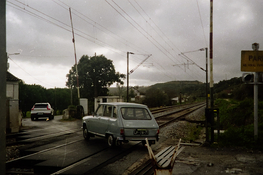
Because both the cat and the bus stop were from the same roll of film with the same camera I suspected the Gamma adjustment stage was the problem. These attachments are from more tests using an earlier method with my venerable G5 Mac and PS Creative Suite (CS), the original version. I would be interested to see how it comes out under scrutiny.
DSC00193PSa.jpg

The picture is very blue. Something is wrong with your colour management.

When I look at it closely with the colour picker it does have a tendency to blue/cyan. This is the complimentary to the orange mask so I suspect the gamma correction stage is where the problem lies. I have posted another version done on PS which looks better.

Still puzzled by the apparently strong cast you are seeing because it is very slight here and I have never had major problems with colour trusting in Apple's equipmant. What sytem do you use. I ask because I have articles published online and I would not like to think some of my illustrations are so skewed colur wise.
 
Still puzzled by the apparently strong cast you are seeing because it is very slight here and I have never had major problems with colour trusting in Apple's equipmant. What sytem do you use. I ask because I have articles published online and I would not like to think some of my illustrations are so skewed colur wise.
I'm using a fairly generic HP LCD here, but it's calibrated. I don't doubt your Mac shows colors just fine - at least well enough to see the kinds of casts we're dealing with here.

What constitutes a strong or a slight cast is of course also subjective, and it's well-known that sensitivity to color varies greatly between people. Then there's the aspect of practice and experience. The more time people spend with this, the more sensitive they tend to become to color casts. What may look like a minor issue to one person can be a massive problem to another. I readily acknowledge I'm on the latter part of the spectrum; I respond quite strongly to color to begin with and spending a lot of time optimizing it in prints & scans makes me all the more focused on it (which isn't to say I always get it right!)

Your adjusted version is better, although it still doesn't look completely natural. Color balancing is a bit of an art and perhaps part magic; in all brutal honesty, operations like "auto levels" etc. really don't cut it in practice. It may give an acceptable quick preview of what's on the image, but it won't be optimal. Trying to fix things once these kinds of auto-adjustments have been done is often a lot more work (and sometimes even impossible) than just starting over with the raw capture of the negative and then adjusting the curves manually as I suggested in my post #14.
 
Because both the cat and the bus stop were from the same roll of film with the same camera I suspected the Gamma adjustment stage was the problem. These attachments are from more tests using an earlier method with my venerable G5 Mac and PS Creative Suite (CS), the original version. I would be interested to see how it comes out under scrutiny.View attachment 414621


When I look at it closely with the colour picker it does have a tendency to blue/cyan. This is the complimentary to the orange mask so I suspect the gamma correction stage is where the problem lies. I have posted another version done on PS which looks better.

Still puzzled by the apparently strong cast you are seeing because it is very slight here and I have never had major problems with colour trusting in Apple's equipmant. What sytem do you use. I ask because I have articles published online and I would not like to think some of my illustrations are so skewed colur wise.

In my (limited) experience with converting color negative film to positive, the fact that "both the cat and the bus stop were from the same roll of film with the same camera" is of little significance. It seems to me like whatever adjustments were required for one frame may not necessarily give the same results with the next frame, expecially when the lighting and exposure are different from frame to frame.

On my calibrated iMac monitor, this version of the bus stop photo looks much better. The blue tint in the deep shadows is now mostly gone, but I think there may be still be some lingering blue cast in the midtones...? I would expect the paving "stones" (more likely concrete?) to be less blue and more gray?

This photo brings up two different issues:
- First, what steps are necessary to get the colors "right" when inverting color negatives. (And by "right" I mean getting the colors to look the way you want them to look.)
- And second, what steps are necessary to maintain a color managed workflow that works for your intended purpose (printing, internet, etc.). I probably listed those issues in the wrong order, because you can't really solve the first problem unless you have a reasonable color managed workflow.

The fact that you can't see the blue color cast that the rest of us are seeing suggests a color management problem. If so, I would concentrate on that before spending a lot of time inverting and color correcting negatives.

One part of color management is calibrating your monitor. Apple computers have always come with a software tool called the "Display Calibrator Assistant" to help adjust the colors on your monitor. In the past (back in the days of CRT displays), I was able to get pretty good results with Apple's software calibration. But when I switched to LED displays, the Apple calibration software got harder to use and I trusted the result less. My suggestion would be to buy a display calibration package which includes a hardware sensor and software to do the job properly.
 
The fact that you can't see the blue color cast that the rest of us are seeing suggests a color management problem.

A friend of mine spent a fair bit of time and a significant amount of money a few years ago trying to learn how to print with Cibachrome/Ilfochrome materials. He ended up getting very frustrated.
His friends couldn't figure out why he was having as much trouble as he was until his wife mentioned he was "colour blind"!
So there could be other sources for the difficulty :smile:
 
A friend of mine spent a fair bit of time and a significant amount of money a few years ago trying to learn how to print with Cibachrome/Ilfochrome materials. He ended up getting very frustrated.
His friends couldn't figure out why he was having as much trouble as he was until his wife mentioned he was "colour blind"!
So there could be other sources for the difficulty :smile:

I said “suggests” not “proves” — add color blindness to the list of things to be ruled out.
 
I scan raw in vuescan and use darktable with it's negadoctor plugin. Adjusting first for film mask and contrast, a few auto white balances, and then fine tweaking. Some films are easy and fast, some others, especially expired or strange light, need a bit more adjustment. But I'm general in works for me.
 
I'm using a fairly generic HP LCD here, but it's calibrated. I don't doubt your Mac shows colors just fine - at least well enough to see the kinds of casts we're dealing with here.

What constitutes a strong or a slight cast is of course also subjective, and it's well-known that sensitivity to color varies greatly between people. Then there's the aspect of practice and experience. The more time people spend with this, the more sensitive they tend to become to color casts. What may look like a minor issue to one person can be a massive problem to another. I readily acknowledge I'm on the latter part of the spectrum; I respond quite strongly to color to begin with and spending a lot of time optimizing it in prints & scans makes me all the more focused on it (which isn't to say I always get it right!)

Your adjusted version is better, although it still doesn't look completely natural. Color balancing is a bit of an art and perhaps part magic; in all brutal honesty, operations like "auto levels" etc. really don't cut it in practice. It may give an acceptable quick preview of what's on the image, but it won't be optimal. Trying to fix things once these kinds of auto-adjustments have been done is often a lot more work (and sometimes even impossible) than just starting over with the raw capture of the negative and then adjusting the curves manually as I suggested in my post #14.

Thanks for that. I did use the quickie run from all 36 frames here so the message is to be more precise after first review versions.
 
Thanks to everyone with your informative replies. I took the advice of simply colour balancing manually. I have found a hack in Photoshop that works remarkably well. After inverting I create a new curves adjustment layer, I then go to "Auto Options" and choose "enhance per channel contrast" and make sure the "snap neutral midtowns" is checked. Minimal colour balancing and contrast adjustment is then needed.
 
"snap neutral midtowns"

I could be wrong, but I'm guessing that it was the "midtones" that you meant to reference here.
My apologies, but "snapping the midtones" made me think of one of the ruder Monty Python routines.
Most important though, I'm glad you found something that works for you.
 
I tried Rawtherapee's Film Negative, but results where not of my liking. I always use Darktable's Negadoctor module (make sure you have Sigmoid and Filmic RGB deactivated) it works like charm both on color and black&white. It takes a small learning curve, but then it's quite simple and super powerfull
 

Attachments

  • 20250003.jpg
    20250003.jpg
    948.1 KB · Views: 37
I use either either 'Smart Convert' by Filmomat or the old 'Color Perfect' as a Photoshop plugin filter, both produce pretty good conversions although with any of them you still need to question the results. Whenever I do a conversion I do a quick check by pressing 'Auto Color' in Photoshop to see if Adobe has an alternative opinion on colour balance.
 
There is a new open source application called NegPy available for Windows, Mac and Linux: https://github.com/marcinz606/NegPy


The results are impressive and the app has seen several updates in just over a week since the first release. I've tried pretty much every app out there and this is probably the most promising imo.
 
There is a new open source application called NegPy available for Windows, Mac and Linux: https://github.com/marcinz606/NegPy
Thanks for sharing that. I gave it a spin and the app evidently doesn't agree with how I scan negatives. It kind of works with C41 film, but with very dramatic adjustments and even then gives so-so results. With ECN2 film it's a total dud.
Needs a lot of work IMO.
 
Thanks for sharing that. I gave it a spin and the app evidently doesn't agree with how I scan negatives. It kind of works with C41 film, but with very dramatic adjustments and even then gives so-so results. With ECN2 film it's a total dud.
Needs a lot of work IMO.

Interesting. How do you scan your film, camera scanning? For me it would give me C41 results that that's about as good as anything with tiffs from several different scanners. I didn't try ENC2 yet. Also, did you adjust the crop offset so there is no film borders visible? If there is anything left of the border it will throw it off.

It's under rapid development, so I would check back in some weeks. A new front end is coming very soon.
 
How do you scan your film, camera scanning?

Scanners, multiple types; scanned as 'raw' as possible in 16bit/channel with no adjustments.

Also, did you adjust the crop offset so there is no film borders visible? If there is anything left of the border it will throw it off.
There's the evidence that it's as haphazard a way of converting as anything else.
I did leave the borders on; that doesn't make any difference for the image data. If it does make a difference for the conversion, it does mean what is to be expected - that it cannot be a consistent inversion approach.

Edit: just tried on a file without borders, but now the app won't work anymore; first a litany of python errors, then general misbehavior. I'm sure this will be interesting at some point but for now it's up to the developer to work on this some more. I've got enough bugfixing, troubleshooting and dev. work on my end to keep me busy.
 
Last edited:
Scanners, multiple types; scanned as 'raw' as possible in 16bit/channel with no adjustments.


There's the evidence that it's as haphazard a way of converting as anything else.
I did leave the borders on; that doesn't make any difference for the image data. If it does make a difference for the conversion, it does mean what is to be expected - that it cannot be a consistent inversion approach.

Edit: just tried on a file without borders, but now the app won't work anymore; first a litany of python errors, then general misbehavior. I'm sure this will be interesting at some point but for now it's up to the developer to work on this some more. I've got enough bugfixing, troubleshooting and dev. work on my end to keep me busy.

Sound like your source files are not that dissimilar to mine actually. I don't know why it didn't give good results on your end.

It uses the actual image to calculate the black and white points, you can read the whole pipeline here: https://github.com/marcinz606/NegPy/blob/main/docs/PIPELINE.md

Yes, there are some bugs right now, most seem to be connected to the front end that is scheduled to be completely replaced this week.
Just so it's clear, I'm not the dev. I just thought the project has a lot of potential.
 
I also just tried it (on Linux, had to use --no-sandbox to get it running), but neither that much convinced. Tried it on two different films (raw scans from Vuescan / Nikon Coolscan 9000, no film boarders in the files), one looked ok but very different to my interpretation (beside that I it was too dark, a quick fix), the other one looked really off, I guess possible to correct with some work. For now I prefer my Darktable workflow.
 
It uses the actual image to calculate the black and white points
That's part of the problem. There are settings to manipulate this (basically, offset & slope, although they're called different here), but their bandwidth is really limited for some odd reason.
Another part is that this tool inherently suffers from the same fundamental shortcoming that all of the conceptually similar ones suffer form - it can't be consistent across images.
Also, I found the blurb somewhat overly optimistic:
It models the H&D Characteristic Curve of photographic material
It is indeed "the" curve, singular - with the apparently implicit underlying assumption that a film curve is always the same. Which of course is not the case.

I don't contest that this may yield perfectly satisfactory results for some people and some images, but in all brutal honesty, I don't see anything here that's conceptually new - except perhaps that it's offered currently for free. That certainly is nice.
 
Photrio.com contains affiliate links to products. We may receive a commission for purchases made through these links.
To read our full affiliate disclosure statement please click Here.

PHOTRIO PARTNERS EQUALLY FUNDING OUR COMMUNITY:


Ilford ADOX Freestyle Photographic Stearman Press Weldon Color Lab Blue Moon Camera & Machine
Top Bottom