
• Welcome to Photrio!
    Registration is fast and free. Join today to unlock search, see fewer ads, and access all forum features.
    Click here to sign up

Build a shutter tester for Focal Plane shutters - Cheap, Easy & it Works

Recent Classifieds

Forum statistics

Threads
203,565
Messages
2,856,583
Members
101,907
Latest member
BoulderCameraRepair
Recent bookmarks
0
Hi all. New code will be out of beta in a week or so and released. Version 4.1.0.4

It has the oscilloscope screen all working ok (as far as I can find) & a few minor issue fixes.
SD logs are no longer deleted during start-up. Instead new data is appended to the existing file.
(Option to delete old file added)

The 3d print file for the camera steady has been updated with holes to allow self-tapping screw to secure it to the table.
(Hot-glue does not stick well to 3d printed PLA).


I am really running out of ideas of what photographic projects I can do next, either with code and/or 3d printing.
Have made tools for repairing Zenit cameras, including a complete jig for repairing & aligning the blinds correctly.

A developing timer & auto-twiddler (times dev, stop, fix) and splash-o-matic for controlling water drop photography, which also works for flash-freeze photos, like balloon bursts, exploding fruit etc.

Happy for any project suggestions or upgrade ideas.
 
Hi all. New code will be out of beta in a week or so and released. Version 4.1.0.4

It has the oscilloscope screen all working ok (as far as I can find) & a few minor issue fixes.
SD logs are no longer deleted during start-up. Instead new data is appended to the existing file.
(Option to delete old file added)

The 3d print file for the camera steady has been updated with holes to allow self-tapping screw to secure it to the table.
(Hot-glue does not stick well to 3d printed PLA).


I am really running out of ideas of what photographic projects I can do next, either with code and/or 3d printing.
Have made tools for repairing Zenit cameras, including a complete jig for repairing & aligning the blinds correctly.

A developing timer & auto-twiddler (times dev, stop, fix) and splash-o-matic for controlling water drop photography, which also works for flash-freeze photos, like balloon bursts, exploding fruit etc.

Happy for any project suggestions or upgrade ideas.

The jig for zenits sounds very nice. Seeing as they're so similar to zorkis and feds could it help with those too? I cut a zorki shutter box to try that but haven't actually used it yet.
 
The jig for zenits sounds very nice. Seeing as they're so similar to zorkis and feds could it help with those too? I cut a zorki shutter box to try that but haven't actually used it yet.

Hi, I have never been able to purchase a zorki or fed at a sensible price, so have never dismantled one to see the difference between the shutter assembly..

However, from pictures, the drum looks identical. If it is, then most of the work has already been done.
The zenit/zorki/fed were all derived from the stolen Leica design.

I took a working shutter mech from an early zenit and used this for all the measurements and spacings.
It is critical both parts of the drum are aligned correctly and the distance from the drum to each of the curtain laths is correct.

It will require somebody to print the Zenit jig & see what parts align correctly with zorki/fed/leica shutter curtains.

Alternate is to send me some free cameras :surprised:)
 
Hi, I have never been able to purchase a zorki or fed at a sensible price, so have never dismantled one to see the difference between the shutter assembly..

However, from pictures, the drum looks identical. If it is, then most of the work has already been done.
The zenit/zorki/fed were all derived from the stolen Leica design.

I took a working shutter mech from an early zenit and used this for all the measurements and spacings.
It is critical both parts of the drum are aligned correctly and the distance from the drum to each of the curtain laths is correct.

It will require somebody to print the Zenit jig & see what parts align correctly with zorki/fed/leica shutter curtains.

Alternate is to send me some free cameras :surprised:)

I might try sending one. I have plenty, but sending them from where I am is not easy. I'll see if posting one from Moldova is not too expensive.

I'll print the jig and try it with a zorki shutter. There are minor differences - some drums have one hole, some feds have a long hole. The feds shutters are not as wide as a zorkis, but zenit and zorkis curtain dimensions are identical. I have transplanted them before. It's quite the hassle to do replace them freehand, but soviet tinkerers did just that. Guys that do zorki repairs in Russia advise buying zenit E's in bulk (6-7 usd a piece) for just the shutter cloth - late E's have good quality cloth and they're already precut.
 
Cool project!
Reading the latest manual, I think that the newest firmware version even works with no screen (other than the one on the connected computer) would need to be connected?

With the issues of getting the correct parts lately, would you currently recommend using the "V4 board" over the earlier model or would it be a better option to go for the 06/02 update?

I was thinking about the possibility of making the sensors/transmittors somewhat modular, but upon reading that they (at least the lasers) can be sensitive, would it be a bad idea to move them around to different positions rather than making a tx/rx module for every configuration (h-v / 35mm/mf) if you were to plug/unplug connectors and/or insert them into different "holders" when you did?
 
Cool project!
Reading the latest manual, I think that the newest firmware version even works with no screen (other than the one on the connected computer) would need to be connected?

With the issues of getting the correct parts lately, would you currently recommend using the "V4 board" over the earlier model or would it be a better option to go for the 06/02 update?

I was thinking about the possibility of making the sensors/transmittors somewhat modular, but upon reading that they (at least the lasers) can be sensitive, would it be a bad idea to move them around to different positions rather than making a tx/rx module for every configuration (h-v / 35mm/mf) if you were to plug/unplug connectors and/or insert them into different "holders" when you did?

Hi, I have used the V4 board ordered from the link on the parts document for my Triaxial clock. It works perfectly, so I cannot see a reason why it would not work for The Shutter Tester. The board is very slightly smaller and the mounting holes a smaller diameter.
It should still fit the 3d printed mounting frame ok, if not, I can easily modify it.


It is a shame there is now so much of a mix-up in china with parts mis-labled and/or misdescribed.
I have always got a refund for an incorrect part sent, but it is a pain having to wait another 8 days for delivery & possibly have to pay postage.

Yes, it is a very bad idea to move sensors & Lasers around. You will not get them aligned correctly.

The build documents describe how to make a horizontal tester only.
This is for simplicity. However, the 3d printed frame has been designed to hold the sensors & Lasers horizontally or vertically.
So it is possible to make a 35mm horizontal & vertical tester all in one unit.

However the build starts to become more complex, so it is left to the builder, if they feel competent enough to make a duel H & V unit.

The latest firmware 4.1.0.4 is (almost) ready to go. The beta version is currently on github and is just awaiting a few final tweaks.
I have been distracted by the Triaxial clock code, which has taken up my spare time.
 
About that, I've been experimenting with a different setup. I work on both MF and 135 cameras with vertical and horizontal shutters. Moving the lasers each time was not practical.

So I made plates with swapable sensors, and switched to a wide light source from a torch.

PXL_20260403_202836864.jpg


PXL_20260404_213722257.jpg


Seems to work well with 135 cameras, needs more testing for the 120 cameras. Having the small aperture in front of the sensor helps with accuracy.
 
About that, I've been experimenting with a different setup. I work on both MF and 135 cameras with vertical and horizontal shutters. Moving the lasers each time was not practical.

So I made plates with swapable sensors, and switched to a wide light source from a torch.

View attachment 421582

View attachment 421583

Seems to work well with 135 cameras, needs more testing for the 120 cameras. Having the small aperture in front of the sensor helps with accuracy.

Hi, you could do away with the sensor module boards. Use a small piece of vero board to solder the legs of the sensor to.
Add a 0.1uf capacitor across the outer and a 10k pull-up resister from the v leg to the centre leg.

This would make it much neater. The vero board can be secured to the 3d printed frame & it would remove the strain on the sensor.

Look at the documents for 3d printing the sensor enclosure, it gives all the details.

The diagonal layout of the sensors, as your photos show, allow for one frame to work for both horizontal and vertical shutters.
However aligning the camera proved troublesome as it had to be aligned accurately in both planes.

(Your method of the frame fitting into the film-gate & using a single large light source of course eliminates this issue.
I did try this & there were details of how to make a frame similar to yours, but I removed it, preferring to keep with Lasers).

If using the lifting table and camera positioning attachment, much of the alignment issue is removed.

Maybe I should redesign the 3d printed sensor box with diagonal sensors, for use with the lifting table?
 
I seem to be having problems registering exposure constistently. The tester says ready, I press the release. The "ready" goes away, and no results are registered. Sometimes they get through, but mostly it just refreshes with the same last result. Is it an alignment issue?
 
I seem to be having problems registering exposure constistently. The tester says ready, I press the release. The "ready" goes away, and no results are registered. Sometimes they get through, but mostly it just refreshes with the same last result. Is it an alignment issue?

Hi, I assume the ESP32 version? What firmware are you running?

You should get an error message displayed in red?

With the camera in B, it is easy to keep the shutter open, to see all three Lasers are hitting the sensors ok.
The camera should be rested, not hand-held, using shims to ensure the camera is at the correct height.

If connected to a computer and with Arduinio IDE Serial Monitor open, there will be much diagnostic information printed to the screen.

Bright or flickering light will upset the readings, including LED lights or a computer screen. My tester sits on the desk right in front of the pc screen, so I had to make a little hood to shield it from light reflections.
 
@Niglyn yes it's a bit flimsy and I'll try to improve it. It's especially difficult to use the lasers on MF cameras since the lens aperture is smaller than the film width/height; you have to cluster them at the centre and fan them out.

I was wondering if it would be possible to get an analogue signal out of the light sensors. They appear to be photo diodes or transistors under the diffuser dome. To get the effective exposure time as per the ISO document shown earlier in this thread you would need to integrate the amount of light received and record the maximum light input.
 
@Niglyn yes it's a bit flimsy and I'll try to improve it. It's especially difficult to use the lasers on MF cameras since the lens aperture is smaller than the film width/height; you have to cluster them at the centre and fan them out.

I was wondering if it would be possible to get an analogue signal out of the light sensors. They appear to be photo diodes or transistors under the diffuser dome. To get the effective exposure time as per the ISO document shown earlier in this thread you would need to integrate the amount of light received and record the maximum light input.

Hi, the camera service manual will often specify the sensor spacing and blind speed between this distance. One does not need to measure from the extreme edge of the film gate.

The sensors are a miracle of modern technology, it is a light sensor, amplifier and Schmitt trigger all in one package. So you only get a clean on-off signal digital signal from it.
 
Hi, I assume the ESP32 version? What firmware are you running?

You should get an error message displayed in red?

With the camera in B, it is easy to keep the shutter open, to see all three Lasers are hitting the sensors ok.
The camera should be rested, not hand-held, using shims to ensure the camera is at the correct height.

If connected to a computer and with Arduinio IDE Serial Monitor open, there will be much diagnostic information printed to the screen.

Bright or flickering light will upset the readings, including LED lights or a computer screen. My tester sits on the desk right in front of the pc screen, so I had to make a little hood to shield it from light reflections.

Yes, esp 32, latest available firmware. Alignment in B seems to be okay. It almost feels like the ESP is slow. Should the whole screen refresh instantly or wave like? And it refreshes on curtain open.
 
Last edited:
Hi, the camera service manual will often specify the sensor spacing and blind speed between this distance. One does not need to measure from the extreme edge of the film gate.

The sensors are a miracle of modern technology, it is a light sensor, amplifier and Schmitt trigger all in one package. So you only get a clean on-off signal digital signal from it.

That's the next best thing; good to know.
 
I took the plunge and ordered the parts that I think would be needed to build a minimal esp32 setup, skipping any screen at all (which I ready was possible a few years ago, hoping it still is). I hope to be able to build in a couple of weeks when the parts arrive - if all the parts are correctly listed. I should be fine running arduino ide, but I wonder if anyone has flashed the board using Linux? My distro should have the drivers built in but I did see that there were some config steps needed in a win-only app. I would really appreciate any feedback!

Regarding the horizontal setup, would it be a good option to just make a simple sketch and have some pcbs made somewhere like jlcpcb? I imagine it might be easier to get the dimensions right than manually moving and hot gluing the sensors as I plan on doing right now...
To everyone not enjoying soldering the buttons - if you have 2-3usd to spare, I would definitely recommend the arcade style cables with 2.8mm f spades (which should be the correct size). It makes life a lot easier!
 
I took the plunge and ordered the parts that I think would be needed to build a minimal esp32 setup, skipping any screen at all (which I ready was possible a few years ago, hoping it still is). I hope to be able to build in a couple of weeks when the parts arrive - if all the parts are correctly listed. I should be fine running arduino ide, but I wonder if anyone has flashed the board using Linux? My distro should have the drivers built in but I did see that there were some config steps needed in a win-only app. I would really appreciate any feedback!

Regarding the horizontal setup, would it be a good option to just make a simple sketch and have some pcbs made somewhere like jlcpcb? I imagine it might be easier to get the dimensions right than manually moving and hot gluing the sensors as I plan on doing right now...
To everyone not enjoying soldering the buttons - if you have 2-3usd to spare, I would definitely recommend the arcade style cables with 2.8mm f spades (which which should be the correct size). It makes life a lot easier!

Hi, there are on-line flash tools. Have just tried the one below & flashed The Shutter Tester code (all three files) successfully. Ensure you set the correct memory location for each file, else it will end badly.......
https://espressif.github.io/esptool-js/

Yes it should all work without a screen.

I have tried to avoid the need for pcbs, as this adds additional cost and time.
Same with 3d printed parts. Whilst there are options for 3d prints, they are not nessasary.

I have made some pcbs to replace the expansion board. The tft screen and ESP32 mount directly to this pcb, thus simplifying the wiring.

I did think about making a pcb for the sensors. Very easy to do. hole spacing pre-drilled & sensors mounted on the back, looking through the hole.

However, the expansion boards did not prove popular, I still have a stack of them, so have not perused sensor pcbs.
My plan was to clear the pcbs I have & then make the pcbs available directly from pcbway.

The other issue is expense for me. Designing 3d print files wastes quite a bit of time & materials in prototypes.
Same with pcbs, one may need to make a few prototypes before the design is finalised.
Maybe I will design it, now you have got me thinking......

lead/tin solder is far better than this new wokey stuff. It melts at a lower temperture and flows easier.
Tinning the wire ends and the button terminals, before soldering the wire to the terminal, help make the joint quicker & less likely to melt the plastic button.

Good luck with your build, keep us updated.
 
Yes, esp 32, latest available firmware. Alignment in B seems to be okay. It almost feels like the ESP is slow. Should the whole screen refresh instantly or wave like? And it refreshes on curtain open.

Hi, screen should update instantly. All the data is compiled, sent to the display buffer then flipped from existing to the new display.

If your screen is updating on B when the shutter is open, the tester thinks the cycle is complete.
This can be caused by light flicker, sensor M or 2 not getting enough light.

Could also be a faulty sensor or faulty esp32, if one of the three sensor input pins blown, for example.

I had a similar issue when designing the 3d printed sensor enclosure. One of the sensors was not quite aligned with the hole, so did not get get enough light, so would just about trigger 'seen' but not enough light, so would instantly go to the 'blocked' state.

Whilst trying to locate the issue, I damaged the input on the esp32, thus giving me a double-fault to find!.

Try the tester in single sensor mode. This uses just sensor 1.
If this works ok, then you could move the wire for sensor M to sensor 1 input and the same with 2.
Thus proving each sensor module is ok.

I would suggest loading the beta firmware.

Also open the Serial Monitor, as this dumps a lot of data to the screen when a test fails.
 
Hey folks. Huge thanks for all the work that has gone into this project! I am in the process of working my way through the entire thread (have another 10 pages to go), but wanted to ask a question so I can order the parts while I finish up the reading. I planned on making the ESP32 version - because it was mentioned to be a more robust board. But after reading the first 1/2 of the thread - I'm not sure I understand the specific benefits of the ESP32 version vs the Nano version. Is it the inclusion of additional sensors that sets it apart from the more simple version? I'm fine going the ESP32 route if it will provide improved performance/results. Could someone please clarify the advantages?

Parts clarification: The PDF parts list for the ESP32 version lists a specific TFT. I've been successful sourcing everything else locally (USA) so i don't need to mess with tariffs, payments upon receipt etc, but have only found a 3.5" TFT that seems to runs the same specs as the 4" version suggested. Unfortunately, the only 4" versions I found are running Drive IC: ST7796S instead of the stated ILI9488. Can you please let me know if this 3.5" TFT would work, other than mounting discrepancies etc? I can always design and 3D print a different box if needed, to match the new dimensions - as long as the specs check out and will work correctly. The nano version parts list is all easily purchased locally.

Below are the specs provided for the smaller version of the ESP32. Please let me know if anything jumps out as incorrect for the project. Really appreciate any help and guidance.

Scott

3.5" SPI 480*320 display parameter​

  • Size: 3.5inch
  • Type: TFT
  • Resolution: 480*320
  • Drive IC: ILI9488
  • Touch: Yes
  • Interface: 4-wire SPI
  • Touch: resistive touch (with touch pen)
  • Active area: 48.96*73.44mm
  • PCB Size: 56.34*98.00mm
  • Weight: 57g
  • Working temperature: -20 °C to 60 °C
  • Storage temperature: -30 °C to 70 °C


2.4in


Hey folks. Huge thanks for all the work that has gone into this project! I am in the process of working my way through the entire thread (have another 10 pages to go), but wanted to ask a question so I can order the parts while I finish up the reading. I planned on making the ESP32 version - because it was mentioned to be a more robust board. But after reading the first 1/2 of the thread - I'm not sure I understand the specific benefits of the ESP32 version vs the Nano version. Is it the inclusion of additional sensors that sets it apart from the more simple version? I'm fine going the ESP32 route if it will provide improved performance/results. Could someone please clarify the advantages?

Parts clarification: The PDF parts list for the ESP32 version lists a specific TFT. I've been successful sourcing everything else locally (USA) so i don't need to mess with tariffs, payments upon receipt etc, but have only found a 3.5" TFT that seems to runs the same specs as the 4" version suggested. Unfortunately, the only 4" versions I found are running Drive IC: ST7796S instead of the stated ILI9488. Can you please let me know if this 3.5" TFT would work, other than mounting discrepancies etc? I can always design and 3D print a different box if needed, to match the new dimensions - as long as the specs check out and will work correctly. The nano version parts list is all easily purchased locally.

Below are the specs provided for the smaller version of the ESP32. Please let me know if anything jumps out as incorrect for the project. Really appreciate any help and guidance.

Scott

3.5" SPI 480*320 display parameter​

  • Size: 3.5inch
  • Type: TFT
  • Resolution: 480*320
  • Drive IC: ILI9488
  • Touch: Yes
  • Interface: 4-wire SPI
  • Touch: resistive touch (with touch pen)
  • Active area: 48.96*73.44mm
  • PCB Size: 56.34*98.00mm
  • Weight: 57g
  • Working temperature: -20 °C to 60 °C
  • Storage temperature: -30 °C to 70 °C


2.4in


Hi, The ESP32 and Arduino version both use almost identical shutter calculations, so have the same accuracy.

The ESP32 version with three sensors, gives a s better indication of curtain issues, as it measures curtain speed from start to middle and middle to end. so any initial drag, or running out of puff at the end is more identifable.

ESP32 version benefits from the colour screen and more data available to be viewed on the screen. It also has additional functionality, data logging for example.

Much data is repeated via the serial output to your pc, so data not shown on the Arduino LCD screen can be viewed on the pc. The ESP32 version can be used solely with the pc output, so a tft screen is not actually needed.

It is not recommended to build without the screen, in case the code changes in the future, but as of now it works and one person is currently building The Shutter Tester without the screen, so hopefully they will let us know if it works ok & any benifets/drawbacks.

The Arduino version is simpler to build, so this can be a good option for people not familiar with microcontrollers, soldering or electronics. The cost of the Arduino version is cheaper, mainly due to the tft cost.

As for the tft itself. I picked the 4" as it was the biggest available at a reasonable price.
One builder has used the smaller 3.5" display (which must have the ili4988 driver) successfully and I also have tried with a 3'5" tft I had, and it worked ok. (not sure if touch worked, cannot remember)

However a cavet, I cannot support different parts or variations other than specified in the build documents. Although I will always help where I can.

The builder of the 3.5" screen built another and found that the screen colour was inverted (white, not black background). One builder of my weather clock, which uses the smaller 3.5" tft, also had the same behaviour.

I have no idea if the inversion is a fault with the tft, or if it is a slightly different variant. Many people have built my weather clock and only one person reported the issue.

You will (probably) find the 3.5" screen display is rotated by 180 degrees, so the connector pins need to be at the bottom of the screen.

I do not know if touch will work correctly on the smaller screen. I cannot remember if I tested it or not.
I might build a 3.5" version just to find out :surprised:)

Hopefully, all of the build documents on github & instructables contain everything required to build the tester.

This thread is an adjunct to that, for discussion & support.

Please keep us updated with your progress.
 
Hi, The ESP32 and Arduino version both use almost identical shutter calculations, so have the same accuracy.

The ESP32 version with three sensors, gives a s better indication of curtain issues, as it measures curtain speed from start to middle and middle to end. so any initial drag, or running out of puff at the end is more identifable.

ESP32 version benefits from the colour screen and more data available to be viewed on the screen. It also has additional functionality, data logging for example.

Much data is repeated via the serial output to your pc, so data not shown on the Arduino LCD screen can be viewed on the pc. The ESP32 version can be used solely with the pc output, so a tft screen is not actually needed.

It is not recommended to build without the screen, in case the code changes in the future, but as of now it works and one person is currently building The Shutter Tester without the screen, so hopefully they will let us know if it works ok & any benifets/drawbacks.

The Arduino version is simpler to build, so this can be a good option for people not familiar with microcontrollers, soldering or electronics. The cost of the Arduino version is cheaper, mainly due to the tft cost.

As for the tft itself. I picked the 4" as it was the biggest available at a reasonable price.
One builder has used the smaller 3.5" display (which must have the ili4988 driver) successfully and I also have tried with a 3'5" tft I had, and it worked ok. (not sure if touch worked, cannot remember)

However a cavet, I cannot support different parts or variations other than specified in the build documents. Although I will always help where I can.

The builder of the 3.5" screen built another and found that the screen colour was inverted (white, not black background). One builder of my weather clock, which uses the smaller 3.5" tft, also had the same behaviour.

I have no idea if the inversion is a fault with the tft, or if it is a slightly different variant. Many people have built my weather clock and only one person reported the issue.

You will (probably) find the 3.5" screen display is rotated by 180 degrees, so the connector pins need to be at the bottom of the screen.

I do not know if touch will work correctly on the smaller screen. I cannot remember if I tested it or not.
I might build a 3.5" version just to find out :surprised:)

Hopefully, all of the build documents on github & instructables contain everything required to build the tester.

This thread is an adjunct to that, for discussion & support.

Please keep us updated with your progress.

Thank you so much for the quick reply. The ability to pinpoint curtain issues is my primary reason for preferring the ESP32 version. I am not sure why all the 4" versions I find locally are running ST7796S, but it might force me to try the smaller version, and hope for the best :smile:

Although it's been a while, I have done various projects with Arduino and RaspPi, so I have high hopes for success with this project. I have read through the parts list and some of the build PDFs, and continue to work my way through this thread. The information and details are amazing - and I really appreciate all the help that has been offered here.

I think I may gamble and purchase the 3.5" TFT. I will report back here with my progress, in case others run into the same issue sourcing the larger screen. I plan on building the initial ESP32 setup, but ultimately would like to build 2 sets of laser/receivers so that I can use the tester for both horizontal and vertical shutters (vertical for an MF camera).

Although the pin assignments appear to be the same on both the 3.5" and 4" versions, it does seem that the 3.5" version has the pins inverted 180 degrees (based on online photos orientation - the connector pins appear to be at the bottom of the 3.5" TFT)). I assume that I can deal with this difference by extending wiring, or is there a larger issue I am not understanding???

Thanks again for all the work and effort that has gone into this project. It is much appreciated.

Scott
 
Either my screen was faulty or the ESP32 was - opened up the box to check the usb cable the screen died and the ESP refuses any commands from the buttons. The arduino IDE terminal showed it spasming through modes without me touching anything and now it just to testing and doesn't respond to anything. I ordered a newer better ESP32 with an included breakout board and a new screen. I'll probably need another code after flashing the esp, right?
 
Either my screen was faulty or the ESP32 was - opened up the box to check the usb cable the screen died and the ESP refuses any commands from the buttons. The arduino IDE terminal showed it spasming through modes without me touching anything and now it just to testing and doesn't respond to anything. I ordered a newer better ESP32 with an included breakout board and a new screen. I'll probably need another code after flashing the esp, right?

Hi, sounds there is something wrong with the touch.
You could try disconnecting the touch witing on the tft, or disconnect all of the wiring to the tft and see if it works just using the Arduino IDE terminal.

Yes, a new code for a new ESP32 board will be required.
 
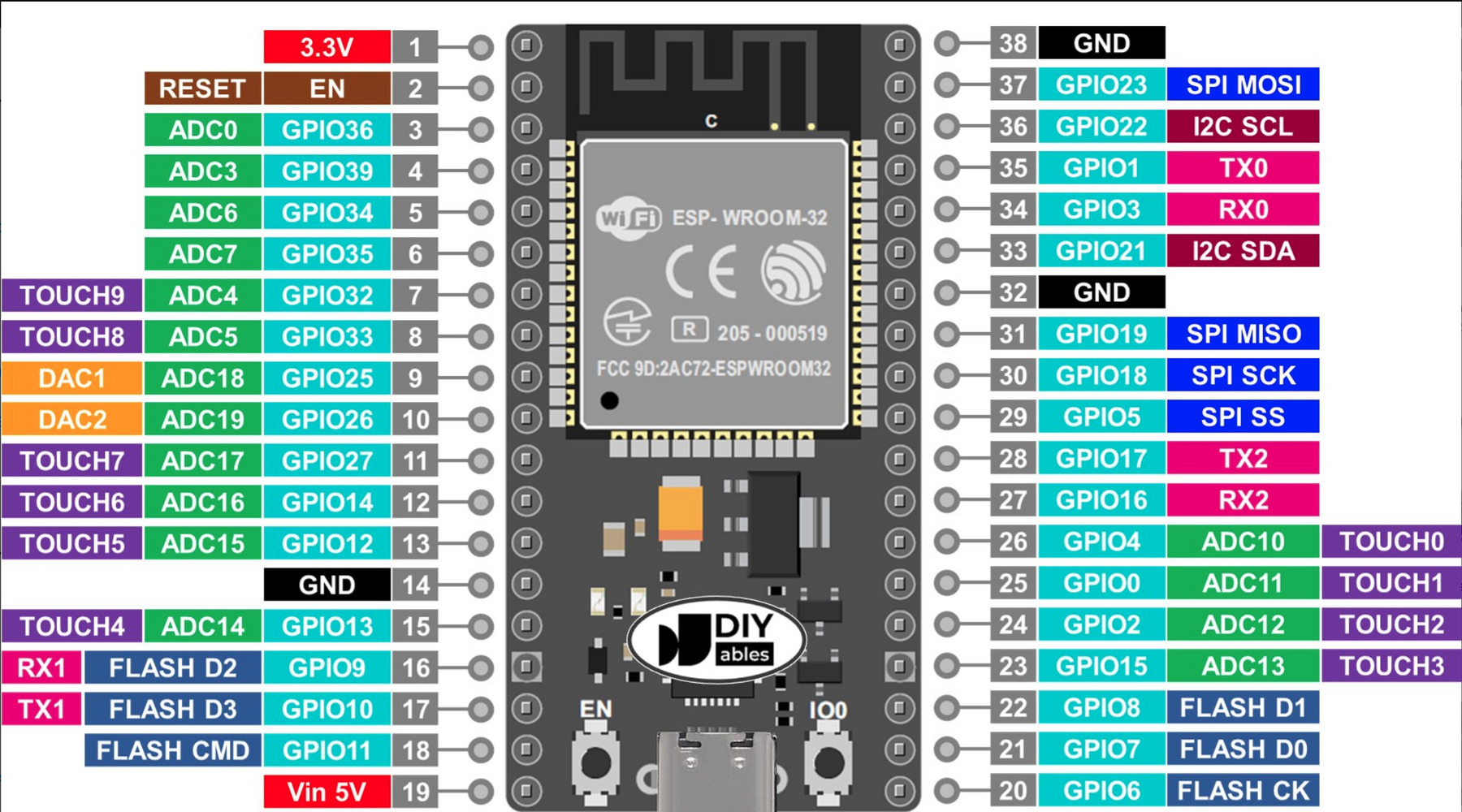
Looks like I may have messed up in ordering the ESP32 board. I only did a brief comparison to the chips and pins before ordering - and now I'm afraid that the one I ordered may not be compatible with this project (based on finally getting to post #822). Mine seems to be a "S" version - so not sure if this creates issues with the code/pins etc. I was able to load the bin, and everything checked out as described in Firmware Load Generic PDF. I got to the screen that seems to want me to push the encoder button 10 times, etc. Not sure if that would be possible or not with the incorrect board.

Sorry for the hassle, but can someone please let me know if this board will work? I ordered the "ESP32S ESP-WROOM-32 Development Board." (LINKED)

The pic below shows the pins for the board I ordered. There does seem to be some discrepancies from the pic I downloaded of the Aliexpress board, but I am not sure if they are deal breakers or not.

Thanks for your patience.

Amazon ESP32.png
 
Looks like I may have messed up in ordering the ESP32 board. I only did a brief comparison to the chips and pins before ordering - and now I'm afraid that the one I ordered may not be compatible with this project (based on finally getting to post #822). Mine seems to be a "S" version - so not sure if this creates issues with the code/pins etc. I was able to load the bin, and everything checked out as described in Firmware Load Generic PDF. I got to the screen that seems to want me to push the encoder button 10 times, etc. Not sure if that would be possible or not with the incorrect board.

Sorry for the hassle, but can someone please let me know if this board will work? I ordered the "ESP32S ESP-WROOM-32 Development Board." (LINKED)

The pic below shows the pins for the board I ordered. There does seem to be some discrepancies from the pic I downloaded of the Aliexpress board, but I am not sure if they are deal breakers or not.

Thanks for your patience.

View attachment 421845

Hi Motopreserve, we are to help, this is what this thread is for :surprised:)

All build doc & latest info should be on github, so there is no need to read all 40 pages in this thread, but there are some great posts & discussions, so worth a flip through.

Yes, it looks like you do have the correct board. 38 pins. The metal cover over the processor says WROOM-32 which is the correct processor.

Sometimes the spacing between the two rows of pins is 22.5mm other times it is 25mm. The pin spacing of both the ESP32 and expansion board must be the same, else obviously they will not fit together.

As you can see on the diagram many pins have different purposes so sometimes you will find pin labelled with the alternate use.

The screen should show an authorisation code. You need to DM this to me (I will send you a DM so you have my details) and in return will send you the pass key, required to unlock the device.

The push 10 times & rotate to 40 is to ensure the encoder has been wired and is functioning correctly, as this is used in the next step to input your pass key.
 
Photrio.com contains affiliate links to products. We may receive a commission for purchases made through these links.
To read our full affiliate disclosure statement please click Here.

PHOTRIO PARTNERS EQUALLY FUNDING OUR COMMUNITY:


Ilford ADOX Freestyle Photographic Stearman Press Weldon Color Lab Blue Moon Camera & Machine
Top Bottom