

• Welcome to Photrio!
    Registration is fast and free. Join today to unlock search, see fewer ads, and access all forum features.
    Click here to sign up

Build a shutter tester for Focal Plane shutters - Cheap, Easy & it Works

The Royal Mile.

A
The Royal Mile.

  • 1
  • 0
  • 11
Oregon Coast

A
Oregon Coast

  • 2
  • 1
  • 45

Recent Classifieds

Forum statistics

Threads
201,620
Messages
2,827,310
Members
100,854
Latest member
thathalian
Recent bookmarks
0
OP
OP

Niglyn

Member
Joined
Feb 26, 2022
Messages
479
Location
Surrey, UK
Format
Analog
Hi everyone,
I'm currently working on an ESP32 shutter tester. Despite the fact that the main computer is working perfectly, I am having serious issues with the light meter and the optical shutter tester (LED matrix) (MAX7219CWG 2530+). The matrix has shown signs of a bad connection, as it hasn't worked properly (sometimes random LEDs were flashing). I only managed to turn it on properly once. I decided to fix the connections on the matrix board and resolder the connections with the DIN connector, but suddenly the matrix started turning off the whole system (it needs resetting, and then everything works smoothly). The case with the light meter module is different because the ESP can't read it. Even during the system's boot process, it says that the BH1750 is not connected. Everything has been checked with an electronic multimeter, and there are no short circuits, and both the matrix and the light meter connections are good.
https://drive.google.com/drive/folders/1JYlTyYjR-IeasL_swDsMy5MfkJgbeMOl?usp=drive_link (photos of shutter tester)

Hi,

First photo, that soldering looks really rough.
Second photo, I like your box. There is a 3d print file for a bezel to fit the tft, on github.
Third photo, same as the first.

Are you using this horrible lead-free solder? If so, put it in the bin.
Buy proper 60/40 lead/tin solder.

You will have to get that solder off the connectors with a a sucker or wick & try again.
 
OP
OP

Niglyn

Member
Joined
Feb 26, 2022
Messages
479
Location
Surrey, UK
Format
Analog
Hi everyone,
I'm currently working on an ESP32 shutter tester. Despite the fact that the main computer is working perfectly, I am having serious issues with the light meter and the optical shutter tester (LED matrix) (MAX7219CWG 2530+). The matrix has shown signs of a bad connection, as it hasn't worked properly (sometimes random LEDs were flashing). I only managed to turn it on properly once. I decided to fix the connections on the matrix board and resolder the connections with the DIN connector, but suddenly the matrix started turning off the whole system (it needs resetting, and then everything works smoothly). The case with the light meter module is different because the ESP can't read it. Even during the system's boot process, it says that the BH1750 is not connected. Everything has been checked with an electronic multimeter, and there are no short circuits, and both the matrix and the light meter connections are good.
https://drive.google.com/drive/folders/1JYlTyYjR-IeasL_swDsMy5MfkJgbeMOl?usp=drive_link (photos of shutter tester)
Moderator edit: these are the relevant snippets of the images on the link above:
Hi everyone,
Many apologies, yes it seems like whilst fw 4.0.0.9 works with touch, LED, light-meter and SD card, version 4.1 does not.

I get either a blank tft screen or the screen is upside down and back-to-front.

I have no idea what on earth is going on.

Update - have just loaded fw 4.1 onto another tester (the one photographed for the build documents) and it is working perfectly!
(It was on 4.0.0.9)

I still have no idea what is going on!
 
Last edited:

Pentaconsixguy

Member
Allowing Ads
Joined
Dec 4, 2025
Messages
4
Location
Belgium
Format
Medium Format
Hi, 3d printed case worked great. Files on Github. I used PLA.

The Authorisation code is unique to each build.

So until you build The Shutter Tester and load the firmware to display your unique

Authorisation code, I cannot generate the pass key.

Sorry to hear of your back problems, I hope the therapy works well.

Hi everyone,
I'm currently working on an ESP32 shutter tester. Despite the fact that the main computer is working perfectly, I am having serious issues with the light meter and the optical shutter tester (LED matrix) (MAX7219CWG 2530+). The matrix has shown signs of a bad connection, as it hasn't worked properly (sometimes random LEDs were flashing). I only managed to turn it on properly once. I decided to fix the connections on the matrix board and resolder the connections with the DIN connector, but suddenly the matrix started turning off the whole system (it needs resetting, and then everything works smoothly). The case with the light meter module is different because the ESP can't read it. Even during the system's boot process, it says that the BH1750 is not connected. Everything has been checked with an electronic multimeter, and there are no short circuits, and both the matrix and the light meter connections are good.
https://drive.google.com/drive/folders/1JYlTyYjR-IeasL_swDsMy5MfkJgbeMOl?usp=drive_link (photos of shutter tester)
Moderator edit: these are the relevant snippets of the images on the link above:
View attachment 414550
View attachment 414551

View attachment 414549

Dear Gruby14,
I've seen the pictures and I'm sorry to say but your soldering joints are very bad. You have to use a FLUX when you solder these delicate PCB's. In my case I use "Chipquik " but there are a lot others on the market.
I also don't know what kind of soldering iron you use but please take care that the temperature is OK and that you work with a fine and clean tip.
Resolder all joints with the aid of flux and try again. If the problem persists then probably something is toasted :-(
maybe this will help you : https://www.pcbasic.com/blog/how_to_solder_wires_to_a_circuit_board.html
kind regards and nice year's ending
I hope this will help you in resolving the issue .
 
OP
OP

Niglyn

Member
Joined
Feb 26, 2022
Messages
479
Location
Surrey, UK
Format
Analog
Update:
Have tested The Shutter Tester with LED Matrix and Light Sensor.

Everything works fine.
My issue yesterday was with a Dupont connector being loose and making a poor contact (which is why I prefer JST XH connectors)

There are two new schematic PDF files on Github, replacing the earlier ones.
One shows all optional module wiring connected
and the second is simplified, showing only the main connections.

Wiring connections remains the same,
but colours of a few wires has changed for the LED Matrix & LCD, to make wire identification clearer
and orange as a wire colour no longer used, as this colour is not in the connector kit.

Some of the build documents are/will be updated,
highlighting the current issue with china mixing up the 22.5 & 25mm expansion boards,
adding details of 3d enclosure etc.
 

Gruby104

Member
Allowing Ads
Joined
Dec 23, 2025
Messages
6
Location
Poland
Format
35mm
Dear Gruby14,
I've seen the pictures and I'm sorry to say but your soldering joints are very bad. You have to use a FLUX when you solder these delicate PCB's. In my case I use "Chipquik " but there are a lot others on the market.
I also don't know what kind of soldering iron you use but please take care that the temperature is OK and that you work with a fine and clean tip.
Resolder all joints with the aid of flux and try again. If the problem persists then probably something is toasted :-(
maybe this will help you : https://www.pcbasic.com/blog/how_to_solder_wires_to_a_circuit_board.html
kind regards and nice year's ending
I hope this will help you in resolving the issue .

I agree that I'm not very good at soldering. But unfortunately, I've never soldered such connections before, and on top of that, the tip of my soldering iron tends to melt, which doesn't help. However, I managed to make the right connections where there are no short circuits in either the light meter module or the optical tester.
 

Gruby104

Member
Allowing Ads
Joined
Dec 23, 2025
Messages
6
Location
Poland
Format
35mm
Update:
Have tested The Shutter Tester with LED Matrix and Light Sensor.

Everything works fine.
My issue yesterday was with a Dupont connector being loose and making a poor contact (which is why I prefer JST XH connectors)

There are two new schematic PDF files on Github, replacing the earlier ones.
One shows all optional module wiring connected
and the second is simplified, showing only the main connections.

Wiring connections remains the same,
but colours of a few wires has changed for the LED Matrix & LCD, to make wire identification clearer
and orange as a wire colour no longer used, as this colour is not in the connector kit.

Some of the build documents are/will be updated,
highlighting the current issue with china mixing up the 22.5 & 25mm expansion boards,
adding details of 3d enclosure etc.

I checked connections once again and everything is properly connected. So is I understand it correctly I should use 4.0.0.9 version
 
OP
OP

Niglyn

Member
Joined
Feb 26, 2022
Messages
479
Location
Surrey, UK
Format
Analog
I checked connections once again and everything is properly connected. So is I understand it correctly I should use 4.0.0.9 version

Hi, latest version should work fine. Problem my end was loose dupont connector.

I would suggest not connecting the LED Matrix or the SD card slot, as these are on the same bus as the TFT.

Connect the light-meter and get this working first. This runs on the 2ic bus, which is only used for the light-sensor (assuming you do not have the LCD)

Optional Light SensorGY-302

module ESP32 Pin Wire Colour
ADDR - GND Black
SDA 21 White
SCL 22 Yellow
GND GND Black
VCC 5V Red


To be honest, the LED matrix and light sensor are not that useful. Most people do not bother with them.
 

MattKing

Moderator
Moderator
Joined
Apr 24, 2005
Messages
55,007
Location
Delta, BC Canada
Format
Medium Format
I agree that I'm not very good at soldering. But unfortunately, I've never soldered such connections before, and on top of that, the tip of my soldering iron tends to melt, which doesn't help. However, I managed to make the right connections where there are no short circuits in either the light meter module or the optical tester.

Thanks for joining Photrio, and participating in this thread.
And as for the criticism of your soldering, it would probably be best to read it as a form of "tough support", rather than anything like condemnation.
My soldering days are in the distant past, but as I recall it, and as I expect others here will agree, one of the problems with solder joints like those is that they tend to fail in a relatively short period of time, and when they fail, troubleshooting the failure is a difficult challenge.
But I will say - good for you for what you have accomplished so far.
 

Gruby104

Member
Allowing Ads
Joined
Dec 23, 2025
Messages
6
Location
Poland
Format
35mm
Hi, latest version should work fine. Problem my end was loose dupont connector.

I would suggest not connecting the LED Matrix or the SD card slot, as these are on the same bus as the TFT.

Connect the light-meter and get this working first. This runs on the 2ic bus, which is only used for the light-sensor (assuming you do not have the LCD)

Optional Light SensorGY-302

module ESP32 Pin Wire Colour
ADDR - GND Black
SDA 21 White
SCL 22 Yellow
GND GND Black
VCC 5V Red


To be honest, the LED matrix and light sensor are not that useful. Most people do not bother with them.

I checked every single connection between light sensor and esp board and everything seems to be fine. No short circuits etc. But the light meter seems to be dead. During booting process of the tester it is written that light meter is not connected. Maybe I accidentally destroyed it during soldering. If it comes to matrix despite the fact that there are also good connections it's still crashing the system.
 

Gruby104

Member
Allowing Ads
Joined
Dec 23, 2025
Messages
6
Location
Poland
Format
35mm
Thanks for joining Photrio, and participating in this thread.
And as for the criticism of your soldering, it would probably be best to read it as a form of "tough support", rather than anything like condemnation.
My soldering days are in the distant past, but as I recall it, and as I expect others here will agree, one of the problems with solder joints like those is that they tend to fail in a relatively short period of time, and when they fail, troubleshooting the failure is a difficult challenge.
But I will say - good for you for what you have accomplished so far.

I think It would be the best for me to buy components that don't need any soldering. Today I will build the main tester and connectors have already been soldered.
 

Pentaconsixguy

Member
Allowing Ads
Joined
Dec 4, 2025
Messages
4
Location
Belgium
Format
Medium Format
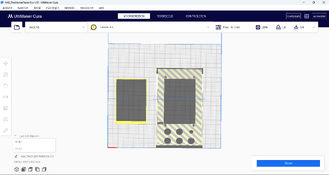
Dear Niglyn, I started to 3d print the parts. When I open some files in Cura to slice it seems that most of the parts are placed at the edge of the building plate. That's not a big deal to move them to the center but I have a few parts that are composed out of several individual parts that are not grouped . One example is "TheShutterTesterBox v15.3mf"that consists out of two parts. Is this the intention or should they be considered as one.
Attached you can find a a snip of the moved main box in Cura but there is a window that stays if you do not move them as a group.
Would it be possible to guide me in this matter ?
 

Attachments

  • Schermafbeelding 2025-12-30 095650.png
    Schermafbeelding 2025-12-30 095650.png
    295.9 KB · Views: 16

Pentaconsixguy

Member
Allowing Ads
Joined
Dec 4, 2025
Messages
4
Location
Belgium
Format
Medium Format
Couldn't you just select all items in Cura and move them together? Seems like an easy enough workaround to me.

Yes, that's not a problem koraks, I just want to know if they are one part or two separate parts as they appear as two structures in Cura. So my question is basically: are they intentionally two parts or are they meant to be one structure ?
 
OP
OP

Niglyn

Member
Joined
Feb 26, 2022
Messages
479
Location
Surrey, UK
Format
Analog
Dear Niglyn, I started to 3d print the parts. When I open some files in Cura to slice it seems that most of the parts are placed at the edge of the building plate. That's not a big deal to move them to the center but I have a few parts that are composed out of several individual parts that are not grouped . One example is "TheShutterTesterBox v15.3mf"that consists out of two parts. Is this the intention or should they be considered as one.
Attached you can find a a snip of the moved main box in Cura but there is a window that stays if you do not move them as a group.
Would it be possible to guide me in this matter ?


-Update have looked at the 3d files in github, the main case and bottom are two separate files.
Not sure how you got them together in your slicer?

Hi, from what I recall, this is the main box and the bottom, so two separate parts.

The rear plate is a separate file, with a few options of which one to print.

I use Fusion which limited to 10 open documents (unless one pays £££££) so I often group parts from the same project onto one drawing.

My printer is the K2+, which I believe has a comparatively large bed & the parts are placed from the centre. Had never thought about smaller printers.

As others have said, if it is two big, delete one item & print separately.

I think I also uploaded the Fusion files, so people can modify/tweak it.

As always, I welcome feedback and ideas for improvements.

Please let me know how your print turns out.
It works fine on my printer.
 
Last edited:
OP
OP

Niglyn

Member
Joined
Feb 26, 2022
Messages
479
Location
Surrey, UK
Format
Analog
@Gruby104 Hi,
Soldering is an art and skill to be learned. Luckily in this modern age, there will be tuition videos on the tube.
It is a skill worth learning.


AliExpress sell cheap soldering practice kits, like a Christmas tree, beetle, aeroplane.
Well worth buying a few to practice with. Get the through-hole kits, not the surface mount ones.


As said before, throw away your lead-free solder. It is awful to work with.
(lead-free needs a higher temperature, leading to over-heating the components, it does not flow well and is brittle).


Buy some proper 60/40 tin/lead solder with rosin flux core. There is normally no need to add any additional flux with this solder.


AliExpress also have cheap soldering irons with temperature control. For 60/40 solder set it around 350 degrees.


Keep us updated with your progress. Lots of helpful friendly people here.
 

MattKing

Moderator
Moderator
Joined
Apr 24, 2005
Messages
55,007
Location
Delta, BC Canada
Format
Medium Format
Soldering is an art and skill to be learned. Luckily in this modern age, there will be tuition videos on the tube.
It is a skill worth learning.

It is fairly easy to learn to solder, and in fact once you do it is surprisingly satisfying - you may find yourself seeking out things to solder!
 
Photrio.com contains affiliate links to products. We may receive a commission for purchases made through these links.
To read our full affiliate disclosure statement please click Here.

PHOTRIO PARTNERS EQUALLY FUNDING OUR COMMUNITY:


Ilford ADOX Freestyle Photographic Stearman Press Weldon Color Lab Blue Moon Camera & Machine
Top Bottom