


• Welcome to Photrio!
    Registration is fast and free. Join today to unlock search, see fewer ads, and access all forum features.
    Click here to sign up

An interesting foray into direct-positive reversal process with photo paper

Ecstatic Roundabout

A
Ecstatic Roundabout

  • 0
  • 0
  • 0
MIT. 25:35

MIT. 25:35

  • 1
  • 0
  • 61

Recent Classifieds

Forum statistics

Threads
202,954
Messages
2,848,081
Members
101,553
Latest member
JasonGoh
Recent bookmarks
0

maritimephoto

Member
Allowing Ads
Joined
Jun 7, 2024
Messages
9
Location
Montreal
Format
35mm
Hey folks! Long-time lurker, rare poster, overall big fan of this community and lover of analog photo :smile:

Some friends and I are working on some in-camera photo paper direct-positive prints. We got a process working from this outline here: http://sgwetplate.com/2020/05/film-photography-black-and-white-paper-reversal

The process:

1. Shoot in-camera with Ilford Multigrade IV Photo Paper (Satin)
2. Develop for 1min (we used both Ilford Multigrade Paper Developer and Quintol in two different trial runs for this, both with the same outcome below)
3. Wash in water bath 1min
4. Bleach in Potassium Permaganate + Sodium Bilsulfate solution for 5mins
5. Wash in water bath 1min
6. Re-expose to incandescent light for 30 secs
7. Re-develop (in same developer bath) in incandescent light for 1 min

The issue:

We only get a few good prints until the second re-development phase begins to max-out on its ability to produce blacks (even though subsequent initial developments still render true blacks). So by print 4, the re-development is not producing blacks, but interestingly, the initial development for the next print DOES produce deep, rich blacks. The same developer continues to work for initial development, but no longer works for the post-bleach step.

First picture:
20250405_001827 Small.jpeg


Second picture (blacks already weakening, in waist area where they should be)
20250405_001931 Small.jpeg


Third picture: (no blacks except in the corners, the darkest area of absolute black, the edges of the flash range)
20250405_002044 Small.jpeg


Fourth picture (already unable to get any blacks at all anymore).
20250405_002106 Small.jpeg


After this fourth picture, the fifth stil develops with rich blacks for the 'negative' initial image, but the second, re-development is inutile.


The confusion:

If the developer is contaminated enough to prevent blacks from forming during second development, why does it still produce full blacks during the first development of the next print, using the same developer?

I'm thinking it has to do with the potency needed for the second, re-development, after bleaching. The Initial Development is handling fresh, unbleached Ilford Multigrade paper. Only the areas hit by light (exposed silver halide) need to be reduced to metallic silver. The emulsion is clean, no weird chemistry in the paper, so even a partially oxidized developer still has enough reducing power to turn this silver halide into deep blacks?

But when the second development (post-bleach + re-exposure), the print has just been through bleach (KMnO₄ + Sodium Bisulfate), a quick unfresh wash, and a fogging exposure to light. The emulsion now contains: residual oxidizers (even if microscopic), possible manganese dioxide stain (from KMnO₄), and fully fogged halides (needs complete reduction across large areas).


So the first dev still works while second dev fails because the developer is partially weakened, but not dead. It can still handle the lighter job of initial development on fresh paper but it can no longer handle the heavier demand of reducing fogged halide after the bleach/fog steps. Does that sound right? We imagined it's like cooking on a camp stove with a dying propane tank. The first development is like frying an egg, and the second is like cooking a steak. We have enough heat left to cook the eggs, but not to fry steaks.

The potential solution?:

We're assuming redevelopment here is much more chemically demanding and that our re-development step is depleted by contamination.

If that's correct
, is the logic step to try to reduce the residual bleach? For removal of potassium permaganate, we came across quite a few suggestions:

-
Sodium metabisulfite (5%) solution
- potassium metabisulphite (3%) solution - (source)
- Sodium sulfite (5%).
- Kodak Cb-6 (sodium bisulfite anh. 15 g in 1 liter of water) - (source)
- combination of Kodak Hypo Clearing Agent stock solution + 15ml Kodak Indicator Stop Bath (concentrate). - (same source as above)
- we have some sodium bisulfite on hand. if mixed with water, would that work as a clearing bath? is that the same as "sodium bisulfite anh." of the Kodak Cb-6?

The question:

Is our assessment of the second development issue sound? If so, what is the best approach to clearing bath here. We'd like to use the same developer bath since we are running out of room.
 
For clearing permanganate bleach, you want to use bisulfite to keep the solution acidic. Using sulfite will allow the formation of manganese oxide. The percentage solution isn't that critical; 1% is fine, and you should see it working as the brown stain fades. If it takes more than a minute, it's too weak. Be careful with this step; the bisulfite will act as a weak fixer if you keep the paper in it too long.

You also want much longer washes between steps. 4 minutes would be much better.

I'd also consider not re-using developer for subsequent prints. Reversal really beats up developers, and I find I only get consistent results if I use developer for one image only. I.e., I use it for first a development and a second development, then discard. You don't need to use a large volume, either... just enough to do the job.

(My experience with this is with enlarging negatives onto lith film. Paper might be different, but not by much.)
 
We'd like to use the same developer bath since we are running out of room.

Alternatively, use a small volume and mix fresh from a concentrated stock for every 2 prints or so. You only need something like 40ml of developer to develop 4x5" in a small tray.

I do agree that the problem is likely caused by bleach carryover into the developer.

you want to use bisulfite to keep the solution acidic

Not too acidic, however; below pH 4 the sulfite will start to turn into get sulfur dioxide gas.
 
I think the problem is not the permanganate carryover.
The problem resides in the clearing bath. It has the function of partially restoring the sensitivity of the film being bleached. In fact permanganic acid destroy all the film sensitivity.
Plus, the clearing bath must be potassium or sodium METABISULFITE.
Sulfite alone is not adequate at all.
 
Hey folks! Long-time lurker, rare poster, overall big fan of this community and lover of analog photo :smile:

Some friends and I are working on some in-camera photo paper direct-positive prints. We got a process working from this outline here: http://sgwetplate.com/2020/05/film-photography-black-and-white-paper-reversal

The process:

1. Shoot in-camera with Ilford Multigrade IV Photo Paper (Satin)
2. Develop for 1min (we used both Ilford Multigrade Paper Developer and Quintol in two different trial runs for this, both with the same outcome below)
3. Wash in water bath 1min
4. Bleach in Potassium Permaganate + Sodium Bilsulfate solution for 5mins
5. Wash in water bath 1min
6. Re-expose to incandescent light for 30 secs
7. Re-develop (in same developer bath) in incandescent light for 1 min

The issue:

We only get a few good prints until the second re-development phase begins to max-out on its ability to produce blacks (even though subsequent initial developments still render true blacks). So by print 4, the re-development is not producing blacks, but interestingly, the initial development for the next print DOES produce deep, rich blacks. The same developer continues to work for initial development, but no longer works for the post-bleach step.

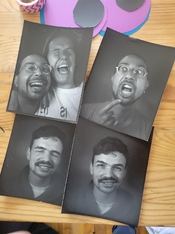
First picture:
View attachment 395647


Second picture (blacks already weakening, in waist area where they should be)
View attachment 395648

Third picture: (no blacks except in the corners, the darkest area of absolute black, the edges of the flash range)
View attachment 395649

Fourth picture (already unable to get any blacks at all anymore).
View attachment 395650

After this fourth picture, the fifth stil develops with rich blacks for the 'negative' initial image, but the second, re-development is inutile.


The confusion:

If the developer is contaminated enough to prevent blacks from forming during second development, why does it still produce full blacks during the first development of the next print, using the same developer?

I'm thinking it has to do with the potency needed for the second, re-development, after bleaching. The Initial Development is handling fresh, unbleached Ilford Multigrade paper. Only the areas hit by light (exposed silver halide) need to be reduced to metallic silver. The emulsion is clean, no weird chemistry in the paper, so even a partially oxidized developer still has enough reducing power to turn this silver halide into deep blacks?

But when the second development (post-bleach + re-exposure), the print has just been through bleach (KMnO₄ + Sodium Bisulfate), a quick unfresh wash, and a fogging exposure to light. The emulsion now contains: residual oxidizers (even if microscopic), possible manganese dioxide stain (from KMnO₄), and fully fogged halides (needs complete reduction across large areas).


So the first dev still works while second dev fails because the developer is partially weakened, but not dead. It can still handle the lighter job of initial development on fresh paper but it can no longer handle the heavier demand of reducing fogged halide after the bleach/fog steps. Does that sound right? We imagined it's like cooking on a camp stove with a dying propane tank. The first development is like frying an egg, and the second is like cooking a steak. We have enough heat left to cook the eggs, but not to fry steaks.

The potential solution?:

We're assuming redevelopment here is much more chemically demanding and that our re-development step is depleted by contamination.

If that's correct
, is the logic step to try to reduce the residual bleach? For removal of potassium permaganate, we came across quite a few suggestions:

-
Sodium metabisulfite (5%) solution
- potassium metabisulphite (3%) solution - (source)
- Sodium sulfite (5%).
- Kodak Cb-6 (sodium bisulfite anh. 15 g in 1 liter of water) - (source)
- combination of Kodak Hypo Clearing Agent stock solution + 15ml Kodak Indicator Stop Bath (concentrate). - (same source as above)
- we have some sodium bisulfite on hand. if mixed with water, would that work as a clearing bath? is that the same as "sodium bisulfite anh." of the Kodak Cb-6?

The question:

Is our assessment of the second development issue sound? If so, what is the best approach to clearing bath here. We'd like to use the same developer bath since we are running out of room.

I think the problem is not the permanganate carryover.
The problem resides in the clearing bath that you've not used. It has the function of partially restoring the sensitivity of the film being bleached. In fact permanganic acid destroy all the film sensitivity.
Plus, the clearing bath must be potassium or sodium METABISULFITE and it's paramount, it's not optional.
Sulfite alone is not adequate at all.
 
Ok so we made some changes but still having contrast issues and some unexpected results.

We changed our developer dilution to 1:12 multigrade with some mixed results, went back to 1:9, and reduced our Sodium Metabisulfite bath to a 2.5% solution and then 1.5%. Bleach we realized is quite effective even at 1 min.

We were still getting very mixed results.

We know the bleach is working because the image is pretty much cleared after 1 min, and we know the clearing bath afterwards is effective: the paper is pure white by the time we re-expose it. Second development usually has some haze or fog.

We found its possible the second development still needs frequent fresh developer to work, even returning the final redevelopment to the original tray (the one that would have no contaminants) still results in some chemical haze or fog.

Here's our modified setup:
1000021401.jpg

Quintol 1:3 for 1 min
Wash 1 min (should we use stop bath?)
Bleach 1 min (Pot Perm + Sod Bisulfate)
Clear 1 min (1.5% sod bisulfite)
Wash 1 min
Re-expose 30 secs
Re-dev 30-45 secs

We tried Phenatol and Multigrade for both dev baths but they never gave us the clarity Quintol has given. We had some success with Multigrade as the first bath and Quintol for the second.

Do folks agree that it's likely insufficient developer strength in the final development bath? Considering the prints look bleached coming out of the bath, and the clearing sod bisulfate wash gives us a crisp white sheet to re-expose, we cant quite imagine what else it could be. What we find odd is, if the initial pure black areas of the initial developed have processed all the silver, when we bleach it and then re-expose and re-develop, what is causing the grey fog/haze pattern? Here are some examples:
Screenshot_20250601_175948_Photos.jpg

Screenshot_20250601_175937_Photos.jpg

Screenshot_20250601_175920_Photos.jpg


We'll be back in the darkroom next weekend for more tests. But even with the Quintol prints, they are quite contrasty... and dilution doesnt seem to help much... and sometimes gives us subtle areas of the haze as well
What can we do to help with contrast?

Screenshot_20250601_181545_Signal.jpg
Screenshot_20250601_181400_Photos.jpg


So the big remainkng questions are:
- Whats really going on with that fog/haze?
- Why are our final prints so contrasty and how can we decrease contrast? Color filters? we are using multigrade paper, so technically we should be able to?

edit: typos and clarifications
 
Last edited:
When I've used MG paper for negatives, the grade 0 filter did reduce contrast; that might help you here.

Otherwise, the standard solution is pre or post flash before first development. This will probably mean changing your exposure time, but will definitely let you reduce contrast as much or as little as you want.
 
wouldn't flashing the paper just turn the black blobs into less-black grey blobs? how would it actually change the contrast range of the paper itself?
 
wouldn't flashing the paper just turn the black blobs into less-black grey blobs? how would it actually change the contrast range of the paper itself?
The former depends on how much you flash; if you flash all the way into the (reversed) blacks, then yes. But you don't have to go that far.
How flashing affects contrast is generally well-understood, but there's no substitute to doing a few experiments with it if you want to learn about it. Of course, flashing doesn't affect the density range of the paper as such (unless you overdo it!), so I wouldn't speak of 'range'. What it does is flatten out part of the transfer function/curve. Specifically, flashing will flatten out the highlights of a negative print (regular enlarger print) so in your case of reversal processing it will create a long 'toe' in the shadows. You could give it a try, although I doubt this is what you're looking for.

As to your problem with the brown spots, I wonder whether the reversal exposure plays a role here. How are you doing that exposure? Maybe it needs to be controlled, and more even across the sheet.

AFAIK there's no solution for the mottling in the highlights; not sure if you experience that as a problem, but in case you start wondering about that - it's inherent to the paper base.
 
We fixed the contrast issues with a Crown Yellow 2 filter. Unfortunately the 0 filter from the enlarger didn't do much.

The development issues we narrowed down to being old/depleted/exhausted developer. After mixing a fresh batch, it pretty much disappeared completely.

We also realized we only really need to bleach for 30 secs until the bleach starts to get tired and we add a few more seconds.

The sodium metabisulfite bath to clear the bleach only needs 1% and 30 secs as well. We're still using the same mix from our early tests and its working like a charm.

Thanks for the feedback and support everyone!
 

Attachments

  • signal-2025-06-14-12-52-52-886.jpg
    signal-2025-06-14-12-52-52-886.jpg
    236.9 KB · Views: 76
I use 1% Potassium dichromate/1.2% sulfuric acid for the bleach with 5% Sodium sulfite as the clearing bath followed by .4% Hypo for 30 sec to reduce mottling and get better highlights and I can do 8 or so 4x5's without the blacks suffering. Dektol works OK but results in high contrast. Ansco 120 seems to tame the contrast better. Potassium dichromate is a toxic chemical and needs PPE and proper procedures to handle it safely, but it lasts a long time after mixing and bleaches a lot of prints before becoming exhausted.
 
...followed by .4% Hypo for 30 sec to reduce mottling and get better highlights and I can do 8 or so 4x5's without the blacks suffering. Dektol works OK but results in high contrast. Ansco 120 seems to tame the contrast better.
0.4% fixer seems crazy diluted...what is this actually doing? We've been reading that there's technically no residual silver in the end anyways, so what's going on here in this step?

We found with Quintol, we can do at least two dozen 4x5 prints, same developer for first and second development.

I'd be curious to try the Ansco 120 since we do lose quite a bit of light due to the Yellow filter, and the paper is already so slow as it is, our flashes are practically touching the subject haha.
 
It's removing some of the silver halide before the rest is developed into the final silver image.

Ah i see now it's before the second development. That's wild, how is it able to remove silver halides to improve the whites but not effect the blacks? The dilution? I would think it would have an impact on both the blacks and the whites or neither.
 
how is it able to remove silver halides to improve the whites but not effect the blacks? The dilution?
In part it's the dilution, but it's mostly because of the logarithmic nature of density. If you remove a small amount of silver halide all across the undeveloped image, the relative loss in density will be far larger in low-density areas than in high-density areas.
 
Hello, I am reviving this thread and hoping "koraks" can chime in. My question is about pre-flashing in order to increase speed and reduce contrast. Can I pre-flash, in my 4x5 camera, a sheet of the ilford multigrade paper by taking a photo of a white card using a yellow filter on the lens? I would rate this exposure at ISO 12. Will doing this increase the speed of the paper and reduce contrast when I am making a photo of the subject without using the yellow filter? What about doing the final photo with the yellow filter? I doing portraits so want to reduce the amount of blinding flash. Thank you for all opinions and insight. I usually do reversal development on black metal with silver gelatin emulsion.
 
Sure thing, but I hope others will respond as well - especially those who have done more work with paper negatives.

Can I pre-flash, in my 4x5 camera, a sheet of the ilford multigrade paper by taking a photo of a white card using a yellow filter on the lens?
Yes. I'd defocus to avoid any texture carrying over from this white card into the preflash.

Will doing this increase the speed of the paper and reduce contrast when I am making a photo of the subject without using the yellow filter?
Yes, but the effects are within certain margins. With preflashing, you effectively alter the toe of the paper (or film), basically lifting it a bit - and if it's a reversal-processed paper or film, it will be the shoulder that's affected, so the highlights as opposed to the shadow. What's limiting is that if you use a stronger pre-flash, it will build visible density and that flattens out things very dramatically in the shadows (negative) or highlights (positive). So contrast reduces in that part of the curve - just not in other parts of the curve. You basically get a curve with a strong kink in it. To an extent that can be desirable, but quite rapidly the flattening out of the curve in either toe or shoulders just leaves a lifeless/bloodless image.

The gain in speed will really be marginal and in practice less than a stop. That means you'll still need considerable flash power for portraits.
 
Well, I tried the process and was successful thanks to a lot of the info above. However, the material is very slow (low ISO), coming in to be ISO 1.5 or 2 for Ilford Multigrade RC paper and ISO 1 for Ilford graded RC. This is close to the sensitivity of wet plate collodion I believe. I work with strobes mainly doing portraits and don't want to have to use more than 2400 WS of power for many reasons - not wanting to blind the subject and not wanting to blow fuses working in place I'm unfamiliar with or don't have full control over. So, I'll go back to my corner which is dry plate silver gelatin which is around ISO 2.5 or so. My next nut to crack will be making my own emulsion, hoping to get to a ISO 8 and higher.

The develop recipes for this technique is a bit scattered around, so I want to write it all out neatly for any new viewers and give some procedure tips and opinions as a user of the material. There is talk above of developer exhausting, so I used a fresh 30ml shot of developer for each photo. Using the same bath for first and second developer worked well. I rinsed the photo in water for one minute between each chemical bath, as its good insurance for chemical baths lasting longer for their intended purpose.

I used Ilford multigrade RC and Ilford graded, #2 RC, (although the box doesn't have a number on it, I'm guessing it is a 2 since that is what they seem to sell now, my box is 5 years old.). Shot in my 4x5 camera with a wide open lens at f5.6. Strobe metered at 5.6 +7 produced a photo that one could say needed more light.

1. Development: Seems any standard paper developer is good. I used Sprint paper developer at the recommended 1:9. I did the 'standard' one minute development for RC paper.

2. Stop/rinse. I didn't use a stop bath but simply rinsed in water for a minute.

3. Bleach: Equal parts of A and B combined right before use. It seemed to last/be effective all day. I bleached until the image disappeared and the paper turned a light grey. Took 15 seconds when bath was fresh, 45 seconds after 8 prints and hours later.
Part A: 2% sulfuric acid. I bought a bottle of drain clog remover as my source, as the SDS that said it was mainly sulfuric acid.
Part B: .04% potassium permanganate.
I used a bath of about 300ml.

4. Rinse with water for 1 minute. May be able to skip this but I'm a fan of not contaminating subsequent chemical baths.

5. Clearing: 1.5% sodium metabisulfate bath. One minute. At this point you no longer need to be working in safelight conditions. I used a bath of 300 ml, and it still seemed strong at the end of the day.

6. Rinse again 1 minute.

7. Expose to light. I had a household LED lightbulb that I had about 12" away and turned that on for 10 seconds.

8. Re-develop using the paper developer.

9. Rinse 1 minute.

10. Fix 1 minute. I used Ilford rapid fixer.

So, there are a lot of steps, but once you do a couple it makes perfect sense and is very easy to do. This would be a great process for outdoor work, which I'm just not doing right now. Keep in mind the ISO 1.5 target and if you are outside you will have to guess about the UV light intensity which changes with the time of day as the photo paper is only sensitive to UV and blue light. I didn't end up using the yellow filter as recommended above as I would have lost more precious light. And, I didn't end up doing the pre-flash to try to eek out a 1/3 stop or so. The material is just took slow for what I do in my practice. (thank you "koraks" for your post above answering my question though!).

Here is a link to my website if anyone cares to view my dryplate portrait work: www.seanmccormick.art. I've been working pouring silver gelatin emulsion on black metal plates and glass for 13 years now. I expose in camera and also by enlarger with slide film that I've shot.

I hope the above summary is helpful to save some leg work!
 
Unlike reversal processing of film where one usually observes an increase in speed (though not substantia), reversal processing of paper results in substantial loss in speed. Papers that work fine at EI:12 in paper negative process tend to work best at EI:2 or lower in reversal process. I don't have an explanation for this behaviour of paper nor have I found one.
 
@AtlantaArtist thanks so much for the valuable write-up - and congrats on so successfully conducting the experiments in the first place! Your post can serve as a convenient how-to guide for any future candidates, it's so well though-out!

Also, beautiful work on your website!!
 
Since the last time I posted, I've gone with "post-flashing" the paper just before the first development and not using .4% hypo to control the highlights and reduce contrast. Photographic paper has 2 qualities that are good to know about when doing reversals:

1. It contains excess silver halide in the emulsion to make a solid black
2. The emulsion itself is made to reproduce an image from a negative, which "compresses" the dynamic range between it's base "fog" (the tint of the acetate) and the darkest shadow it can produce.


When using paper to produce a photo from a negative, it all works quite nicely because the paper "expands" the dynamic range of the negative to a photo that can contain zones 0-10 (through features of silver halide which is sensitive to different colours that can be recruited with filtration to control contrast), and you can expose the paper "just enough" to get nice blacks. Any extra silver halide beyond what is needed to produce a solid black gets removed with the fixer.

But when you do a reversal, if the "negative" looks normal after development, you'll notice that after bleaching and fogging, the resulting reversal is too dark because of the excess silver halide in the emulsion which gets developed after fogging. Instinct tells you to expose more, to make the "negative" darker so the reversal can develop lighter. This results in higher contrast in the reversal.

Trying to determine the viability of a paper negative developed for a reversal isn't really feasible because you can't tell how much silver didn't get developed with the first development step. So a black part of the negative (which should produce white when reversed) can look nice and black, but after it's bleached, fogged, and redeveloped, it could still be from darker gray to a mottled white. In my experience, a well exposed paper negative and post-flashing will produce an almost uniform black negative before bleaching.


In theory, post-flashing exposes the paper with just enough light to get rid of that excess silver and to also produce a solid black in the reversal. The method is similar to pre-flashing for paper negatives, except in reverse. When examining the test strip (after reversal processing), you're looking for the darkest grey next to solid black, then using the exposure settings of the solid black next to it. For my setup, it's quite a bit of light: 5 sec at f/22 with the enlarger at 32cm. I've found post flashing allows me to shoot outdoors at a solid ISO 4 or so (depending on UV light) and the contrast is very much under control. Indoor lighting will be slower, depending on its colour temperature and the amount of UV. I've shot as low as ISO 1 using just incandescent lights, or ISO 2 with flash.

Here's some tests I did with old fogged paper. Fogged paper itself would do better with reversals than non-fogged paper because the base fog (some of the excess silver halide) will get removed with the bleach. Using fogged paper and post-flashing lowers the contrast a lot:


Photrio.com contains affiliate links to products. We may receive a commission for purchases made through these links.
To read our full affiliate disclosure statement please click Here.

PHOTRIO PARTNERS EQUALLY FUNDING OUR COMMUNITY:


Ilford ADOX Freestyle Photographic Stearman Press Weldon Color Lab Blue Moon Camera & Machine
Top Bottom
