• Welcome to Photrio!
    Registration is fast and free. Join today to unlock search, see fewer ads, and access all forum features.
    Click here to sign up

What happened here? Light areas in print

Forum statistics

Threads
202,127
Messages
2,835,471
Members
101,124
Latest member
taro
Recent bookmarks
0

ke6igz

Member
Allowing Ads
Joined
Dec 31, 2010
Messages
31
Format
35mm
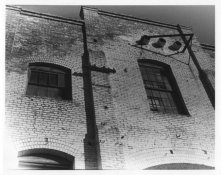
I am fairly new to printing. I have a few prints that have bright white areas with no detail in certain areas. It is not a light leak. Looking at the negative on the light table I can see detail in the bricks there. It just did not get captured by the paper. Maybe the negative has too much range for the paper to capture? What the best way to fix this? Maybe burning that area or maybe printing with a lower contrast grade filter?

Printed on a Beseler 45 - 8x10 enlargement - No filters
Aristra Private reserve RC paper VC
35mm Fuji Neopan 400 film
Film developed with Kodak D76 1:1
Paper developed with Claton P20 developer 1:7
 

Attachments

  • Scanned Image 6.jpg
    Scanned Image 6.jpg
    65.9 KB · Views: 249

Sparky

Member
Allowing Ads
Joined
Jun 19, 2005
Messages
2,096
Location
Los Angeles
Format
Multi Format
No - there's a deeper problem. Certainly not a problem with dynamic range of neg/paper/film etc... since the edges are very different from the center... LOOKS SORT OF like fogging... but it's kind of hard to tell - if It weren't 35mm I'd suggest maybe you're using a wrong or misaligned lens... you might also want to check to see if your enlarging lens is properly mounted and not spewing light...
 
OP
OP

ke6igz

Member
Allowing Ads
Joined
Dec 31, 2010
Messages
31
Format
35mm
Another print same roll. printed just a few minutes later

Here is another print I made just a few minutes later. Same roll of fim. Same pack of paper etc. It looks fine to me.
 

Attachments

  • Scanned Image 3.jpg
    Scanned Image 3.jpg
    26.3 KB · Views: 202

Sparky

Member
Allowing Ads
Joined
Jun 19, 2005
Messages
2,096
Location
Los Angeles
Format
Multi Format
looks like exactly the same problem... it's just that the darker tonality of the subject masks it a little.
 

Sparky

Member
Allowing Ads
Joined
Jun 19, 2005
Messages
2,096
Location
Los Angeles
Format
Multi Format
your paper's either centrally fogged somehow (solution: try a different pack or a different part of the same pack - i.e. from the back of the stack), or there's something funny going on with your enlarging lens (as mentioned - check mounting of lens) or light source (if you have a condenser enlarger (there's a cover on the model you have -look inside to check for lenses focusing the light source- could be set up for the wrong lens)... there's still an OUTSIDE chance that it's from your camera (see if your negs look even - maybe scan one and post here?) - but I doubt that..
 

hitcher

Member
Allowing Ads
Joined
Jan 6, 2004
Messages
83
Location
Michigan
Format
35mm
Kind of looks like a film development problem to me , like the edges might be over developed, which may happen with inadequate agitation. Is this the only roll you have gotten this result ?
 

Luseboy

Member
Allowing Ads
Joined
May 26, 2010
Messages
252
Location
Marin, Calif
Format
Multi Format
Check that your safelights are safe and that you have no major light leaks in your darkroom. If your using a beseler 45, which i assume has the typical condenser head on it, make sure that it is raised to the level of 35mm (the light source as far away from the negative as the adjustment allows). This looks to me that its a problem with film development. Looks like bad agitation methods to me. definitely scan the negs for us, so we can tell you if thats the problem or not. Also, just feedback on your printing. the first one has a bit too much contrast, and is a little dark, bring the contrast down a grade, and give it a little less exposure with the enlarger, and your there!
 

Rick A

Subscriber
Allowing Ads
Joined
Mar 31, 2009
Messages
10,038
Location
Laurel Highlands
Format
8x10 Format
First thing I would look for is to make sure your condenser head is adjusted for the proper format height. Appears to me you have a hot-spot. What lens are you using, and what condenser setting?
 

Bob Carnie

Subscriber
Allowing Ads
Joined
Apr 18, 2004
Messages
7,735
Location
toronto
Format
Med. Format RF
Yes this is the problem,
the negative is not centered under the lens, and condensors or the condensors are in the wrong position for the negative or wrong lens is being used for the negative format.

First thing I would look for is to make sure your condenser head is adjusted for the proper format height. Appears to me you have a hot-spot. What lens are you using, and what condenser setting?
 

graywolf

Member
Allowing Ads
Joined
Jun 5, 2009
Messages
166
Location
Boone, North
Format
Multi Format
Is your negative stage set in the appropriate position for the lens you are using?

However, I would guess that the problem is at the camera level. What it looks like to me is you used a normal lens hood on a wide angle lens, and are getting vignetting in the camera.
 

Bob Carnie

Subscriber
Allowing Ads
Joined
Apr 18, 2004
Messages
7,735
Location
toronto
Format
Med. Format RF
Vingnetting on camera would be negative density on the film which would be then plus density on the prints.
Negative density on edges of the print is certainly a enlarger problem set up.
Is your negative stage set in the appropriate position for the lens you are using?

However, I would guess that the problem is at the camera level. What it looks like to me is you used a normal lens hood on a wide angle lens, and are getting vignetting in the camera.
 
Joined
Jan 21, 2003
Messages
15,715
Location
Switzerland
Format
Multi Format
I believe that this can have two sources:
1. Like Bob, Tom, and Rick I think that you are either using the wrong condenser for your lens, or some other setup with your enlarger is wrong.
2. It can also be over-developed edges of the film, which is due to insufficient agitation.

It could be BOTH of these.

Do a contact print of your negatives. That will tell you if there is a problem with your negatives or not. If you can tell that you have perfectly even density in your negatives - work on setting up the enlarger correctly.
If you are having problems with the negatives, visible in the contact sheet, you need to address that issue first, before you think of working on the enlarger.

- Thomas
 

Bob Carnie

Subscriber
Allowing Ads
Joined
Apr 18, 2004
Messages
7,735
Location
toronto
Format
Med. Format RF
I concur Dr Bertilsson, but if it is the negative over agitated it is the worst case I have ever seen, and the OP should forever stop ingesting coffee.

I believe that this can have two sources:
1. Like Bob, Tom, and Rick I think that you are either using the wrong condenser for your lens, or some other setup with your enlarger is wrong.
2. It can also be over-developed edges of the film, which is due to insufficient agitation.

It could be BOTH of these.

Do a contact print of your negatives. That will tell you if there is a problem with your negatives or not. If you can tell that you have perfectly even density in your negatives - work on setting up the enlarger correctly.
If you are having problems with the negatives, visible in the contact sheet, you need to address that issue first, before you think of working on the enlarger.

- Thomas
 
Joined
Jan 21, 2003
Messages
15,715
Location
Switzerland
Format
Multi Format
I concur Dr Bertilsson, but if it is the negative over agitated it is the worst case I have ever seen, and the OP should forever stop ingesting coffee.

Ha! Good advice for anyone, including me. Perhaps that will stop me from spraying advice all over the interwebs and focusing on my own pictures some more... :devil:
 

Sparky

Member
Allowing Ads
Joined
Jun 19, 2005
Messages
2,096
Location
Los Angeles
Format
Multi Format
First thing I would look for is to make sure your condenser head is adjusted for the proper format height. Appears to me you have a hot-spot. What lens are you using, and what condenser setting?

HEY! I a'ready said that...! hijacker!! :smile:
 
OP
OP

ke6igz

Member
Allowing Ads
Joined
Dec 31, 2010
Messages
31
Format
35mm
Details about my enlarger setup

If I had to guess I would say that there is some sort of light fall off problem with the enlarger. I can not see the fall off in the negatives on the light table. I can not see it on the easel before I print. I will scan some negatives so you guys can take a look.

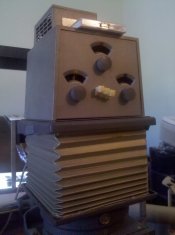
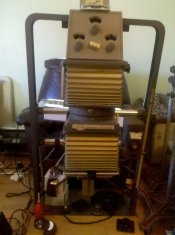
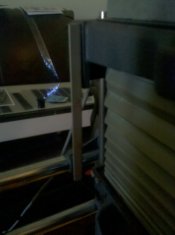
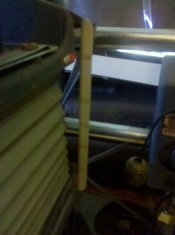
Its possible that I have the enlarger setup wrong or it may be dust or dirt in the light house causing the problem. I have not taken the light house apart to make sure everything is clean in there. The lens I am using is a Minolta Rokkor 50mm 5.6. The example prints you see are printed at f8 to f11. The light house is made for color printing. Its a Besler/Agfa brand. It also has a bellows with a index on the side. When printing 35mm I have the bottom bellows set at 35mm and the top bellows set to "1" which is bellows fully extended farthest away from the lens. You can see my setup in the attached pictures.

I have also included a scan of another print that my illustrate the falloff better.
 

Attachments

  • Scanned Image 1.jpg
    Scanned Image 1.jpg
    54.7 KB · Views: 111
  • IMG_20110425_092604.jpg
    IMG_20110425_092604.jpg
    648.9 KB · Views: 111
  • IMG_20110425_092643.jpg
    IMG_20110425_092643.jpg
    605.1 KB · Views: 128
  • IMG_20110425_092813.jpg
    IMG_20110425_092813.jpg
    404.3 KB · Views: 107
  • IMG_20110425_092741.jpg
    IMG_20110425_092741.jpg
    555.3 KB · Views: 110
Last edited by a moderator:
OP
OP

ke6igz

Member
Allowing Ads
Joined
Dec 31, 2010
Messages
31
Format
35mm
Camera use to expose the film.

The camera used to take these pictures is a Yashica Electro 35 GSN with a 45mm F1.7 lens. No filters or lens hoods were used.
 

Sparky

Member
Allowing Ads
Joined
Jun 19, 2005
Messages
2,096
Location
Los Angeles
Format
Multi Format
I haven't used that exact setup - but it looks to me as though the condenser is WAY too far away from the light source! You need to decrease the distance between the light source and consdenser. That should fix things.
 
OP
OP

ke6igz

Member
Allowing Ads
Joined
Dec 31, 2010
Messages
31
Format
35mm
I am not sure how the top bellows should be set. I do print 35mm, 6x7 and 4x5 negatives. Do I need to change the top bellows whenever I change the bottom ones?
I have not been able to find any documentation on this color head.
 

Rick A

Subscriber
Allowing Ads
Joined
Mar 31, 2009
Messages
10,038
Location
Laurel Highlands
Format
8x10 Format
There should not be any condensers in that set-up, only a diffuser chamber. The lamp housing should be set at lowest position for dichroic head, no matter which format.
 
Last edited by a moderator:

hpulley

Member
Allowing Ads
Joined
Oct 6, 2010
Messages
2,207
Location
Guelph, Onta
Format
Multi Format
Light areas on the print won't be light leaks, light leaks in the darkroom will be darker, not lighter. It can be tough to judge by eye if the brightness is correct but if it looks fine by eye then only your paper or developer could be at fault.
 
OP
OP

ke6igz

Member
Allowing Ads
Joined
Dec 31, 2010
Messages
31
Format
35mm
There should not be any condensers in that set-up, only a diffuser chamber. The lamp housing should be set at lowest position for dichroic head, no matter which format.

If its suposed to be at the lowest position (bellows fully collapsed) for all formats then what is the purpose for this adjustment?
 

Rick A

Subscriber
Allowing Ads
Joined
Mar 31, 2009
Messages
10,038
Location
Laurel Highlands
Format
8x10 Format
That is for condenser set-up only, not for dichroic set-up, at least thats how my 23C's work. You remove the condenser set, insert the diffuser in its place, run the lamp housing to its lowest position, and install the dichroic head. Oh, and remove the adjusting knob from the lamp house, its not needed anymore.
 
Joined
Jan 21, 2003
Messages
15,715
Location
Switzerland
Format
Multi Format
I still think a contact sheet would tell a lot. It's easy to make, takes a couple of minutes of time, and would give a good indication of where to start trouble-shooting.

Negatives can look just fine and print with uneven density. Or scan them. That will show uneven densities too.

I am afraid I don't know much about the Beseler enlargers.
 
Joined
Jan 21, 2003
Messages
15,715
Location
Switzerland
Format
Multi Format
That is for condenser set-up only, not for dichroic set-up, at least thats how my 23C's work. You remove the condenser set, insert the diffuser in its place, run the lamp housing to its lowest position, and install the dichroic head. Oh, and remove the adjusting knob from the lamp house, its not needed anymore.

Are all color heads set up with diffusion light source? Or are some of them condenser?
 
Photrio.com contains affiliate links to products. We may receive a commission for purchases made through these links.
To read our full affiliate disclosure statement please click Here.

PHOTRIO PARTNERS EQUALLY FUNDING OUR COMMUNITY:


Ilford ADOX Freestyle Photographic Stearman Press Weldon Color Lab Blue Moon Camera & Machine
Top Bottom