• Welcome to Photrio!
    Registration is fast and free. Join today to unlock search, see fewer ads, and access all forum features.
    Click here to sign up

Weird bleach / toning issue

Recent Classifieds

Forum statistics

Threads
201,723
Messages
2,829,109
Members
100,910
Latest member
SuninPisces
Recent bookmarks
0

Marco B

Subscriber
Allowing Ads
Joined
Jan 13, 2005
Messages
2,736
Location
The Netherla
Format
Multi Format
Hi all,

I just today tried to copper-red tone a handcoated developed print. The paper was coated with Rollei Black Magic VC and the toner I used was a copper based toner consisting of two components that need to be mixed in one tray for creating the working solution:

- Component 1 is a regular Potassium Ferricyanide bleach
- Component 2 is Copper (II) Sulphate

So these are simply mixed in one tray in which the print is dunked.

All seemed to go well initially, with the black of developed print slowly being replaced by copper red. However, after a while (about 10 min), when large parts of the print were already toned to completion, with no silver black left, I started noticing a number of big black stains that seemed to resist the toning action.

And so they did... :rolleyes:

Initially, I thought the solution might be exhausted, as the stated capacity was not that big, and the print was heavy black all over, but adding another set of toning bottles to the solution, did NOT solve the black stains and toning issue.

I finally, after about 1 hour(!) ended up leaving the print in the toning solution (heck, it was already ruined likely) and went out to do some other things.

After about 5 hours I came back and noticed the resistant black stains were gone, only to be replaced by now lighter "holes". So instead of the copper red replacing the silver (or whatever the stains were), the toning solution ended up just bleaching the stains away. :surprised:

So now I have a print that for 80% of the surface looks "normal" and is properly toned, while the other 20% looks like if the "wall paint" came of a red painted wall...

What went wrong :confused:

I can tell you the resistant stains were at the position of the thickest layer of emulsion. I coat with a brush, so inevitably, the coating tends to be a bit messy with thicker and thinner layers present.

I may easily have had processing issues because of this: undeveloped but exposed silver emulsion, improperly fixed due to thick layer...

But how would that explain "resistant" black stains????? :confused:

I just can not think of options. For example, if the thicker emulsion was not propely fixed all the way through the emulsion, how would that explain a dark black stain resistant to the bleach and toning??

Any clues highly welcome!! :smile:
 
OP
OP
Marco B

Marco B

Subscriber
Allowing Ads
Joined
Jan 13, 2005
Messages
2,736
Location
The Netherla
Format
Multi Format
Referring to this thread and PE's remarks of printing out of silver halide:

(there was a url link here which no longer exists)

could the observed black stains actually be printed out silver halide due to insufficient fixing of the original print? But why would this be "resistant" to bleach? Or is the crystal form of a complex metallic colloidal silver and a non charged halide (cl,br,i) actually more resistant to bleach than normal, properly developed and fixed (so no halide present) silver?
 

Photo Engineer

Subscriber
Allowing Ads
Joined
Apr 19, 2005
Messages
29,018
Location
Rochester, NY
Format
Multi Format
It was not printed out silver halide if the original was properly developed and fixed and washed.

I have seen this effect with heavy silver levels in dark areas which exhaust the toner due to dilution or due to the toner being exhausted. This can lead to what looks like positive and negative images combined, or to prints in which the surface looks like it has a colored deposit on it in dark areas.

Without a scan, it is hard to say, but if my description fits, then you can take it as probably being what you have. It is a normal happening with very high silver levels. About the only way around it is by experimentation to find out the best condition which avoids it.

PE
 

tim rudman

Member
Allowing Ads
Joined
May 9, 2006
Messages
694
Format
Medium Format
It was not printed out silver halide if the original was properly developed and fixed and washed.

I have seen this effect with heavy silver levels in dark areas which exhaust the toner due to dilution or due to the toner being exhausted. This can lead to what looks like positive and negative images combined, or to prints in which the surface looks like it has a colored deposit on it in dark areas.

Without a scan, it is hard to say, but if my description fits, then you can take it as probably being what you have. It is a normal happening with very high silver levels. About the only way around it is by experimentation to find out the best condition which avoids it.

PE

Copper toners can be very prone to solarisation, which gives positive/negative reversal in some tones. This is more common (sometimes very) with some papers and also varies with the toner. It sounds as though this could be what you are seeing. Does this description fit?
Tim
 

Photo Engineer

Subscriber
Allowing Ads
Joined
Apr 19, 2005
Messages
29,018
Location
Rochester, NY
Format
Multi Format
Tim;

It could be the same effect. Copper is light sensitive itself and can form a metallic image that can then be bleached out. OTOH, it can be the exhaustion of the bleach which then leaves black areas which then restart bleaching. IDK, it could be a number of things. I hesitate to say this or that without doing the experimentation, but I have seen the effect with other toners as well.

PE
 
OP
OP
Marco B

Marco B

Subscriber
Allowing Ads
Joined
Jan 13, 2005
Messages
2,736
Location
The Netherla
Format
Multi Format
Thanks Ron and Tim for the responses. The print is currently drying, so I can't put it on my scanner yet. I will try to respond to all the suggestions though:

It was not printed out silver halide if the original was properly developed and fixed and washed.

As said in the original post, I may have had an issue with developing or fixing. Since the areas affected were where the emulsion was thickest, and the image was a lowkey, almost black photo, any fixing issues in deeper layers of the emulsion may have been hidden by a black top layer of silver...

I have seen this effect with heavy silver levels in dark areas which exhaust the toner due to dilution or due to the toner being exhausted.

Exhaustion was my first idea too, however, after adding two new fresh bottles of toner (I started out with a solution at half of the designated strength, so adding just made up for that), it still did not tone properly. I am sure it should have, since the first two bottles managed to tone 80% without issue in about 10 min.

Even a 5 hour wait was not enough with the extra toner... The black stains really resisted bleaching and toning.

This can lead to what looks like positive and negative images combined, or to prints in which the surface looks like it has a colored deposit on it in dark areas.

Copper toners can be very prone to solarisation, which gives positive/negative reversal in some tones. This is more common (sometimes very) with some papers and also varies with the toner. It sounds as though this could be what you are seeing. Does this description fit?
Tim

It doesn't look like a positive / negative or solarized image, as I described, it looks like if the paint started peeling of a red painted wall, so irregular (not following any contours, just the brush strokes) and lighter than the surrounding areas, just like if the paint peeled of or was bitten away by some chemical.

Copper is light sensitive itself and can form a metallic image that can then be bleached out.

Ron, this is probably the most tantalizing suggestion. Since the black resistant stains were at the point of thickest emulsion, you may be right that they are actually NOT silver, but a metallic copper deposit... Can that appear almost black?

It would at least explain why the stains were so much more resistant to bleaching, as it is likely that the copper deposit has different characteristics than ordinary silver, being another metal. And maybe also explain why the 5 hour toning, actually failed to tone, but simply bleached away, since there was no longer silver, but only copper. Remains the question what happened to the original silver? Maybe the very high silver content caused issues like PE described, and silver was replaced by copper deposit (but not copper toning!) before the actual toning could take place.

There seems some logic in this suggestion. Tim: any input also from your side on this? Does the solarization you were talking about cause some form of ( metalic) copper deposit to form?
 

Photo Engineer

Subscriber
Allowing Ads
Joined
Apr 19, 2005
Messages
29,018
Location
Rochester, NY
Format
Multi Format
Marko;

Many Copper salts are light sensitive. Cuprous oxide is light sensitive and has about the same speed as Kodabromide paper and gives about the same tone scale when tested with a step wedge. When fixed, the salt vanishes and leaves a very cold toned copper metal image which vanishes very rapidly leaving a blank sheet of paper.

This has been described in a series of papers by P. J. Hillson of Kodak and myself. It is also published as research disclosures and patents, but I have no numbers for them, sorry.

PE
 

Sparky

Member
Allowing Ads
Joined
Jun 19, 2005
Messages
2,096
Location
Los Angeles
Format
Multi Format
I'd suggest making two more sacrificial prints and give them both the same bleach treatment - but wash one MUCH longer... you may be seeing the result of bleach residue in the paper. Just a thought - but I've been through similar issues and that was my problem...
 

tim rudman

Member
Allowing Ads
Joined
May 9, 2006
Messages
694
Format
Medium Format
Thanks Ron and Tim for the responses. The print is currently drying, so I can't put it on my scanner yet. I will try to respond to all the suggestions though:

snip snip
It doesn't look like a positive / negative or solarized image, as I described, it looks like if the paint started peeling of a red painted wall, so irregular (not following any contours, just the brush strokes) and lighter than the surrounding areas, just like if the paint peeled of or was bitten away by some chemical.

Are there any Mackie lines?
Tim
 
OP
OP
Marco B

Marco B

Subscriber
Allowing Ads
Joined
Jan 13, 2005
Messages
2,736
Location
The Netherla
Format
Multi Format
I'd suggest making two more sacrificial prints and give them both the same bleach treatment - but wash one MUCH longer... you may be seeing the result of bleach residue in the paper. Just a thought - but I've been through similar issues and that was my problem...

I don't think this is the issue. Actually, the components 1 and 2 MUST be added together for toning. Only when you add them together, the copper red is formed (I don't know the exact composition of these two solutions, see my first post for the only information I have on that).

It is a bleach AND tone solution in one. This is per the instructions that came with it.
 
OP
OP
Marco B

Marco B

Subscriber
Allowing Ads
Joined
Jan 13, 2005
Messages
2,736
Location
The Netherla
Format
Multi Format
Are there any Mackie lines?
Tim

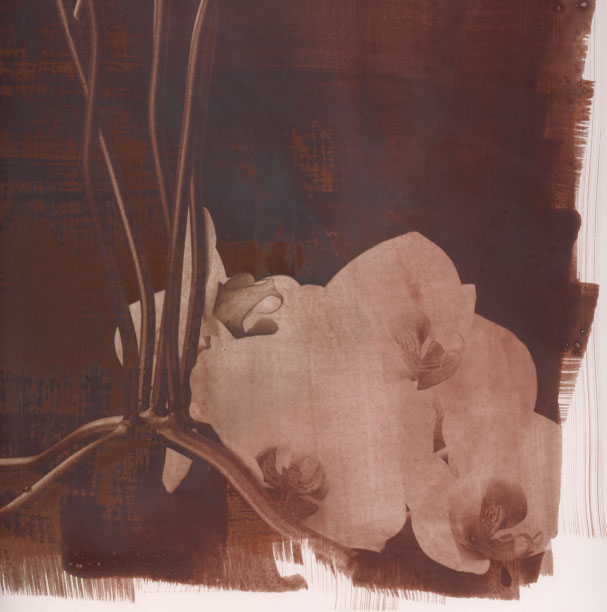
No, it doesn't really look like any solarization or Sabattier as I know it. I have now included a scan below.

Please note it looks horrible, but it was in the toning solution way to long, so there is an overall dense red cast.

Notice the "peeled" of paint look to the left of the metal candle and orchid flowers... The lighter areas are where the black resistant (copper?) deposit was. So you will just have to imagine that. Replace the lighter areas with black, and that was what I saw after about 10 min up to about 1 hour. After 5 hours bleaching and toning, this was left...

As said before, these were the areas of highest silver density and thickest emulsion, almost completely black in the original print before toning.

Tim: I still think though that your's and PE's suggestion of the formation of light sensitive and possibly metallic copper is on the right track. The "resistant" black stains just can not have been silver, considering the completely different response to the bleach in the solution and the fact that no toning took place in these spots.

Toning.jpg
 

Sparky

Member
Allowing Ads
Joined
Jun 19, 2005
Messages
2,096
Location
Los Angeles
Format
Multi Format
most 'bleach and tone' processes that I know of are separate steps. You never add them together. But maybe copper is different - I found that with thiourea dioxide toning that the washing was a VERY sensitive step... it seems to me that might be true with other 'bleach and tone' processes.
 
OP
OP
Marco B

Marco B

Subscriber
Allowing Ads
Joined
Jan 13, 2005
Messages
2,736
Location
The Netherla
Format
Multi Format
most 'bleach and tone' processes that I know of are separate steps. You never add them together. But maybe copper is different - I found that with thiourea dioxide toning that the washing was a VERY sensitive step... it seems to me that might be true with other 'bleach and tone' processes.

The toner is by a Dutch manufacturer called Amaloco, they also have a blue toner of two components that need to be added together with the bleach and toning taking place in the same tray.

I haven't tried separating these two steps for this copper toner. It might actually be that it is possible to separate these steps and bleach and tone in separate trays, with a wash inbetween, but I haven't tried it... I just followed the instruction sheet that said to add the components together. But maybe the instruction to tone and bleach in one bath is just for convenience...

I do know that Amaloco's thiourea based sepia toner uses two seperate baths for the bleaching and toning.
 

Photo Engineer

Subscriber
Allowing Ads
Joined
Apr 19, 2005
Messages
29,018
Location
Rochester, NY
Format
Multi Format
Marko;

Whatever it is, I have gotten it with other toners and papers. I'm really not sure what it is.

PE
 

tim rudman

Member
Allowing Ads
Joined
May 9, 2006
Messages
694
Format
Medium Format
most 'bleach and tone' processes that I know of are separate steps. You never add them together. But maybe copper is different - I found that with thiourea dioxide toning that the washing was a VERY sensitive step... it seems to me that might be true with other 'bleach and tone' processes.

Most copper and iron blue toners are made to be mixed into a single bleach'n'tone solution. There are some separate solution formualae but most if not all commercially available versions are made to be used in one bath.
Tim
 

tim rudman

Member
Allowing Ads
Joined
May 9, 2006
Messages
694
Format
Medium Format
No, it doesn't really look like any solarization or Sabattier as I know it. I have now included a scan below.

Please note it looks horrible, but it was in the toning solution way to long, so there is an overall dense red cast.

Notice the "peeled" of paint look to the left of the metal candle and orchid flowers... The lighter areas are where the black resistant (copper?) deposit was. So you will just have to imagine that. Replace the lighter areas with black, and that was what I saw after about 10 min up to about 1 hour. After 5 hours bleaching and toning, this was left...

As said before, these were the areas of highest silver density and thickest emulsion, almost completely black in the original print before toning.

Tim: I still think though that your's and PE's suggestion of the formation of light sensitive and possibly metallic copper is on the right track. The "resistant" black stains just can not have been silver, considering the completely different response to the bleach in the solution and the fact that no toning took place in these spots.

Toning.jpg

Hmm, I've never toned a print in copper for 5 hours so can't speak from personal experience! However, the result doesn't look too surprising considering the natural tendency that Cu has for solarisation and tone reversal and the grossly overtoned treatment. What would be helpful/interesting would be a see scans of the untoned print and a normally Cu toned print (say a few minutes!) side by side.
BTW, what was the paper and developer?
Tim
 
OP
OP
Marco B

Marco B

Subscriber
Allowing Ads
Joined
Jan 13, 2005
Messages
2,736
Location
The Netherla
Format
Multi Format
Tim and PE,

Thanks for all the input so far.

Tim: I am not so much interested in the "overall" look of the scan. Do you understand which areas I mean? I maybe should have marked them, but they are visible enough. I am talking about the large lighter red coloured areas left of the metal candle-standard, you can also see some of the "peeled-of" areas in between the candle-standard legs and two areas above the orchid flowers. The edges are ragged while showing the direction of the brush marks of the liquid emulsion coating.

These "lighter" areas remained almost completely black after the rest of the print had toned and switched to red, they clearly resisted bleaching. I still think it might have been some kind of copper substance, maybe caused by an initial very high silver content in these areas, as it responded completely different than silver.

About the paper and developer:
I used an art paper specially designed for acrylic paint. I have good experiences with that in combination with liquid emulsion. The paper is though and durable, and thus withstands the wet processing well. It has less tendency to buckle than watercolour paper in my experience. I think the main difference with watercolour paper is that it is quite heavily sized, so as to absorb less water from the acrylic paint, contrary to watercolour paper if I am right.
The developer was just an ordinary developer similar to Ilford Multigrade developer.

Here's an example of how the print looked, notice that there are no lighter areas in the print left of the candle-standard foot (please note, this is another liquid emulsion print of the same negative on a smaller size, so it's not the same as the one I toned!, but it does give a good impression):

Dead Link Removed
 

Photo Engineer

Subscriber
Allowing Ads
Joined
Apr 19, 2005
Messages
29,018
Location
Rochester, NY
Format
Multi Format
Well, FWIW, I have had the same effect take place with copper toners, and it does appear in high density areas and appears to be a complex redox reaction with copper, silver and the other ingredients.

Also, FWIW, the effect appears to vanish or become very minor with lower silver papers. And, it can be taken advantage of for some very nice effects as it varies from paper to paper.

PE
 

tim rudman

Member
Allowing Ads
Joined
May 9, 2006
Messages
694
Format
Medium Format
Tim and PE,
Tim: I am not so much interested in the "overall" look of the scan. Do you understand which areas I mean? I maybe should have marked them, but they are visible enough. I am talking about the large lighter red coloured areas left of the metal candle-standard, you can also see some of the "peeled-of" areas in between the candle-standard legs and two areas above the orchid flowers. The edges are ragged while showing the direction of the brush marks of the liquid emulsion coating.

These "lighter" areas remained almost completely black after the rest of the print had toned Dead Link Removed

Thanks Marco. That original scan makes it much easier to appreciate your description. I agree with PE, this sort of effect is not uncommon with copper toners, particlarly with high silver emulsions and or cadmium containing emulsions (only one left now). You could try putting it back in developer and reverting to B&W. You could then tone it more subtly, but redeveloped prints often solarise quicker - but you might like it.
 
OP
OP
Marco B

Marco B

Subscriber
Allowing Ads
Joined
Jan 13, 2005
Messages
2,736
Location
The Netherla
Format
Multi Format
Thanks Marco. That original scan makes it much easier to appreciate your description. I agree with PE, this sort of effect is not uncommon with copper toners, particlarly with high silver emulsions and or cadmium containing emulsions (only one left now).

Thanks Tim and PE. I think you both explained it well enough. I don't need an exact explanation, I was just very curious as what was going on.

It's good to know these things can happen, especially with copper toners.

You could try putting it back in developer and reverting to B&W. You could then tone it more subtly, but redeveloped prints often solarise quicker - but you might like it.

Revert back to BW :confused: You mean the silver is still present? I thought the bleaching and toning would somehow remove the silver from the print with this kind of toning... according to your reaction it isn't... Well, time to look up the chemistry behind this kind of copper toning, do you have an internet reference for that? The reason why I originally thought the silver would be removed (contrary to with for example a sepia toner where the silver is converted to Ag2S) is that the red coloured substance that makes up the tone, is formed as a visible suspension as soon as you add the components of the toner together, even without the print being present in the toning solution. So contrary to a sepia or selenium toner that directly converts the silver and causes the colour change to brown, the red is formed by the copper itself, and not necessarily as a reactionproduct with silver, and than somehow deposited on the image???

Well, OK, so I have given a try to redevelop it, and yes, it does turn black, but as expected the areas that caused an issue with the copper toning, don't completely turn back to deep black, they stay just as visible as in the red toned print. Of course this is no surprise, since something went wrong...
 
Last edited by a moderator:
OP
OP
Marco B

Marco B

Subscriber
Allowing Ads
Joined
Jan 13, 2005
Messages
2,736
Location
The Netherla
Format
Multi Format
OK, found a number of references on copper toning through Google, and of course I should once buy your book Tim...
 

tim rudman

Member
Allowing Ads
Joined
May 9, 2006
Messages
694
Format
Medium Format
Hey - that's news to me..!! What is this paper (if it is a paper) - do you mind my asking...?

Fomatone MG allegedly contains cadmium, and its reaction to lith and selenium strongly suggest this is true. But Foma is now under EEC directives and has allegedly been given a time period (some time ago now) to stop cadium use, exactly the same as Kentmere Kentona/Art Classic some years ago (see stop press announcments in my 1st Lith book warning of its iminent demise).
The tricolour response that Fomatone Lith prints have in selenium is the same, albeit less pronounced, as the old Kentona. It disappeared when the cadium was removed and I fear the same will be true with Fomatone before much longer.
Tim
 
OP
OP
Marco B

Marco B

Subscriber
Allowing Ads
Joined
Jan 13, 2005
Messages
2,736
Location
The Netherla
Format
Multi Format
Tim, after your remark concerning the possibility to redevelop a copper red toned image back to black, I had been wondering if there was any sense in fixing the image after toning. Since redeveloping means there is possibly (light) sensitive silverhalide in a copper toned image (though invisible since colourless), fixing might help in making it more archival...

To test this, I dipped a piece in fixer, and subsequently in developer again. As expected, the image did not turn back in black, since the fixer removed the silverhalide. I also noticed that, contrary to some experimentation with blue toner, the copper toned image seems to hold up pretty well in the fixer (it's destroyed in the developer). There wasn't much of a visible change, if at all, even though I am using a basic fixer.

So, my question is: Do you also fix a copper toned image to make it more archival?
 

tim rudman

Member
Allowing Ads
Joined
May 9, 2006
Messages
694
Format
Medium Format
Generally, there is no need to re-fix Marco. Although re-fixing is used sometimes with any of the metal ferrocyanide toners it is usually not included in instructions and most workers don't bother. It may depend on how far you tone though, as toning with the MFC toners isn't always taken to an end point.
I put the following para in the copper toning chapter of my toning book ...

Re-fixing after toning

Some workers recommend that fully copper toned prints should be re-fixed in a 5% solution of sodium thiosulphate before the final wash. Unless used for one of the special effects, and over-printed especially, this should only ever be considered for prints that have been fully toned to the ‘end-point’. Most copper toner instructions in fact make no reference to fixing at all, and it should absolutely be avoided where prints have been incompletely copper toned, as irreversible bleaching is likely to take place. This is associated with a loss of density, which can be considerable with some papers. It should also be noted that a post-toning dilute fixer bath is one way of obtaining solarisation effects with some papers, as described later.

If a copper -toned print dries too dark or too red, slow fixing in a weak fixer can sometimes improve the density or the colour. The print will lighten to a variable degree and the colour will usually shift towards the browns.


BW
Tim
 
Photrio.com contains affiliate links to products. We may receive a commission for purchases made through these links.
To read our full affiliate disclosure statement please click Here.

PHOTRIO PARTNERS EQUALLY FUNDING OUR COMMUNITY:


Ilford ADOX Freestyle Photographic Stearman Press Weldon Color Lab Blue Moon Camera & Machine
Top Bottom