• Welcome to Photrio!
    Registration is fast and free. Join today to unlock search, see fewer ads, and access all forum features.
    Click here to sign up

Vuescan can't find scanner: Nikon 4000, Windows 10

Finis Lineae

H
Finis Lineae

  • 0
  • 0
  • 22
Angular building 6

A
Angular building 6

  • 4
  • 0
  • 44

Recent Classifieds

Forum statistics

Threads
202,556
Messages
2,842,276
Members
101,379
Latest member
deckeda
Recent bookmarks
0

John Wolf

Member
Allowing Ads
Joined
Jul 2, 2017
Messages
25
Location
Chicacgo
Format
35mm RF
Just got a Nikon 4000 and Vuescan doesn't recognize it. I'm on a PC with Win 10.

My motherboard has a Firewire port, which Device Manager says is active. I know Vuescan has the driver for this scanner. I tried both the 64-bit and 32-bit latest Vuescan versions.

Can anyone point me in the direction to troubleshoot this? Thank you.

John
 
FireWire?? How old is the scanner? I wouldn't be a bit surprised Win 10 has no drivers for it.
 
Vuescan uses it's own drivers, from what I understand. I would suggest checking the device manager to see if windows sees the scanner. If it does, try removing the Vuescan software and reinstalling it with the scanner hooked up. If it doesn't see it, try a different FireWire cable, move the FireWire card to a different slot, and/or update the FireWire and motherboard drivers. If the FireWire is built into the motherboard, try disabling it in the bios, restarting to let Windows fully load, then restart the computer again and enable the FireWire in the bios.
 
What does Device Manager show for the scanner? If it's coming up as "Unrecognized Device" or has some other error, try installing the latest version of the 64-bit Nikon driver that you can find: A driver written for W7 will likely work.
 
If you hook up anything to Win, the computer needs the drivers for the device you are hooking up. If a scanner was made during the XP or Vista years, then 10 will NOT have drivers, and MSFT never wrote any for 10. Try downgrading to XP, which is better anyway. Microsoft could have shut down after XP and wouldn't bother me in the slightest. Just like Nikon could have shut down after the F2. Once you made the best, anything after that is just peddling new junk to satisfy the stockholders.
 
It may not be an issue with a driver for the scanner - Vuescan does that for you.
The issue is may be with the Firewire port.
I'd contact Mr. Hamrick if I were you.
 
I'll butt out of the tread at this point and make way for better voices. I'm still trying to get past a Win 10 machine having Firewire in the first place. I thought it was mainly an AAPL thing, and outdated at that.
 
My VueScan experience is on a Mac and an old Minolta scanner that I connect via a SCSI-to-Firewire-adapter. So, a lot of differences compared to your set up.

On my set up, the scanner must be turned on first (before launching Vue Scan) and then I must wait a LONG time before launching Vue Scan. Like maybe 5 minutes? If I launch VueScan first, or if I don't wait long enough after turning on the scanner, it will not work, and I have to start over.
 
Thank you, everyone. Much appreciated. I'll try some of your suggestions. Failing that, I'll contact Ed Hamrick.

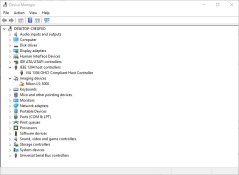
My motherboard has an integrated port, which is what I'm using. I've attached a Device Manager screenshot. Windows says I'm using the latest driver.

Device Manager didn't show the scanner, so I used the Actions function to add the driver from the Vuescan list. There was no 4000 driver, so I used the 5000, which I understand is the same.

I have a Plustek 8200 but saw this one for a low price and thought I'd compare them.

John
 

Attachments

  • device_manager.JPG
    device_manager.JPG
    54.1 KB · Views: 206
Last edited:
I used my Coolscan 4000 on an old Mac mini with FireWire running 32 bit windows 10. It worked great when using Nikon’s own scan software 4.0.3

I’ve never used vuescan with it.
 
Have you reached out to Hamrick (the developer)? When I had an issue a while back, he was quick to respond.
 
Get rid of or ignore FireWire. You probably have a modern port already.
The scanner outputs to Firewire, and actually came with a computer card for Firewire.
 
I'll butt out of the tread at this point and make way for better voices. I'm still trying to get past a Win 10 machine having Firewire in the first place. I thought it was mainly an AAPL thing, and outdated at that.

Sounds like the mini is trying to fake Win10.
 
Still struggling with getting this going. Ed Hamrick kindly sent the drivers directly. The port and scanner drivers are recognized in Device Manager, but Vuescan still doesn't find the scanner. My motherboard has two integrated Firewire ports and I've also added a card and tried all of them with two different cables. I'm stumped but not ready to give up yet.

John
 
What if you install Nikon Scan 4.0.3.
It works under windows 10 in 32 bit mode.

Can the native Nikon drivers see the scanner?
 
Still struggling with this. Ed Hamrick kindly sent the drivers and provided some advice. Device Manager shows the port and scanner drivers, but Vuescan still doesn't detect the scanner. My motherboard has two integrated Firewire ports and I've added a card, but no luck with any of them. It's frustrating but I'm not ready to give up yet.
 
Thanks for the suggestion. I'll try Nikon Scan tonight. Vuescan does not have a 4000 driver. It uses a generic Firewire scanner driver. I'm going to try SilverFast as well.

John
 
Occasionally computers get confused when multiple drivers are present. If there is another driver accessing the firewire port or scanner, it could prevent VueScan from recognizing the scanner. Unfortunately, I do not have the expertise to instruct you on how to do this with windows
 
Photrio.com contains affiliate links to products. We may receive a commission for purchases made through these links.
To read our full affiliate disclosure statement please click Here.

PHOTRIO PARTNERS EQUALLY FUNDING OUR COMMUNITY:


Ilford ADOX Freestyle Photographic Stearman Press Weldon Color Lab Blue Moon Camera & Machine
Top Bottom