

• Welcome to Photrio!
    Registration is fast and free. Join today to unlock search, see fewer ads, and access all forum features.
    Click here to sign up

Uh oh!!! another 120 film with possible backing paper issues and its not kodak

Somewhere...

D
Somewhere...

  • 2
  • 1
  • 46
Iriana

H
Iriana

  • 5
  • 1
  • 97

Forum statistics

Threads
202,735
Messages
2,844,861
Members
101,493
Latest member
aekatz
Recent bookmarks
0

destroya

Subscriber
Joined
Jul 23, 2012
Messages
1,238
Location
Willamette Valley, OR
Format
Multi Format
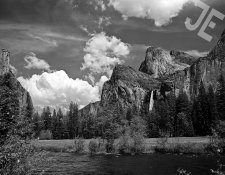
I had this issue a few weeks ago with brand new Rollie retro 80S film. this is the new batch in the cardboard boxes, not the older plastic cigar style holders (which I really like). I sent this scan off to someone who knows the rollei films very well and asked his opinion. He replied "this does not look good, it looks like a backing paper issues" I trust his opinion and sent off an email to maco. I got the typical response fomr them, that it is my process that is at fault and im wrong. I even developed three different rolls of film at the same time with the RR80s, two of acros and now one tmax 100 and none of them had issues. also then did 3 more rolls, three different developers all with brand new one shot fixer and the entire process with distilled water. same issues. I had bought a bulk roll of RR80s in 35mm at the same time i bought the 120 rolls. So I rolled up a few rolls of the 35mm and had no issues at all with them. I wanted to keep this quiet until I knew it was something that i did or didn't do as I didn't want to point a findger at someone who did nothing. After getting blown off by maco I posted the shot in the flickr RR80s group and within a week got 4 others who had the exact same issue. anyway here is what I posted on flickr......

not sure whats going on here. the grey sky has black dots all over. it is on every frame of the three rolls I shot. used the same camera for many other rolls and none had the issues. I then developed the last roll along with a roll of acros to see if its the developer but the acros was great and RR80 had the dots all over clear grey sections, like skies. and YES it is on the negatives as I used a high power loop to view and they are there, along with using a macro lens to to take a digital shot and zoomed in a lot. this is on the brand new batch i bough about a month ago, exp date 9/18. i have more rolls along with bulk rolls and im afraid the use them. sent an email to maco, but based on their past behavior, I really dont expect them to answer.

And here was Maco's reply to my email

"
Hello John,

Thanks for your inquiry.

I have discussed it with our specialist in the lab and from our point of view we are thinking that it is not a converting issue.
We can see these kinds of micro-grains, white on the negative, especially in the more middle homogeneous shades of grey.
It seems that there happened a creation of air bubbles or air pockets which were not shaked of the emulsion after filling the tank.
We have the "problem" that PET films with some developers provokes a kind of sparkling effect (similar to a fizzy tablet). A pre-washing could help as well as a strict pitching of the tank on the table (perfect before every tilting).

We have neither changed the film emulsion nor the converter. Ilford is converting for us the Retro 80S 35mm, not site 120. The only changing were the backing paper from a black one to a white/green one.
And now we are using triplex foil and a carton instead of our plastic rollfilm container. We are still selling this batch."

So if Im not the only one with this issue, and there is only one company left, if I remember reading correctly that makes the backing paper, and Kodak has an issue are we in trouble? I was particularly interested in the quote that we changed the backing paper, in a similar way to kodak changing theirs. dont want to cause concern but Im feeling like there is a reason to worry. I re scanned the neg, same issue. Used 3 different loops, same issue. printed the photo with 3 different enlargers, same issue.

Anyway thoughts?

john
 

Attachments

  • rr80s film defect reduced in size.jpg
    rr80s film defect reduced in size.jpg
    1 MB · Views: 890
why would that be backing paper causing the stipples? does the backing paper have these stipples? when holding the backing paper up to a bright light, can you see these stipples? does the backing paper have a texture?


beautiful photo!
 
I can only see the JE which looks so clear and bold it is almost as if it is meant to be there. I can't see any black dots.

So to be clear, can the OP say why he makes no reference to the JE? Can he also confirm that what he has are random/patterned black dots but are not the frame numbers or the patterned dots from the backing paper that lead to the frame numbers, assuming that there is writing/dots on the backing paper that leads to the frame numbers

Thanks

pentaxuser
 
JE and Jet stream, annoys me a bit.
 
If you click on the .jpg link in the attachment you will open the image that can be magnified; then the dots can be seen.

Yes, click on the text link instead of the thumbnail. The "JE" is a watermark put there by the OP.
 
sorry, the JE is a watermark my son put on it so my photo teacher could see that it was my photo. if could be hard to see the black dots as im limited to the size of the uploaded photo. the full size scan where you can scan in shoes them easily. if im allowed i could post a link the flickr upload which is a larger size
 
Last edited:
It's a beautiful image and a tragedy about the black dots. Maybe a developer issue?
 
i took the same shot in the same location with a roll of across as that was the last shot on the RR80s roll and developed it at the same time in the same tank as the RR80s. the acros came out fine.

here is the acros shot. sorry for the watermark.
valley floor bridalvale falls.jpg
 
It does not look like air bubbles to me (too many for normal bubbles and too small) and it also does not look like backing paper.

PE
 
Those black dots may not be that noticeable if you don't go too big and print it with a diffuser enlarger. My guess is dust in the emulsion, maybe by contamination of the water. Do you use a coffee filter for your chemicals? Was it just on this frame? No matter what someone else says, you have the negative, so look closely w/ a loupe and see if others on the roll have this issue, and see if you can determine what is on the negative. If it's dust in the emulsion, it could have come from inside the camera or from when the negs were hung up and drying (this happened to me once), etc.

The good news is that you are very, very lucky, as the Acros shot came out fine. W/ a filter in the enlarger for a little more contrast it will give a wonderful print.
 
I just came back from a trip to Scotland with 7 rolls of retro80. So far I developed 6 and almost all frames show (I think) the same issue:
_DSC3999_2048.jpg
_DSC3999_crop.jpg


I wrote an email to macodirect in germany and they directly answered me that this could be a known issue caused by humidity entering the film for example when storing in the fridge.
They also wrote me that since they realized this issue they are packing the film into a tripex foil.

My retro80 rolls were also shipped with an air tight packaging so I don't think that this caused the issue.
I'm still not sure what causes this.
I have one exposed roll left. I will try to use distilled water this time but I don't think this will help.

All damaged 6 rolls have been developed with hc110 1+63 23°C.
 
Those black dots may not be that noticeable if you don't go too big and print it with a diffuser enlarger. My guess is dust in the emulsion, maybe by contamination of the water. Do you use a coffee filter for your chemicals? Was it just on this frame? No matter what someone else says, you have the negative, so look closely w/ a loupe and see if others on the roll have this issue, and see if you can determine what is on the negative. If it's dust in the emulsion, it could have come from inside the camera or from when the negs were hung up and drying (this happened to me once), etc.

The good news is that you are very, very lucky, as the Acros shot came out fine. W/ a filter in the enlarger for a little more contrast it will give a wonderful print.

Dust in the emulsion would cause white spots, not black. :smile:
 
Dust on the emulsion during the taking of the photograph will appear as light spots in the negative and dark spots in the print. Dust in the film will appear as dark spots in the negative and light spots in the print.

Separating the light spots from dust and air bubbles is hard unless you know the format size and image magnification, however, air bubbles often have small rings around them.

PE
 
It would appear from what has been said and deduced so far by other posters that it is not the frame number transfers from the backing paper that afflicted some Kodak batch numbers and may be not related to the backing paper per se at all.

Very unfortunate and disappointing nevertheless

pentaxuser
 
It looks like lots of dust that was there during the exposure (yes, BTDT with 4x5). Is the new backing paper more flaky? But it doesn't look like airbells (BTDT,T) or the same issue as the Kodak backing paper.
 
Maybe dust is being deposited on the film prior to exposure when you remove the dark slide.

Are the light seals in the film back degrading?
 
Last edited:
I'm not buying into the dust thing! Unless of course your dust is different than mine. My dust is much more irregular in shape compared to what I see in these shots. Might just be something contaminated the emulsion base itself???? Fungi, bacteria or gremlins? Better yet, maybe the OP captured a micro-meteor shower coming directly at him and didn't know it. All kidding aside, this would piss me off if it were on scenes as gorgeous as those.
 
Did you clean your sensor? .... wait .... that's that other forum ....
 
i took the same shot in the same location with a roll of across as that was the last shot on the RR80s roll and developed it at the same time in the same tank as the RR80s. the acros came out fine.

here is the acros shot. sorry for the watermark.
View attachment 158232
That is a super shot sad that it is dsmaged.
If you can see shots like that I'm envious.
But you need to be able to look at negatives as well.
Jewellers loupe or prime lens and light source both at glancing angle to validate that the emulsion surface is perfect...
This only eliminates one mechanism.
 
I don't see how this is the backing paper nor how it resembles in any way the recent backing paper issues seen recently. Your subject line is unfortunate, premature and alarmist.
 
I don't see how this is the backing paper nor how it resembles in any way the recent backing paper issues seen recently. Your subject line is unfortunate, premature and alarmist.

Richard, I said possible backing paper issue. that was based on sending my scan to a pro who knows a lot more about these things than myself. I also didnt post this for two weeks after I found out about the problem, until others commented on having the same issue. so how should I have titled it?

Xmas, yes the dots are on the negs, every one of them.
 
Richard, I said possible backing paper issue. that was based on sending my scan to a pro who knows a lot more about these things than myself. I also didnt post this for two weeks after I found out about the problem, until others commented on having the same issue. so how should I have titled it?

Xmas, yes the dots are on the negs, every one of them.
Thanks but where there any surface flaws associated with the dots?
If a bit of emulsion is missing or there is a pit eg that could give a black dot on a print.
If there where bits of emulsion missing it is back to supplier...
 
Photrio.com contains affiliate links to products. We may receive a commission for purchases made through these links.
To read our full affiliate disclosure statement please click Here.

PHOTRIO PARTNERS EQUALLY FUNDING OUR COMMUNITY:


Ilford ADOX Freestyle Photographic Stearman Press Weldon Color Lab Blue Moon Camera & Machine
Top Bottom
