
• Welcome to Photrio!
    Registration is fast and free. Join today to unlock search, see fewer ads, and access all forum features.
    Click here to sign up

TMY dense bluish base fog - Cause?

PenStocks

A
PenStocks

  • 1
  • 0
  • 33
Landed Here

H
Landed Here

  • 4
  • 3
  • 47

Recent Classifieds

Forum statistics

Threads
201,833
Messages
2,830,876
Members
100,976
Latest member
Gorrunyo
Recent bookmarks
0
Joined
Sep 10, 2002
Messages
3,675
Location
Eugene, Oregon
Format
4x5 Format
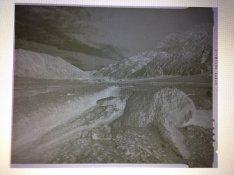
The photo is of freshly-processed T-Max 400 4x5 sheet film. It has a very high, bluish-tinged base fog that will likely be difficult to print though.

I'm just trying out this film. However, my film speed and development tests did not exhibit this bluish base fog. I did not expect this at all.

I'm wondering what happened and if there is any way to remove the tinge/fog. Note: this is not the normal pink tinge that is common on many of these films, and with which I am familiar.

Here are the details:

The film is relatively fresh and has been stored together with boxes of 320Tri-X purchased at the same time. The film was shot back-to-back in holders with the 320Tri-X. Both films were stored alike and processed together. I'm not sure of the actual expiration date, since I don't have the film box at hand, but I am fairly sure it is not outdated.

The negative I posted below was actually processed together in the same trays of chemistry with sheets of 320Tri-X (my standard film) that came out just fine and just as expected. This effectively rules out processing problems. Other sheets of TMY processed separately also exhibit this bluish fog.

Developer was PMK after a 3-minute pre-soak. I used a citric-acid stop bath at the recommended dilution. The negatives were fixed in Ilford Rapid Fix 1+4 in a two bath regime for 8 minutes total; 4 minutes in each bath. The fixer was freshly-mixed and this was the first batch through it (5 sheets only). The film was washed for 30+ minutes with running water in an archival film washer (together with Tri-X sheets that are just fine). (I don't use a wash aid with pyro negatives, as it removes the stain.)

I've searched here but come up with little information on this problem. Again, storage was at room temperature (no extreme heat, etc.) together with other films that exhibit no defects whatsoever.

The photo below is a quick iPhone photo of the wet neg plastered on my computer screen over a blank Word document. The blue tinge doesn't show that well, but in real life, it is definite.

Any ideas?
 

Attachments
  • BlueTMY.jpg
    BlueTMY.jpg
    892.9 KB · Views: 280
Last edited by a moderator:

MattKing

Moderator
Moderator
Allowing Ads
Joined
Apr 24, 2005
Messages
55,191
Location
Delta, BC Canada
Format
Medium Format
Try re-fixing - TMax films need a lot more fixing than 320 Tri-X.
 
OP
OP
Joined
Sep 10, 2002
Messages
3,675
Location
Eugene, Oregon
Format
4x5 Format
Thanks Matt, I'll try a longer fix, but suspect that it won't help much. Eight minutes in film-strength Rapid Fix should be enough. The film was clear in two... I fix 320Tri-X for significantly less time.

Doremus

Update: Another 10 minutes in fresh fix did not help. I'm trying an extended soak in distilled water with PhotoFlo now.
 
Last edited by a moderator:

DREW WILEY

Member
Allowing Ads
Joined
Jul 14, 2011
Messages
14,874
Format
8x10 Format
I have never had this issue with PMK and any film, including sheet TMY. There are a couple of things you could try. Do a brief plain water rinse after the stop bath, and/or switch to an alkaline fixer like TF4, which I routinely use. But I also use a weak acetic acid stop bath, not citric.
 
OP
OP
Joined
Sep 10, 2002
Messages
3,675
Location
Eugene, Oregon
Format
4x5 Format
Drew,

Me neither, and not with my tests, as I mentioned. That's why this has me stumped. I'll try a plain water rinse after the developer for the next batch and see if, for some crazy reason, the citric acid stop is the culprit. That's the only variable that has changed since my tests. I'll update in about half an hour.

Doremus

Okay, here's the update: Plain water rinse instead of the citric acid stop didn't help.

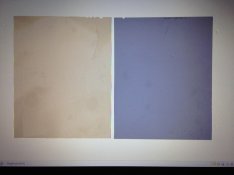
I mixed up fresh fix (Ilford Rapid Fix 1+4) and fixed an unexposed sheet of the suspect TMY. I also fixed a scrap sheet of Tri-X that I had lying around. It had seen a lot of light, so some of the fog remains, but, in the photo below (again, with my cruddy iPhone camera against the computer screen) you can see the difference in density. The TMY is definitely darker and bluer. Interestingly (or distressingly in this case...) the TMY fog does not seem to exhibit much grain when viewed through a 10x loupe (really, none that I can see). It looks much more like resudual dye of some kind. However, a drop of rehalogenating bleach (ferri and pot bromide) leaves a marked clear spot...

I did clip tests on my fresh fixer. It clears Tri-X in just over 30 seconds and TMY (to as good as it gets, that is) in under one minute. It seems to be good; no sulfur smell, just a bit of acetic acid odor. Nevertheless, I'm going to pick up a bottle of fresh fix to test against just in case. That won't happen till Wednesday now.

I've never seen so much fog even in very old films, and this TMY is fairly new. If outdated at all, it would only be for a short time; less than a year.

I'm still interested in salvaging these if possible. Any more suggestions?

In the photo, the Tri-X is on the left, the suspect TMY on the right.

Thanks in advance.
 

Attachments

  • TriX-TMY.jpg
    TriX-TMY.jpg
    549.5 KB · Views: 203
Last edited by a moderator:

pentaxuser

Member
Allowing Ads
Joined
May 9, 2005
Messages
20,339
Location
Daventry, No
Format
35mm
I have never used 4x5 sheets but with TMax 400 roll film I had to use a pre-soak of 5 mins overall with at least two dumps. That got rid rid of enough of the blue look for me but it still wasn't clear. At the first dump the water was still the colour of blue ink and it looked suspiciously like the colour of your suspect TMY picture.

pentaxuser
 

Photo Engineer

Subscriber
Allowing Ads
Joined
Apr 19, 2005
Messages
29,018
Location
Rochester, NY
Format
Multi Format
Try using some acid fix or a sulfite solution just on the acid side so you smell sulfur dioxide. If this does not work, and you have some handy, try some blix.

If the acid fix or sulfite clear the film it is retained dye, if the blix clears it the film has retained some antihalataion material for some reason, and I will look into it.

PE
 
OP
OP
Joined
Sep 10, 2002
Messages
3,675
Location
Eugene, Oregon
Format
4x5 Format
Gentlemen,

Thanks for the replies and the suggestions. I'll get to trying some of them as soon as I can. I'm in Europe at the moment, going to bed now, and have a full day of other things ahead tomorrow. I'll see what I can do on Wednesday and report back.

One quick question PE: Would regular Kodak F-5 powdered fixer qualify as "acid," or do I need something else. Kodak Rapid Fix is difficult to find here for some reason.

Thanks again,

Doremus
 

Photo Engineer

Subscriber
Allowing Ads
Joined
Apr 19, 2005
Messages
29,018
Location
Rochester, NY
Format
Multi Format
Yeah, F5 would work. I didn't know it was still out there.

Basically, if you can smell SO2, it will work - if this is the problem I suspect it is. Give it a good soak and then a wash.

PE
 

Andrew O'Neill

Moderator
Moderator
Joined
Jan 16, 2004
Messages
12,931
Location
Coquitlam,BC Canada
Format
Multi Format
I always pre soak TMY especially when tube development is given. If not, I would get the blue band on the back of the film that was in contact with the tube. This always cleared in the fix.
 
OP
OP
Joined
Sep 10, 2002
Messages
3,675
Location
Eugene, Oregon
Format
4x5 Format
Update - Problem Solved

Apologies for not getting back sooner. Here's the update and the good news.

I developed the rest of the batch (~20 negs) with new stop and fix. The most acidic fix I could find here in Vienna was the Tetenal Superfix (pH 5.2). Short version: no difference, all the TMY negs had a marked increased blue base density. Tri-X negs developed together in the same developer were just fine.

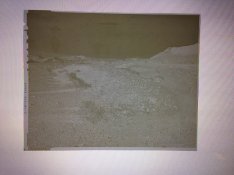
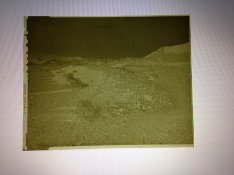
Since PE recommended blix, which I don't have, I decided to try a bleach/redevelop with a standard rehalogenating bleach of K-ferricyanide and KBr. Photos of the results are below (again, iPhone photos against my laptop screen). In summary, the bleached negative still exhibited the increased blue base density (first photo) along with a pronounced stain image from the PMK (the photo shows a bit more image than was really apparent to the naked eye). However, after redevelopment (second photo), the blue cast had disappeared and the negative looked normal for a PMK neg bleached and redeveloped (I use this technique occasionally to increase contrast).

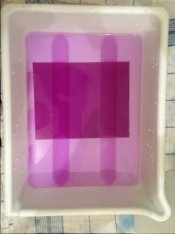
Thinking that it may have been the alkaline environment of the developer that got rid of the stain, I mixed a weak Sodium Metaborate (Kodalk) solution using the B part of the PMK mix and immersed my blank test negative (see photo above, the clear neg was quite blue). Almost immediately, the dye started to disperse into the alkaline solution, resulting in a very magenta cast to the solution and eventually in a clear negative (photos 3 and 4).

I have since tried other alkaline solutions with equal success, but slightly varying speeds of clearing the dye. Sodium bicarbonate is the slowest, a weak sodium hydroxide solution is faster and the resulting color of the solution is markedly bluer and less magenta. (Note: I only had household chemicals to work with, baking soda and drain cleaner, no sodium sulfite, which might have also cleared the negs).

So, it appears that an alkaline bath does the job for removing the dye. I'm not sure why the dye did not come out during the initial development though, since the very same developer did the job after fixing and bleaching...

I am in the process of treating all the affected negatives as described above. All the solutions that I've mentioned are in use and doing the job just fine. The dye (which I now suspect is a sensitizing dye) continues to disperse in the wash water.

I still have no idea what the cause of this was and what the mechanism is that fixed the problem. I would love to hear an analysis from the experts. Nevertheless, I'm happy I found a way to salvage the negatives and look forward to printing the best of them this summer. And, I'm confident I can use the rest of the box of TMY, even if the same problem crops up.

Thanks again for the help and the suggestions,

Doremus
 

Attachments

  • Bleached-w-Stain.JPG
    Bleached-w-Stain.JPG
    114.1 KB · Views: 180
  • Redeveloped1.jpg
    Redeveloped1.jpg
    117.9 KB · Views: 157
  • TMY-NaMBO2Sol.jpg
    TMY-NaMBO2Sol.jpg
    36.7 KB · Views: 150
  • TMY-AfterNaBO2.jpg
    TMY-AfterNaBO2.jpg
    96.1 KB · Views: 171
Last edited by a moderator:

trythis

Member
Allowing Ads
Joined
Sep 26, 2013
Messages
1,208
Location
St Louis
Format
35mm
I just refixed some very purple/blue Arista premium (tri.x?) To get rid of some minor weak fixer issues and pre soaked for 20 minutes accidentally. The film base no longee has any color. Finally found a way to get rid of the blue tinge myself
 

Photo Engineer

Subscriber
Allowing Ads
Joined
Apr 19, 2005
Messages
29,018
Location
Rochester, NY
Format
Multi Format
Sounds like a severe case of retained dye of some sort. I would notify Kodak as this is not a normal problem to this extent.

PE
 
OP
OP
Joined
Sep 10, 2002
Messages
3,675
Location
Eugene, Oregon
Format
4x5 Format
Sounds like a severe case of retained dye of some sort. I would notify Kodak as this is not a normal problem to this extent.

PE

PE,

That was my suspicion as well, but I have no way to definitively confirm this. FWIW, there seemed to be quite a bit of dye left; I wonder whether this much dye is normally used. I had four trays of very dye-saturated water at the end of things. I had 500ml+ of alkaline solution per tray - 5 negatives through each tray. The tray with sodium hydroxide solution turned so dark I could not see the bottom of the tray. The holding trays and the wash water also had significant dye in them as well after holding the negs for a while. Even after I had washed for 20-25 minutes, there was still a faint but noticeable pink tinge to the final distilled water/PhotoFlo rinse I used before hanging the negatives to dry. I have 21 negs hanging now and they all look fine; clear borders and deep shadows, so the culprit was not fogging. At least I have a method of removing the dye that I can use in the future for the remaining film.

I have not heard of such a problem before. If it were a batch problem, I would suspect it to have turned up here before. The film was not the newest, but was stored well. I can't think of anything I've done with handling that should cause this. I'm very curious as to what could have caused this. Can you give me an avenue to best contact Kodak?

Best,

Doremus
 
Last edited by a moderator:

Photo Engineer

Subscriber
Allowing Ads
Joined
Apr 19, 2005
Messages
29,018
Location
Rochester, NY
Format
Multi Format
There can be up to 3 types of dyes in a film or paper:

1. Dyes used to reduce internal reflections due to turbidity and thus increase sharpness.
2. Dyes used to adjust speed if the emulsions are off a tad in speed (fast in speed).
3. AH dyes used to prevent back reflection.

None of these are used in huge quantity as you describe AFAIK. Either that or they changed the dyes. The dyes are designed to be water soluble.

There is a 4th dye, the sensitizing dye, which is stuck to the grain and should wash off in the fix.

Most of these dyes are destroyed to some extent by acid or acid + sulfite which is why I made my recommendations.

I suggest you call Kodak and if you get no satisfaction, I can contact someone there in an emergency.

PE
 
OP
OP
Joined
Sep 10, 2002
Messages
3,675
Location
Eugene, Oregon
Format
4x5 Format
I've sent Kodak Tech Support an e-mail with a description of the problem and a link to this discussion. Let's see what they have to say.

Doremus
 
OP
OP
Joined
Sep 10, 2002
Messages
3,675
Location
Eugene, Oregon
Format
4x5 Format
I'm resurrecting my old thread with an update:

I have in the last year developed several more batches of TMY in 4x5. Every single time I have the same results: excessive retained dye of some kind which significantly obscures the image with a dark blue hue. TXP developed in the same chemicals (and even together in the same batch) comes out just fine. The extra dye seems to be made soluble after fixation by bathing the negatives in an alkaline solution.

I now have a routine to deal with this. I return the negatives to the developer for a couple of minutes after fixing and rinsing, then another rinse and into a weak bath of sodium metaborate (about 5g in 500ml) with agitation for 4-6 minutes. The resulting negatives are fine; the metaborate solution turns bright pink/purple (see the photos from the first time above).

I still have no idea whatsoever why this is happening and what changes I could make in my processing to prevent it.

For reference my workflow is:
.
1. water pre-soak in tap water for 2-3 minutes. (The pre-soak water is always dark blue with dissolved anti-halation dye after soaking.)
2. develop in PMK anywhere from 9-15 minutes. (The developer looks normal after use; i.e., dark brown.)
3. stop in either a citric acid or acetic acid stop, half-strength. (The stop doesn't change color except for some browning from dev. carry-over)
4. two-bath fix in Ilford Rapid Fixer diluted 1+4, 3 min./bath (at this point, the TMY negs are dark blue, my TXP negs look great...)
5. The stained negs get a 1-minute rinse and then get returned to the developer; the stain starts to lighten. (TXP goes to the wash).
6. The stained negs get another rinse and into the metaborate solution. Staining disappears within 6 minutes. The negs then get rinsed and into the wash.

I never heard a peep from Kodak; I'm hoping the community here can help me figure out what the problem is. I thought it might disappear with a different batch of film, but it hasn't.

Any ideas?

Best,

Doremus
 

JW PHOTO

Member
Allowing Ads
Joined
May 15, 2006
Messages
1,148
Location
Lake, Michig
Format
Medium Format
I don't know if this will help, but it might be worth a try and sounds easier compared to the method you are now using. It's from John Wimberley's instructions for WD2D+ pyro developer of his.

A pre-bath (Presoak) is recommended to help ensure even development and to minimize the
presence of air bells (bubbles) on the film. The pre-bath consists of a working solution of
wetting agent such as Formulary Forma-Flo or Edwal LFN in distilled water.
To help dissolve anti-halation dyes present in the film emulsion, 1 level teaspoon of Sodium
Carbonate, Monohydrate and 1/2 level teaspoon of Sodium Bisulfite per liter of distilled
water may be added to the pre-bath.
Presoak the film for two minutes, agitating vigorously for the first 30 seconds,
intermittently thereafter.

I use this developer and his WD2H developer with a presoak + LFN, but nothing else. If I were to have the problem you have I would then add the Sodium or Potassium Carbonate + BiSulfite.
 

DREW WILEY

Member
Allowing Ads
Joined
Jul 14, 2011
Messages
14,874
Format
8x10 Format
No. That would merely increase the yellowish density of the image, and a tad of yellowish base fog to the emulsion perhaps. Pyro tans the
gelatin, and has nothing to due with the antihalation base dye. The reason Gordon retracted his advice to return the film to the developer (or actually, any weak alkaline afterbath, not necessarily the developer itself), is that it is a redundant step, especially given the fact that his preferred fixer (and my favorite) is TF4, which is itself alkaline. And like I already noted, I NEVER have this problem with TMax films in PMK or any other pyrogallol or pyrocat formula I have personally tried (which is quite a few of them).
 
OP
OP
Joined
Sep 10, 2002
Messages
3,675
Location
Eugene, Oregon
Format
4x5 Format
Thanks for the replies gentlemen.

This problem has me stumped. Maybe I just got a couple of bad boxes, although I can't imagine that if I did that no one else has reported a similar problem. When I get a chance, I'll try some TMY from a different batch number.

Drew, it's nice to know you have never had a problem with TMY. My processing sequence is the same as it has been for years. I've developed TMY before without this problem at all. I don't use an alkaline fixer, but I can't really imagine that using a standard rapid fix (pH 5.5) would really cause dye to be retained.

FWIW, returning the negs to the developer was just to get them quickly into an alkaline environment. I've used spent developer, sodium metaborate, sodium hydroxide and even bicarbonate of soda; all work fine to remove the stain with the more alkaline solutions being faster.

The stain visible on the negative is dark blue, but lightens to magenta as it soaks out. The solution turns a brilliant magenta after a few negatives. It looks similar to the anti-halation dye. However, my pre-soak is completely dark with anti-halation dye so I can't imagine that more is being retained in the negative through the entire process, even if the film were inadvertently double-coated with anti-halation backing. Coupling dyes come to mind, but I'm not sure. And, like I said, TXP processed in exactly the same way comes out just fine.

After "dye removal" in the alkaline bath, the TMY negatives are just fine too. I'm just stymied about the dye retention and would really like to avoid the extra step.

If no one else has observed anything like this at all, it must be isolated to me, my boxes of film or something specific to my processing. I just can't figure out which or how. The fact that an alkaline environment releases the dye must be important, but my knowledge of how anti-halation and coupling dyes work and/or could go wrong is nil. I'm hoping one of the chemists here might have an insight.

Best,

Doremus
 
Photrio.com contains affiliate links to products. We may receive a commission for purchases made through these links.
To read our full affiliate disclosure statement please click Here.

PHOTRIO PARTNERS EQUALLY FUNDING OUR COMMUNITY:


Ilford ADOX Freestyle Photographic Stearman Press Weldon Color Lab Blue Moon Camera & Machine
Top Bottom