• Welcome to Photrio!
    Registration is fast and free. Join today to unlock search, see fewer ads, and access all forum features.
    Click here to sign up

The "Perceptual" approche - a new Digital Negative method

Recent Classifieds

Forum statistics

Threads
201,108
Messages
2,819,279
Members
100,530
Latest member
Rebalance
Recent bookmarks
0

nmp

Member
Allowing Ads
Joined
Jan 20, 2005
Messages
2,057
Location
Maryland USA
Format
35mm
I came across this script that creates a curve layer by numeric input. Apparently it works well.
https://drive.google.com/open?id=0B4dENtC-VAIhRFRuajE1Y1JfUG8
I tried this. It seems nice. However, I see a potential problem in using it. It seems to not plot the original points but a smoothened curve with only 8 (different from those inputted) points. So you can not go back and change any of the points. I would have preferred if it simply plotted the data. Smoothening is nice but I don't like to not see the original data. Oh, well. It is still better than nothing. Thanks all the same....

:Niranjan.
 
OP
OP
Dan Pavel

Dan Pavel

Member
Joined
Sep 11, 2017
Messages
245
Location
Constanta, Romania
Format
Multi Format
Yes, It's not the ideal tool. I'm thinking of adding latter such a tool to my script.
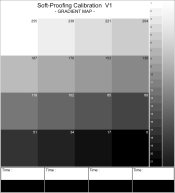
For now I've just ended the part of the script that draws the 16 grays Calibration Map. The gray patches are 300x300px.(1 inch when printed) because larger patches help to get more accurate results. It is pointless to build a larger map as long as only 16 points are acceptable in the curve creation. The strips at the bottom are intended for exposure tests.

Gradient Map.jpg

Any suggestions of how to improve it?
 

Richard Boutwell

Member
Allowing Ads
Joined
Jul 21, 2003
Messages
583
Location
Philadelphia
Format
8x10 Format
Yes, It's not the ideal tool. I'm thinking of adding latter such a tool to my script.
For now I've just ended the part of the script that draws the 16 grays Calibration Map. The gray patches are 300x300px.(1 inch when printed) because larger patches help to get more accurate results. It is pointless to build a larger map as long as only 16 points are acceptable in the curve creation. The strips at the bottom are intended for exposure tests.

View attachment 187338

Any suggestions of how to improve it?
I would not say that it is pointless to use more patches. There are a lot of steps between 255 and 238 and you can not see where the tones are dropping off if you don’t include them (the same for the other end of the scale).
 

Bob Carnie

Subscriber
Allowing Ads
Joined
Apr 18, 2004
Messages
7,735
Location
toronto
Format
Med. Format RF
I would not say that it is pointless to use more patches. There are a lot of steps between 255 and 238 and you can not see where the tones are dropping off if you don’t include them (the same for the other end of the scale).
plus one
 
OP
OP
Dan Pavel

Dan Pavel

Member
Joined
Sep 11, 2017
Messages
245
Location
Constanta, Romania
Format
Multi Format
So, you suggest to add more patches at both ends. It can be done and in that regions I'll calculate the points that generate the curve from readings.
Another way would be to keep the number of patches 16 but to use more of them at both ends (and fewer in the middle), where the problems usually are. Or, even better, to offer 2, optional, calibration maps.
It needs some real tests to see the difference.
Thanks!
 
Last edited:

Richard Boutwell

Member
Allowing Ads
Joined
Jul 21, 2003
Messages
583
Location
Philadelphia
Format
8x10 Format
So, you suggest to add more patches at both ends. It can be done and in that regions I'll calculate the points that generate the curve from readings.
Another way would be to keep the number of patches 16 but to use more of them at both ends (and fewer in the middle), where the problems usually are. Or, even better, to offer 2, optional, calibration maps.
It needs some real tests to see the difference.
Thanks!
After 50 some posts in this thread, I still can't see the benefit of what you are trying to do here with the way you are trying to do it. You said you have a colormunki? use that to measure any number of patches (within reason) and make an ICC profile to proof the final tonal values. IF you still want to make some curve adjustments specific to each image to adjust for the lower dmax you can do that without needing multiple steps or manual entries. If you need/want to do it with a scanner, you can use the QTR step wedge tool to get the measurement data from the 21-step target and use that to make an icc profile. This particular aspect is a solved problem.
 
OP
OP
Dan Pavel

Dan Pavel

Member
Joined
Sep 11, 2017
Messages
245
Location
Constanta, Romania
Format
Multi Format
Do you know a PS script that will take a scan of a 21-step target, automatically create an ICC profile from it and install it (without any other steps, manual introduction of data, etc)? Something like that will do the job, indeed, but I haven't seen any.
I trie to make a script without the need of manual entries at all and without leaving PS or using other 3-rd party programs.
My answer to Niranjan is unrelated.
The curves layer adjustment is more flexible than the ICC profiling as more curves can be added in a stack to to achieve the desired correction. I trie to finish the script with a single curve now but nothing stops me to latter add, let's say, 2 more curves in a layer group to get a more accurate simulation of the wet process in use (with a 48 patches gradient map), if it proves necessary.
You said you have a colormunki? .
I haven't said that.
After 50 some posts in this thread, I still can't see the benefit of what you are trying to do here with the way you are trying to do it.
I have outlined the expected benefits in my previous posts.
But, of course, this approach may not be everybody's taste.
 
Last edited:

faberryman

Subscriber
Allowing Ads
Joined
Jun 4, 2016
Messages
6,048
Location
Wherever
Format
Multi Format
I have outlined the expected benefits in my previous posts. But, of course, this approach may not be everybody's taste.
You are attempting to solve a technical problem: translating what you see on the screen to the print. What has taste got to do with it?
 
Last edited:
OP
OP
Dan Pavel

Dan Pavel

Member
Joined
Sep 11, 2017
Messages
245
Location
Constanta, Romania
Format
Multi Format
My English may be poor.
I wanted to say that people may have well established working habits they are content with and different approaches may not interest them or may not be on their taste("this approach"=always working with an simulation of the print and not by applying the same correction to all DNs made for the same paper/process). I suppose your statement refereed to the entire ideea and not to the ICC-Curves option ("...50 some posts"), which is, indeed, a technical problem.
 

tnp651

Subscriber
Allowing Ads
Joined
Jan 9, 2017
Messages
184
Location
St. Paul, Minnesota, USA
Format
4x5 Format
If I understand correctly, the perceptual approach is a previsualization tool to allow you to estimate the look of the finished print. Alternative processes have a reduced dynamic range compared to silver prints or inkjets, so the screen image will look lower-contrast (and colored to match the VDB or whatever). Then the perceptual curve is removed and the final curve is applied, right?

My own approach is more calibrationist. My Zone II (barely perceptible dark-gray) is RGB 30-30-30 and my Zone IX (barely perceptible light-gray) is 243-243-243. I can find the darkest and lightest textured areas and keep them within those limits. All that's left is the midtones. I made a curve-test negative starting with CharThrob's recommended curve, then tweaking and saving nine variations. I printed that and picked the curve I liked best. It seems to be working for me.
Curve Test.jpg
 
OP
OP
Dan Pavel

Dan Pavel

Member
Joined
Sep 11, 2017
Messages
245
Location
Constanta, Romania
Format
Multi Format
If I understand correctly, the perceptual approach is a previsualization tool to allow you to estimate the look of the finished print.
Yes, that's correct. You can adjust your image while previewing your finished print.
Your "variations" approach gives good results, as well.

The PS script for using the "perceptual approach" is almost finished. It developed into a quite large script with ~ 7000 lines of code and 5 modules : print the chart, scan it and build the 2 curves, make the PS layer groups for the working flow, a "print the negative" module that will create a layer with your image automatically inverted, mirrored and with your own UV blocking color applied and the UI module. The modules are already finished and I only have to mount them together and write the "Help" files. I hope I'll get some help with writing the "Help" files :smile:.
So far it works quite well.
I'll soon post here a "beta" of the script (without the "Help" files) for those interested in it.
 

nmp

Member
Allowing Ads
Joined
Jan 20, 2005
Messages
2,057
Location
Maryland USA
Format
35mm
If I understand correctly, the perceptual approach is a previsualization tool to allow you to estimate the look of the finished print. Alternative processes have a reduced dynamic range compared to silver prints or inkjets, so the screen image will look lower-contrast (and colored to match the VDB or whatever). Then the perceptual curve is removed and the final curve is applied, right?

My own approach is more calibrationist. My Zone II (barely perceptible dark-gray) is RGB 30-30-30 and my Zone IX (barely perceptible light-gray) is 243-243-243. I can find the darkest and lightest textured areas and keep them within those limits. All that's left is the midtones. I made a curve-test negative starting with CharThrob's recommended curve, then tweaking and saving nine variations. I printed that and picked the curve I liked best. It seems to be working for me.
View attachment 191161

That's exactly right. There are different ways of achieving the final outcome. You are doing a tweak of the main ChartThrob-provided correction curve. What I do is apply the ChartThrob curve as is and add another curve underneath to make the final image to look like the way I want. The key is, as you surmised, because of the inherent lower contrast of the process itself (clipping everything below 30 and above 243 in your case,) we have to give it some more perceptual contrast to the original image which was otherwise processed to look its best on the monitor. The only drawback with your appraoch perhaps, though there is no substitute for empirical data, is you have to print that matrix and pick the best. The approach that both I and Dan are proposing is to use a simulation method to predict before printing the image to get a general idea. You can do this pre-tweak by using a curve or any other available means in Photoshop with or without masks.

:Niranjan.
 
Last edited:

Bob Carnie

Subscriber
Allowing Ads
Joined
Apr 18, 2004
Messages
7,735
Location
toronto
Format
Med. Format RF
Yes, that's correct. You can adjust your image while previewing your finished print.
Your "variations" approach gives good results, as well.

The PS script for using the "perceptual approach" is almost finished. It developed into a quite large script with ~ 7000 lines of code and 5 modules : print the chart, scan it and build the 2 curves, make the PS layer groups for the working flow, a "print the negative" module that will create a layer with your image automatically inverted, mirrored and with your own UV blocking color applied and the UI module. The modules are already finished and I only have to mount them together and write the "Help" files. I hope I'll get some help with writing the "Help" files :smile:.
So far it works quite well.
I'll soon post here a "beta" of the script (without the "Help" files) for those interested in it.
I would be interested in Beta testing this for you ... I use Epson K3 inks...
For what its worth when I do Lambda digital negatives , I take an approach somewhat similar to the Ring Around Method of profiling a process.

As the Lambda linerizes a 21 step automatically before I start printing live files, Machine will not operate without doing this . So in effect all the legwork is done by the lasers so a L-95 will indeed print as highlight with detail, a L- 6 as shadow with detail, everything inbetween falls automatically in place.... Soooooo If I want to balance out Cot 320 with a Palladium mixture only, I will make a ringaroung file of my image, including step wedges that has -- different curves from normal, much like a RingAround.. thankfully this is a easy canvas to set up in PS and I print one negative with 4-9 visual curve shapes that are different from normal.. Then I will print this out on paper , make any small tweeks required to get an OVERALL good balance in density and contrast... once this master negative-print is done I let it dry and decide which curve shape I like best and for that series of work I apply that curve to my files...

So as you can see its a little bit different than most but it works for me.
 

nmp

Member
Allowing Ads
Joined
Jan 20, 2005
Messages
2,057
Location
Maryland USA
Format
35mm
Yes, that's correct. You can adjust your image while previewing your finished print.
Your "variations" approach gives good results, as well.

The PS script for using the "perceptual approach" is almost finished. It developed into a quite large script with ~ 7000 lines of code and 5 modules : print the chart, scan it and build the 2 curves, make the PS layer groups for the working flow, a "print the negative" module that will create a layer with your image automatically inverted, mirrored and with your own UV blocking color applied and the UI module. The modules are already finished and I only have to mount them together and write the "Help" files. I hope I'll get some help with writing the "Help" files :smile:.
So far it works quite well.
I'll soon post here a "beta" of the script (without the "Help" files) for those interested in it.
sounds like great progress...I would love to beta test it, too.
 
OP
OP
Dan Pavel

Dan Pavel

Member
Joined
Sep 11, 2017
Messages
245
Location
Constanta, Romania
Format
Multi Format
Thank you gentlemen for your support !
Mr. Carnie, your help, as a profesional printer, in testing the script for this new method of making the DN proposed by me and Niranjan will be very welcomed.
I'll probably finish and post the "beta" of the script in 10 days -2 weeks.
 
Photrio.com contains affiliate links to products. We may receive a commission for purchases made through these links.
To read our full affiliate disclosure statement please click Here.

PHOTRIO PARTNERS EQUALLY FUNDING OUR COMMUNITY:


Ilford ADOX Freestyle Photographic Stearman Press Weldon Color Lab Blue Moon Camera & Machine
Top Bottom