

• Welcome to Photrio!
    Registration is fast and free. Join today to unlock search, see fewer ads, and access all forum features.
    Click here to sign up

Surge marks on CN film?

Recent Classifieds

Forum statistics

Threads
203,218
Messages
2,851,573
Members
101,729
Latest member
Luis Angel Baca
Recent bookmarks
0
Joined
Jan 1, 2025
Messages
93
Location
Puerto Rico
Format
35mm
Greetings all,

I have been consistently running into an issue for the couple months. I have some negatives that come out with strong staining along the edge of the negatives and projecting out from the sprocket holes. In almost all cases it is on Portra film. I develop in a 5-roll paterson tank with manual agitation - four gentle inversions every 30 seconds after 30 seconds of initial (also gentle) agitation. I have seen others post about the possibility of inversions causing surge marks in larger tanks due to the force of the chemicals running across the film. However, the issue persisted even when changing to rotary agitation with the "swizzle stick."

I have been unable to recreate the problem when running test strips. I ran a test with much more vigorous agitation than usual in the same fully-filled 5-roll tank and saw absolutely no marks. I thought that this could eliminate agitation as the culprit.

I tried re-fixing affected negatives in fresh fixer. No change. Re-bleaching and fixing. No change. I'll run devs and see no notable staining, and then the next day the staining returns. Yesterday I ran 5 rolls, three Portra and two Ultramax. Only the Portra showed staining, the Ultramax showed absolutely no sign.

The stain is also strongest ALWAYS on the same side of the negatives regardless of their location in the tank (more towards the bottom or top). It is also present in some 120 negatives (PORTRA ALWAYS). The one thing I did change in my process is moving to Kodak CN fixer, after which the problem started cropping up at least much more noticeably. But if refixing does not eliminate it then the fixer shouldn't be the issue...I should mention that I never see this in my ECN-2 devs (using the same bleach and fix) so I'm wary on blaming the secondaries.

I have run out of tests to run as far as I can think of. Anybody have any ideas? Could the film already be somehow stained before processing?

I have included images of a negative as well as a conversion.

 

Attachments

  • STAIN - NEGATIVE-1.jpg
    STAIN - NEGATIVE-1.jpg
    698 KB · Views: 112
  • STAIN - POSITIVE-1.jpg
    STAIN - POSITIVE-1.jpg
    1.3 MB · Views: 110
I can only confirm that I've seen/had a very similar problem, but (1) refixing did solve it, (2) there was a perfectly reasonable cause for it (using too dilute fixer one shot; I was seeing how little I could get away with) and (3) it didn't involve sprocket hole anomalies, but rather followed different patterns.

Sprocket-hole related anomalies are a bit more likely to point towards light leak problems during film handling, esp. if they're along one edge.

The stain is also strongest ALWAYS on the same side of the negatives regardless of their location in the tank (more towards the bottom or top).
That's an important clue and it points more towards a light leak issue than one with chemistry.
In what part of your total film handling process do the films have the same orientation?
Can you confirm it's always the bottom edge of the film that's affected?
How do you handle the exposed film; i.e. what's your process of getting it from its packaging into the processing tank? What kind of tank do you use? (5-reel Paterson; you mentioned it)
You mention it also occurs on 120 film; what does it look like in that case?
Can you show examples scanned edge to edge and not just the image frame? Does the problem show on non-image areas (film edges, leader/trailer sections)?
 
Last edited:
You mention it also occurs on 120 film; what does it look like in that case?

Yes, I'm not imagining what a sprocket hole pattern looks like when applied to 120 film. I think those could be 2 separate problems.

And maybe the part where you only see it on Portra doesn't mean it doesn't happen with everything, just something about Portra's base or the way you expose it making it more visible.
 
Thank you for your thoughtful response @koraks

In what part of your total film handling process do the films have the same orientation?

Their orientation in the tank should theoretically be random. I load almost always the same way through muscle memory, but then place them onto the center spool whichever side is convenient in the moment. I suppose it is possible that I always load the rolls with the same edge facing down but probably not.
Can you confirm it's always the bottom edge of the film that's affected?

Yes, always the strongest at the bottom edge, but staining is sometimes also visible on both sides.
How do you handle the exposed film; i.e. what's your process of getting it from its packaging into the processing tank? What kind of tank do you use?

The 35mm canisters are opened in a dark bag, 120 gets the seal broken then placed in the bag. I considered this being a light leak issue and my first thought was an imperfect seal on the Paterson tank. However, if anything the films most affected are at the bottom of the tank rather than the top. And if the dark bag was letting in light then this would crop up in all my rolls and in less of a consistent pattern. Never happens with ECN-2 or B/W.
You mention it also occurs on 120 film; what does it look like in that case?

On 120 it looks more like an uneven smear along the edge rather than from a source ie sprocket holes. I can upload an example.
Can you show examples scanned edge to edge and not just the image frame? Does the problem show on non-image areas (film edges, leader/trailer sections)?

Yes, it is usually present across the entire film strip but not consistently. Some frames are more affected. I'll upload a photo of a full strip later today.
 

Attachments

  • STAIN - NEGATIVE 120-1.jpg
    STAIN - NEGATIVE 120-1.jpg
    776.8 KB · Views: 42
For now my best guess the problem is your dark bag. The bottom Rollins affected more because it depends more time exposed to that environment. Verify that the sleeves seal properly around your arms, and that the fabric of the bag is sufficiently lightpoof. Also verify the zipper is covered by material. Preferably use the dark bag in an environment with muted light and as far away as possible from any light sources. Try leading film into the dark bag at night with the room.pights off so it's more or less dark in the room. If problems remain at bay of you do that, you know the culprit.
 
The dark bag is about 6 years old so there's a possibility it could have developed a subtle leak. I just can't understand why this would never occur on ECN-2 or B/W rolls loaded in the same bag.

And why would it affect portra more than others? Again, two of the five rolls developed the other day were ultramax and they had no staining whatsoever. Light leak doesn’t explain that.

I'll borrow another dark bag and see.
 
Yes that's odd, but could be coincidence.
I can't think of a reason that would affect Portra and not other films and that's not ruled out by the other factors.
 
FWIW I did fight a particularly sticky emulsion the other day. Flic Film Elektra 100. 45 minutes trying to get it to wind on the reel. That's opposed to about 30 seconds on average.

No stains, even after being exposed to the environment for 10x longer than a roll normally would be.

The arm gaskets could be stretched out and occasionally allow for light to peek through depending on how they're situated.
 
Greetings all, I have been unable to fully eliminate the staining. The problem still only visible in rolls of portra. My sample size is quite large for this to simply be a coincidence. This is also the case even when other emulsions are also developed in the same tank.

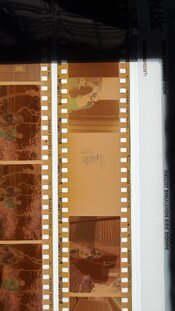
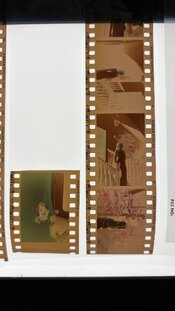
I had a friend lend me a different dark bag that has seen almost no use. I also reduced the amount of ambient light during loading. Since then the rolls have seemingly had a reduction in the amount of staining, but it is still present. To me this is rather inconclusive as to whether a light leak was causing the stains. The color of the staining is also not a bluish tone as a light leak would normally present. It presents as a darker greenish along the edges of the negative, and again most strongly on the bottom of the strip.

I considering whether incomplete fixing could be the culprit. As I mentioned previously, I recently switched to Kodak CN fixer roughly around when the issue began appearing consistently. The manufacturer claims that CN negatives will fully clear in one minute with fresh fixer (replenished at 50ml/roll) with a capacity of about 20-25 rolls per liter of replenished solution with minimal bleach crossover. One minute seems quite fast to fully clear CN rolls, especially when considering that most other CN fixers list times closer to 6 minutes. I have been fixing for 2+ minutes to be safe...perhaps portra has additional silver that isn't fully clearing? Perhaps portra is more susceptible to environmental damage in the tropical climate here??

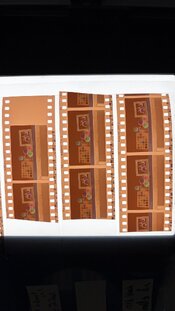
I will run another test today to see if the secondaries are to blame, but as I mentioned I have been unable to recreate the issue on any of my test strips (using Color Plus emulsion). These are all quite consistent.

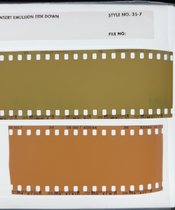
Here are two examples of the full negative strip where you should be able to see the stains quite clearly. I have also noticed the overall color of the film base tends to shift more towards green in the final few frames on the roll. Perhaps that provides an additional clue.
 

Attachments

  • PORTRA 1.jpg
    PORTRA 1.jpg
    224.8 KB · Views: 23
  • PORTRA 2.jpg
    PORTRA 2.jpg
    173.9 KB · Views: 19
  • TEST STRIPS.jpg
    TEST STRIPS.jpg
    183.9 KB · Views: 23
One possibility is what is called developer carry-over in larger roller transport processing machines where developer - still working - is not uniformly squeegeed off the film prior to going up over the carry-over rollers and down into the next bath. Some films are far more prone to this issue vs, others and it was seen from several motion picture labs when their squeegees were not set correctly or just too old. Films like the high speed Portra and VISION3 500T which have large fast yellow silver grains in the top-most emulsion layer are most problematic for this issue for consumer/professional films and the flattest & thinnest films in the MP world (Estar based color intermediate) were the lab's worst offender.

That said, I am assuming that the additional yellow development is at the bottom of the film when handling the tank normally and when you dump the developer you are turning the tank over. That would cause the developer to flow off of the film, but where perforations are located you may be having developer flow unevenly and the fast yellow emulsion is still being developed. Perhaps changing the time allowed to empty the developer would cut additional development time of the film, or seeing if adding a dilution liquid can be tested out to stop the development. Shaking while draining might also get more of the developer out of the perforation holes, so that would be worth a try.
 
Thanks @FredK this is an interesting insight into how differences in the emulsion could contribute to varied results. I do notice that portra is rather temperamental and the color of the film mask color can vary rather wildly depending on how it was stored. See examples above. The other film I have seen this occur with (although with much less frequency/severity) is CS 800T/Vision 3 500T so that coincides with your statement.

I use a 2% acetic stop bath directly after development (begin pouring out developer at 3:10 and stop goes in around 3:35) pouring out the developer takes about 20 seconds. I would think this would arrest development quickly enough that it wouldn't cause the stain. Perhaps I am pouring out the developer too slowly? But then pouring it out faster would cause faster flow through the sprocket holes.
 
20 seconds sounds a little long. I'd just dump it faster. The faster flow through the sprocket holes is not an issue.
However, I don't think this will solve the problem.

The fact that the other changing bag made the problem less severe suggests you're still battling a light leak.

As to fixer: 1 minute fixing time for a modern (post 1995 or so) rapid access C41 fixer is very normal.
 
Thanks @koraks I figured the manufacturer would be correct but might as well double check. Curious as to why none of the DIY fixer formulas that I have seen are an updated RA version.

Happy to say that of the 13 rolls I developed yesterday none exhibit any signs of staining.

Then again, none of them were portra...
 
It's an interesting pattern for sure.

I don't know if there's anything very particular about the RA color fixers. Going by the SDS of e.g. Fuji's flavor, it's basically just a fairly concentrated ammonium thiosulfate solution with a buffer to maintain desired pH.
 
Shaking while draining might also get more of the developer out of the perforation holes, so that would be worth a try.

I had a very similar problem as presented in this thread when I would develop Portra 800 early in the morning. While I don't live in the tropics, the relative humidity is often nearly 100% in the morning. My hypothesis was that in these conditions, some small droplets of developer were sticking to the reel and film. I found that really shaking the tank when pouring out the developer got rid of the issue. This also took the time spent pouring out the developer from about 20 seconds to about 10.
 
I had a very similar problem as presented in this thread when I would develop Portra 800 early in the morning. While I don't live in the tropics, the relative humidity is often nearly 100% in the morning. My hypothesis was that in these conditions, some small droplets of developer were sticking to the reel and film. I found that really shaking the tank when pouring out the developer got rid of the issue. This also took the time spent pouring out the developer from about 20 seconds to about 10.

Were you using a stop bath?
 
I was not. Straight to bleach with a 5 second pour, 45 seconds of continuous agitation, and 10 seconds to drain. Followed by fixer with 5, 105, and 10 seconds for each step respectively.
 
Photrio.com contains affiliate links to products. We may receive a commission for purchases made through these links.
To read our full affiliate disclosure statement please click Here.

PHOTRIO PARTNERS EQUALLY FUNDING OUR COMMUNITY:


Ilford ADOX Freestyle Photographic Stearman Press Weldon Color Lab Blue Moon Camera & Machine
Top Bottom