


originalwinslow
Member
Greetings all,
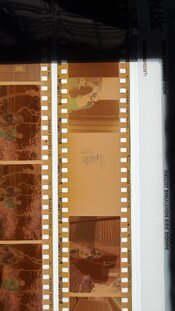
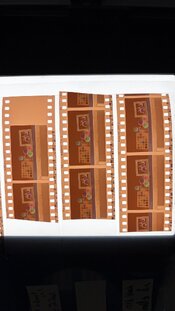
I have been consistently running into an issue for the couple months. I have some negatives that come out with strong staining along the edge of the negatives and projecting out from the sprocket holes. In almost all cases it is on Portra film. I develop in a 5-roll paterson tank with manual agitation - four gentle inversions every 30 seconds after 30 seconds of initial (also gentle) agitation. I have seen others post about the possibility of inversions causing surge marks in larger tanks due to the force of the chemicals running across the film. However, the issue persisted even when changing to rotary agitation with the "swizzle stick."
I have been unable to recreate the problem when running test strips. I ran a test with much more vigorous agitation than usual in the same fully-filled 5-roll tank and saw absolutely no marks. I thought that this could eliminate agitation as the culprit.
I tried re-fixing affected negatives in fresh fixer. No change. Re-bleaching and fixing. No change. I'll run devs and see no notable staining, and then the next day the staining returns. Yesterday I ran 5 rolls, three Portra and two Ultramax. Only the Portra showed staining, the Ultramax showed absolutely no sign.
The stain is also strongest ALWAYS on the same side of the negatives regardless of their location in the tank (more towards the bottom or top). It is also present in some 120 negatives (PORTRA ALWAYS). The one thing I did change in my process is moving to Kodak CN fixer, after which the problem started cropping up at least much more noticeably. But if refixing does not eliminate it then the fixer shouldn't be the issue...I should mention that I never see this in my ECN-2 devs (using the same bleach and fix) so I'm wary on blaming the secondaries.
I have run out of tests to run as far as I can think of. Anybody have any ideas? Could the film already be somehow stained before processing?
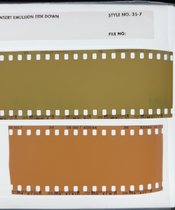
I have included images of a negative as well as a conversion.
I have been consistently running into an issue for the couple months. I have some negatives that come out with strong staining along the edge of the negatives and projecting out from the sprocket holes. In almost all cases it is on Portra film. I develop in a 5-roll paterson tank with manual agitation - four gentle inversions every 30 seconds after 30 seconds of initial (also gentle) agitation. I have seen others post about the possibility of inversions causing surge marks in larger tanks due to the force of the chemicals running across the film. However, the issue persisted even when changing to rotary agitation with the "swizzle stick."
I have been unable to recreate the problem when running test strips. I ran a test with much more vigorous agitation than usual in the same fully-filled 5-roll tank and saw absolutely no marks. I thought that this could eliminate agitation as the culprit.
I tried re-fixing affected negatives in fresh fixer. No change. Re-bleaching and fixing. No change. I'll run devs and see no notable staining, and then the next day the staining returns. Yesterday I ran 5 rolls, three Portra and two Ultramax. Only the Portra showed staining, the Ultramax showed absolutely no sign.
The stain is also strongest ALWAYS on the same side of the negatives regardless of their location in the tank (more towards the bottom or top). It is also present in some 120 negatives (PORTRA ALWAYS). The one thing I did change in my process is moving to Kodak CN fixer, after which the problem started cropping up at least much more noticeably. But if refixing does not eliminate it then the fixer shouldn't be the issue...I should mention that I never see this in my ECN-2 devs (using the same bleach and fix) so I'm wary on blaming the secondaries.
I have run out of tests to run as far as I can think of. Anybody have any ideas? Could the film already be somehow stained before processing?
I have included images of a negative as well as a conversion.