I tried tweeking the yellow and magenta dials under the safelight and it was a total pain. You can get Ilford filters for about $30. Swapping out filters is way easier.
I have a set of those too. Okay.. if have a time for the shadow in grade 4 or 5, say 15 sec. then you use a grade 0 for your highlights sat 15 sec.. a total of 30 for whole print. Aren't you over cooking the shadows with highlight filter and filling it in? or the filter block out what you allowed for shadows?
Todd
Up to a certain point,, the lower-contrast filters like 00, 0 and 1 only add density to the lighter tones in the print. Rather than expose this whole image with both filters, I cut a custom mask from cardboard in the shape of my highlight areas and use this to selectively burn in those parts of the print. The trick is knowing how much density to build in the light areas without it starting to become visible in the darker adjacent areas, which can appear as a dark halo around your highlights.
This is why it's difficult to get true blacks from a normal negative if printing at lower grades. The highlights and mid tones will just get all muddy before the shadows get dark enough.
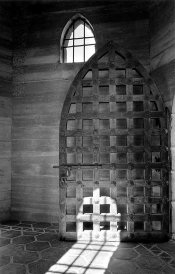
For the Tower Door image above, this was my printing "map":
1. Base exp: 30 sec @ f11, grade 4.5
- dodged the upper central part of door for 8 sec
2. Burn each of the upper corners (@4.5) for 10 sec
3. Burn left 1/3 of image for 6 sec (@4.5)
- at this point the upper window and bottom highlight are still almost blank white
4. Using cardboard cutouts in shape of window at top, and bright area at bottom:
- burn bottom highlight at grade 0 for 15 sec
- burn window at grade 0 for 20 sec
- the key is to build enough density to show some detail but not look unnatural