• Welcome to Photrio!
    Registration is fast and free. Join today to unlock search, see fewer ads, and access all forum features.
    Click here to sign up

Single grade vs split grade printing question

feeling grey

A
feeling grey

  • 2
  • 0
  • 51
Inconsequential

H
Inconsequential

  • 2
  • 0
  • 55

Forum statistics

Threads
201,805
Messages
2,830,461
Members
100,965
Latest member
Awwjay
Recent bookmarks
0

Jessestr

Member
Allowing Ads
Joined
Mar 31, 2014
Messages
399
Format
35mm
So I've been single grade printing all the time upon this day. I had a very low contrast scene which resulted in a flat negative. I printed it Saturday on grade 5 - f 16 and 18 seconds of exposure. Looked great - just wanted to burn in the sky a little more.

As you see, I had to print at grade 5. Luckily I developed my film a little longer then I use to do. If I did not do that the print might still look too flat at grade 5.

However, this is where my question comes in.

The question: Is it possible to achieve a higher contrast print with split-grade printing than a single grade 5 print? Since you can just increase the time of the grade 5 exposure to get more contrast if necessary. However upon a point this will affect the highlights I think? ... or how does this work? :smile: It's my only question about the split grade printing. The rest look very straightforward.

As said in my example. Let's say a single grade 5 exposure would not result in enough contrast. Would split-grade solve the problem or would this be the same? I know I could make a less diluted paper developer to get increased contrast for the print or just develop the film longer. But don't think about those options.

Thoughts:
I feel like I have much more control over the contrast with spit-grade printing and helps me a lot with choosing what I want. Speeds up the process. Quite liking this, don't know why I didn't try this earlier.

Thank you!
 

Frank53

Subscriber
Allowing Ads
Joined
May 18, 2013
Messages
665
Location
Reuver, Netherlands
Format
Multi Format
Although I love split grade printing, I must admit, that in theory the same results must be possible in single grade. It' just a choice.
If you cannot print your negative on grade 5, there is not much you can do, because there is no grade 6.
Maybe you should look at your negative again and change something in development, so you can generally print on grade 2 to 3. Than you have a lot of room on both sides.
You could increase the contrast of this negative by giving it some extra treatment, mayby selenium toner. This could give upto an extra grade.
Regards,
Frank
 

K-G

Subscriber
Allowing Ads
Joined
Mar 29, 2006
Messages
557
Location
Goth, Sweden
Format
Multi Format
You can try to overexpose on grade 5 and then bleach back to desired tone. This will give you a slight increase in contrast as the bleach has most effect in the bright areas.

Karl-Gustaf
 
Joined
Sep 10, 2002
Messages
3,675
Location
Eugene, Oregon
Format
4x5 Format
Jesse,

The short answer is: No, you won't be able to get more contrast than grade 5 with split-grade exposure, only less.

Split-grade techniques divide an intermediate grade into separate exposures of low contrast (green light) and high contrast (blue light). For a straight print with no manipulations, any split-grade exposure can be replicated by the proper mix of blue and green components in a single exposure. Color heads, which are continuously variable, are easy to do this with. The real advantage of split-grade printing is being able to dodge and burn with different filtration. For many, it also fits their workflow better. Grade 5, being the highest contrast grade, would only get less contrasty if you added a low-contrast exposure to the mix.

If you need to get still more contrast for your print, try some of the following, alone or in combination:

First, make sure you are getting optimum grade 5 filtration. If your filters are old, they may have faded. If you are using a color head, try using the grade 5 filter; often they are more blue than the magenta filtration in a dichro head. If you have a #47 blue filter hanging around, you can expose through it and be assured of only getting blue (i.e., max. contrast) exposure.

If you are using red safelights, turn them off and make a print. There's an effect, called the Herschel Effect that can result in reduced contrast with some blue-sensitive materials when they are exposed to red light. Not only that, your safelights could be not as safe as you think they are and fogging the print some, thereby reducing contrast.

If none of the above helps, you can try a more contrasty developer (straight Dektol, for example, or Ethol LPD) to try and up the contrast. Local bleaching of the highlights will often give the whites a boost and increase the perception of print contrast. Printing the entire print a bit dark and bleaching it back can help too, as Karl-Gustaf mentions above.

You can also intensify the negative. By far the easiest is selenium toning of the negative IF it wasn't developed with a staining developer (selenium toner will remove the stain from a pyro neg, thereby reducing contrast). I use Kodak Rapid Selenium Toner 1+2 for 5-6 minutes. This will give you a 1/2-1-grade contrast increase.

You can also bleach/redevelop with a staining developer to increase contrast. This is the option I use for stained negatives. The idea is to bleach the silver image of the negative with a rehalogenating bleach made from potassium ferricyanide and potassium bromide. Bleach till the image is completely gone and then redevelop the negative in a staining developer like PMK or Pyrocat. This will restore the silver image and add image stain as well, thereby increasing contrast. Search here for more details if you are interested in this. I've described it in detail several times in other threads.

There are other intensifiers as well, but I have never used them. The above methods are safer and have been more than enough for my occasional underdeveloped negs.

Best,

Doremus
 

RauschenOderKorn

Member
Allowing Ads
Joined
Apr 14, 2016
Messages
814
Location
Bavaria, Germany
Format
Medium Format
+1 for Doremus!

you can furthermore try to increase the Dmax of the print with selenium toning and thereby increase the contrast a little.
 
OP
OP

Jessestr

Member
Allowing Ads
Joined
Mar 31, 2014
Messages
399
Format
35mm
Thanks to everyone. This is exactly what I wanted to know.

First, make sure you are getting optimum grade 5 filtration. If your filters are old, they may have faded. If you are using a color head, try using the grade 5 filter; often they are more blue than the magenta filtration in a dichro head. If you have a #47 blue filter hanging around, you can expose through it and be assured of only getting blue (i.e., max. contrast) exposure.

Yes. The filters are slightly faded. I've been looking to under the lens filters from Ilford.


If you are using red safelights, turn them off and make a print. There's an effect, called the Herschel Effect that can result in reduced contrast with some blue-sensitive materials when they are exposed to red light. Not only that, your safelights could be not as safe as you think they are and fogging the print some, thereby reducing contrast.

Did safelight tests even at 10cm away from my paper up till 15 minutes no fogging.

If none of the above helps, you can try a more contrasty developer (straight Dektol, for example, or Ethol LPD) to try and up the contrast. Local bleaching of the highlights will often give the whites a boost and increase the perception of print contrast. Printing the entire print a bit dark and bleaching it back can help too, as Karl-Gustaf mentions above.

You can also intensify the negative. By far the easiest is selenium toning of the negative IF it wasn't developed with a staining developer (selenium toner will remove the stain from a pyro neg, thereby reducing contrast). I use Kodak Rapid Selenium Toner 1+2 for 5-6 minutes. This will give you a 1/2-1-grade contrast increase.

Thanks for the tip! Did not know I could intensify the negative.

---

Note: You Doremus and others helped me earlier in topics that I said I regulary had to print at grade 4 and sometimes even 5. The advice I got was increase development time by 15%.

My normal development was HC-110 Dilution B 6m30s for Tri-X 400. For this roll I did 7m30s. A 15% increase. I can see that almost all the negatives are denser thus having more contrast. However the shot we are talking about right now yields enough shadow detail, so it is correctly exposed. However the density is not as dense as the other pictures. (I did not print any other pictures so I don't know at which grade they will print, they look denser so I guess 2-3).
Meaning this picture has a lower density than the other pictures on the same roll, can I conclude that the scene contract was very low? Which results in the use of grade 5 to get decent black tones?

I find it strange that my development time is so much higher than the rest of us for the same combination.
 
Last edited:

Svenedin

Member
Allowing Ads
Joined
Mar 19, 2016
Messages
1,191
Location
Surrey, United Kingdom
Format
Med. Format RF
If your development times are significantly higher than most other people there must be something going on. Enlargers and their light sources vary (condensers more contrast, diffusers less generally) so that may be an influence. Old light bulbs in the enlarger can influence the light spectrum produced and affect contrast. If old might be worth changing the bulb.

Are you negatives correctly exposed? Could they be underexposed? Are you developing at the correct temperature? Is your developer tired and worn out?

I don't know what size enlargements you are making or anything about your enlarger but just ballpark 18s f16 grade 5 seems quite short (possibly) suggesting a thin negative. May be completely wrong though! Too many variables and not enough data so just a guess.
 
OP
OP

Jessestr

Member
Allowing Ads
Joined
Mar 31, 2014
Messages
399
Format
35mm
If your development times are significantly higher than most other people there must be something going on. Enlargers and their light sources vary (condensers more contrast, diffusers less generally) so that may be an influence. Old light bulbs in the enlarger can influence the light spectrum produced and affect contrast. If old might be worth changing the bulb.

Are you negatives correctly exposed? Could they be underexposed? Are you developing at the correct temperature? Is your developer tired and worn out?

I don't know what size enlargements you are making or anything about your enlarger but just ballpark 18s f16 grade 5 seems quite short (possibly) suggesting a thin negative. May be completely wrong though! Too many variables and not enough data so just a guess.

Hey. Thanks for the message.

My Laborator 1200 has a CLS500 head with colour filters. I have opened the head to remove the dust after the purchase, a new bulb was fitted.
Both I and a friend develop prints here at my home. His negatives often developed with my chemicals are always grade 2-3 (although he uses Ilford MG IV RC paper and I use Adox MCC fiber).

I did a safelight test resulting in no fogging up to 15 minutes with the safety light only 10-15cm away from the paper. Developer is fresh.

18s f16 grade 5 is short indeed. When I have a negative that is denser, it's a longer print time. Exactly. So I guess the negative is just thin due to underdevelopment, exposure is okay since I have a lot of shadow detail, especially compared to other frames on the same roll. I will print a few teststrips tonight to see if the other frames also suffer from being thin.

So could it be that it's the scene that was low contrast resulting in a high grade print? And that the other pictures are okay because the scene were more average/normal contrast?
 

Svenedin

Member
Allowing Ads
Joined
Mar 19, 2016
Messages
1,191
Location
Surrey, United Kingdom
Format
Med. Format RF
Maybe post a scan of your negative (as a negative not a positive) and your resulting print. Include the edge numbers as they can give a hint to development.
 
OP
OP

Jessestr

Member
Allowing Ads
Joined
Mar 31, 2014
Messages
399
Format
35mm
Maybe post a scan of your negative (as a negative not a positive) and your resulting print. Include the edge numbers as they can give a hint to development.

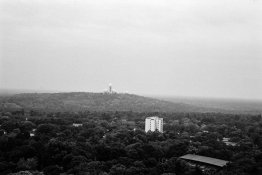
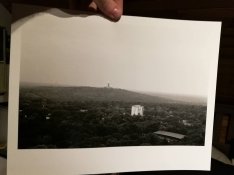
This is the single grade 5 print. f16 - 18 seconds exposure. No burn/dodge.
The Berlin-2.jpg is a scan.
 

Attachments

  • negative.jpg
    negative.jpg
    93.7 KB · Views: 352
  • Berlin-2.jpg
    Berlin-2.jpg
    971.4 KB · Views: 318
  • print.jpg
    print.jpg
    122.7 KB · Views: 341
Joined
Sep 10, 2002
Messages
3,675
Location
Eugene, Oregon
Format
4x5 Format
Jesse,

If your other negatives developed at the same time are printing at a lower contrast setting, then you likely simply have a low-contrast lighting situation for that particular shot. If you're shooting roll film with a lot of scenes with different lighting on it, there's really nothing much you can do about it. That's why it's good to aim for an intermediate contrast setting for "normal" scenes. That way, there will be enough leeway for more and less contrasty subjects in the contrast settings.

If you have an entire roll shot in low contrast, or if you shoot sheet film, then you can develop more to compensate for the lighting situation.

And don't worry about how much your particular development times vary from those of others; if it works for you, then it's likely correct.

Edit: I cross-posted with your post containing the negative/print. The lighting on overcast days with lots of sky in the scene is always hard to deal with. The sky is relatively light, but most everything else is flatly-lit and pretty low contrast. I think your neg and print look just fine!

Best,

Doremus
 
Last edited:

Bob Carnie

Subscriber
Allowing Ads
Joined
Apr 18, 2004
Messages
7,735
Location
toronto
Format
Med. Format RF
So I've been single grade printing all the time upon this day. I had a very low contrast scene which resulted in a flat negative. I printed it Saturday on grade 5 - f 16 and 18 seconds of exposure. Looked great - just wanted to burn in the sky a little more.

As you see, I had to print at grade 5. Luckily I developed my film a little longer then I use to do. If I did not do that the print might still look too flat at grade 5.

However, this is where my question comes in.

The question: Is it possible to achieve a higher contrast print with split-grade printing than a single grade 5 print? Since you can just increase the time of the grade 5 exposure to get more contrast if necessary. However upon a point this will affect the highlights I think? ... or how does this work? :smile: It's my only question about the split grade printing. The rest look very straightforward.

As said in my example. Let's say a single grade 5 exposure would not result in enough contrast. Would split-grade solve the problem or would this be the same? I know I could make a less diluted paper developer to get increased contrast for the print or just develop the film longer. But don't think about those options.

Thoughts:
I feel like I have much more control over the contrast with spit-grade printing and helps me a lot with choosing what I want. Speeds up the process. Quite liking this, don't know why I didn't try this earlier.

Thank you!
There are a couple of things you could do

You could flash the paper and still print at grade 5 , this would bring in more detail in the sky
You could do a 00 filter hit of the sky region with little effort.
any bleed over of the 00 into the foreground would be absorbed and not seen.


Grade 5 is about all you can hope to get, as well punching in more time will not increase contrast after a certain point, all you will do is start filling in the low end.
Someone mentioned bleach , and you could do that with some of the tricks I mention and work in the low areas to create perceived contrast differences in the low end.
You also could add a burn with the 5 filter into the sky after the tricks are done and be careful with this burn as the 5 burn will definitely create a line if you are not careful.
the reason to burn in the sky with the 5 as well as the flash or 00 is to define any dark areas or tones in the white sky, this will help create the illusion of a good sky.

hope this helps.
btw if your negatives require a Grade 5 filter or paper , it should only be by design for a particular look and not your regular process.

Bob
 
OP
OP

Jessestr

Member
Allowing Ads
Joined
Mar 31, 2014
Messages
399
Format
35mm
Thanks Bob Carnie!

Jesse,

If your other negatives developed at the same time are printing at a lower contrast setting, then you likely simply have a low-contrast lighting situation for that particular shot. If you're shooting roll film with a lot of scenes with different lighting on it, there's really nothing much you can do about it. That's why it's good to aim for an intermediate contrast setting for "normal" scenes. That way, there will be enough leeway for more and less contrasty subjects in the contrast settings.

If you have an entire roll shot in low contrast, or if you shoot sheet film, then you can develop more to compensate for the lighting situation.

And don't worry about how much your particular development times vary from those of others; if it works for you, then it's likely correct.

Best,

Doremus

That's what I'm about to test tonight. Doing some test strips of the other negs on the film and see what grade they print at.

I forgot to add: My m4 with tri-x 400 went through an xray machine in Berlin. They refused to hand check the camera. I left my other film behind so it didn't go through. Could this affect contrast? They were telling me it didn't affect my film because it was very high end xray stuff. I didn't trust it but I had no choice.

Doremus, so it's perfectly normal that one person can develop at 5 minutes and the other has to use 8 minutes to get the same result? There are however a few things that I know of that could lower the contrast of my print: filter fading and my developer (Moersch ECO). I find that compared to Adotol NE, Moersch gives less contrast but more dynamic range. Maybe a combination of both those problems and a low contrast scene make for a grade 5 exposure..

I wish I could find out what a normal to average contrast scene looks like (is there like a setup I can do at home to find an artificial normal contrast scene?), take some pictures of it. Develop them and print them at grade 2-3, if they seem okay I could finally find out my development time... but it's been a while since I was able to print at grade 2-3 .. even with increased dev time.
 
Last edited:

miha

Member
Allowing Ads
Joined
Feb 15, 2007
Messages
3,037
Location
Slovenia
Format
Multi Format
BIG SNIP: filter fading and my developer (Moersch ECO). I find that compared to Adotol NE, Moersch gives less contrast but more dynamic range.
Having used both, I cannot agree. Moersch ECO 4812 gives superb Dmax but needs 3 minutes in order to give full blacks, which is twice as much as a regular HQ developer.
 
Joined
Sep 10, 2002
Messages
3,675
Location
Eugene, Oregon
Format
4x5 Format
Don't worry about the x-ray scan for carry-on baggage. I've had Tri-X go through 6-8 separate scans with no ill effects. Sure, it's a good idea to minimize the scans, but one scan isn't going to have any effect on the negative.

Your development time takes into account the way you agitate, your particular thermometer, etc., etc. Your negative looks fine, so don't sweat the time.

Bob's comments about trying to get a bit more contrast/detail/substance in the sky are good. If there's no detail in the negative, though, you won't be able to do much. Sometimes a bit of bleach to heighten what is there helps a lot for clouds. If you're trying for more separation in the dark trees, printing a bit lighter and selenium toning may help a bit, as would bleaching the darkest areas a bit (as Bob suggests).

A "normal" scene is basically a sunlit day with a few puffy white clouds filling in some of the shadows and with the light coming from behind you. That said, you need to define normal based on what kind of scenes you shoot most and keeping enough latitude in your process to accommodate the occasional extra high or low contrast situation.

Best,

Doremus
 

MartinP

Member
Allowing Ads
Joined
Jun 23, 2007
Messages
1,569
Location
Netherlands
Format
Medium Format
As mentioned, if the sky/clouds are fairly low contrast ('dark' and 'darker', on the neg) then burning enough with Gd.5, such that the thinnest bits of 'dark' just barely print, will give more apparent contrast. As Mr.Carnie mentioned, a flash on the sky/clouds would also help what density differences there are, look more apparent - especially if you aren't doing anything more than a single printing exposure (no burning in).
 

Bob Carnie

Subscriber
Allowing Ads
Joined
Apr 18, 2004
Messages
7,735
Location
toronto
Format
Med. Format RF
Thanks Bob Carnie!


That's what I'm about to test tonight. Doing some test strips of the other negs on the film and see what grade they print at.

I forgot to add: My m4 with tri-x 400 went through an xray machine in Berlin. They refused to hand check the camera. I left my other film behind so it didn't go through. Could this affect contrast? They were telling me it didn't affect my film because it was very high end xray stuff. I didn't trust it but I had no choice.

Doremus, so it's perfectly normal that one person can develop at 5 minutes and the other has to use 8 minutes to get the same result? There are however a few things that I know of that could lower the contrast of my print: filter fading and my developer (Moersch ECO). I find that compared to Adotol NE, Moersch gives less contrast but more dynamic range. Maybe a combination of both those problems and a low contrast scene make for a grade 5 exposure..

I wish I could find out what a normal to average contrast scene looks like (is there like a setup I can do at home to find an artificial normal contrast scene?), take some pictures of it. Develop them and print them at grade 2-3, if they seem okay I could finally find out my development time... but it's been a while since I was able to print at grade 2-3 .. even with increased dev time.

Something that always works, place a newspaper on a table , then lay down your negative, if you can read your print through the highlights one end is good.
If you see lots of detail in the low end then I would say you are good to go.
 
OP
OP

Jessestr

Member
Allowing Ads
Joined
Mar 31, 2014
Messages
399
Format
35mm
Something that always works, place a newspaper on a table , then lay down your negative, if you can read your print through the highlights one end is good.
If you see lots of detail in the low end then I would say you are good to go.

What do you mean with read the print/letters through the negative. I did it, impossible to read - only the black parts (so transparent parts) on the negative are able to read the letters. Do I have to do this in full daylight or with a flashlight on it?

Side note:
I'm going to get out my newer Durst M305. It served me well and doesn't have faded contrast filters. Then I compare both prints to eachother so I can check if the enlarger might be the bad guy here.
 

Andrew O'Neill

Moderator
Moderator
Joined
Jan 16, 2004
Messages
12,928
Location
Coquitlam,BC Canada
Format
Multi Format
When you make a print, are you thinking, expose for the highlights, develop/adjust contrast filtration for shadows? I love split grade printing on VC papers. I'd first expose a test strip (I use full sheet for 8x10 prints) with a low contrast filter and choose the exposure that brings out detail in the clouds. Then test strip over this exposure with high contrast filter to choose my shadows. To bring out more contrast in the trees, I'd selectively bleach them.
 

Bob Carnie

Subscriber
Allowing Ads
Joined
Apr 18, 2004
Messages
7,735
Location
toronto
Format
Med. Format RF
What do you mean with read the print/letters through the negative. I did it, impossible to read - only the black parts (so transparent parts) on the negative are able to read the letters. Do I have to do this in full daylight or with a flashlight on it?

Side note:
I'm going to get out my newer Durst M305. It served me well and doesn't have faded contrast filters. Then I compare both prints to eachother so I can check if the enlarger might be the bad guy here.

well this is where you are in a problem area , your negative would be considered bullit proof which can mean hugely over exposed or over developed, sounds like your neg is really overexposed.
You should be able to read the newspaper through the highlights in normal light.

Some one here should be able to send you a sample negative that is good, I would do it but you would need to arrange shipping from my place .
 

Andrew O'Neill

Moderator
Moderator
Joined
Jan 16, 2004
Messages
12,928
Location
Coquitlam,BC Canada
Format
Multi Format
I print with cold light. I cannot read text through negatives highlights developed for the cold light. My negatives look very over exposed. :smile:
 
OP
OP

Jessestr

Member
Allowing Ads
Joined
Mar 31, 2014
Messages
399
Format
35mm
well this is where you are in a problem area , your negative would be considered bullit proof which can mean hugely over exposed or over developed, sounds like your neg is really overexposed.
You should be able to read the newspaper through the highlights in normal light.

Some one here should be able to send you a sample negative that is good, I would do it but you would need to arrange shipping from my place .

I can arrange the shipping costs for you. Don't think it will be that much.

So, the negative is overdeveloped. Wouldn't that make it print on a lower grade because it's too contrasty? or overexposed.. yes but that would mean long printing times which I do not have?
Would be nice to have a comparison to a good negative.
 

Bob Carnie

Subscriber
Allowing Ads
Joined
Apr 18, 2004
Messages
7,735
Location
toronto
Format
Med. Format RF
I can arrange the shipping costs for you. Don't think it will be that much.

So, the negative is overdeveloped. Wouldn't that make it print on a lower grade because it's too contrasty? or overexposed.. yes but that would mean long printing times which I do not have?
Would be nice to have a comparison to a good negative.

exposure on film does not always equate to high contrast, Photograph fog and you can overexpose and still have a flat scene, which would require a higher printing filter.

email me at bob@bobcarnieprintmaking.ca and I will see if I have a negative I will never print but is still good for printing.
 
OP
OP

Jessestr

Member
Allowing Ads
Joined
Mar 31, 2014
Messages
399
Format
35mm
Notes:
I just installed my M305 that I never use anymore, to check for contrast differences with my Durst Laborator 1200 w/ CLS 500. Printed the same negative, same height, same paper and developer etc. Different light source, so I had to adjust the aperture. Other than that I got the same grade. Meaning both enlargers give off the same contrast level. I’m pretty sure the M305 is still in good condition. So the Laborator 1200 is not the problem here.

Next up: Trying to print different frames of the same roll. See if they also need such a high grade or if it's only limited to this one low contrast frame. (Let's hope it's the last option :smile:)
 

RauschenOderKorn

Member
Allowing Ads
Joined
Apr 14, 2016
Messages
814
Location
Bavaria, Germany
Format
Medium Format
So, the negative is overdeveloped. Wouldn't that make it print on a lower grade because it's too contrasty? or overexposed.. yes but that would mean long printing times which I do not have?
Would be nice to have a comparison to a good negative.

Under- and Over-exposure & -development beyond a certain point will leave you with flat negatives. Overall printing times should increase with overexposed negatives, but: I have been playing with a splitgrade controller a few days ago, in particular I have been changing through the VC-papers after measuring a negative. I was very surprised to see that the splitgrade controller calculated totally different combinations of time / grade for the same negative with different papers (I tried MCC vs. MCP vs. MGIV). For the MCC, times are extremly short (I even wanted to change to a less intense bulb) and grading is higher, with the MCP being just the opposite, MGIV I found somewhere in the middle.

So, the absolute exposure time & aperture of the print depend on the enlargement ratio, the paper, the light source and other factors -> long and short printing times are quite relative. How do you determine grade & development time, do you use some kind of computer or do you use test strips?

I have had similar results like yours when I was experimenting with special a home-brew developer. I used a similar negative (landscape from the lignite mine Cottbus Nord) which is a little overexposed and with a lot of blue sky (no cloud at all), so quite hard to print. In this particular experiment, I had to overexpose the print heavily, so I was not able to develop the print to completion. I pulled the prints at sight from the tray and as it seems, I underestimated the fix-down and dry-down of the paper. All prints are flat, greyish (Dmax<1,6 on MCP) and dull. Do you develop your prints to completion or do you pull the print at sight? If you develop to completion, what is the usual developer & development time?

There is an unlimited amount of variables which are influencing your results. Starting with your camera (are the times and aperture accurate?) your way of determining exposure times, the film, the film development process, your printing process and all tools & consumables involved. As you seem to have little confidence in your negatives, I would start there. You say you develop & print with a friend. Why not switch equipment for a day, you shoot with his camera and he does so with yours and then you compare the results. You can do the same for film development and printing (he prints your negs and you print his on each other´s paper).
 
Photrio.com contains affiliate links to products. We may receive a commission for purchases made through these links.
To read our full affiliate disclosure statement please click Here.

PHOTRIO PARTNERS EQUALLY FUNDING OUR COMMUNITY:


Ilford ADOX Freestyle Photographic Stearman Press Weldon Color Lab Blue Moon Camera & Machine
Top Bottom