• Welcome to Photrio!
    Registration is fast and free. Join today to unlock search, see fewer ads, and access all forum features.
    Click here to sign up

Single grade vs split grade printing question

feeling grey

A
feeling grey

  • 2
  • 0
  • 51
Inconsequential

H
Inconsequential

  • 2
  • 0
  • 55

Forum statistics

Threads
201,805
Messages
2,830,461
Members
100,965
Latest member
Awwjay
Recent bookmarks
0

MattKing

Moderator
Moderator
Allowing Ads
Joined
Apr 24, 2005
Messages
55,168
Location
Delta, BC Canada
Format
Medium Format
It looks to me like you have a subject that is relatively low in contrast, has a relatively narrow range of brightness and has different light on the foreground than the background (due to atmospheric effects), and you are trying to get something different out of it.

I don't think just adjusting the overall contrast of either the negative or the print is what you need to do to accomplish what you want.

Essentially, you need to print the two sections (the foreground and the sky) separately and then, once you get what you want from each section, figure out how to combine the two on the same print. That will involve using different contrast settings and exposures on different sections. You do this through split filtering techniques and burning and dodging.

You may find that due to the nature of the sky and things like airborne dust and UV in the original, you won't be able to get the sky to look more contrasty, but you will be able to get it darker. To my mind, the foreground would look better and more well defined if it was printed lighter with a lower contrast setting - you need to open up those shadows.

The approach that says use exposure to set the tones for the highlights and adjust contrast to set the darkness of the shadows isn't a bad approach for a lot of things, but it really only works perfectly for evenly lit subjects. In the situation you are working with the lighting on the foreground is different than the distance and the sky, due to things like atmospheric effects, so you need to approach the two parts separately.

-
 
OP
OP

Jessestr

Member
Allowing Ads
Joined
Mar 31, 2014
Messages
399
Format
35mm
Under- and Over-exposure & -development beyond a certain point will leave you with flat negatives. Overall printing times should increase with overexposed negatives, but: I have been playing with a splitgrade controller a few days ago, in particular I have been changing through the VC-papers after measuring a negative. I was very surprised to see that the splitgrade controller calculated totally different combinations of time / grade for the same negative with different papers (I tried MCC vs. MCP vs. MGIV). For the MCC, times are extremly short (I even wanted to change to a less intense bulb) and grading is higher, with the MCP being just the opposite, MGIV I found somewhere in the middle.

Really? So let's talk about development only for a second. Since I'm pretty sure my exposure is correct. So there is a point when exceeded that your negative won't gain contrast but lose it upon increasing development time? This is the first time I hear this.

So, the absolute exposure time & aperture of the print depend on the enlargement ratio, the paper, the light source and other factors -> long and short printing times are quite relative. How do you determine grade & development time, do you use some kind of computer or do you use test strips?
I used an analyzer before and had the same problem. I sold it because I didn't get it why I got so high grades in printing. So I wanted to go full manual until I sorted out what I was doing wrong.

I have had similar results like yours when I was experimenting with special a home-brew developer. I used a similar negative (landscape from the lignite mine Cottbus Nord) which is a little overexposed and with a lot of blue sky (no cloud at all), so quite hard to print. In this particular experiment, I had to overexpose the print heavily, so I was not able to develop the print to completion. I pulled the prints at sight from the tray and as it seems, I underestimated the fix-down and dry-down of the paper. All prints are flat, greyish (Dmax<1,6 on MCP) and dull. Do you develop your prints to completion or do you pull the print at sight? If you develop to completion, what is the usual developer & development time?

I always develop to completion. I use Moersch Eco dev. Adox MCC - 3 minutes development time. I have a good friend in Germany who uses the same combo and gets great tones.
 
OP
OP

Jessestr

Member
Allowing Ads
Joined
Mar 31, 2014
Messages
399
Format
35mm
It looks to me like you have a subject that is relatively low in contrast, has a relatively narrow range of brightness and has different light on the foreground than the background (due to atmospheric effects), and you are trying to get something different out of it.

I don't think just adjusting the overall contrast of either the negative or the print is what you need to do to accomplish what you want.

Essentially, you need to print the two sections (the foreground and the sky) separately and then, once you get what you want from each section, figure out how to combine the two on the same print. That will involve using different contrast settings and exposures on different sections. You do this through split filtering techniques and burning and dodging.

You may find that due to the nature of the sky and things like airborne dust and UV in the original, you won't be able to get the sky to look more contrasty, but you will be able to get it darker. To my mind, the foreground would look better and more well defined if it was printed lighter with a lower contrast setting - you need to open up those shadows.

The approach that says use exposure to set the tones for the highlights and adjust contrast to set the darkness of the shadows isn't a bad approach for a lot of things, but it really only works perfectly for evenly lit subjects. In the situation you are working with the lighting on the foreground is different than the distance and the sky, due to things like atmospheric effects, so you need to approach the two parts separately.

-

This sounds like a valid answer. :smile: I have no experience with that so quite nice that you noticed this. However, when I open up the shadows in the bottom part I get good shadow detail but not really the tones what I'm looking for. I love it that it is so moody.
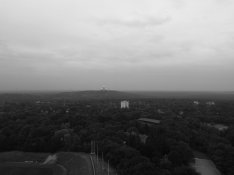
Also, a practical question. Upon finding the exposure (not contrast). Should I look towards the sky or the white building? I could get the right exposure on the building and then burn the sky OR I could get the right exposure in the sky and then dodge the building.

Funnily enough I found a digital capture with my phone from the same scene. The building doesn't white at all like in my print. Seeing this... makes me think. Maybe I could just print the whole picture a little darker, lower the grade and dodge the building and the sky only a little. To make the building pop out and make the sky just a little brighter. Then I probably never had a problem with grade 5... but only been working on grade 4 perhaps. Which seems reasonable because it's a low contrast scene. What do you think?
 

Attachments

  • IMG_20161001_110045.jpg
    IMG_20161001_110045.jpg
    441.7 KB · Views: 102

MattKing

Moderator
Moderator
Allowing Ads
Joined
Apr 24, 2005
Messages
55,168
Location
Delta, BC Canada
Format
Medium Format
Also, a practical question. Upon finding the exposure (not contrast). Should I look towards the sky or the white building? I could get the right exposure on the building and then burn the sky OR I could get the right exposure in the sky and then dodge the building

Some scenes are easier to work with when you burn, whereas others are easier to work with when you dodge. And some work best when you do both. I would probably use a cut up smaller print as a burning mask and burn the sky. As well as a cut out set of buildings as a dodging tool.

Maybe I could just print the whole picture a little darker, lower the grade and dodge the building and the sky only a little. To make the building pop out and make the sky just a little brighter.

I would definitely try this.

However, when I open up the shadows in the bottom part I get good shadow detail but not really the tones what I'm looking for.

Play with this a bit more. Lower the contrast and then print a few variations that are slightly darker.

Also consider burning in selected areas, like the corners, to manipulate the moodiness.
 

jimjm

Subscriber
Allowing Ads
Joined
May 2, 2007
Messages
1,239
Location
San Diego CA
Format
Multi Format
One issue I see here is that the atmospheric haze in the middle distance is adding to your perception of low-contrast. It's hard to add contrast to an image when it was reduced by haze to begin with. The use of a yellow, orange or red filter when you shot the photo may have helped with this. As much as you try, you may not be able to get that area to look like your foreground, which I think has adequate contrast.

As Matt mentioned, your shadows are starting to block up in the foreground so you can try reducing exposure in that area or going to a slightly softer grade. In the end, it's up to your personal preference.

If this were my image, I'd also try a test print at grade 0 or 1 to see if there is any detail in the sky to be brought out. Expose the print for the sky alone, ignoring what the ground looks like. If you can bring forth any detail or tone in the sky, I think it would help. Split-grade printing may be your best bet, going with a 4 or 5 to get the foreground and mid-ground the way you like, then burn in the sky at a softer grade. It may take some trial and error, or you may never get a print you're really happy with, but you'll learn a lot in the process.

If you're looking for some good books on some of these techniques, I can recommend Tim Rudman's "The Photographers Master Printing Course", Eddie Ephraums' "Creative Elements - Landscape Photography" and Bruce Barnbaum's "The Art of Photography". Good Luck!
 

MattKing

Moderator
Moderator
Allowing Ads
Joined
Apr 24, 2005
Messages
55,168
Location
Delta, BC Canada
Format
Medium Format
If you're looking for some good books on some of these techniques, I can recommend Tim Rudman's "The Photographers Master Printing Course", Eddie Ephraums' "Creative Elements - Landscape Photography" and Bruce Barnbaum's "The Art of Photography". Good Luck!
These are good recommendations, and I and others could add a few more recommendations of a similar ilk.
With respect to any book or course recommendation, it is important to also understand that each of the authors make great prints, but if you read all three you will find that they aren't necessarily completely consistent with each other.
There is no one approach that is "correct". But there are approaches that are internally consistent, and if the visualization portion of one of those approaches resonate with you, it may be that the rest of that author's approach will work for you as well.
And one final warning - some books and authors are great about "what" you should do, without being quite as good about the underlying "why" it works.
 
OP
OP

Jessestr

Member
Allowing Ads
Joined
Mar 31, 2014
Messages
399
Format
35mm
Thanks to all once again!

One issue I see here is that the atmospheric haze in the middle distance is adding to your perception of low-contrast. It's hard to add contrast to an image when it was reduced by haze to begin with. The use of a yellow, orange or red filter when you shot the photo may have helped with this. As much as you try, you may not be able to get that area to look like your foreground, which I think has adequate contrast.

As Matt mentioned, your shadows are starting to block up in the foreground so you can try reducing exposure in that area or going to a slightly softer grade. In the end, it's up to your personal preference.

If this were my image, I'd also try a test print at grade 0 or 1 to see if there is any detail in the sky to be brought out. Expose the print for the sky alone, ignoring what the ground looks like. If you can bring forth any detail or tone in the sky, I think it would help. Split-grade printing may be your best bet, going with a 4 or 5 to get the foreground and mid-ground the way you like, then burn in the sky at a softer grade. It may take some trial and error, or you may never get a print you're really happy with, but you'll learn a lot in the process.

If you're looking for some good books on some of these techniques, I can recommend Tim Rudman's "The Photographers Master Printing Course", Eddie Ephraums' "Creative Elements - Landscape Photography" and Bruce Barnbaum's "The Art of Photography". Good Luck!

Thanks for the clarification about the atmospheric haze. Funny enough I find that the foreground, the bushes and such should be even darker. I'm a guy who like a lot of contrast, though there should be enough shadow detail showing. I like it when you get these silver tones/great tonal ranges, especially darker and moody pictures. Deep blacks and shadows with big tonal ranges .. but yes the light should be good for that too.

I like the idea of printing the sky at grade 0 only. To see if there is detail in it. However how do you practically print an image in two different grades? Make a foreground print while dodging the sky and then do it the other way around?

This playground is so big you can get lost in it. Love it though.

Good news too. I've been making test strips of other frames from the same rolls and they print great at grade 2. Which means the development time is quite okay right? :smile: However Bob Carnie told me I should be able to read a newspaper through the darkest part of a negative. Will try this tomorrow with good light... Was not able to read through.
 

RalphLambrecht

Subscriber
Allowing Ads
Joined
Sep 19, 2003
Messages
14,923
Location
K,Germany
Format
Medium Format
So I've been single grade printing all the time upon this day. I had a very low contrast scene which resulted in a flat negative. I printed it Saturday on grade 5 - f 16 and 18 seconds of exposure. Looked great - just wanted to burn in the sky a little more.

As you see, I had to print at grade 5. Luckily I developed my film a little longer then I use to do. If I did not do that the print might still look too flat at grade 5.

However, this is where my question comes in.

The question: Is it possible to achieve a higher contrast print with split-grade printing than a single grade 5 print? Since you can just increase the time of the grade 5 exposure to get more contrast if necessary. However upon a point this will affect the highlights I think? ... or how does this work? :smile: It's my only question about the split grade printing. The rest look very straightforward.

As said in my example. Let's say a single grade 5 exposure would not result in enough contrast. Would split-grade solve the problem or would this be the same? I know I could make a less diluted paper developer to get increased contrast for the print or just develop the film longer. But don't think about those options.

Thoughts:
I feel like I have much more control over the contrast with spit-grade printing and helps me a lot with choosing what I want. Speeds up the process. Quite liking this, don't know why I didn't try this earlier.

Thank you!
I'm afraid the answer is 'No', You cannot raise contrast beyond grade 5 just due to split-grade printing but extending dev time and toning the negative will increase overallcontrast.
 

jimjm

Subscriber
Allowing Ads
Joined
May 2, 2007
Messages
1,239
Location
San Diego CA
Format
Multi Format
I like the idea of printing the sky at grade 0 only. To see if there is detail in it. However how do you practically print an image in two different grades? Make a foreground print while dodging the sky and then do it the other way around?
In this case, you can try making your overall exposure at 4 or 5 (or whatever you decide), then switch to a soft grade like 0 or 1 and use a piece of card or your hand to dodge the rest of the image while you expose the sky only. Now a soft grade like 0 will really only affect the lighter tones to bring out detail or add density, and won't change the darker mid-tones or black much .... up to a point. This means you might not have to dodge the rest of of the print, unless you have to expose the sky for a long enough time that the darker tones are affected.

Just keep in mind that low contrast filters will print the lighter tones (highlights) more effectively to bring out details and a high contrast filter will have more impact on the darker tones and blacks. That's why a print at grade 5 only will have dense blacks and bright featureless highlights. A print at grade 0 might have enough detail in the highlights, but a lot of greys and no true dense blacks. This is a general observation for negatives shot in average lighting situations and with normal development. If you can get a straight print at grade 2 or 3 which gives you most of the shadow and some highlight detail you need from the negative, your exposure and negative development were most likely fine.

Here's one example where split-grade printing with dodging and burning made a big difference. Film was TMax100 developed in HC110 dil B for about 6.5 mins.
- I shot knowing I might have to sacrifice some highlight detail to ensure sufficient exposure for the rest of the scene, so I probably overexposed about a half-stop from the meter reading from the upper part of the door.
- a straight print at grade 2 was fairly flat, little contrast in the wood door or walls and the upper and lower highlight areas were very light with almost no detail.
- a grade 4 straight print gave me the detail and "look" I wanted in the door and walls, so I started from that. The upper and lower highlight areas were blank white with very little detail at all.
- I cut holes in 2 separate pieces of card stock to match the shape of the upper window and lower highlight areas. Switched to grade 0 and burned these areas in to bring out the detail. It's important not to expose too long, and to keep the card moving slightly. This helps to avoid halos or sharp edges around the burned-in areas.
- additional burning in of the left and right floor and upper corners at grade 3 gave a little more density and deeper shadows in these areas.

It takes a bit of practice and trial-and-error to get results, especially to keep a relatively "natural" look. One thing I really hate seeing these days is all this darn HDR imagery that screams manipulation.

Scottys_Castle_door_sm.jpg
 
OP
OP

Jessestr

Member
Allowing Ads
Joined
Mar 31, 2014
Messages
399
Format
35mm
In this case, you can try making your overall exposure at 4 or 5 (or whatever you decide), then switch to a soft grade like 0 or 1 and use a piece of card or your hand to dodge the rest of the image while you expose the sky only. Now a soft grade like 0 will really only affect the lighter tones to bring out detail or add density, and won't change the darker mid-tones or black much .... up to a point. This means you might not have to dodge the rest of of the print, unless you have to expose the sky for a long enough time that the darker tones are affected.

Just keep in mind that low contrast filters will print the lighter tones (highlights) more effectively to bring out details and a high contrast filter will have more impact on the darker tones and blacks. That's why a print at grade 5 only will have dense blacks and bright featureless highlights. A print at grade 0 might have enough detail in the highlights, but a lot of greys and no true dense blacks. This is a general observation for negatives shot in average lighting situations and with normal development. If you can get a straight print at grade 2 or 3 which gives you most of the shadow and some highlight detail you need from the negative, your exposure and negative development were most likely fine.

Here's one example where split-grade printing with dodging and burning made a big difference. Film was TMax100 developed in HC110 dil B for about 6.5 mins.
- I shot knowing I might have to sacrifice some highlight detail to ensure sufficient exposure for the rest of the scene, so I probably overexposed about a half-stop from the meter reading from the upper part of the door.
- a straight print at grade 2 was fairly flat, little contrast in the wood door or walls and the upper and lower highlight areas were very light with almost no detail.
- a grade 4 straight print gave me the detail and "look" I wanted in the door and walls, so I started from that. The upper and lower highlight areas were blank white with very little detail at all.
- I cut holes in 2 separate pieces of card stock to match the shape of the upper window and lower highlight areas. Switched to grade 0 and burned these areas in to bring out the detail. It's important not to expose too long, and to keep the card moving slightly. This helps to avoid halos or sharp edges around the burned-in areas.
- additional burning in of the left and right floor and upper corners at grade 3 gave a little more density and deeper shadows in these areas.

It takes a bit of practice and trial-and-error to get results, especially to keep a relatively "natural" look. One thing I really hate seeing these days is all this darn HDR imagery that screams manipulation.

View attachment 165971 View attachment 165971

This is a very nice and practical example! Shows how it's done. However I have one question left. Assuming you know your development time for a given film. Why is it that you still had to choose grade 4 for this print? I would think because it's a low contrast scene, but it doesn't look like it because you have the strong contrast between the darks and the white part at the bottom? Or did you underdevelop the shot? Please enlighten me!

So assuming that you know the film development time to get good contrast prints at grade 2, it's not uncommon to print at higher grades?
 

MattKing

Moderator
Moderator
Allowing Ads
Joined
Apr 24, 2005
Messages
55,168
Location
Delta, BC Canada
Format
Medium Format
Why is it that you still had to choose grade 4 for this print? I would think because it's a low contrast scene, but it doesn't look like it because you have the strong contrast between the darks and the white part at the bottom? Or did you underdevelop the shot?
I think we have had this discussion before :smile:.
I'm looking forward to jimjim's response, but here is mine.
Some people use "contrast" when they are talking about the range between the brightest and the darkest parts of either their subject or their print. With the greatest respect, that isn't contrast - that is subject brightness range ("SBR").
Contrast is a term that is better used to decribe how adjacent tones in a subject or a print are differentiated. We talk about the slope of the curve when we are discussing contrast of a film or a print because it provides a shorthand description of how those tones are differentiated. Higher contrast means the transitions between similar but different tones are larger and more obvious, whereas lower contrast means the transitions between similar but different tones are smaller and more subtle.
Some differentiate between SBR and what I consider to be contrast by using instead the terms macro-contrast and micro-contrast.
One of the most powerful parts of jimjim's example is the striking appearance of the details in the door and walls. I expect those details were illuminated by fairly low contrast light. That reality probably competed with jimjim's desire to capture the really wide SBR, because a development time that boosted the contrast of the details would tend to make it difficult to effectively record the really high SBR on the negative.
What I think jimjim has already told you is that he chose his exposure and development times to both effectively capture the SBR, and to give him the detail in the door and wall that he needed. Because he had that detail he was able to use the printing techniques (more blue/magenta - grades 4 or 5) available to him to emphasize that detail.
 

ic-racer

Member
Joined
Feb 25, 2007
Messages
16,728
Location
USA
Format
Multi Format
You can try lith printing thin negatives. That can get you beyond grade 5.
 

Attachments

  • Minox1.jpg
    Minox1.jpg
    185.9 KB · Views: 104

jimjm

Subscriber
Allowing Ads
Joined
May 2, 2007
Messages
1,239
Location
San Diego CA
Format
Multi Format
This is a very nice and practical example! Shows how it's done. However I have one question left. Assuming you know your development time for a given film. Why is it that you still had to choose grade 4 for this print? I would think because it's a low contrast scene, but it doesn't look like it because you have the strong contrast between the darks and the white part at the bottom? Or did you underdevelop the shot? Please enlighten me!

So assuming that you know the film development time to get good contrast prints at grade 2, it's not uncommon to print at higher grades?

I don't always print at grade 4 or higher, but in this case the change to the overall image (for me) was very dramatic. I've often had satisfactory prints at grade 2 or 3. I think part of the reason was that most of the interior illumination was from indirect light, except for the window and spot of light at the bottom. This opened up the shadows, but punching up the contrast helped to bring out the texture in the door that I remembered seeing. If the door was in direct light I might have printed at a 2 and been happy, but the character of the image would have been very different.

Thanks to Matt for his comments above, because that has helped me to figure out why I was able to get this print to work. If I had overdeveloped to compensate for the indirect light, I might not have been able to reclaim the detail I needed in the highlights. When in doubt, I just try to get all the detail (SBR) I can in the negative, because in the printing stage I can take the time I need to try to figure out why the hell I took the picture in the first place ...:unsure:

Jim
 

RauschenOderKorn

Member
Allowing Ads
Joined
Apr 14, 2016
Messages
814
Location
Bavaria, Germany
Format
Medium Format
Really? So let's talk about development only for a second. Since I'm pretty sure my exposure is correct. So there is a point when exceeded that your negative won't gain contrast but lose it upon increasing development time? This is the first time I hear this.

You are right, I did not explain myself very well. When pushing film too much, you do not get overall flat negatives but the local contrast in the shadows gets lost due to increasing base fog.
 
OP
OP

Jessestr

Member
Allowing Ads
Joined
Mar 31, 2014
Messages
399
Format
35mm
I think we have had this discussion before :smile:.
I'm looking forward to jimjim's response, but here is mine.
Some people use "contrast" when they are talking about the range between the brightest and the darkest parts of either their subject or their print. With the greatest respect, that isn't contrast - that is subject brightness range ("SBR").
Contrast is a term that is better used to decribe how adjacent tones in a subject or a print are differentiated. We talk about the slope of the curve when we are discussing contrast of a film or a print because it provides a shorthand description of how those tones are differentiated. Higher contrast means the transitions between similar but different tones are larger and more obvious, whereas lower contrast means the transitions between similar but different tones are smaller and more subtle.
Some differentiate between SBR and what I consider to be contrast by using instead the terms macro-contrast and micro-contrast.
One of the most powerful parts of jimjim's example is the striking appearance of the details in the door and walls. I expect those details were illuminated by fairly low contrast light. That reality probably competed with jimjim's desire to capture the really wide SBR, because a development time that boosted the contrast of the details would tend to make it difficult to effectively record the really high SBR on the negative.
What I think jimjim has already told you is that he chose his exposure and development times to both effectively capture the SBR, and to give him the detail in the door and wall that he needed. Because he had that detail he was able to use the printing techniques (more blue/magenta - grades 4 or 5) available to him to emphasize that detail.

So I think I finally understand. You have an SBR which you want to get on a negative as good as possible, with as much detail as possible. You do this by varying the contrast index (CI) (done with development time) which results in a density range (DR) on the negative.

In the case of the picture of the door, jimjim needed all the SBR he could get because he wanted the detail both in the door as in the bright spots. Thus overdeveloping would have killed the highlights resulting in no detail.

So instead jimjim chose to get all the SBR and opted for a higher grade to get the contrast he wanted in the door bringing out the detail in the wood. Yet he still had the information in the highlights (on the negative) so he was able to burn them in?

Somewhat like that right?

So let's do another example, if he didnt had the window and the bright spot on the door, the subject had a much lower SBR. Then he could opt for a longer development time (if it was only that frame) or just a higher grade in print?

---

So in my case for the Berlin picture. I might have actually overdeveloped the negative which made me lose the highlights in the sky here (there were some darker clouds visible in real). So my negative is overdeveloped which loses detail which results in a flatter picture. Also the overcast makes the foreground rather low contrast.

We talked about this on many previous topics when I was doing my indoor portrait series. I had a consistent need to print at grade 4 to get the tones I like because indoor you have a lower SBR (only darker background zone 4 and the skintones/hair 4-5-6). Which sometimes resulted in a flat looking negative at grade 2. Increasing to grade 4, but maintaining the skin tones where they belong (to my eyes) made the background darker then it actually is/was. Increasing the visual contrast while also increasing microcontrast and bringing out freckles and more. Which made a pleasing print... for me :smile:

So what I could have done is increasing the film development time for that particular series so the density range from the negative matched the exposure scale to be able to print them on grade 2. Thus making the printing easier.

So I'm quite sure I'm overdeveloping my negatives right now having learned this.

Compensating for contrast in a print is normal because different scenes vary. It's finding out the right CI for my enlarger which gives the best density range on the negative for an average scene on my paper.

Unless you have a roll in a low contrast environment it's better to increase development time (if you know that you won't lose any highlights) to be able to print at grade 2-3 instead of 4-5.


Is this somewhat right?
 
Last edited:

MattKing

Moderator
Moderator
Allowing Ads
Joined
Apr 24, 2005
Messages
55,168
Location
Delta, BC Canada
Format
Medium Format
Is this somewhat right?
It is pretty well right.

Although your Berlin shot may not actually have been over-developed to the point of being made worse. I think it is just a challenging original, which results in a challenging negative to print.

In my Darkroom group, one of the things we have been doing recently is having a member bring a challenging negative to a meeting. Then another group member volunteers to print it, making sure to give a running commentary to the group about the observations and decisions they make through the process. It is both great fun and really interesting, because of the dozen or so members, no two will approach the challenge exactly the same way.

One final point about what I was saying above about SBR. I learned relatively recently that that phrase is actually out of date. Subject Brightness Range ("SBR") is now known as Subject Luminance Range ("SLR"). I find that the new acronym - SLR - is a bit confusing, so I tend to "forget" and use the old one instead.
 

Bob Carnie

Subscriber
Allowing Ads
Joined
Apr 18, 2004
Messages
7,735
Location
toronto
Format
Med. Format RF
I try to match my split filter method tame the SBR or SLR . I use a low and high filter , with low most times a single hit and the high filter multiple hits determined by the original scene, the way the neg was processed , and then of course the type of print I want to create.

I think those people trying to create perfect negatives are only getting 1/2 of the equation right, after that how you want the image to be perceived takes over and many ways of creating the look are explored .
 
OP
OP

Jessestr

Member
Allowing Ads
Joined
Mar 31, 2014
Messages
399
Format
35mm
It is pretty well right.

Although your Berlin shot may not actually have been over-developed to the point of being made worse. I think it is just a challenging original, which results in a challenging negative to print.

In my Darkroom group, one of the things we have been doing recently is having a member bring a challenging negative to a meeting. Then another group member volunteers to print it, making sure to give a running commentary to the group about the observations and decisions they make through the process. It is both great fun and really interesting, because of the dozen or so members, no two will approach the challenge exactly the same way.

One final point about what I was saying above about SBR. I learned relatively recently that that phrase is actually out of date. Subject Brightness Range ("SBR") is now known as Subject Luminance Range ("SLR"). I find that the new acronym - SLR - is a bit confusing, so I tend to "forget" and use the old one instead.

Thank you :smile:! At first I typed a whole different answer haha. I took a shower and suddenly the "click" was there. I finally understand.

I try to match my split filter method tame the SBR or SLR . I use a low and high filter , with low most times a single hit and the high filter multiple hits determined by the original scene, the way the neg was processed , and then of course the type of print I want to create.

I think those people trying to create perfect negatives are only getting 1/2 of the equation right, after that how you want the image to be perceived takes over and many ways of creating the look are explored .

I'm still struggling with finding my development time to translate the exposure to the negative.. but I'll get there. I also still have to figure out the real advantage of split grade printing. For now I find it easier, because you get a separation between exposure and contrast. Single grade printing too, but it is different? Not sure how to put it. Suddenly you control contrast with exposure time.. that makes it different but also strange. Going to watch some video's / practical examples now :smile:! Looking forward to finally start printing without worrying what is happening.

1st side question: when do you know you exceeded the time limit of the magenta (contrast) part in split grade? When the highlights are getting affected? Is that the point where you cannot go further in contrast?

2nd side question: Bit theoretical though. Yellow filter has more effect on highlights, magenta has more effect on shadows.

How does the paper know which is a highlight and which is a shadow? (through the negative yes ok) but is it like the emulsion that reacts differently when hit with more light (shadow) that the magenta filter (blue light) increases more quickly? I don't know. Just wanted to know how this works.
 

RauschenOderKorn

Member
Allowing Ads
Joined
Apr 14, 2016
Messages
814
Location
Bavaria, Germany
Format
Medium Format
I might have actually overdeveloped the negative which made me lose the highlights in the sky here (there were some darker clouds visible in real).

I took a look at some Kodak data sheets I have (unfortunately the Kodak website is incomplete). Any details in the highlights captured on the film will survive overdevelopment at n+1 or n+2. The extent of your pushing the film depends on the development temperature & agitation scheme, you can find some data here:

http://www.kodak.com/global/en/professional/support/techPubs/f32/f32b.jhtml
 

jimjm

Subscriber
Allowing Ads
Joined
May 2, 2007
Messages
1,239
Location
San Diego CA
Format
Multi Format
1st side question: when do you know you exceeded the time limit of the magenta (contrast) part in split grade? When the highlights are getting affected? Is that the point where you cannot go further in contrast?

2nd side question: Bit theoretical though. Yellow filter has more effect on highlights, magenta has more effect on shadows.

How does the paper know which is a highlight and which is a shadow? (through the negative yes ok) but is it like the emulsion that reacts differently when hit with more light (shadow) that the magenta filter (blue light) increases more quickly? I don't know. Just wanted to know how this works.

Most variable-grade papers have dyes added to the emulsion layers which are sensitive to different colors of light. A magenta (higher grade) filter transmits more blue light and a yellow (lower grade) filter transmits more green light. Basically, using a magenta filter will have a more pronounced effect on the darker tones of the print, which helps when you're trying to get deeper blacks or denser shadows, without making the lighter areas too dark. All of the emulsion layers are equally sensitive to blue light and this additive effect results in higher contrast more quickly.
The yellow filter will have more effect on the lighter tones and highlights, which is good if you're trying to bring out detail in a bright sky, but it's effect on the darker tones will be less significant. The emulsion layers have different sensitivities to green light, with different layers acting quicker and overall max density taking a longer time to reach.

1st question: I expose with the higher-grade filters until I get sufficient density in the shadows, without starting to lose any shadow detail I want to keep. It's all up to your personal aesthetic, but I like to have my absolute darkest tone hit that pure black somewhere in the print, even if it's a small area. Some folks like a more "high-key" print, with no true blacks anywhere, so there's no right way or wrong way, if it satisfies you. You can expose long enough that the mid-tones will also get too dark, but then you're starting to lose detail.

2nd question: That's basically correct. This allows you to selectively enhance certain tones in the image, with minimal impact to other areas. If you're looking for more technical details, Ilford's data sheet is here: http://www.ilfordphoto.com/Webfiles/2010628932591755.pdf
 
OP
OP

Jessestr

Member
Allowing Ads
Joined
Mar 31, 2014
Messages
399
Format
35mm
Most variable-grade papers have dyes added to the emulsion layers which are sensitive to different colors of light. A magenta (higher grade) filter transmits more blue light and a yellow (lower grade) filter transmits more green light. Basically, using a magenta filter will have a more pronounced effect on the darker tones of the print, which helps when you're trying to get deeper blacks or denser shadows, without making the lighter areas too dark. All of the emulsion layers are equally sensitive to blue light and this additive effect results in higher contrast more quickly.
The yellow filter will have more effect on the lighter tones and highlights, which is good if you're trying to bring out detail in a bright sky, but it's effect on the darker tones will be less significant. The emulsion layers have different sensitivities to green light, with different layers acting quicker and overall max density taking a longer time to reach.

1st question: I expose with the higher-grade filters until I get sufficient density in the shadows, without starting to lose any shadow detail I want to keep. It's all up to your personal aesthetic, but I like to have my absolute darkest tone hit that pure black somewhere in the print, even if it's a small area. Some folks like a more "high-key" print, with no true blacks anywhere, so there's no right way or wrong way, if it satisfies you. You can expose long enough that the mid-tones will also get too dark, but then you're starting to lose detail.

okay so this boils down back to my original question. if it's possible to get more contrast with split grading than it is with single grading. Everyone said no.. but now you say it can be done?

So when doing the high contrast grade 5 exposure, it changes the shadows and blacks by altering the exposure time of that grade. So if I need more blacks and shadows I can just increase the exposure time of the grade 5 exposure until I get the results I want? Meaning I can expose it to any level of black I want.

But with a single grade (not split grading) I cannot go higher than grade 5 (there is no grade 6). Which means, I cannot get deeper blacks. So I cannot expose it to any black I want without affecting the highlights.

So it is possible to get more contrast with split grading .. I hope you get what I mean and correct me if I'm wrong.
 

MattKing

Moderator
Moderator
Allowing Ads
Joined
Apr 24, 2005
Messages
55,168
Location
Delta, BC Canada
Format
Medium Format
There are no grades with variable contrast materials. There is just more or less contrast, up to a limit built into the paper. The reference to grades is basically there to help those who learned on fixed contrast papers.

As jimjim mentioned, the different components of the paper's emulsion have different sensitivities to different colours of light. When you are printing, you adjust the filtration to adjust how much density builds at different parts of the print.

Magenta filtration passes blue (and red) light and blocks green light. That causes the blue light sensitive parts of the emulsion (all parts) to build density in correlation with the densities of the negative. The green sensitive parts of the emulsion are not affected.

Yellow filtration passes green (and red) light and blocks blue light. That causes the green light sensitive parts of the emulsion (only) to add density to the image.

If you have full magenta filtration, you will achieve maximum contrast. There will be no green light to lower the contrast of the result.

In most cases though, what you are doing is balancing the contrast. You do that by using different amounts of blue and green exposure. The two ways of changing each colour exposure are the same ways you change any exposure - either adjust the intensity, or adjust the length of the exposure.

Split grade printing achieves the balance by adjusting the length of each exposure, but you still have to choose the right exposure. If you lengthen the blue exposure past the right point, all you will do is make all the parts of the print too dark (other than those parts that were already completely dark).
 
OP
OP

Jessestr

Member
Allowing Ads
Joined
Mar 31, 2014
Messages
399
Format
35mm
There are no grades with variable contrast materials. There is just more or less contrast, up to a limit built into the paper. The reference to grades is basically there to help those who learned on fixed contrast papers.

As jimjim mentioned, the different components of the paper's emulsion have different sensitivities to different colours of light. When you are printing, you adjust the filtration to adjust how much density builds at different parts of the print.

Magenta filtration passes blue (and red) light and blocks green light. That causes the blue light sensitive parts of the emulsion (all parts) to build density in correlation with the densities of the negative. The green sensitive parts of the emulsion are not affected.

Yellow filtration passes green (and red) light and blocks blue light. That causes the green light sensitive parts of the emulsion (only) to add density to the image.

If you have full magenta filtration, you will achieve maximum contrast. There will be no green light to lower the contrast of the result.

In most cases though, what you are doing is balancing the contrast. You do that by using different amounts of blue and green exposure. The two ways of changing each colour exposure are the same ways you change any exposure - either adjust the intensity, or adjust the length of the exposure.

Split grade printing achieves the balance by adjusting the length of each exposure, but you still have to choose the right exposure. If you lengthen the blue exposure past the right point, all you will do is make all the parts of the print too dark (other than those parts that were already completely dark).

Okay, fair enough. But let's say I have this print which is very dark grey and with single grade I cannot get the right amount of blacks because else the highlights would suffer.

With split grade I could increase the exposure until that dark grey hits maximum black. No?

--

Another side question: If you do single grade printing and have to use an extreme like grade 5. Which only affect the blue sensitive parts. Let's assume you have a decent amount of highlight detail. Printing on grade 5 won't reveal those because there is no green light for the low contrast stuff. Is this a valid conclusion?

Because when printing at grade 5 you still get some decent detail in the highlights and such. Even though it's said that it will not affect green sensitive parts?
 
Last edited:

piu58

Member
Allowing Ads
Joined
May 29, 2006
Messages
1,545
Location
Leipzig, Germany
Format
Medium Format
Split grade consists of two exposures: One with the highest contrast and one with the lowest. The resulting contrat comes for the proportion oft the two.

Exposing at the highest contrast is in fact split grading with 100% high contrat and 0% low contrast. There is no way to increase the contrast further with changed exposition.

But there are other ways:
- Using of more concentrated developer
- increasing the developing time up to the maximum (just before the paper gets yellow)
- Selen toning of the print
- Additional selen toning of the negative
- Reducing the green light to a higher degree by an additional Grade 5 Multigrade filter

All of these ways may be combined. You get at least on contrast step if you use all of them, probably more.
 
OP
OP

Jessestr

Member
Allowing Ads
Joined
Mar 31, 2014
Messages
399
Format
35mm
Split grade consists of two exposures: One with the highest contrast and one with the lowest. The resulting contrat comes for the proportion oft the two.

Exposing at the highest contrast is in fact split grading with 100% high contrat and 0% low contrast. There is no way to increase the contrast further with changed exposition.

But there are other ways:
- Using of more concentrated developer
- increasing the developing time up to the maximum (just before the paper gets yellow)
- Selen toning of the print
- Additional selen toning of the negative
- Reducing the green light to a higher degree by an additional Grade 5 Multigrade filter

All of these ways may be combined. You get at least on contrast step if you use all of them, probably more.

Sounds fair but this is totally the opposite of what MattKing says? Thank you though - Upon increasing the exposure of the high contrast setting makes everything darker. Hope someone will get what I mean. Upon increasing the time, the high contrast exposure becomes darker. What I want to know if this has a limit? For example will it affect the other parts of the print and such?
 
Photrio.com contains affiliate links to products. We may receive a commission for purchases made through these links.
To read our full affiliate disclosure statement please click Here.

PHOTRIO PARTNERS EQUALLY FUNDING OUR COMMUNITY:


Ilford ADOX Freestyle Photographic Stearman Press Weldon Color Lab Blue Moon Camera & Machine
Top Bottom