
I use an LED movie light. Right color, no heat, adjustable brightness, and plenty of it, and a small one costs very little. I run it through a 1/4" thick piece of white plexiglass to diffuse the light. I have a couple of heads, including a color head, that i could use, but why make things more complex than they need to be?
-
Welcome to Photrio!Registration is fast and free. Join today to unlock search, see fewer ads, and access all forum features.Click here to sign up
You are using an out of date browser. It may not display this or other websites correctly.
You should upgrade or use an alternative browser.
You should upgrade or use an alternative browser.
Replacing Enlarger Head with DSLR??
-
H
- Thread starter yessammassey
- Start date


Recent Classifieds
-
Sold Kodak Ektar 203mm F 7.7 on flash supermatic shutter, mounted on 98x96 board
- Started by Gaston 012
-
For Sale 150mm f/8 Nikkor-SW - covers 8x10 and more
- Started by Steve Goldstein
-
Sold SUMMICRON 35mm F2 With Googles (8 elements) + M3 Double Stroke (For parts or repair)
- Started by Guillaume Zuili
-
Sold Hasselblad V Adapter To Linhof
- Started by Jessxi
Forum statistics
For negative or slide copying one can place the colourhead on the base plate, put in the negative/slide and use it as tunable light source with the copy camera mounted at the enlarger collum.
Here are other approaches usung an enlarger for negative or slide copying:
http://www.directupload.net/file/d/3623/y8wdmt4e_pdf

If you need a picture I could put mine back into copy stand mode. The M601 head slides onto a post that is fixed to the carriage. The M301 head is attached to the carriage with a 1/4-20 knob. I'm busy today but should be able to do tomorrow.
.
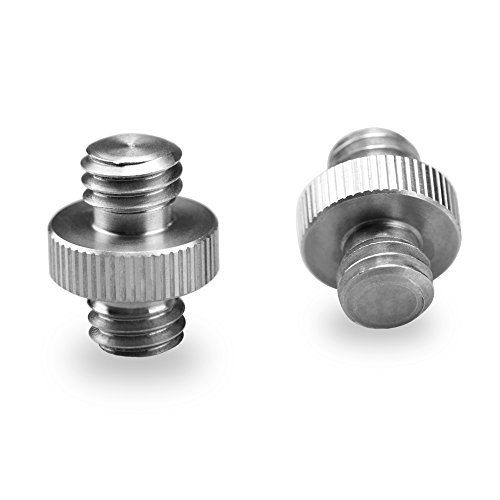
I just found a M601 on eBay and want to use the column with my Nikon PB-6 bellows. Will this stud work?
SmallRig Double Head Stud Adapter 3/8" Male to 3/8" Male Thread Screw
https://www.amazon.com/SmallRig-Double-Head-Stud-Adapter/dp/B006OTI2D8
Last edited:

Should work.

From my personal experience I found that using vertical set up (as enlarger column) for DSLR scanning is extremely painful for extended scanning sessions. I was looking down thru viewfinder to precisely position negative in negative carrier on the reversed enlarger head. Pain in my neck was unbearable after 30-45min. YMMV but I had to move to horizontal set up and difference in comfort is simply amazing. I can work for entire day with out any discomfort. If you are using Live view on your DSLR and connect camera to the monitor is maybe easier to position negatives but then you can not connect camera to Lightroom for tethered shooting. Now I'm using vertical set up only to copy entire pages of negative sleeves as kind of "digital contact sheet" but in that case I do not have to look thru DSLR viewfinder after first test run.
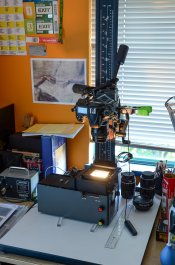
Here is column and colour head from my Durst M605 in action
Good luck!
Here is column and colour head from my Durst M605 in action
Good luck!
Attachments
Another way to use the camera vertically and not get a pain in the neck is to use software like ControlMyNikon / ControlMyCanon. It doesn't only allow you to use your computer screen as a viewfinder and your mouse as a trigger, you can also configure it to automatically and immediately import the shots into Lightroom. You can even use it to manage a focus stacking.system.
Another way to use the camera vertically and not get a pain in the neck is to use software like ControlMyNikon / ControlMyCanon. It doesn't only allow you to use your computer screen as a viewfinder and your mouse as a trigger, you can also configure it to automatically and immediately import the shots into Lightroom. You can even use it to manage a focus stacking.system.
Unfortunately Win OS only! Yes, tilting and rotating screen can help for sure. Here I was using classic DSLR. There is a reason why Leitz Reprovit was the best 35mm copy camera system ever.

BAC1967
Subscriber
My setup uses an old Kodak Flurolite enlarger. I can scan 35mm 127 and 120 up to 6X9. I mount it on a tripod so I can sit in a chair and see the camera screen easily. I use an iPad as a back light, the weight of it helps hold the negatives flat in the negative carriers.

This is a 6X9 scan I made recently
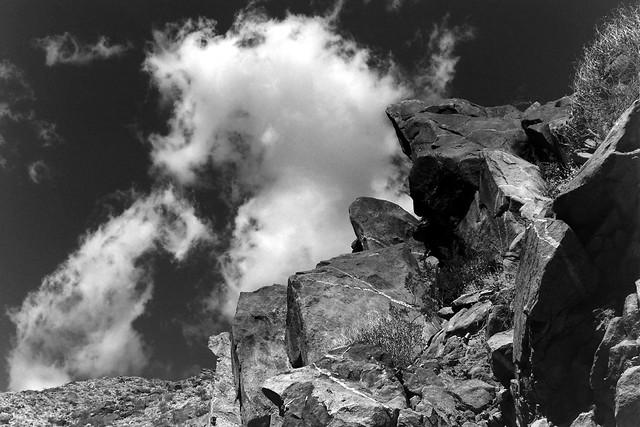 Tahquitz Canyon Rock Formation by Bryan Chernick, on Flickr
This is a 6X9 scan I made recently
Tahquitz Canyon Rock Formation by Bryan Chernick, on Flickr
- Joined
- Dec 10, 2009
- Messages
- 6,295
- Format
- Multi Format
How a Bogen Super clamp with a stud that screws into the base of your camera? Use the clamp attach the camera?
Dead Link Removed
Dead Link Removed
- Joined
- Dec 10, 2009
- Messages
- 6,295
- Format
- Multi Format
The quality is amazing.My setup uses an old Kodak Flurolite enlarger. I can scan 35mm 127 and 120 up to 6X9. I mount it on a tripod so I can sit in a chair and see the camera screen easily. I use an iPad as a back light, the weight of it helps hold the negatives flat in the negative carriers.
View attachment 196649
This is a 6X9 scan I made recently
How a Bogen Super clamp with a stud that screws into the base of your camera? Use the clamp attach the camera?
Dead Link Removed
Super clamp is attached to horizontal stud from enlarger column, I'm using
Manfrotto 118 Male Spigot Mounting Adapter
Dead Link RemovedDead Link Removed
in the Super clamp to attach Manfrotto tripod head on it, so I can adjust it's level in all directions.
Last edited:
Another way to use the camera vertically and not get a pain in the neck is to use software like ControlMyNikon / ControlMyCanon. It doesn't only allow you to use your computer screen as a viewfinder and your mouse as a trigger, you can also configure it to automatically and immediately import the shots into Lightroom. You can even use it to manage a focus stacking.system.
I am using a Fujifilm X-T2 with an adapter to a Nikon PB6 bellows with an EL-Nikkor 50mm F/2.8 enlarger lens or a 60mm Micro Nikkor. So those will not work. Years ago, when I had a Nikon camera the ControlMyNikon was pretty cool.
However, Fujifim cameras have a WiFi app that allows full control of the camera from my iPad or iPhone. So that works very well. The iPad gives you a nice size image to work with and no neck pains ;-)
Well, between Nikon D810 and Fuji T-X2 (both in my kit) on copy stand I will never pick Fuji, even with pain in the neck!

Or how about just a plain old copy stand, and put an 8x10-ish light box on the base? Or see if you can find one of those old Beseler Slide Duplicator outfits, and just replace the camera (often a Minolta X-series) with your DSLR? Everything about it is pre-set for duplicating 35mm negatives/slides. If you need to duplicate larger film, then the copy stand/lightbox rig would be the way to go.
I also used a pano head mounted directly to the Durst arm to provide a stable mounting place for my bellows. A ball head was not stable. This head is great because it is easy to level and includes an Arca Swiss clamp. I got this cheap one on Amazon and it works great: https://www.amazon.com/gp/product/B00MUYWCUA/ref=oh_aui_detailpage_o05_s00?ie=UTF8&psc=1
Attachments


Cholentpot
Member
- Joined
- Oct 26, 2015
- Messages
- 7,114
- Format
- 35mm
I did this with a cheap enlarger.
Took off the enlarger head and got a cheap ball head. Camera is mounted to the ball head.

Took off the enlarger head and got a cheap ball head. Camera is mounted to the ball head.
| Photrio.com contains affiliate links to products. We may receive a commission for purchases made through these links. To read our full affiliate disclosure statement please click Here. |
PHOTRIO PARTNERS EQUALLY FUNDING OUR COMMUNITY:  |