• Welcome to Photrio!
    Registration is fast and free. Join today to unlock search, see fewer ads, and access all forum features.
    Click here to sign up

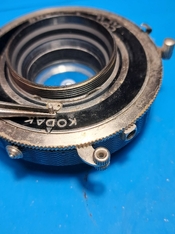
Removing the Compur-Rapid bolt cover

Arterial

H
Arterial

  • 7
  • 6
  • 97

Recent Classifieds

Forum statistics

Threads
202,191
Messages
2,836,557
Members
101,161
Latest member
2k_Nasty
Recent bookmarks
0

Karmeluka

Member
Allowing Ads
Joined
Feb 3, 2026
Messages
1
Location
Ukraine
Format
Multi Format
Добрый день всем.
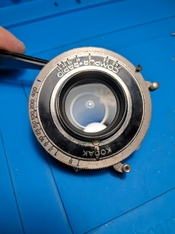
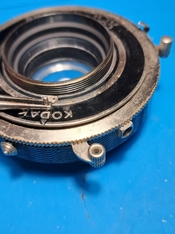
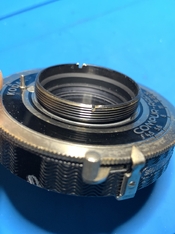
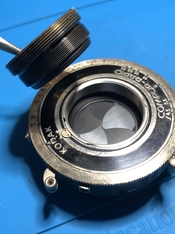
Заранее прошу прощения за возможные ошибки в тексте; я использую переводчик. У меня возникли проблемы со снятием крышки болта. Я уже несколько раз разбирал болты, но с такой проблемой столкнулся впервые. Я повернул стопорный винт и вращал кольцо. Вокруг крышки есть три лепестка, а на корпусе — три углубления. Они плотно прилегают друг к другу. Но резьба, выступающая за пределы углублений, не позволяет поднять крышку. Это, конечно, странная проблема… Возможно, я что-то делаю не так, но на данный момент я совершенно не представляю, как снять крышку. Может быть, кто-нибудь из участников форума сможет мне помочь? Заранее спасибо.
 

Attachments

  • зображення_viber_2026-02-06_20-42-39-777.jpg
    зображення_viber_2026-02-06_20-42-39-777.jpg
    210.3 KB · Views: 29
  • зображення_viber_2026-02-06_20-42-39-885.jpg
    зображення_viber_2026-02-06_20-42-39-885.jpg
    216.2 KB · Views: 24
  • зображення_viber_2026-02-06_20-42-39-659.jpg
    зображення_viber_2026-02-06_20-42-39-659.jpg
    242.3 KB · Views: 33

loccdor

Subscriber
Joined
Jan 12, 2024
Messages
2,808
Location
USA
Format
Multi Format
Are there two tiny screws here you can remove?

shutterhelp.jpg


Welcome to Photrio!
 

reddesert

Member
Allowing Ads
Joined
Jul 22, 2019
Messages
2,609
Location
SAZ
Format
Hybrid
No, those holes are for a pin spanner.

I didn't fully understand the question when machine-translated (I'm not sure where the tabs are that the OP refers to), and I haven't taken apart this lens/shutter. However, I think that the method is: you rotate the inner part with the threading until the circular-profile notch is against the retaining piece with the pin-spanner holes. Now you can rotate the retaining piece by 180 degrees. This hopefully allows you to lift off the black faceplate that says Kodak Compur-Rapid.
 

retina_restoration

Member
Allowing Ads
Joined
Jan 28, 2023
Messages
1,609
Location
Wilammette Valley, Oregon
Format
35mm RF
The "snake eye" screw. simply rotates, it does NOT come out. Rotate it so that the flat surface faces towards the center of the shutter, then with two thumbs on the black ring, push to rotate it counter-clockwise to line up the three large tabs with the cutouts. Then, it can be lifted off the shutter. You may need to lift the speed selector ring at the same time to get both rings off.
 

Dan Daniel

Subscriber
Joined
Jul 4, 2009
Messages
3,072
Location
upstate New York
Format
Medium Format
The OP has already rotated the main coverplate after orienting the small disk properly. You can see where the disk spins into in the first photo- follow the right leg of the A. I assume that he has the small tabs aligned with the release holes and it simply is not coming up. Retina's suggestion to pull the full lower disk as well is good. Sometimes the release tabs seem to be slightloy off kilter and you need to get one out a bit and then rotate a bit to finish it off.

It is a basic Compur Rapid. No tricks added by Kodak. The pin you are holding with the tweezers is a stop for the lens, nothing more. Don't break it off.
 

reddesert

Member
Allowing Ads
Joined
Jul 22, 2019
Messages
2,609
Location
SAZ
Format
Hybrid
Thanks for the correct answers. I understood the locking role of the rotating disk,but did not get the order of operations correct.
 
Photrio.com contains affiliate links to products. We may receive a commission for purchases made through these links.
To read our full affiliate disclosure statement please click Here.

PHOTRIO PARTNERS EQUALLY FUNDING OUR COMMUNITY:


Ilford ADOX Freestyle Photographic Stearman Press Weldon Color Lab Blue Moon Camera & Machine
Top Bottom