• Welcome to Photrio!
    Registration is fast and free. Join today to unlock search, see fewer ads, and access all forum features.
    Click here to sign up

Printing Diptichs and Triptichs in the darkroom

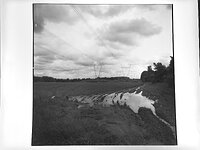
Puddle

Puddle

  • 2
  • 2
  • 54

Recent Classifieds

Forum statistics

Threads
202,724
Messages
2,844,677
Members
101,487
Latest member
Bmattei
Recent bookmarks
1

mexipike

Member
Allowing Ads
Joined
Feb 12, 2007
Messages
377
Location
Los Angeles, CA
Format
Med. Format RF
I'm printing for an upcoming show and have a two triptychs and one diptych from 3 and 2 separate negatives each respectively that I'm trying to think about how I would print in the darkroom? The images will be framed and window matted.

I'm sure I could cover one part of the paper and then print the next one but I feel like registration would be a nightmare.

Another idea is to print each image at the size they would be in the triptych/diptych, cut each one full bleed and then mount them, guessing I would probably have to dry mount them I would guess. I mocked up the images in PS and I don't mind not having space between them so I would just mount them right next to each other.

I'd love to hear any and all ideas and how people have done this in the past.
 
How much time do you have? The creation of a triple image from three separate negs one at a time would challenge my skills and patience I would try to find ways to mount three separate prints in a sympathetic arrangement. Depending on the images it is likely they will interact visually, if it were my project I would need to see a mock-up finished size before committing to the finished design in terms of aspect ratio, cropping, density, and contrast.
 
I normally make individual images then mat and mount them together as a triptych, easier to cut matboard than try to figure print spacing in the dark.
 
I would print them separately and then have the mats cut for the two or three prints. Leave room to move the print locations around.
 
It's possible to do this, depending on how much time you have. It's not something I've tried and it seems a bit of a faff, but I think your routine would be something like this:

First of all, work out exposure times for each image; you'll need to know exactly how you want to expose each negative before you start.

Make yourself a template in card the same size as your paper. Mark out the positions of the exposures then cut apertures slightly larger than each of your planned exposures. Tidy and raggedy bits.

Make sure you have enough space both sides of the enlarger to accommodate your baseboard, which you'll need to slide across.

Make sure your baseboard, template and photographic paper won't slide across each other while you're working.

Under the enlarger, use the template to align aperture 1 for the first exposure, then place the photographic paper on your baseboard under the template. Check alignment using your red or orange swing-filter. Use another sheet of card to cover apertures 2 and 3 so the paper doesn't catch any stray light.

Uncover aperture 1 and make your first exposure, then cover aperture 1 with card. Slide the baseboard across and change the negative to set up the second exposure; you shouldn't need to refocus if you're using the same magnification and/or crop. Slide aperture 2 under the enlarger, uncover the paper and align the exposure using a red or orange swing filter to avoid exposing the paper. Make the second exposure in the same way, then repeat the sequence for the third exposure.

Once you've done this a few times, you'll get into a routine and it should become easier. Personally, I'd take the suggestions of making individual prints and presenting them together behind a single mat; but then I'm quite lazy! :D Good luck. :smile:
 
One could also dial in the separate prints, trim and mount them, and re-photogarph the print 4x5 to make a "master" neg. I'd guess the copy shoot might call for slightly reduced contrast, etc. I've done this with bromoil prints to get nice fiber copies of them, but bromoil is more "abstract" vs. a print with lots of subtle tonal gradation and so on. I'll be experimenting with copying some of my more complex lith prints this was across the next few weeks (not triptychs, just want to be able to replicate prints that were a huge pain to get in the first place).
 
I'm sure I could cover one part of the paper and then print the next one but I feel like registration would be a nightmare.

Just cut and position mats for each image on the paper, then position them at red light by moving the whole easel and expose, best with respective mat in place. Then just cover that mat during the neighbouring exposure.
There were/are even special easels for this.
 
As long as you can consistently align your paper with your easel, move it back into the box between each exposure and use a template to setup and register the next exposure. Just make sure you stick the paper back in the same way it was before
 
Use masking tape to make a reference on your paper before exposure. When putting the paper on the easel, you can use the tape reference to properly align each of the exposures. Cover the part of the paper that is not covered by the masking blades of the easel while making the exposures. Remove tape and develop. Regular masking tape used for house painting may do the trick and otherwise look for tape for delicate surfaces.
 
drafting tape or freezer tape??? Or, regular masking tape put down on a surface and remove a couple times to remove the "stickiness." - ???
 
I had good luck taping a piece of regular paper to the easel and marking the first neg projection onto the paper with a pencil and then doing the same with the second. I'd make the first exposure, put in the second neg, re-align, put the paper back down and make the second exposure. Just make sure that you line up your paper to the same corner every time. I managed to do 30 triptych panoramas with only a few errors.
 
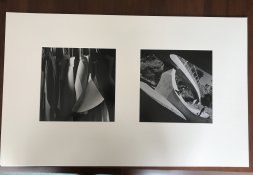
I did a series of 7 diptychs, each image printed 10x10 and matted in two windows with 3" between. Came out nice (although the iPhone photo is crude).
Diptych.jpg
 
I’ve always printed them separately. You can match them up when they’re wet in terms of tone and contrast. When matting, you can adjust the horizon line when trimming if needed, and I am always careful to align everything before dry mounting.

Good luck, it very rewarding when the images turn out.
 
I ended up printing them separately as three 8x10s and had them matted. I'm very pleased with how they came out.
 
Photrio.com contains affiliate links to products. We may receive a commission for purchases made through these links.
To read our full affiliate disclosure statement please click Here.

PHOTRIO PARTNERS EQUALLY FUNDING OUR COMMUNITY:


Ilford ADOX Freestyle Photographic Stearman Press Weldon Color Lab Blue Moon Camera & Machine
Top Bottom