
• Welcome to Photrio!
    Registration is fast and free. Join today to unlock search, see fewer ads, and access all forum features.
    Click here to sign up

P600 error code 0x53

Forum statistics

Threads
202,513
Messages
2,841,722
Members
101,357
Latest member
Kenscanners
Recent bookmarks
0

MurrayMinchin

Membership Council
Subscriber
Allowing Ads
Joined
Jan 9, 2005
Messages
5,652
Location
North Coast BC Canada
Format
Hybrid
Hi there,

On startup, our Epson P600 has a very slow initial carriage movement to the left, comes back fast to the right, the print head lowers, then there is a grinding sound before things stop and the error code 0x53 flashes.

1) I've cleaned the carriage rod with PEC-12 and a lint free PEC PAD, then gave it time to evaporate.

2) I applied WAHL clipper oil to the rod, manually moving the carriage back and forth several times.

3) I cleaned the Encoder Strip.

4) The back and side panels have been removed and found the gears to be in good shape and the motor on the left side (has a rubber cogged belt) to be fine.

When looking down into the vertical paper feed area, below the big wheel that grabs the paper, there is a small piece of white plastic. Pretty sure that's where the problem is...but not sure.

Does this sound familiar? Have you fixed this problem?
 
Last edited:
I only had one instance where my P600 actually stopped working. I don't remember how I figured this out, but one of the inks was simply bad and the printer worked again when I replaced it.
 
I only had one instance where my P600 actually stopped working. I don't remember how I figured this out, but one of the inks was simply bad and the printer worked again when I replaced it.
Hi Roseha,

Thanks. I’ve had ink issues before as well and fixed them. Pretty sure this problem is mechanical (stripped or misaligned plastic gear?) buried deep inside the guts of the beast.
 
Update:

Since the printer is way past warranty, I decided to go snooping.

Took all the covers off by following this video:

...and found this:

IMG_0822.jpeg


...which I believe is the end of the 'drive shaft' for paper feeding.

Here's the broken shaft end removed from the gear:

IMG_0823.jpeg


The saga continues. Will a solution be found before the ink nozzles start clogging up? Stay tuned!
 
Oh, that looks like it can be glued back together. Interesting!

I would tworry about the nozzles too much. They generally declog OK, but sometimes it takes some (a lot of) ink.
 
Oh, that looks like it can be glued back together. Interesting!
Interesting indeed.

I've sent a message to the Canadian parts supplier listed on the epson.ca website. Expecting sticker shock!

Impatient me is considering putting it all back together (except for the broken bit) to see if it will front feed and print on OHP film taped to mat board using the front feed option.

The motor with the cogged belt is fine. It's a gear under the take up wheel in the vertical feed area that broke.

Maybe tomorrow......
 
Have you checked sites like AliExpress? I'm not sure about this Epson model but for other models, I've seen a surprising variety of spare/replacement parts and modules for sale. Sometimes for fairly sane prices as well.
 
Have you checked sites like AliExpress? I'm not sure about this Epson model but for other models, I've seen a surprising variety of spare/replacement parts and modules for sale. Sometimes for fairly sane prices as well.
Good tip, will do 👍
 
Sigh...

Began exploring how to take the paper feed assembly off, before deciding on whether to order a replacement.

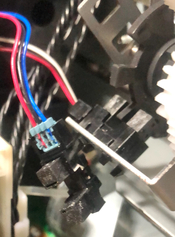
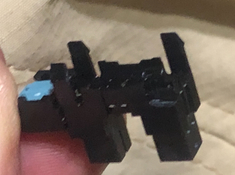
While doing so I found a sensor (?) in the photo below dangling in midair. One of the four plastic 'barbs' had broken off. It goes into the two cutouts in the aluminum tab in photo #1's top right corner. This is on the opposite side of the printer from where the paper feed assembly shaft had broken.

IMG_0833.jpeg IMG_0840.jpeg

Weird. Things must have been jumping in there!

Looks like the whole paper feed assembly will come out easily, and pretty sure the broken bit found today will be part of the new assembly because its wires go right into the green electrical connection board.

Pondering...order new paper feed assembly...or...find someone to print my negatives for me...or...
 
Ah, that looks like a decent explanation for your error. That dangling sensor would likely result in no readings from that one, while another sensor in the paper path would see motion, in which case the printer's firmware would decide something's not right.

The plastic on those molds gets brittle over time. Sometimes it doesn't take a lot of force at all for small parts to just snap. I had a similar thing happening on an Epson scanner; after 20+ years, the plastic just got too weak and even normal use broke the part.

Pondering...order new paper feed assembly...
I'd start by trying to fix this and remount the sensor where it's supposed to be using any convenient configuration of glue, tape and odd items found around the house. See how that goes, and hopefully buy yourself some time to decide where to go next.

Honestly, this looks like something that can be overcome.
 
Ah, that looks like a decent explanation for your error. That dangling sensor would likely result in no readings from that one, while another sensor in the paper path would see motion, in which case the printer's firmware would decide something's not right.

The plastic on those molds gets brittle over time. Sometimes it doesn't take a lot of force at all for small parts to just snap. I had a similar thing happening on an Epson scanner; after 20+ years, the plastic just got too weak and even normal use broke the part.


I'd start by trying to fix this and remount the sensor where it's supposed to be using any convenient configuration of glue, tape and odd items found around the house. See how that goes, and hopefully buy yourself some time to decide where to go next.

Honestly, this looks like something that can be overcome.
Agree with you that a quick fix should be doable for the sensor, but there is also the broken shaft from post #4:

IMG_0823.jpeg
 
No success yet trying to glue that part ? The parts will have to be degreased thoroughly, but I'm sure they can be glued back together with an appropriate glue.
 
No success yet trying to glue that part ?
No, I haven't tried glueing it. If there was enough force to break the hollow thin walled roller shaft, I can't imagine a glued joint surviving long at all.

I did try inserting a somewhat form fitting 'splint' into the hollow broken off piece and the rest of the shaft, but there was too much sloppiness.

Will give it one more try, then...
 
No, I haven't tried glueing it. If there was enough force to break the hollow thin walled roller shaft, I can't imagine a glued joint surviving long at all.

I did try inserting a somewhat form fitting 'splint' into the hollow broken off piece and the rest of the shaft, but there was too much sloppiness.

Will give it one more try, then...

This is very strange. I have exactly the same problem, discovered it today.

I will also be looking for ways to fix it. I asked ChatGPT about super glue and said it is pointless on nylon material.

I am looking in parallel for a solution. Will update as soon as I have something. If you managed to solve it, let me know how.
 
This is very strange. I have exactly the same problem, discovered it today.

I will also be looking for ways to fix it. I asked ChatGPT about super glue and said it is pointless on nylon material.

I am looking in parallel for a solution. Will update as soon as I have something. If you managed to solve it, let me know how.
I've not tried to fix it these last couple weeks. Been exploring other options, like finding someone to make enlarged digital negatives for me, buying a P700 (they are on sale right now) or buying an old printer and installing Piezography inks.

Treating it like an opportunity for a start in a new direction.
 
This is very strange. I have exactly the same problem, discovered it today.

I will also be looking for ways to fix it. I asked ChatGPT about super glue and said it is pointless on nylon material.

I am looking in parallel for a solution. Will update as soon as I have something. If you managed to solve it, let me know how.
Try searching a variation of the wording below. I found a Canadian source for a replacement auto sheet feeder assembly...just not sure if I want to stay with the P600.

Epson PN 1757519 Auto Sheet Feeder Asm P600​

 
Photrio.com contains affiliate links to products. We may receive a commission for purchases made through these links.
To read our full affiliate disclosure statement please click Here.

PHOTRIO PARTNERS EQUALLY FUNDING OUR COMMUNITY:


Ilford ADOX Freestyle Photographic Stearman Press Weldon Color Lab Blue Moon Camera & Machine
Top Bottom