• Welcome to Photrio!
    Registration is fast and free. Join today to unlock search, see fewer ads, and access all forum features.
    Click here to sign up

Over-Expose and Under-Develop

Recent Classifieds

Forum statistics

Threads
201,747
Messages
2,829,505
Members
100,924
Latest member
hilly
Recent bookmarks
0

MattKing

Moderator
Moderator
Joined
Apr 24, 2005
Messages
55,127
Location
Delta, BC Canada
Format
Medium Format
Skip:
Remind me - are you printing optically, or are you limited to scanning?
If scanning, it may be that your development changes just agree with all the built in algorithms in your scanner and software.
Just as if you are printing optically, it may be that your development changes suit the light source you are using and the characteristic curve of your paper in the developer you are using.
 
OP
OP

JWMster

Member
Allowing Ads
Joined
Jan 31, 2017
Messages
1,160
Location
Annapolis, MD
Format
Multi Format
Matt:

Wow. Thanks! Gracious of you for your continued aid. A photographer's triage.

Yes, the short story is that I am limited to scanning with a Nikon LS8000 that's been cleaned, serviced and rejuvenated. Run it with Vuescan... and basically do nothing at the scanner other than crop the images manually after a Batch Preview scan at 670 and then scan at 4000 to DNG/TIFF. From there, import into Capture One is done without any adjustments. Minimal adjustments are done.... usually take no more than a minute or two per image. I haven't learned dodging and burning with this yet, but that's the next step.

Workflow improvements over the last few months:

1) ID-11 in a Jobo tank on a Jobo machine with a Jobo 16 Timer - I just figured out with the help of someone here on the list. ID-11 seems a favorite with Catlabs and many of my reference sources (British mostly).
2) Exposure meter (randomly) switched to Sekonics. Shouldn't be a deal, but coincided nicely with "better" improvements. Used Gossen Luna Pro and Pentax Digital Spot before - the latter was calibrated last spring by a great LF guy in PA.... so nothing wrong per se with them, but they obviously didn't click, and though I suspected the batteries, I'm thinking it may have been they didn't work with my ergonomics. LOL
3) Switch to the simplicity of a Rolleiflex 3.5E (from sweet but schizo or at least tempramental Rolleiflex 6008 - which is a great system but fairly, over-engineered to a point where I think it may suffer from complexity syndrome).
4) Trial of "just higher than ambient room temp" for developing at 72F. I'm beginning to think it's not an effect on contrast, but the raising of temp in this way forces a more even, consistent "every time it's the same" process. I'd been using room temp and that varied every time as the ground water heats up. While it's possible the higher temp has a contrast effect as Belew suggests, if you guys are right and its imperceptible - which I'll grant is likely, then the trick (magic bullet) is this shift to a higher temp simply means engaging in an effort that finally puts all the chemistry at a controlled even level.
5) The only other "switch" has coincided with my schedule and an effort to focus more shooting time in the morning and evening light.

Which all goes along with your tag line in your signature.... or alternately, the old SNL line from Rosanne Rozanna Danna, "If it's not one thing, it's another."

Thanks for your patient debugging. You and all the guys here have been very helpful. Photography... it ain't like cutting Velvetta with a slicer.

 
OP
OP

JWMster

Member
Allowing Ads
Joined
Jan 31, 2017
Messages
1,160
Location
Annapolis, MD
Format
Multi Format
Hey, if there's a way to post an image in here, maybe I can show you an image I like from the other night. Size restrictions? JPEG required?
 

MattKing

Moderator
Moderator
Joined
Apr 24, 2005
Messages
55,127
Location
Delta, BC Canada
Format
Medium Format
Hey, if there's a way to post an image in here, maybe I can show you an image I like from the other night. Size restrictions? JPEG required?
Skip:
In response to a few things in your last two posts:
a) all scanners and all scanning software makes adjustments - it is a necessary component of the scanning process. All of your struggles may very well just be a result of your trying to accomodate the built in assumptions and peferences of the equipment and software you are using. Even if you add no adjustments of your own, that software/scanner combination is adding all sorts of adjustments, and is likely to be adding different adjustments to different negatives - sort of like cameras set to auto-exposure;
b) it isn't the meter you are using, it is how you are using the meter. Spot meters in particular require quality interpretation, and that is hard to achieve if you are still getting your development calibrated;
c) room temperature processing should give you the same results as 72F processing - if you adjust the developing time accordingly. That being said, there really isn't any reason to not let the JOBO control the temperature of all your solutions. One question though - if you are developing at 72F, how are you ensuring your wash temperature is 72F?;
d) to upload, use the upload image or file link at the bottom of the posting section. You will get the best results if you first resize the file way down to 800 pixels on the longest side. If you try to upload something larger, the site software will either reject the file as too large, or resize it aggressively, wwhich renders things yech!
 
OP
OP

JWMster

Member
Allowing Ads
Joined
Jan 31, 2017
Messages
1,160
Location
Annapolis, MD
Format
Multi Format
a) Fairly.... less sure of Vuescan, but what I can turn off IS turned off - though I do use the TMAX film "color profile". Doesn't seem to have a Delta400 profile. This hasn't changed recently. CaptureOne is actually very good about this. You can set up defined import profiles - which I did initially, but stopped using when I switched to MF format last Fall. My current import profile is NO Adjustments. Nice, but this hasn't changed in months. With these constant over the months, the source must lie elsewhere.

b) Yes, that's true. Holding the meter and the angle of the meter made a huge improvement. Again, one of those books: "Perfect Exposure" by Hicks and Schultz was a helpful correction. The Luna Pro actually IS a problem because the sensor is at what's normally the top, and doesn't ergonomically orient in my hand as readable in my hand very well that way. The Pentax... I still have to run to ground because I'm curious why that's the problem. The other issue with the Sekonic 758 is ... poor? no, terrible documentation and a bit of overkill complexity, but I can readily duplicate the 308's settings. The 308 is just simpler and doesn't try to do millions of things, or confuse you in the settings you've forgotten were buried. Both Sekonics are easier to orient properly (10-15 degree down for reflected; 20-30 degrees or so up for incident).

c) I'm agreeing with you and allowing the Jobo to cook all the chems always is probably a factor. I am also filling it a lot higher... thanks to all the feedback I got on my XTOL-R failures. Yes, failure has taught me much through the good folks here like you and some others, too.

new) My rinses sit in the bath with all the rest until the final. The final washes at the end will have sat through the Fix period (8.5 minutes for T-grain according to Belew's schedule) in the square bottle area and the whole time in the round. Pretty close to the right temp. But that covers really only the first 5 of the 10 or more that I run at that point. Good news is that the film is "supposedly" set by that time.

d) I'll do an upload either later or in the a.m. Have to go get some treadmill time before it gets too late!

Thanks, Matt!
 
OP
OP

JWMster

Member
Allowing Ads
Joined
Jan 31, 2017
Messages
1,160
Location
Annapolis, MD
Format
Multi Format
Let's see if these will work:

SpeckledDog.jpg
PotomacStreetGarden.jpg

Hosta-U.jpg
Azaleas.jpg


My dog, the Hosta and Azaleas are all from TMY-2 and the Street Garden (Image # 2) is Delta 400. These are 164KB JPEGs.Took a while to figure out how to reduce it to this, but here you are. All were shot handheld with a Rolleiflex 3.5E that is "new to me". Nice camera! Who'd have thunk it? Thanks!
 

MattKing

Moderator
Moderator
Joined
Apr 24, 2005
Messages
55,127
Location
Delta, BC Canada
Format
Medium Format
They look nice.
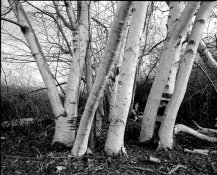
Just to be contrary, this was shot on TMY as well, developed in replenished HC-110, and scanned a few years ago with a $100 used Canon 9000F scanner using Vuescan:
Boundary Bay-53b-2015-02-16-2-res.jpg

I post this to point out that:
1) posting any image here distorts it - not surprising given you are trying to squeeze it into 800 pixels or so on a side; and
2) there are a massive number of variables that you need to deal with when you go from unexposed film to exposed film to developed film to scanned film, and you have very limited control of many of the variables that are dealt with by the scanner and scanning software - just because you don't request adjustments doesn't mean that the scanner and the software don't make them.
 
Last edited by a moderator:
OP
OP

JWMster

Member
Allowing Ads
Joined
Jan 31, 2017
Messages
1,160
Location
Annapolis, MD
Format
Multi Format
Matt: Very nice. Like it. Great composition. LOVE birch trees! I liked HC-110. It's a handy and easy developer. I used it at 1:100 and a bunch of other dilutions before wandering and trying other things, finally settling on XTOL and now ID-11. Export of an image to size seemed to involve a lot more than the usual export to TIFF... which is at least the same format. Usual export to JPEG wants to run 1 to 2 megs. And I couldn't reduce it further until I found a hidden spec, which allowed me to compress it to 164 KB. I haven't really done all that much to these images, and need to learn dodging and burning in this software. THere's a fellow I think in Seattle or Portland area, an octogenarian now who does LF and wonderful cibachrome images. He's a friend of a friend, and I watched a youtube of him filming that I think was made by National Geographic. Shows him doing his dodging and burning on a wall size cibachrome print. Very wow!
 
Last edited:

MattKing

Moderator
Moderator
Joined
Apr 24, 2005
Messages
55,127
Location
Delta, BC Canada
Format
Medium Format
I just use the re-sizing tool in whatever photo editor I happen to be using at the time. I tell it how many pixels I want the log side to end up at, make sure it is set to keep the aspect ratio unchanged, and click the button.
Some of my software choices allow me to choose between several re-sizing algorithms - I tend to prefer the ones that maximize acutance (the most obvious component of apparent sharpness). If you need to re-size down a long way, it can be helpful to do it in stages, with a little bit of digital sharpening added between each stage.
Each digitization step - scanning, digital editing, re-sizing and sharpening both destroys original information and adds additional artificial information, so it can be a challenge to do it well.
I greatly prefer working with an enlarger!
 
Last edited by a moderator:
OP
OP

JWMster

Member
Allowing Ads
Joined
Jan 31, 2017
Messages
1,160
Location
Annapolis, MD
Format
Multi Format
Matt: Understand. I didn't actually sharpen anything in the exports here. I typically like to reserve sharpening for the last step and currently do that only in my printing program. I think the mess you can get into is why exercising (maximum) restraint is the key word. On the other hand, I'd shot some Velvia 35mm in Sarasota last November at Sunset and didn't like the Magenta tonality that seems to lurk in Velvia "according to the multitude". Using CaptureOne it wasn't really a big deal to push the color back closer to Portra tonality that I tend to find more appealing. Who knew? So I'm using Portra for color mostly... and cherishing that at least with color negative there's still a range of Kodak choices. Color Temp is the key for me there, and the rest I don't like to mess with more than I have to. Like to let Uncle George earn his supper. But that said, from everything my local (former) film shooters tell me, color enlarging was not much fun. Dealing with color is one digital's strengths - especially in post. If I were a younger man, maybe I'd try to deal with learning a wet darkroom at least for B&W, and we do have a community darkroom nearby but it's only open to non-students on Sunday afternoons. In my house, the vague ambition is to slowdown, downsize and possibly move away in the next five years means that a wet darkroom is probably not terribly realistic ( wouldn't last long enough to be worth the squeeze ). Leaves me as a digital printer... and there's worse things in this life to get slammed for. I have an ambition to gravitate toward Cone's process... but that prices out a mite more than I'm ready to bite into at the moment. Yes, you'd definitely need to take a class!
 

MattKing

Moderator
Moderator
Joined
Apr 24, 2005
Messages
55,127
Location
Delta, BC Canada
Format
Medium Format
I worked as a colour printer (the darkroom and machine printer type) for a couple of years and loved it.
A small adjustment of exposure and filtration and a colour print will just explode from the paper.
I would love to get back to it - the modern films are wonderful.
 
Photrio.com contains affiliate links to products. We may receive a commission for purchases made through these links.
To read our full affiliate disclosure statement please click Here.

PHOTRIO PARTNERS EQUALLY FUNDING OUR COMMUNITY:


Ilford ADOX Freestyle Photographic Stearman Press Weldon Color Lab Blue Moon Camera & Machine
Top Bottom