
• Welcome to Photrio!
    Registration is fast and free. Join today to unlock search, see fewer ads, and access all forum features.
    Click here to sign up

Oddball DX coding stickers/Cassettes.

Recent Classifieds

Forum statistics

Threads
202,886
Messages
2,847,062
Members
101,529
Latest member
Flo18
Recent bookmarks
0

cmacd123

Subscriber
Allowing Ads
Joined
May 24, 2007
Messages
4,336
Location
Stittsville, Ontario
Format
35mm
I have two rolls of Bulk film in my frideg which I would like to use up, some PanF and some oddball 200ISO stuff.

My Canon Film camera is designed to expect DX codeing and will Flash an Icon continualy telling me to set the ISO, even if I have already done so, SO it is at the very least Annoying to use plain cassettes.

I recently did a web search and found that Porters cameras had some stickers to label Cassettes but they seemed to be clearing them out, having only a few values I did not recognise. First CallPhotographic has simalr stickers, but they are not willing to ship them to Canada.

Is there another source for this sort of product, or alternativly, is there a place where I can get reloadable cassettes with 50 and 200 ISO codes. I am not confortable with trying to re-manufacture Crimped style cassettes.
 
I will see if I save the url. A while ago someone posted where one can get the software to print DX labels.

Steve
 
If you have any empty cassettes with the ISO value you're needing (non-reloadable), I've read of someone who simply cuts out the DX encoding strip and tapes it down to her reloadable cassette using double sided sticky tape. I looked at First Call Photographic as well, thinking they might be happy enough to send it to Australia and I could simply send them on to you...but for 84 pounds, sorry, can't help you there. You'd think they'd be nicer to their 'loyal' colonies, wouldn't you?
 
You should be able to scrape the paint or paper off the cassette down to metal.

You can check your camera to see what type of sensors it has. Some cameras have two contacts for each metal patch, and check continuity at two places on the same patch. Other cameras use patch "G" as a 'ground' and check for continuity between that patch and whatever other may be exposed. You can read more about it here.

The easiest thing to do is to get some DX coded film and just copy the pattern by scraping with a knife.
 
So no one has seen either reloadable ISO 50 and 200 Cassettes or stick on labels for blank ones available to someone in Canada? I really don't want to try to make my own, and their is only a very small amount of room in the camera such that the existing cassettes are a snug fit.
 
So no one has seen either reloadable ISO 50 and 200 Cassettes or stick on labels for blank ones available to someone in Canada? I really don't want to try to make my own, and their is only a very small amount of room in the camera such that the existing cassettes are a snug fit.

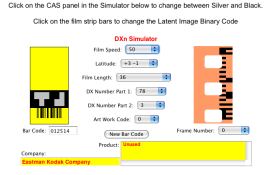
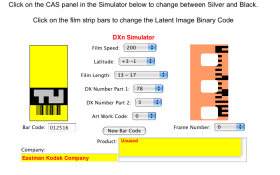
Print them out and paste them on the film cassettes. I just printed one for ISO 50 36 Exp and ISO 200 36 Exp

Follow the links on Post #5 to find where you can purchase the foil.
 

Attachments

  • ISO  50 36 exp.png
    ISO 50 36 exp.png
    48 KB · Views: 381
  • ISO 200 36 exp.png
    ISO 200 36 exp.png
    48.7 KB · Views: 627
Last edited by a moderator:
Hi again, Charles. Failing all of the other suggestions, would you happen to have a one hour lab anywhere near by? They'll generally hand over their empty cannisters intact to anyone who asks nicely. There may be an ISO 50 and 200 in amongst them which you can re-use.
 
On my Vista/IE9/Java6 I don't get the applet coming up. Any advice?
 
On my Vista/IE9/Java6 I don't get the applet coming up. Any advice?

Have you checked that Java is ticked in your Internet Options? I have XP and IE8 (I think... I use FireFox so I don't keep track of what IE is doing). Anyway, I can't imagine the layout is too different. Go into Tools-->Internet Options and choose the last tab 'Advanced'. Java is about half way down the list and should be checked to use whatever version you currently have on your system (mine is JRE 1.6.0_26).

Hope that helps.
Molli
 
Turned out to be a bad dll in the java runtime. I re-installed the package and all was fine.
 
Photrio.com contains affiliate links to products. We may receive a commission for purchases made through these links.
To read our full affiliate disclosure statement please click Here.

PHOTRIO PARTNERS EQUALLY FUNDING OUR COMMUNITY:


Ilford ADOX Freestyle Photographic Stearman Press Weldon Color Lab Blue Moon Camera & Machine
Top Bottom