
• Welcome to Photrio!
    Registration is fast and free. Join today to unlock search, see fewer ads, and access all forum features.
    Click here to sign up

Need Opinion on this Photo

Do Not Come Here

A
Do Not Come Here

  • 5
  • 3
  • 49
Heavy

H
Heavy

  • 11
  • 5
  • 107

Recent Classifieds

Forum statistics

Threads
201,921
Messages
2,832,085
Members
101,018
Latest member
andycapp
Recent bookmarks
0

RattyMouse

Member
Allowing Ads
Joined
Oct 18, 2011
Messages
6,045
Location
Ann Arbor, Mi
Format
Multi Format
I am worried about a recent batch of film that I just got back from the lab for scanning. I developed this film at home, all Neopan Acros in HC-110. I look at these scans and they just seem "off" in a big way. Here is one example:
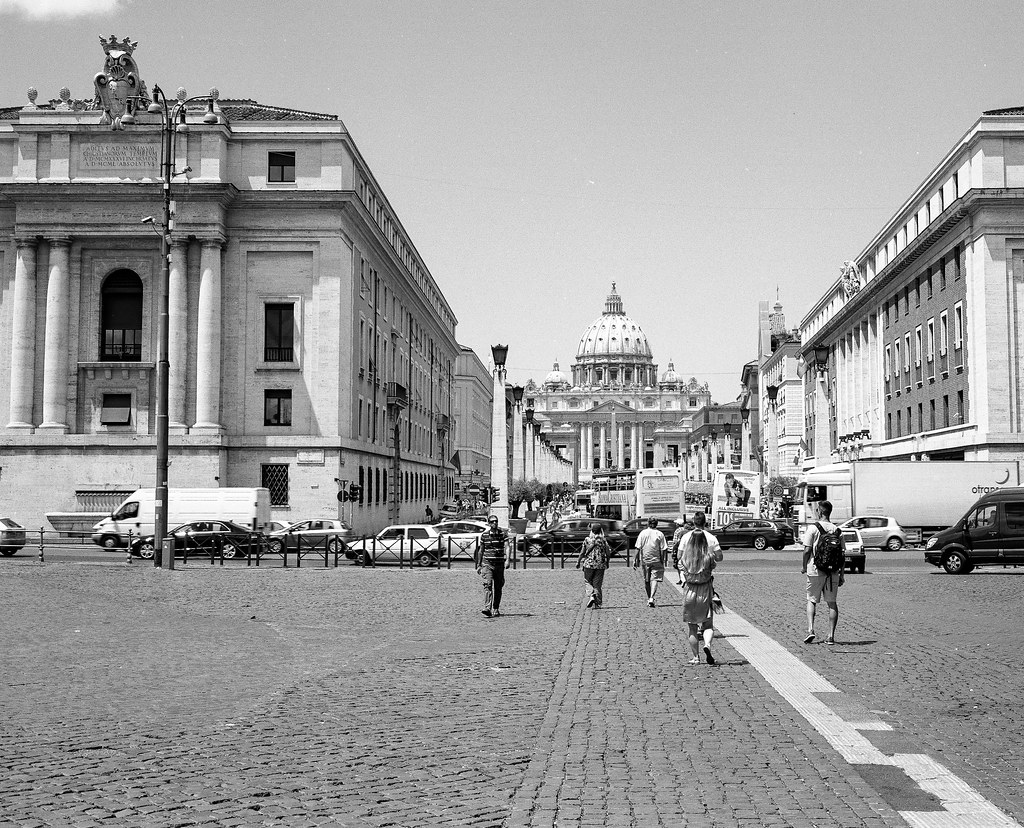
14465208829_d10429f1bc_b.jpg


This doesn't look right to me, yet I'm not exactly sure why. The images almost all appear to have some blue in them. As a result, they have a very unnatural feel to them.

I'm worried that something has happened to my development process to cause this. Or, is it that the scans are wrong? That would be the best solution, except I have to ship all my film back.

Does anyone recognize what is wrong with this image?

Thanks!
 

baachitraka

Member
Joined
Apr 6, 2011
Messages
3,649
Location
Bremen, Germany.
Format
Multi Format
I do not understand the problem...
 

trythis

Member
Allowing Ads
Joined
Sep 26, 2013
Messages
1,208
Location
St Louis
Format
35mm
Were you expecting a color negative? It looks like a standard b&w image to me.
 
OP
OP
RattyMouse

RattyMouse

Member
Allowing Ads
Joined
Oct 18, 2011
Messages
6,045
Location
Ann Arbor, Mi
Format
Multi Format
I guess I've failed to describe my issue. No I wasn't expecting color. There seems to be very little black in these images and the grays look blueish to me.

Maybe I'm out of my mind, but my wife thinks they look odd too.
 

Jaf-Photo

Member
Allowing Ads
Joined
Feb 12, 2014
Messages
495
Format
Medium Format
Hmm... I do see some unevenness and faint banding in the second photo, especially to the top right.

Also, the centre edifice looks very flat and void of detail.

The best way to remove colouring to a B&W scan is to convert it to greyscale in PhotoShop. Use Channel Mixer, set Green to 100%, Red and Blue to 0% and check the grayscale box. Then set the colour space for the whole file to greyscale.

That will remove any colour shift and may reduce some of the blue-purple banding.
 

Jim Jones

Member
Allowing Ads
Joined
Jan 16, 2006
Messages
3,740
Location
Chillicothe MO
Format
Multi Format
A histogram shows a full range of tones from black to white, with a predominance of pixels in the lighter grey region. The subject may have been rather high key. The scanner's response curve might be set poorly for scanning these images. In Irfanview lowering the gamma correction in the color correction panel improves the appearance of these images to me.
 

baachitraka

Member
Joined
Apr 6, 2011
Messages
3,649
Location
Bremen, Germany.
Format
Multi Format
They all look beautiful to me, when viewed with Nexus 5.
 

TheFlyingCamera

Membership Council
Advertiser
Allowing Ads
Joined
May 24, 2005
Messages
11,603
Location
Washington DC
Format
Multi Format
Actually, they look fine on my monitor. Perhaps a little lacking in contrast, but that's a matter of taste. With the second shot, to bring up the white in the building, you'd have to either do some careful selecting of the sky to mask it and then brighten the buildings or you'd blow out the sky by lightening the whole scene.
 

Jaf-Photo

Member
Allowing Ads
Joined
Feb 12, 2014
Messages
495
Format
Medium Format
So are you scanning B and W negs in a colour scanner setting? if so there should be a B&W scan mode that should not have a colour cast.

Sent from my GT-I9505 using Tapatalk

It is actually best to scan B&W negatives in a linear 48bit RGB tiff. After proper inversion and correction, it should be converted to a 16bit greycale image, as per above.
 
OP
OP
RattyMouse

RattyMouse

Member
Allowing Ads
Joined
Oct 18, 2011
Messages
6,045
Location
Ann Arbor, Mi
Format
Multi Format
Thanks everyone. I am not doing the scanning as I don't own one and have never operated one either. I send out my negatives for scanning and am normally very thrilled with what comes back. This time however, things look odd and I don't know why. Since I do the developing, I fear that something has gone wrong in that area. I can re-scan these again at a later date if that is the problem here. Or, perhaps there isn't even a problem and I am in the wrong, not the images.

Thanks again.
 

RalphLambrecht

Subscriber
Allowing Ads
Joined
Sep 19, 2003
Messages
14,937
Location
K,Germany
Format
Medium Format
I am worried about a recent batch of film that I just got back from the lab for scanning. I developed this film at home, all Neopan Acros in HC-110. I look at these scans and they just seem "off" in a big way. Here is one example:

14465208829_d10429f1bc_b.jpg


This doesn't look right to me, yet I'm not exactly sure why. The images almost all appear to have some blue in them. As a result, they have a very unnatural feel to them.

I'm worried that something has happened to my development process to cause this. Or, is it that the scans are wrong? That would be the best solution, except I have to ship all my film back.

Does anyone recognize what is wrong with this image?

Thanks!
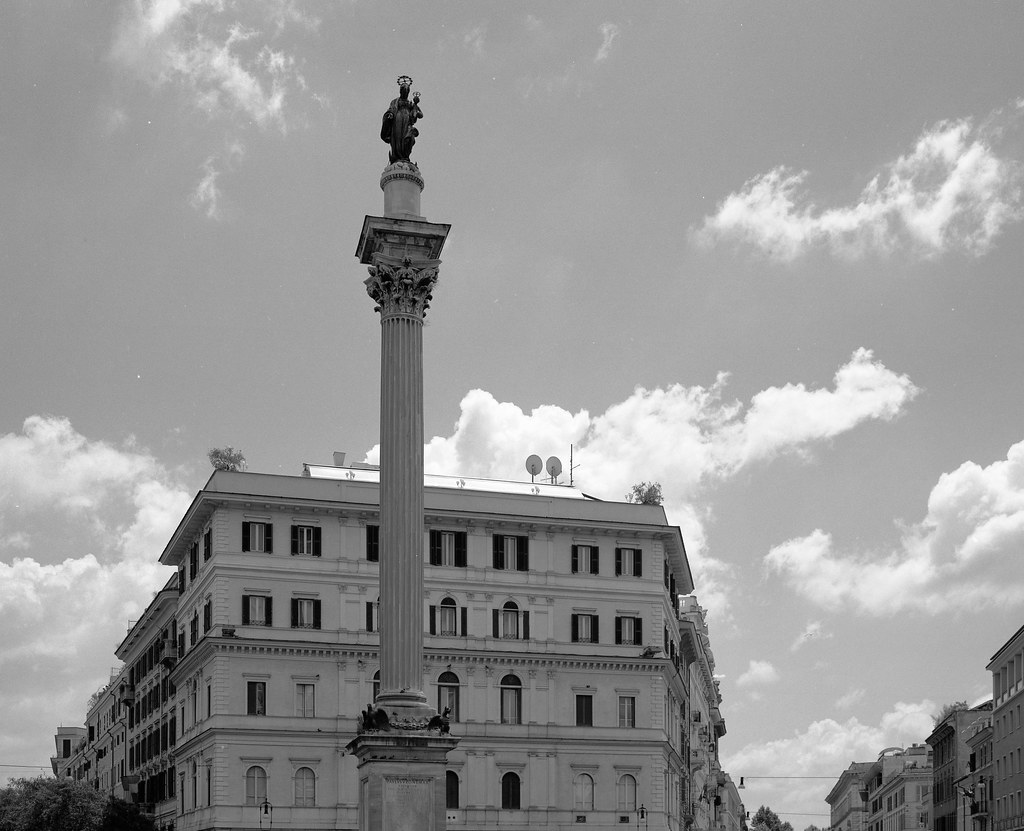
a high-contrast scene developed a bit on the soft sidewith decent shadow exposure looks right to me.:smile:
 

Truzi

Member
Joined
Mar 18, 2012
Messages
2,685
Format
Multi Format
The photos look fine to me. If I really concentrate, I think I _mite_ be able to see what you are talking about. I don't see a "blue" tint so much as the images seem a little on the "cold" side.
 

nworth

Member
Allowing Ads
Joined
Aug 27, 2005
Messages
2,228
Location
Los Alamos,
Format
Multi Format
They look fine to me. Of course, scans can lie a lot. There are not many really dark (Zone I-II) areas in either scene, but where they exist they have the proper density. Actually, the gradation is excellent, as it usually is with Acros. Don't worry about the tint. That is an artifact of the scanning process, and you can correct it in Photoshop or whatever software you use.
 

Jaf-Photo

Member
Allowing Ads
Joined
Feb 12, 2014
Messages
495
Format
Medium Format
Good negative scanning requires a lot of manual work on each frame. That's why lab scans often come out so-so, even if they use expensive scanners.

You can still fix the colour shift in these images by coverting them to greyscale. Using only the green channel, as I descibed above, usually produces the sharpest results. In this case i's especially suitable as you have purple banding, i.e. blue and red.
 

pentaxuser

Member
Joined
May 9, 2005
Messages
20,348
Location
Daventry, No
Format
35mm
Can't see any blue on my monitor nor can I see anything else wrong either. In the second shot both the sky and building have great detail.

pentaxuser
 

MartinP

Member
Allowing Ads
Joined
Jun 23, 2007
Messages
1,569
Location
Netherlands
Format
Medium Format
If you are asking about a problem with the negatives then a picture of the negs would be far more useful than 'scans' which were auto-adjusted, then auto adjusted again to get in to the Apug site software. I suggest that you tape a piece of white paper to the window, hold the negs 10cm in front of it, make a picture with your phone (assuming that it has a camera in it) and post the result.
 

Kirks518

Member
Allowing Ads
Joined
Oct 5, 2013
Messages
1,494
Location
Flori-DUH
Format
Multi Format
I'm just wondering if the 'blue' you're seeing could be your monitor? Have is been calibrated? Not sure if that would be the problem, especially since you say other scans are fine, but it's just a thought. Maybe a combination of a cool monitor and this particular set?
 

removed account4

Subscriber
Allowing Ads
Joined
Jun 21, 2003
Messages
29,832
Format
Hybrid
last year i made retina prints when i was living in france.
the same paper that at home turned BLUISH
were RED because the light is different in france.
maybe it isn't an issue with the film, but because the quality of light
is completely different where you currently are, and where you usually are.
 

Jaf-Photo

Member
Allowing Ads
Joined
Feb 12, 2014
Messages
495
Format
Medium Format
I had been meaning to try the scanning the blue/green channel only option in Vuescan.

Sent from my GT-I9505 using Tapatalk

It's even better to scan all channels RGB and then convert to grey scale using the green (or blue) channel after all basic corrections. That way you pick up everything from the negative.
 

Richard S. (rich815)

Member
Allowing Ads
Joined
Jan 14, 2003
Messages
4,924
Location
San Francisco
Format
Multi Format
I scan all my film with Vuescan software exclusively with Nikon 4000 and 9000 and an Epson 4990 using tips from this page as my initial set up:

http://www.kenleegallery.com/html/tech/scanning.php

Some great advice there and gives me gorgeous scans of B&W film. See my website or Flickr page to see some examples.
 
Photrio.com contains affiliate links to products. We may receive a commission for purchases made through these links.
To read our full affiliate disclosure statement please click Here.

PHOTRIO PARTNERS EQUALLY FUNDING OUR COMMUNITY:


Ilford ADOX Freestyle Photographic Stearman Press Weldon Color Lab Blue Moon Camera & Machine
Top Bottom
