• Welcome to Photrio!
    Registration is fast and free. Join today to unlock search, see fewer ads, and access all forum features.
    Click here to sign up

Need advise: Portra400 green color shift while developing at home

Sunk

H
Sunk

  • 1
  • 0
  • 30

Forum statistics

Threads
201,227
Messages
2,820,771
Members
100,599
Latest member
chibill
Recent bookmarks
0

Skycreeper

Member
Allowing Ads
Joined
Aug 11, 2024
Messages
42
Location
China, Chengdu
Format
Medium Format
Hi all, first time for me to post here.
Got an issue developing Portra 400 at home.
I always get a greenish color shift, very difficult to correct in pp. This is the second time already.
This time, in the same tank during the same development was an expired Fuji Pro400, which turned out ok.
I developed Ektar, Gold, Fuji 160 before without any problem. Only Portra has this color shift, which turns me crazy as this is supposed to be one of the best films available.
My processing parameters:
3:30 developing @ 38C
7:30 bleach @38C (a bit long, but first time I bleached for 6mins and had this color shift and it was suggested I lengthen the bleach)
14:00 fix @RT
1:00 stabilizer
Thorough rinsing in between steps, especially between developing and bleach, like 7 times. I used 38C water to rinse before developer as well, like 10 times, until the water became clear.
Camera is Pentax 645N+75mm2.8, C41 kit purchased online.
Scanned with Canon R, pp with Negative Lab Pro.

The following is Portra 400. The girl became a little green alien.
0e74db9cf4aed6b6e73a10269f7f2ae9.jpg


This is Fuji 400, expired, in the same tank during same development, no problem with color
db73956aabc78db5fe1e571400a2ca70.jpg


Please advise!
 

BillBaileyImages

Member
Allowing Ads
Joined
Aug 8, 2024
Messages
102
Location
Nebraska, USA
Format
Medium Format
Is it possible your Portra 400 was overheated before you processed it?
Film goes through so many hands and storage conditions on the way to us; and even if our film is in the same dye lot, individual rolls can be mishandled by freight forwarders.
Everything you list is fine, and it's a plus that you're using a separate bleach and fix. The idea of blix has never felt "right" to me.
My wife and I owned and ran a large commercial film lab with Pako dip and dunk processors for E-6 and C-41. We kept the temp +/- one quarter of a degree with two 100-gallon water heaters and a super-accurate temperature control system. Even running 3 control strips a day, replenishing with my obsessive tendencies, and removing as many sources of error as I thought possible, there would be that rare "Oh, my goodness" situation.
Just a thought 🤔: what if you purchased 3 (or more) rolls of fresh Portra 400 from 3 different suppliers, mark them with twin checks (or other unique identifiers), and processed them in your well-established procedure setup.
Hopefully somebody will have THE answer for you.
 
OP
OP
Skycreeper

Skycreeper

Member
Allowing Ads
Joined
Aug 11, 2024
Messages
42
Location
China, Chengdu
Format
Medium Format
Is it possible your Portra 400 was overheated before you processed it?
Film goes through so many hands and storage conditions on the way to us; and even if our film is in the same dye lot, individual rolls can be mishandled by freight forwarders.
Everything you list is fine, and it's a plus that you're using a separate bleach and fix. The idea of blix has never felt "right" to me.
My wife and I owned and ran a large commercial film lab with Pako dip and dunk processors for E-6 and C-41. We kept the temp +/- one quarter of a degree with two 100-gallon water heaters and a super-accurate temperature control system. Even running 3 control strips a day, replenishing with my obsessive tendencies, and removing as many sources of error as I thought possible, there would be that rare "Oh, my goodness" situation.
Just a thought 🤔: what if you purchased 3 (or more) rolls of fresh Portra 400 from 3 different suppliers, mark them with twin checks (or other unique identifiers), and processed them in your well-established procedure setup.
Hopefully somebody will have THE answer for you.

Thank you very much for your reply. I purchased twice from different shops and they both have this green shift. That is why I think it is my process.
First time was even more severe with 6 mins bleach, second time a little better with 7:30 bleach.
Would a even longer bleach help?
 

cerber0s

Member
Allowing Ads
Joined
Nov 16, 2020
Messages
618
Location
Sweden
Format
Multi Format
I think it’s difficult to judge based on an inverted scan of a negative, some films just come out like that. Every single Portra I’ve scanned has had a green/teal color shift. I also develop at home.

Would you mind uploading the scanned negative somewhere to let me have a try at converting it?
 
Last edited:

Romanko

Member
Joined
Sep 3, 2021
Messages
890
Location
Sydney, Australia
Format
Medium Format
What do the negatives look like on the light table? Could you compare your Portra 400 vs. Fuji 400 vs. a third negative that you know is good?

As @BillBaileyImages said your film is a primary suspect here. It has a characteristic "expired look". Your Fuji film also has problems. The part to the right of the subject is much warmer than the left-hand half of the image.
Also, could you share information on the C41 kit you are using? Was single-use or did you reuse it after developing other films in the same solutions?

I like your images. I hope you can recover the colors with post processing.
 
OP
OP
Skycreeper

Skycreeper

Member
Allowing Ads
Joined
Aug 11, 2024
Messages
42
Location
China, Chengdu
Format
Medium Format
What do the negatives look like on the light table? Could you compare your Portra 400 vs. Fuji 400 vs. a third negative that you know is good?

As @BillBaileyImages said your film is a primary suspect here. It has a characteristic "expired look". Your Fuji film also has problems. The part to the right of the subject is much warmer than the left-hand half of the image.
Also, could you share information on the C41 kit you are using? Was single-use or did you reuse it after developing other films in the same solutions?

I like your images. I hope you can recover the colors with post processing.

Glad you like my pics.
I will double check when I get home. As I remember, the negative came out green, not the typical brown as the Fuji was. I thought it is how Portras look like.
Yes, you are right, the Fuji has a spot where it is yellow. But the overall color is ok. It is an expired film gifted to me so some color error is acceptable. But not from the Portra I purchased.
I do reuse the chemicals, adding some replenisher each time for developer and bleach. Never had issues with other films.
 
Last edited:
OP
OP
Skycreeper

Skycreeper

Member
Allowing Ads
Joined
Aug 11, 2024
Messages
42
Location
China, Chengdu
Format
Medium Format
I think it’s difficult to judge based on an inverted scan of a negative, some films just come out like that. Every single Portra I’ve scanned has had a green/teal color shift. I also develop at home.

Would you mind uploading the scanned negative somewhere to let me have a try at converting it?

What is your email?
 

brbo

Member
Joined
Dec 28, 2011
Messages
2,326
Location
EU
Format
Multi Format
Fuji 400H scan is almost as bad as Portra. It's not even close to being fine even if we consider the fact that it is expired. Uniformity is bad, at the same time no part of the negative looks correct.

I'd follow the advice already given (inspecting the negative on the light table or anything that would serve as one ) and then look into your scanning setup.
 

khh

Member
Allowing Ads
Joined
Apr 25, 2020
Messages
90
Location
Oslo, Norway
Format
Multi Format
The Kodak color films have a very persistent magenta dye in the emulsion, and require longer wash times than other film. I usually leave it soaking for 20 minutes with very slowly changing water before final rinse. Even so, Kodak films always turn the final rinse magenta. Magenta tint would turn green on inversion. You could try washing one of your existing strips again to check of this might be the problem.
 

koraks

Moderator
Moderator
Joined
Nov 29, 2018
Messages
26,117
Location
Europe
Format
Multi Format
Welcome to Photrio, @Skycreeper! Sorry to hear you're having problems with color balancing your color negative scans.

Scanned with Canon R, pp with Negative Lab Pro.

This is most likely the major part of your problem. And even if it isn't, it means you cannot really tell what color shift may or may not be present in your negatives.

Sorry, there's nothing useful anyone can say about your processing based on inverted scans of negatives. For all we know, your negatives may be fine, they may be horribly crossed over and shifted, but we'll never find out on the basis of examples such as what you've posted.

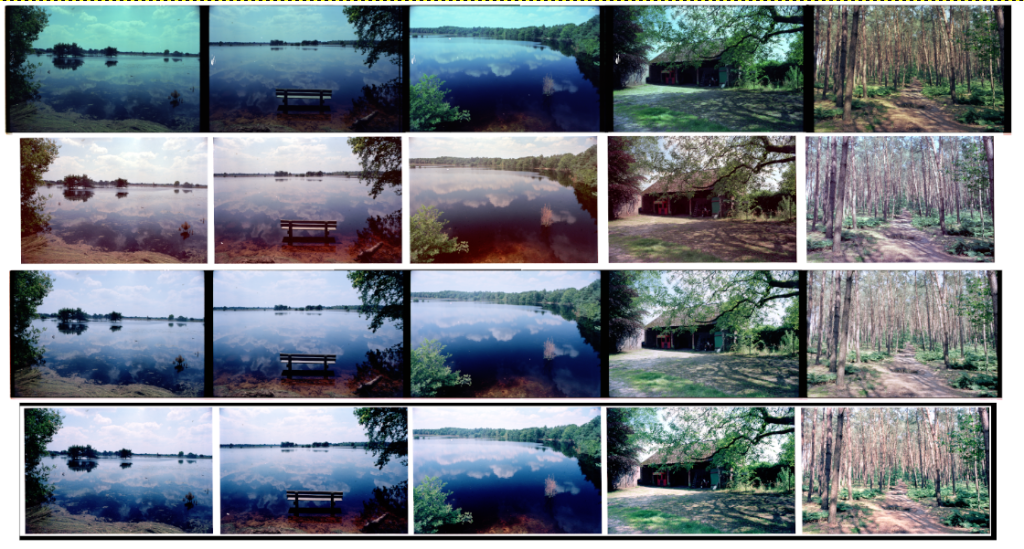
To illustrate, this is the same strip of negatives, scanned in 4 different ways:
image-41-1024x549.png

Can you tell on the basis of these scans if there was a development problem? Indeed, neither can I! It's impossible.
Taken from this blog on the subject: https://tinker.koraks.nl/photography/all-over-the-place-the-problem-with-color-negative-film-scans/ (I wrote this because this question pops up just about every week and has thrown a large number of photographers for a loop - it's a shame of all the wasted time!)

The problem is that automatic color correction tools (like NPP, but also 'standard' scanning tools like Epson scan etc.) determine "correct" color balance on the basis of image content. These tools have no absolute benchmark to base the color correction on, and as a result, the final color balance of the image is fairly random. Most of the time it will not match the original scene, but depending on what the tool does and what your preferences are, you may still be happy with it (see e.g. the Fuji shot, which also has unrealistic colors).

no problem with color

If you're satisfied with the Fuji negative, that's fine, but I suspect it's pretty bad even based on the scan. Given the rendering of the shadows, it's either underexposed or (more likely) fairly heavily fogged. The latter is likely given the age of the film.

The part to the right of the subject is much warmer than the left-hand half of the image.

Yes, there are gross color balance variations across the frame, in both examples posted. This makes them virtually impossible to color balance well. I suspect these trace back to the camera scanning setup and unevenness in the illumination of the negative.
@Skycreeper can you provide some more details on your camera scanning setup? I think most of your problems trace back to this part.

Once you've got the digital part of the process under control, it's worth having another look at your film processing. However, it makes no sense to try and troubleshoot your development process at this point. You would just end up trying to correct digitization/scanning problems by adjusting the chemical side of the process. The result of this will just be a massive amplification of problems and a bunch of wasted film and chemistry.

What is your email?
Please just upload them here, thanks.

The Kodak color films have a very persistent magenta dye

Yes, but I find that wash times don't affect color filtration during printing much, so apparently, this dye doesn't hurt as much as we might think. I also wondered about it, but since I optically/wet print, I would have run into big problems with this if it really had been a problem.
 
OP
OP
Skycreeper

Skycreeper

Member
Allowing Ads
Joined
Aug 11, 2024
Messages
42
Location
China, Chengdu
Format
Medium Format
The problem is that automatic color correction tools (like NPP, but also 'standard' scanning tools like Epson scan etc.) determine "correct" color balance on the basis of image content. These tools have no absolute benchmark to base the color correction on, and as a result, the final color balance of the image is fairly random. Most of the time it will not match the original scene, but depending on what the tool does and what your preferences are, you may still be happy with it (see e.g. the Fuji shot, which also has unrealistic colors).


If you're satisfied with the Fuji negative, that's fine, but I suspect it's pretty bad even based on the scan. Given the rendering of the shadows, it's either underexposed or (more likely) fairly heavily fogged. The latter is likely given the age of the film.


Yes, there are gross color balance variations across the frame, in both examples posted. This makes them virtually impossible to color balance well. I suspect these trace back to the camera scanning setup and unevenness in the illumination of the negative.
@Skycreeper can you provide some more details on your camera scanning setup? I think most of your problems trace back to this part.

Once you've got the digital part of the process under control, it's worth having another look at your film processing. However, it makes no sense to try and troubleshoot your development process at this point. You would just end up trying to correct digitization/scanning problems by adjusting the chemical side of the process. The result of this will just be a massive amplification of problems and a bunch of wasted film and chemistry.

Hi Koraks, thank you very much for your detailed advice!
I understand that scanning and inverting is the most critical part affecting color.
I am scanning on a light box with Canon R6+100mm2.8 macro on a tripod. This lightbox should be fine, as it worked well previously with Gold200, Ektar100, Fuji160, Cinestill800T. The only time it failed was with Portra400 (now twice).
This expired Fuji400 is indeed not optimal, with a blotch of yellow in the middle, and it is noisy, but the skin tone is much better than Portra.
I will scan the negative and invert manually once more.
 

koraks

Moderator
Moderator
Joined
Nov 29, 2018
Messages
26,117
Location
Europe
Format
Multi Format
This expired Fuji400 is indeed not optimal, with a blotch of yellow in the middle

The yellow blotch is unrelated to the film being expired. It's most likely a light scanning source problem. Maybe you've just overlooked it until now; it sometimes takes a while before you figure a problem out and then it turns out it was there all the time.

Could you post some scans of your good Gold 200, Ektar 100 etc. negatives?
What kind of light box and diffusion do you use? Many white LED panels have very uneven illumination and need additional diffusion.

PS: it might really help if you could also post one or two 'raw' negative scans here (not inverted or color-corrected). They don't need to be full-resolution files; you can downsize them so they can be posted on the forum. This will make it a little easier to see what you're actually working with.
 

cerber0s

Member
Allowing Ads
Joined
Nov 16, 2020
Messages
618
Location
Sweden
Format
Multi Format
PS: it might really help if you could also post one or two 'raw' negative scans here (not inverted or color-corrected). They don't need to be full-resolution files; you can downsize them so they can be posted on the forum. This will make it a little easier to see what you're actually working with.

Yes, this ^ would be great!
 
OP
OP
Skycreeper

Skycreeper

Member
Allowing Ads
Joined
Aug 11, 2024
Messages
42
Location
China, Chengdu
Format
Medium Format
The yellow blotch is unrelated to the film being expired. It's most likely a light scanning source problem. Maybe you've just overlooked it until now; it sometimes takes a while before you figure a problem out and then it turns out it was there all the time.

Could you post some scans of your good Gold 200, Ektar 100 etc. negatives?
What kind of light box and diffusion do you use? Many white LED panels have very uneven illumination and need additional diffusion.

PS: it might really help if you could also post one or two 'raw' negative scans here (not inverted or color-corrected). They don't need to be full-resolution files; you can downsize them so they can be posted on the forum. This will make it a little easier to see what you're actually working with.

Yes, this yellow blotch might not be from film. I will check my setup when I scan again.
This is last week's Ektar
IMG_1392c.jpg


And this is Fuji160
IMG_1382c (1).jpg


This was Gold 200 from about 2 months ago, shot with Autocord manual focus, so a bit blurry
IMG_8453.jpg


And this was the first Portra 400. I already tried my best to balance color, direct NLP conversion was worse
IMG_8513.jpg
 
Last edited:
OP
OP
Skycreeper

Skycreeper

Member
Allowing Ads
Joined
Aug 11, 2024
Messages
42
Location
China, Chengdu
Format
Medium Format
And this is the light box I am using. Sorry for the Chinese, but taken directly from the online seller's webiste I purchased from.
tb_image_share_1723449718040.jpg.png

I will post some raw files later when I get home.
 

koraks

Moderator
Moderator
Joined
Nov 29, 2018
Messages
26,117
Location
Europe
Format
Multi Format
Yeah, all your scans have the same problem with a yellow spot in the center. I think you maybe overlooked it because it kind of looks like a natural vignette.
The color balance on all of your photos shows distinct anomalies; none of them looks right.

In the Ektar example, note the blue band at the bottom of the frame.
On the Fuji example, note how the white dress goes from blue (bottom) to yellow (top).
Both of them have a distinctly brighter center area and darker corners that don't look like lens vignette since they coincide with color balance changes.

The Gold 200 shot is overall wonky color-wise, but that's at least partly due to the lighting in the scene, so difficult to get that to come out right one way or another.

I agree the Portra 400 shot looks especially problematic, but since the problems are occurring in all examples, I think you're dealing with a systematic issue in your scanning setup, not so much a film-related problem.

And this is the light box I am using.

It's a tracing pad. It's not made to offer perfectly diffuse and even lighting. You could try building another diffuser on top of it; take a piece of milky white translucent plexiglass and place that on top of the light pad, with a distance of a couple of centimeters (let's say 10cm or so) between the tracing pad and the additional plexiglass.

The other thing you'll have to do is block out all light that doesn't come from the actual light source, and reduce reflections. It's possible that your color balance problems are in part caused by light from your tracing pad bouncing around between the negative and the lens, creating flare and contrast problems (they will also affect color balance). You need to use a mask that cuts sharply around the negative and blocks out all other light. Ideally you use a column that blocks all light from outside entering the space between the negative and the digital camera lens. The inside of this column/chimney needs to be painted matte black so it doesn't reflect any light, which can cause flare problems.

Light source design is kind of an art and turns out to be more complicated than it seems at first glance. It's tricky because at first you might expect that you can simply take any old tracing pad, slap a negative onto it and fire away, but then it turns out that you run into a million problems - as you are presently finding out.

If you can post some photos of your scanning setup I'm sure people will be able to offer some additional advice. The general tendency will come down to:
1: Ensure perfectly even, diffuse light shining through the negative.
2: Block out all other light regardless where it comes from, and reduce reflections in the optical system.
If you look at how a diffusor enlarger works, you'll notice that it is designed to exactly these things, so it's not really new knowledge. It's been around for 100+ years, but the digital generation will need to re-invent it from the ground up, it seems.
 

brbo

Member
Joined
Dec 28, 2011
Messages
2,326
Location
EU
Format
Multi Format
Yes, none of them look particularly good to me. The second one might be the closest to what I would find acceptable.

I suspect any low-cost desktop flatbed scanner would produce better colour because it has a uniform and above else suitable light source for scanning film. Considering that you are shooting medium format even the resolution penalty shouldn't be too big.

But, since you've already decided that it's a no brainer that in this time everybody should be camera scanning, I'd follow @koraks advice for getting uniform and reflection free illumination, ditching NLP and getting a light source better suited for scanning if everything else fails.
 
Last edited:
OP
OP
Skycreeper

Skycreeper

Member
Allowing Ads
Joined
Aug 11, 2024
Messages
42
Location
China, Chengdu
Format
Medium Format
Yeah, all your scans have the same problem with a yellow spot in the center. I think you maybe overlooked it because it kind of looks like a natural vignette.
The color balance on all of your photos shows distinct anomalies; none of them looks right.

In the Ektar example, note the blue band at the bottom of the frame.
On the Fuji example, note how the white dress goes from blue (bottom) to yellow (top).
Both of them have a distinctly brighter center area and darker corners that don't look like lens vignette since they coincide with color balance changes.

The Gold 200 shot is overall wonky color-wise, but that's at least partly due to the lighting in the scene, so difficult to get that to come out right one way or another.

I agree the Portra 400 shot looks especially problematic, but since the problems are occurring in all examples, I think you're dealing with a systematic issue in your scanning setup, not so much a film-related problem.


It's a tracing pad. It's not made to offer perfectly diffuse and even lighting. You could try building another diffuser on top of it; take a piece of milky white translucent plexiglass and place that on top of the light pad, with a distance of a couple of centimeters (let's say 10cm or so) between the tracing pad and the additional plexiglass.

The other thing you'll have to do is block out all light that doesn't come from the actual light source, and reduce reflections. It's possible that your color balance problems are in part caused by light from your tracing pad bouncing around between the negative and the lens, creating flare and contrast problems (they will also affect color balance). You need to use a mask that cuts sharply around the negative and blocks out all other light. Ideally you use a column that blocks all light from outside entering the space between the negative and the digital camera lens. The inside of this column/chimney needs to be painted matte black so it doesn't reflect any light, which can cause flare problems.

Light source design is kind of an art and turns out to be more complicated than it seems at first glance. It's tricky because at first you might expect that you can simply take any old tracing pad, slap a negative onto it and fire away, but then it turns out that you run into a million problems - as you are presently finding out.

If you can post some photos of your scanning setup I'm sure people will be able to offer some additional advice. The general tendency will come down to:
1: Ensure perfectly even, diffuse light shining through the negative.
2: Block out all other light regardless where it comes from, and reduce reflections in the optical system.
If you look at how a diffusor enlarger works, you'll notice that it is designed to exactly these things, so it's not really new knowledge. It's been around for 100+ years, but the digital generation will need to re-invent it from the ground up, it seems.

Wow, thank you very much for the analysis. You have really professional eyes! Never noticed these color shifts before.
How about this image, apart from focus error, any color shift issues?
Shot with FE2+Cinestill 800T
IMG_8468.jpg
 

koraks

Moderator
Moderator
Joined
Nov 29, 2018
Messages
26,117
Location
Europe
Format
Multi Format
How about this image, apart from focus error, any color shift issues?

Hard/impossible to tell with the mixed lighting. You've got very warm/low-K artificial (LED?) lighting in the foreground right, something much cooler (streetlights; with typical Cinestill halation) shining in from the exterior and mixed lighting on the wine rack in the middle. The couch is also a mix. Since the lighting is so variable across the image area, it would be hard to notice more subtle shifts across the frame, even if they are there. For instance, if the center is yellow in this particular frame, you'll never notice because the skin tones on the face are very warm due to the light source on the right side and on the wine rack the yellow cast is lost in the color of the bottles.

For reasons like these it's very likely you never noticed the problem - until you start photographing scenes that are more critical and everything starts to crumble. Try shooting a model on a grey/overcast day in a concrete environment. You'll drive yourself crazy to get it to balance shots like those well, especially if you need good shot-shot and roll-to-roll consistency!
 

BillBaileyImages

Member
Allowing Ads
Joined
Aug 8, 2024
Messages
102
Location
Nebraska, USA
Format
Medium Format
Wonderful insights and analyses from everyone, and this proves the amazing value of having so much experience available--and offered in a professional and helpful tone. There are multiple variables at work here, and I would caution you to change only one variable at a time. Dye crossover from possibly-exhausted bleach, imperfect scanning (at least 50 variables right there!), and so on. I suggest changing to a flatbed scanner like the Epson 850 to eliminate a huge set of variables at once. Then you will know that scanning is not the issue (given your scanner is set up perfectly--and perfection is a path down an impossibly long road). Your patience and persistence WILL lead you to resolving this troubling and frustrating issue. As Omer (CatLabs owner) says, "Shoot more film."
 
OP
OP
Skycreeper

Skycreeper

Member
Allowing Ads
Joined
Aug 11, 2024
Messages
42
Location
China, Chengdu
Format
Medium Format
I think it’s difficult to judge based on an inverted scan of a negative, some films just come out like that. Every single Portra I’ve scanned has had a green/teal color shift. I also develop at home.

Would you mind uploading the scanned negative somewhere to let me have a try at converting it?

Hard/impossible to tell with the mixed lighting. You've got very warm/low-K artificial (LED?) lighting in the foreground right, something much cooler (streetlights; with typical Cinestill halation) shining in from the exterior and mixed lighting on the wine rack in the middle. The couch is also a mix. Since the lighting is so variable across the image area, it would be hard to notice more subtle shifts across the frame, even if they are there. For instance, if the center is yellow in this particular frame, you'll never notice because the skin tones on the face are very warm due to the light source on the right side and on the wine rack the yellow cast is lost in the color of the bottles.

For reasons like these it's very likely you never noticed the problem - until you start photographing scenes that are more critical and everything starts to crumble. Try shooting a model on a grey/overcast day in a concrete environment. You'll drive yourself crazy to get it to balance shots like those well, especially if you need good shot-shot and roll-to-roll consistency!
I looked at the negatives and did a rescan. This time I put the negative in the middle of the light pad and did manual inversion. These are findings:
1. 120 Portra negatives are greener than Fuji, both 120 Portra 400 I developed at home are like this. I have a lab developed 135 Portra 400 which is brown like the Fuji.
2. Turns out that the yellow blotch in the Fuji image is indeed caused by uneven lighting in the pad. Fuji image improved.
2. Manual inversion yields better results than NLP, for both Fuji and Portra.
3. However, the Portra is still color shifted to green, and very difficult to yield pleasing color.
Conclusion: Light pad is a problem, but Portra is still off.....

Here are the 2 rescanned negatives to play with. Both are under the same white balance of my R6, you can see the color difference.
Do let me know the parameters if you manage to get pleasing colour out of Portra.

IMG_1453s.jpg


IMG_1456s.jpg
 

brbo

Member
Joined
Dec 28, 2011
Messages
2,326
Location
EU
Format
Multi Format
So, are you saying that you developed this Portra 400 and Fuji 400H at the same time (same tank) and Portra came out green?!


BTW, lighting is still not even close to being uniform (unless, of course, actual negatives both have higher density on the upper clear part than the lower).
 
Last edited:

koraks

Moderator
Moderator
Joined
Nov 29, 2018
Messages
26,117
Location
Europe
Format
Multi Format
the Portra is still color shifted to green

Thanks for posting the actual negatives. You have severe cyan staining on the portra negative. In my experience this is generally due to either optical fogging (e.g. while spooling the film onto the developing reel) or due to incomplete bleaching and/or especially fixing. I'd start by running this film through fresh bleach and fix and see if that makes a difference. If you try one strip of film, you can compare it with the rest of the film to see if there was any change. I suspect that your replenishment method doesn't work well and has left you with dead fixer.
 
OP
OP
Skycreeper

Skycreeper

Member
Allowing Ads
Joined
Aug 11, 2024
Messages
42
Location
China, Chengdu
Format
Medium Format
Thanks for posting the actual negatives. You have severe cyan staining on the portra negative. In my experience this is generally due to either optical fogging (e.g. while spooling the film onto the developing reel) or due to incomplete bleaching and/or especially fixing. I'd start by running this film through fresh bleach and fix and see if that makes a difference. If you try one strip of film, you can compare it with the rest of the film to see if there was any change. I suspect that your replenishment method doesn't work well and has left you with dead fixer.

Thank you for the advice. Fuji and Portra were loaded onto the same reel, developed in the same process in the same tank, So I don't think it is optical fogging.
I heard that Portra has thicker emulsion, So demands better bleach and fix. Will try with fresh bleach and fix.
So I put one strip of already developed Portra into bleach and fix again?
 
Photrio.com contains affiliate links to products. We may receive a commission for purchases made through these links.
To read our full affiliate disclosure statement please click Here.

PHOTRIO PARTNERS EQUALLY FUNDING OUR COMMUNITY:


Ilford ADOX Freestyle Photographic Stearman Press Weldon Color Lab Blue Moon Camera & Machine
Top Bottom