
• Welcome to Photrio!
    Registration is fast and free. Join today to unlock search, see fewer ads, and access all forum features.
    Click here to sign up

Mark on Negative

twisted wheels

A
twisted wheels

  • 0
  • 0
  • 11
Chose vue

A
Chose vue

  • 0
  • 1
  • 23

Recent Classifieds

Forum statistics

Threads
202,073
Messages
2,834,619
Members
101,099
Latest member
pavloskatsonis
Recent bookmarks
0

andrew.roos

Member
Allowing Ads
Joined
Jan 4, 2011
Messages
572
Location
Durban, Sout
Format
35mm
I've just printed some photos I took in the Drakensberg mountains this week. One of them shows a mark on the print. It's as though a small area is slightly lighter than it should be. The increased density is visible on the negative, so it's not a printing problem. I would be most grateful if anyone could identify the reason for this so I can avoid it in future. The mark is visible on the top edge of the print about 1/5 of the way from the right. The boundary is a nearly straight line running down the print at an angle of about 25 degrees from vertical. To be honest, it's also possible that it's just how the light was falling, but I don't think so.

Here's everthing I can think of about process that might be relevant:

The film was Delta 100 (120 format, 6 x 4.5) developed in a Paterson tank for 11 minutes using Ilford ID-11 1:1, IlfoStop and Rapid Fixer as per the datasheet instructions. The ID-11 was from a 5l batch of stock made up from powder immediately before developing this film. The fixer was checked with a clip test the day before, and had a clearing time of 45 seconds. I used a fix time of 3 minutes.

Wash was as per the Ilford method (3 rinses with 5 inversions, 10 inversions and 20 inversions. I did a fourth rinse also with 20 inversions just for safetly). I did not use any wetting agent in the final rinse. It was hung up to dry at an angle from the vertical. Come to think of it, the angle is perhaps similar to the angle of the mark on the print - could this be a drying mark, and if so, can I re-wash the negative to remove it?

The film was loaded into the camera in the field in moderately bright daylight (about 10 am). I attempted to keep the film and back shaded with my body during the film loading. The film was removed in my darkroom, secured with a rubber band and wrapped in aluminium foil until I loaded it into the tank. I left it loaded in the tank overnight (because I prefer to load tanks at night but did not have time to process immediately) and I kept the tank inside a zipped up black camera bag to provide additional protection.

Of course this is about the only photo for which I don't have a duplicate negative. Lesson learned!

Thanks for the help!
Andrew
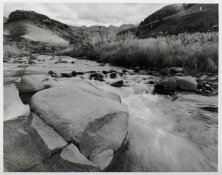
DSC_1667_DxO_Small.jpg
 
Last edited by a moderator:

sandermarijn

Member
Allowing Ads
Joined
Oct 19, 2005
Messages
704
Location
Leiden, Neth
Format
35mm
First of all, that's a beautiful print, I love the smoothness of tones. The composition is also great. Wonderful.

My guess would be a light leak, in camera. I saw something very similar once in one of my cameras. It's a pure guess though. OTOH, you seem very careful throughout your entire workflow, which adds a reason to blame the camera.

This sort of thing is annoying if you don't know the cause.

Sander
 
OP
OP
andrew.roos

andrew.roos

Member
Allowing Ads
Joined
Jan 4, 2011
Messages
572
Location
Durban, Sout
Format
35mm
Sander, thanks for the nice comments. None of the other frames on this film have a similar problem, so hopefully it's not a camera light leak!

Mr Rusty, the exposure was 1/4" at f/16 (with Orange filter x4). It may be flare. I admit that I don't have a lens shade, and wasn't manually shading the lens as it wasn't in direct sunlight, but I think flare is still a possibility.

Thanks to both of you,
Andrew
 

sandermarijn

Member
Allowing Ads
Joined
Oct 19, 2005
Messages
704
Location
Leiden, Neth
Format
35mm
The lighting is perhaps a bit too diffuse for such pronounced flare. The location in the frame also seems a bit odd for flare, to my eyes. But I agree that a light leak in just one frame doesn't make much sense either.

Which camera did you use (also out of curiosity)? Maybe something wrong with a shutter curtain, showing up only at certain speeds? I once had a leak in the curtain of my Kiev 60- gave similar be it larger streaks.

Could it be that some kind of mechanical pressure was applied to this location of the film during development? Far fetched, yes.

Sander
 
OP
OP
andrew.roos

andrew.roos

Member
Allowing Ads
Joined
Jan 4, 2011
Messages
572
Location
Durban, Sout
Format
35mm
Sander the camera is a Bronica ETRSi with 40mm PE lens. It has a leaf shutter lens, so no shutter curtains. It's possible that the film didn't load correctly into the spiral, but I think I would have noticed - there didn't seem to be any problem getting it in.
 

snederhiser

Member
Allowing Ads
Joined
Oct 14, 2010
Messages
161
Format
Medium Format
Hello Andrew;
Looks to me like lens flare. A sun shade would have been helpful. Seems that wide angle lenses are prone to flare. Were you using a prism finder? Covering the eyepiece should also help. Nice picture, Steven.
 

kevs

Member
Allowing Ads
Joined
Aug 21, 2006
Messages
711
Location
North of Pangolin
Format
Multi Format
Hi Andrew,

I suspect a light leak too; sometimes they're not obvious until the right conditions exist, like sunlight hitting the camera back in the right place, or a long-ish exposure lets in just enough light. Then you won't see it for ages because you're using a faster shutter speed and winding on quickly or some other variable has, erm, varied. I've had a similar problem with my Yashica TLR, which only showed up on the first four frames of the film. I finally worked out that the light seal by the take up spool was decaying; I changed it and the leak disappeared. Check around the bottom edges and hinge of your film back; if it happens with another film back I'd suspect the join between the back and the body, or around the darkslide slot. I have just looked at my SQ-A, which is a very similar camera to the ETRS-i.

I like your picture btw.
Good luck,
kevs
 

MattKing

Moderator
Moderator
Joined
Apr 24, 2005
Messages
55,352
Location
Delta, BC Canada
Format
Medium Format
Could it be flare from the highlight area in the rapids?
 

snederhiser

Member
Allowing Ads
Joined
Oct 14, 2010
Messages
161
Format
Medium Format
Hello Andrew;
Seeing that you are using a waistlevel finder, do a quick check. With the lens off and the mirror up, take a flashlight and shine down into the viewfinder and see if there is any light leaks into the mirror chamber. Of course do this in a darkened room. Best of luck, Steven.
 

sandermarijn

Member
Allowing Ads
Joined
Oct 19, 2005
Messages
704
Location
Leiden, Neth
Format
35mm
Excellent suggestion. You could also load a film, put the camera in bright sunlight and make several exposure at different angles to the sun, at the shutter speed that the problem occurred in the first place.

Also let direct sunlight shine onto the dark slide slot (vary the angle) and see what happens to the film.

Not saying that this is a light leak per se, just trying to exclude it.
 
OP
OP
andrew.roos

andrew.roos

Member
Allowing Ads
Joined
Jan 4, 2011
Messages
572
Location
Durban, Sout
Format
35mm
Thanks Kevs, Matt, Steven and Sandermarijn.

Well, if it's flare from the rapids then not much I could have done about it as a lens hood would not have helped, and I'm already using multicoated filters. I'll take the Bronnie out in the sun this weekend as Sandermarijn suggests and shoot a roll with the lens cap on, with the same shutter speed I used here and varying the sun angle. That should find any light leaks. In any case I shall definitely add a lens hood to my next order from KEH.

Anyhow, last night I made the best print I could from the neg (removed all dust from the neg and holder, dodged the far bank of the river more to lighten the shadow, and reduced overall exposure by 1/4 stop so the rapids sparkle), and I'm pleased with it. Flare or light leak notwithstanding!

Thanks to everyone for all the help,
Andrew
 
Last edited by a moderator:

OP
OP
andrew.roos

andrew.roos

Member
Allowing Ads
Joined
Jan 4, 2011
Messages
572
Location
Durban, Sout
Format
35mm
Hello Andrew;
Seeing that you are using a waistlevel finder, do a quick check. With the lens off and the mirror up, take a flashlight and shine down into the viewfinder and see if there is any light leaks into the mirror chamber. Of course do this in a darkened room. Best of luck, Steven.

Thanks Steven, excellent suggestion. I'll try that tonight!

Andrew
 
OP
OP
andrew.roos

andrew.roos

Member
Allowing Ads
Joined
Jan 4, 2011
Messages
572
Location
Durban, Sout
Format
35mm
Hello Andrew;
Seeing that you are using a waistlevel finder, do a quick check. With the lens off and the mirror up, take a flashlight and shine down into the viewfinder and see if there is any light leaks into the mirror chamber. Of course do this in a darkened room. Best of luck, Steven.

Just an update - I tested as suggested, both with mirror up and with mirror down, and did not see any light leaks.

I also checked the light seal between the back and the body (thanks kevs for the suggestion) and there is a small area, about 2mm on the top left of the body (as seen when looking from the back) where the black coating has rubbed off, leaving a reflective surface. The position of this reflective surface would translate into the bottom right-hand corner of the printed image. When I trace the edges of the mark on the print, I can imagine them converging at the bottom right of the image. So I think it's possible that a reflection from the worn surface is just kissing the film plane when it reaches the far side of the image. I'll test for light leaks using film over the weekend - possibly try half a roll at various angles to the light and then re-blacken this area and repeat the exercise on the other half a roll to see if it solved the problem.

I can't find krylon 1602 (mentioned in another thread as being the best flat black available) locally, but a hobby shop near me stocks Tamiya XF-1 flat black acrylic, so I think I'll try that unless anyone has a better suggestion...

Andrew
 
Last edited by a moderator:
Photrio.com contains affiliate links to products. We may receive a commission for purchases made through these links.
To read our full affiliate disclosure statement please click Here.

PHOTRIO PARTNERS EQUALLY FUNDING OUR COMMUNITY:


Ilford ADOX Freestyle Photographic Stearman Press Weldon Color Lab Blue Moon Camera & Machine
Top Bottom