• Welcome to Photrio!
    Registration is fast and free. Join today to unlock search, see fewer ads, and access all forum features.
    Click here to sign up

Light Fall off

IMG_1285.jpeg

D
IMG_1285.jpeg

  • 0
  • 0
  • 10
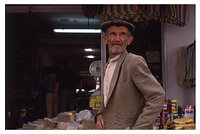
Man in market place

A
Man in market place

  • 0
  • 0
  • 38

Forum statistics

Threads
203,122
Messages
2,850,144
Members
101,684
Latest member
Deepfins
Recent bookmarks
0

oriecat

Member
Allowing Ads
Joined
Nov 4, 2004
Messages
241
Location
Portland, OR
Format
35mm
I have a couple of prints (prints with black backgrounds) (example http://moltenwords.net/picto/index.php?p=42) where the corners are not as dark as the rest and someone mentioned once that it could be light fall off in the enlarger. So I am thinking maybe I should test for that. If I just expose a piece of paper for a while, with no negative, then it should all be even, right? And then if it isn't, it shows I have a problem? But then how do I fix that? Is that an alignment issue?
 
Either its the wrong bulb or bulb height in the head or the wrong lens for the condensor set. Doing what you mentioned, exposing a sheet without a neg, is very effective if high contrast paper is used. It will exaggerate the falloff and allow you to test any modifications effectively.
 
which enlarger?
 
Is this light fall off also noticeable in the negative?
 
It's an Omega B600. I'll have to recheck the negs, but I don't think it was, that I could tell anyway.
 
oriecat said:
It's an Omega B600. I'll have to recheck the negs, but I don't think it was, that I could tell anyway.
Just a thought but print a negative, then turn the negative 180 degs and re-print it, that way you will be able to see if the fall off is from your negative or the enlarger.

Another issue could be that your easel is not square to the light source or as said are you using a bulb instead of a lamp or the other way around?
 
There are several factors that play into this, Melinda. First is even illumination by the enlarger's light head, where one (general) side of the print area gets more light than the other. Second is lens coverage or falloff - usually showing up in the corners. Finally, there's the possibility that the falloff is coming from the taking lens, but this is usually encountered only with LF lenses that don't have sufficient coverage for the format on which they are being used. Alignment of the enlarger can also play a roll, but the variations are usually more subtle with exposure, but more pronounced with print focus.

As your sample appears to be exhibiting corner falloff, my guess is the enlarger lens doesn't have sufficient coverage. The easy work-around is to give a little corner burn to the prints to compensate. The technique I use is to use an elliptical dodging tool, moved vertically during the additional exposure to create the blend.

Another thing you might check is to simply meter the light at the easel with a right-angle incident meter (so the back of the meter can be placed on the easel to maintain distance), or with a RH Designs meter if you have one. Measure the light (with no neg, and at your usual exposure f-stop) at the center, and then the corners. Also, check to see if the evenness changes when the lens is stopped down beyond the f-stop you normally use.
 
Thanks everyone! :smile: I wil try these things out next time I retire to the darkroom (I've been ill, so lately just retire to the dark of the bedroom instead) and see what I can figure out, so I can get printing again without worry.
 
Are you using a condenser version of the B600?

Gary has already mentioned lamp height and correctness of condenser lens/lenses. Just in case you don't already know, here's the classic way of checking for optimum illumination with a condenser enlarger or projector: remove the objective lens (the enlarging lens in this case) and see if the condenser produces a centred image of the lamp at the normal working location of the objective lens - ie 'is the condenser doing its job properly'? You can mark the lamp temporarily if necessary to observe the lamp image.

Best,
Helen
 
Are you using the lens wide open? If it is the lens vignetting, I agree with Ralph that stopping down a bit should help.

David.
 
Photrio.com contains affiliate links to products. We may receive a commission for purchases made through these links.
To read our full affiliate disclosure statement please click Here.

PHOTRIO PARTNERS EQUALLY FUNDING OUR COMMUNITY:



Ilford ADOX Freestyle Photographic Stearman Press Weldon Color Lab Blue Moon Camera & Machine
Top Bottom